


URBI Kore · The building operating system
One Platform. Total Alignment.
Stop juggling systems that don't talk. Kore runs tickets, vendors, amenities, events, packages, visitors, documents, and board governance in one shared interface for managers, owners, and staff, with HERO AI drafting the briefs and automating the routine. Everything you see on this page is the real product.
Up close
What does Kore actually look like?
Seven moments from a building running on Kore, straight from the designs our team builds against. Scroll to flip through the stack.
Dashboard
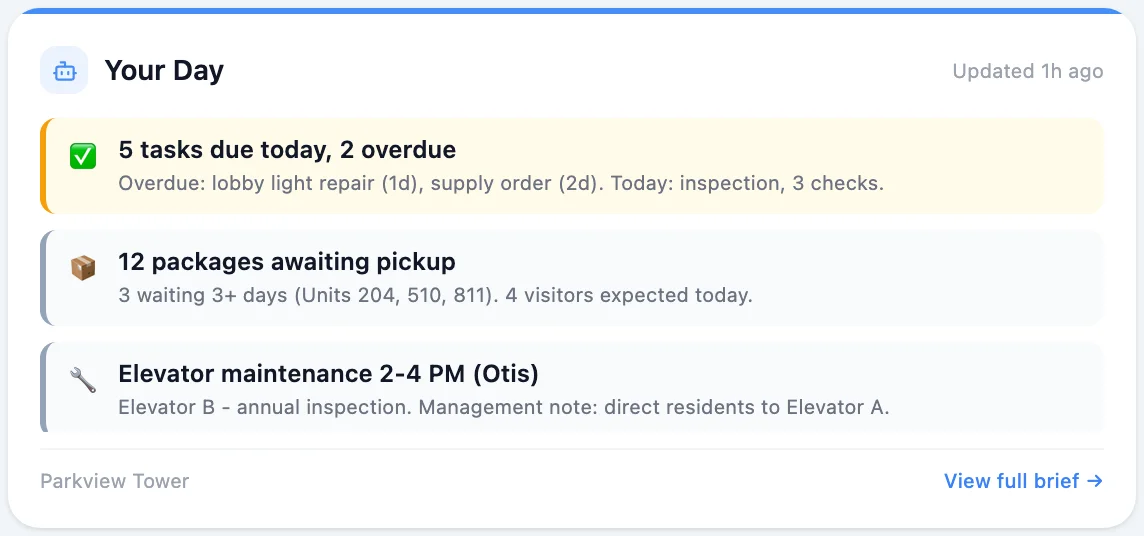
A dashboard that knows your role
Managers, boards, and staff each start from their own view: health score, notes, briefings, and the day's work already arranged. Keep the layout, go classic, or build your own.
Package operations
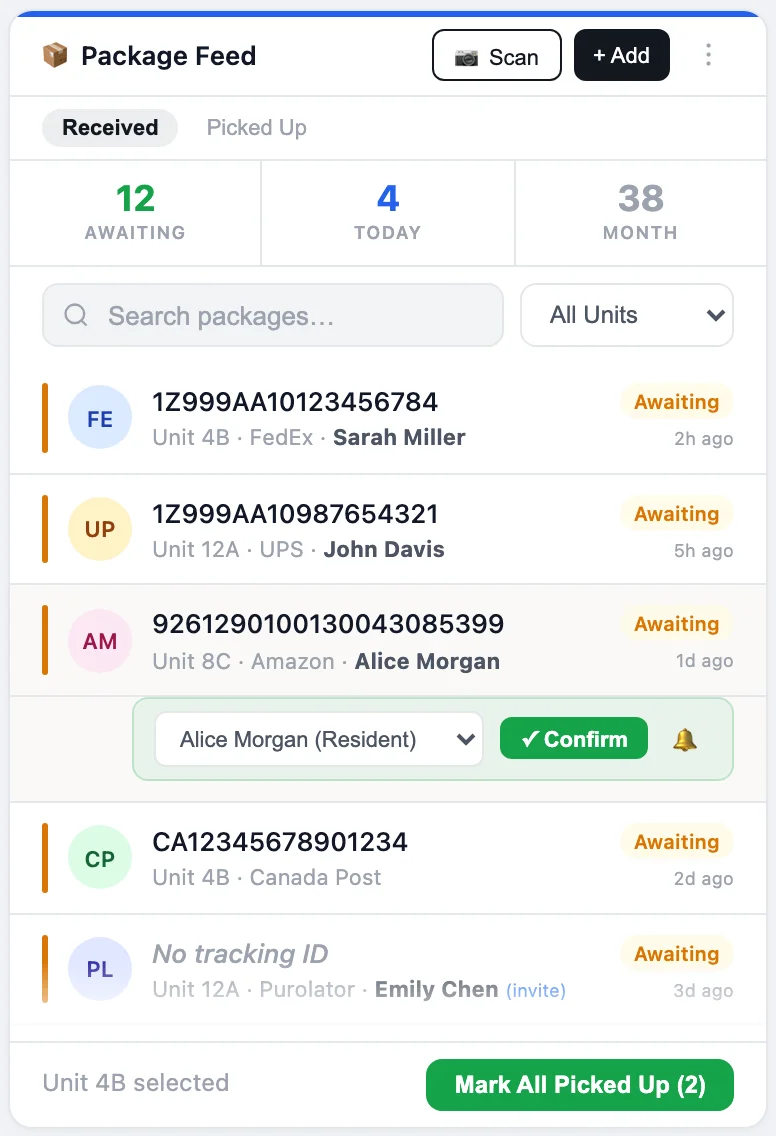
Packages without the clipboard
Deliveries land, labels are read by the AI scanner, residents get notified, and pickups confirm with one tap. The volume chart watches the month so the desk doesn't have to.
Amenity booking
One booking, start to finish
Capacity aware booking with deposits, conflict detection, and cancellation rules. The deposit can wait until closer to the date, check in is a QR scan at the door, and the amenity screen carries the schedule.
Events
From ticket to door
Publish once with tickets, waivers, and reminders included. RSVPs land as wallet passes, and on the night the guest list is a QR scan at the door, group check in and all.
URBI Display
The lobby that talks
Branded kiosk screens for elevators and lobbies rotate news, events, and property notices on their own, and a QR code takes any resident from the wall to their phone.
Emergency takeover
When it matters, HERO asks first
A fire alarm becomes a proposed action. A human holds to confirm, and seconds later every display in the building is carrying evacuation instructions.
Administration
Every building, every teammate, one login
Invite the team, assign their properties, and run the whole portfolio from one place, while each building keeps its own data and reporting.
What runs inside Kore?
Every workflow a building runs on, in one system: operations, governance, amenities, events, communication, and the front desk, all working the same live record.
An operations desk, not a ticket list
Tickets run in list, kanban, or calendar views with subtasks, projects, recurrence, and photo attachments straight from the resident app. A ticket can become a task with auto assignment, or escalate into a board decision without retyping a word.
Learn moreGovernance built in
Board members vote approve, reject, or abstain from the web or their phone, batch several open decisions in one sitting, and every decision generates a PDF for the board package. In app AGM voting, quorum tracking, and a full audit trail replace the paper chase.
Learn moreAmenities that run themselves
Capacity aware booking with deposits, conflict detection, and cancellation rules. Multi day reservations get an after service buffer and an atomic collision guard, deposits can wait until closer to the date, and check in is a QR scan at the door.
Learn moreEvents from ticket to door
Tickets, waivers, and reminders publish in one pass. RSVPs land as Apple and Google Wallet passes, the door runs on QR scanning with group check in, and raffles, vendor invites, and post event surveys are built into the same flow.
Learn moreCommunication that lands
News with scheduled publish and per unit targeting fans out across every property you select, each building at its own local send time. Concierge messaging and the staff inbox keep every resident conversation logged in one thread.
Learn moreA front desk with superpowers
Photograph a shipping label and the AI scanner reads the tracking number, carrier, and unit before anyone types. Smart lockers take the small parcels, visitors check in against live pass counts, and guest parking is a QR pass with its own monthly allowance.
Learn moreOperations · The work
How does work actually move?
A ticket in Kore carries everything the job needs: the vendor, the schedule, the access request, even the amenity closure. Nobody chases paperwork between systems, because there is only one system.
- Vendors answer RFPs and run work order scheduling from an emailed link, no vendor login, no vendor account
- Work order subtasks tick to done by the vendor as the job progresses
- Access requests ride along with the ticket that needs them
- An amenity closure schedules itself straight from the maintenance ticket
- When a teammate leaves, their open work reassigns instead of vanishing
- Residents submit from the app, with the emergency line always one tap away
A vendor's whole login
RFP: Lobby floor refinishing
Sent to 3 vendors · Responses land on the ticket
Quote submitted from the emailed link
Site visit proposed for Thursday
Work order accepted, subtasks live
The vendor clicked a link in an email. That's it. No account, no password, no app to install, and your team watched every step from the ticket.
Governance · The board
What does a board decision look like in Kore?
Board votes stop waiting for the next meeting. Decisions are created in Kore, voted from anywhere, tracked to quorum, and filed with a paper trail your auditor will actually enjoy.
- Governance and vendor selection decisions, created in seconds from scratch or from a ticket
- Approve, reject, or abstain from the boardroom or the beach, on web or phone
- Batch voting clears a backlog of open decisions in one sitting
- Quorum tracked live, so you know the vote will count before the meeting
- Every decision exports as a PDF for the board package
- A full audit trail of who voted, when, and on what
Lobby renovation: contractor selection
Vote closes ThursdayM. Chen
Approved
R. Osei
Approved
S. Kaur
Approved, from her phone
J. Alvarez
Abstained
Quorum reached · PDF ready for the board package
Building Health Score
How healthy is your building?
Kore scores every property from 0 to 100 on adoption, engagement, and operations, benchmarked against the platform average and weighted by the last 30 days of real activity. The score isn't a trophy, it's a to do list: each one comes with the concrete next moves that will raise it.
Benchmarked live against buildings across the platform
Weighted by what your team actually did in the last 30 days
Every score ships with its own quick win list, rated by effort
Maple Court · This week
84
Platform average: 71
Start scanning packages with the AI scanner
Low effortTurn on the morning brief for your team
Low effortInvite your onsite staff to their mobile app
Medium effortThe only platform built for shared properties
URBI Kore lets multiple properties share common areas inside one application while keeping ownership, data, and reporting completely separate.
- One app for twin towers or multi property portfolios
- Shared amenities managed seamlessly without duplicate systems
- Separate reporting and control for each owner
- A single, smooth experience for communities
Tower A
Own data and reporting
Shared amenities
One booking system
Tower B
Own data and reporting
Multi property management
The details
Why does Kore feel effortless?
Because the small things are already handled: the shortcuts, the payments, the passes, and the permissions that make a platform feel like it was built for your building.
A command palette that jumps anywhere and finds anyone from the keyboard
A purpose built mobile app for staff: inbox, bookings, operations, and tracking, not a shrunken desktop
App Pay with Apple Pay and Google Pay, with no surcharge on Kore and Premium
A payment portal residents and owners open from an email code, no app install required
Wallet passes for events, bookings, and building access
Bulk import of units and residents from a spreadsheet on day one
Permissions per module at create, read, update, and delete granularity
Every feature toggles per property from one settings surface
Every workflow, centralized
From tickets to tenants to tasks, Kore replaces fractured systems with one shared interface for managers, owners, and staff.
Property managers
Be the central system
Manage everything from one place. HERO AI handles the routine so you can scale up.
- Ticket and task workflow
- AI driven briefs
- Decision log
Owners
Run asset health from anywhere
Real time insights and audit trails powered by HERO AI give you confidence in ROI and risk oversight.
- Compliance visibility
- Tenant satisfaction
- Aligned reporting
Onsite staff
The tools you need on the go
From maintenance to packages, get work done without jumping between apps.
- Work order management
- Visitor logging
- Mobile UI
URBI Kore, answered
What is URBI Kore?
URBI Kore is the central operating system for buildings: the web dashboard where managers, boards, and staff run tickets, vendors, amenities, events, packages, visitors, documents, governance, and communication in one place, with HERO AI working alongside them.
Who uses Kore day to day?
Property managers, boards, and onsite staff work in Kore. Residents use the URBI App on iOS and Android, which is fully integrated, so a request from a resident's phone lands in the same system your team runs.
Can the board really vote inside Kore?
Yes. Board members vote approve, reject, or abstain on governance and vendor selection decisions from the web or the resident mobile app, including batch voting across several open decisions at once. Quorum is tracked live, decisions export as PDFs for the board package, and the AGM suite adds in app voting with a full audit trail.
How do vendors work in Kore?
Vendors never need a login. They answer RFPs and manage work order scheduling and subtasks entirely from an emailed link, and their responses land back on the ticket your team is already watching.
How do residents pay for bookings and bills?
Inside the app, App Pay supports Apple Pay and Google Pay with no surcharge on Kore and Premium. Outside the app, an email code opens the payment portal where residents and owners view bills across properties, pay one off, or set up card autopay. Staff can also record manual payments like cash or cheque.
Can Kore run shared and multi property portfolios?
Yes, and it is built for exactly that. One login gives a portfolio wide roll up, twin towers can share amenities inside one application, and each owner keeps completely separate data, reporting, and control.
How do permissions work?
Access is granted per module at create, read, update, and delete granularity, so a concierge, a board member, and a portfolio manager each see exactly what their role needs. Features also toggle per property, so every building runs only what it uses.
How do HERO AI and Arthur fit in?
HERO AI lives inside Kore for your team: answers, plans, drafting, and routing. Arthur is the resident facing concierge on Premium, answering voice, SMS, email, and in app chat. Both work the same live record, so nothing is copied between systems.
Does Kore handle accounting?
Accounting is in Beta. It brings a full double entry engine with AI woven through it: AI consolidation, AI processing of invoices and receipts, and books pre reconciled before month end at up to 90 percent. Ask about the Beta program when you book a demo.
Explore the rest of URBI
See your building on Kore.
Twenty minutes with the founder, your workflows running in the real product, and a straight answer on whether it fits.