



A senior living digital signage content calendar tells your lobby and elevator screens what to show each morning, midday, and evening, and what to feature each month. This free template gives you both. URBI Display runs it from the same calendar your life enrichment team already publishes.
If you are still deciding whether screens belong in your community at all, start with our guide to digital signage for senior living. This post assumes the screens are on the wall and asks the next question: what goes on them, every week, for a year.
What goes into a senior living digital signage content calendar?
Three layers of content, each with its own update rhythm. Mixing them is the most common reason a screen ends up ignored.
- Today. The next activity, today's menu, the weather, room changes. This layer changes daily and goes stale by lunch if nobody owns it.
- This month. The featured observance, the big outing, birthdays with permission, the resident spotlight. This layer is planned three weeks ahead.
- Evergreen. Wayfinding tips, how to request a ride, who to call for a repair, a photo from last month's event. This layer fills the gaps so the screen never goes blank.
Emergency messages sit above all three and interrupt them. Required postings sit outside all three, on the wall, where your state put them.
The calendar matters because the screen gives residents a reason to come out to the common areas. The National Academies found that approximately one quarter of community dwelling Americans aged 65 and older are considered socially isolated. A screen will not fix that on its own. A screen that names today's 2 PM music hour, in letters a resident can read from the couch, gives someone a concrete reason to walk down the hall.
How should the screens rotate through a typical day?
Match each part of the day to the question residents are asking right then. In the morning they ask what is on today. At midday they ask about the afternoon and dinner. In the evening they ask about tonight and tomorrow morning.
| Slot | What residents want to know | What the screen shows | What comes off |
|---|---|---|---|
| Morning (wake up to lunch) | What is on today, what is for lunch, do I need a coat | Today's activities in time order with the room, weather, lunch menu, today's birthdays (opted in only) | Yesterday's events, anything more than a week out |
| Midday (lunch to dinner) | What is on this afternoon, when is dinner, what needs a sign up | Afternoon activities, dinner hours and menu, sign up reminder for this week's outing, one evergreen tip | Morning activities that have ended |
| Evening (dinner to lights out) | What is on tonight, what happens first tomorrow | Tonight's program, tomorrow's first activity and the van time, a photo from today's event (with permission) | Anything that already happened today |
Then give each day of the week one recurring feature, so residents learn what to look for.
| Day | Recurring feature |
|---|---|
| Monday | The week ahead: outings, visiting performers, sign up deadlines |
| Tuesday | Resident spotlight (written permission on file) |
| Wednesday | This month's observance or health theme |
| Thursday | Team member thank you or welcome for a new team member |
| Friday | Weekend preview, including services and family friendly events |
| Saturday | Photos from the week (with permission) |
| Sunday | Services and quiet programs, then Monday's first activity |
Keep each slot short. A screen that holds three or four items is read. A screen that holds fourteen is wallpaper, as our guide to font size and contrast for senior living screens works out from the character height math.
What should the screens feature each month?
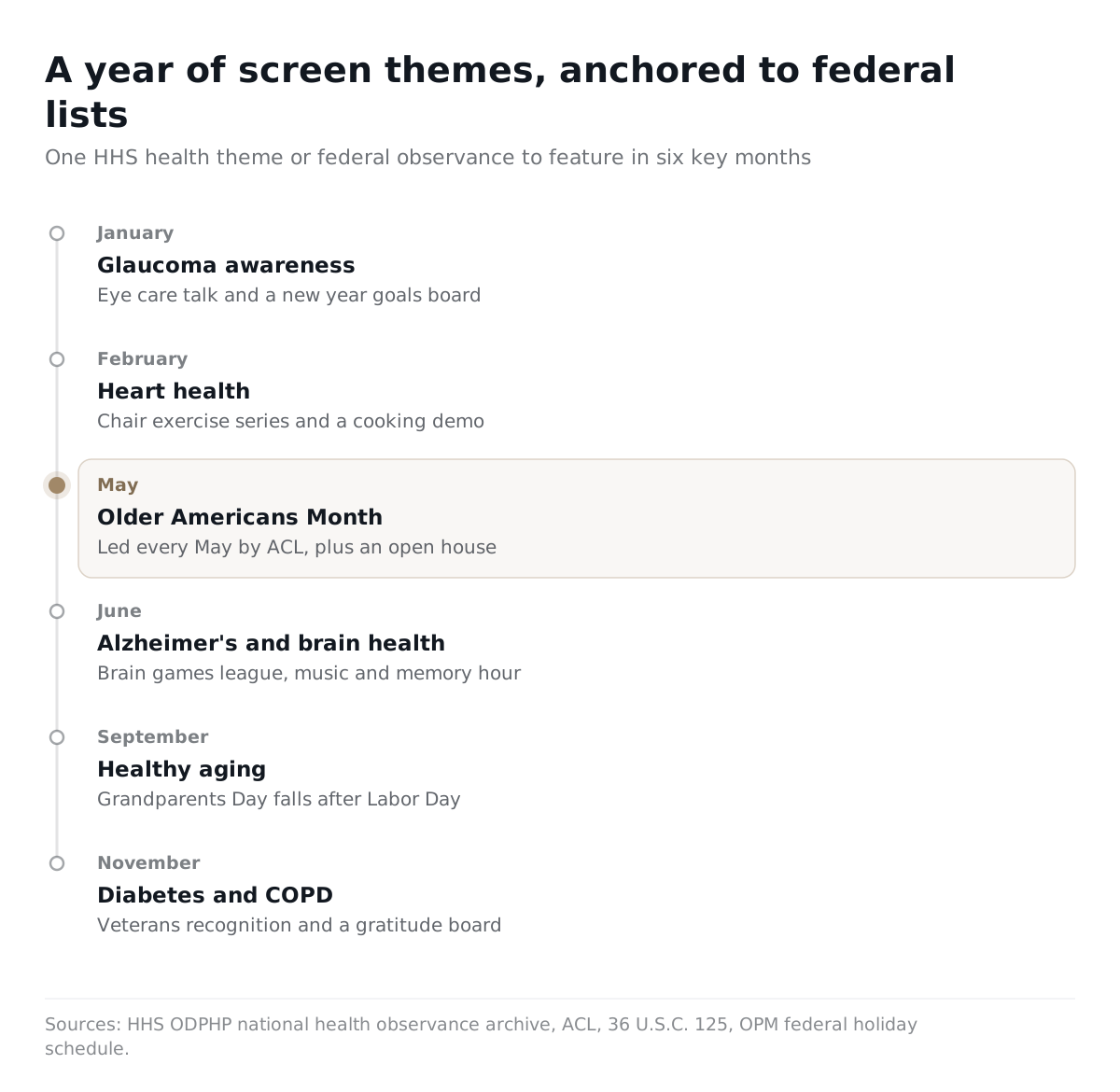
One federal holiday or observance, one health theme, two or three activity highlights, and one idea that brings families in. The table below uses two primary lists. Holidays come from the Office of Personnel Management federal holiday schedule. Health themes come from the monthly posts in the HHS Office of Disease Prevention and Health Promotion observance archive, which last covered every month in 2024.
| Month | Federal holiday or observance | HHS health theme | Activity highlights to feature | Family engagement idea |
|---|---|---|---|---|
| January | New Year's Day; Birthday of Martin Luther King, Jr. | Glaucoma awareness | New year goals board, indoor walking club, eye care talk | Families send a winter photo for the screen |
| February | Washington's Birthday | Heart health | Chair exercise series, a Valentine's social, heart healthy cooking demo | Family valentines shown on the screen |
| March | None | Nutrition | Resident recipe week with the dining team, tasting afternoon | Families share a favorite family recipe |
| April | None | Public health week | Spring garden planting, resident council planning for summer | Families join a garden planting morning |
| May | Memorial Day; Older Americans Month | Physical fitness and sports, mental health, older adults | Walking challenge, resident spotlight every week, Memorial Day remembrance | Families invited to an Older Americans Month open house |
| June | Juneteenth National Independence Day | Alzheimer's disease and brain health | Brain games league, music and memory hour, Juneteenth program | Summer family picnic |
| July | Independence Day | No HHS pick fits most communities; use your own | Fourth of July parade, cool indoor programs on hot afternoons | Family cookout or ice cream social |
| August | None | Immunization awareness | Intergenerational visit with a local school, vaccine clinic dates as your team sets them | Families help choose fall outings |
| September | Labor Day; National Grandparents Day | Healthy aging | Grandparents Day photo booth, healthy aging talks, fall outing sign ups | Grandchildren visit day |
| October | Columbus Day | Health literacy; breast cancer awareness | Bring your questions session, fall festival, pink week | Family fall festival |
| November | Veterans Day; Thanksgiving Day | Diabetes; COPD | Veterans recognition (permission first), gratitude board | Family Thanksgiving meal invitations |
| December | Christmas Day | Flu vaccination | Holiday concerts, celebrations across faiths, winter craft week | Holiday visiting hours and events for families |
Three notes on the table. Older Americans Month is led every May by the Administration for Community Living. National Grandparents Day falls on the first Sunday in September after Labor Day, under 36 U.S.C. 125. HHS highlighted Healthy Aging Month in a September 2026 post, so check its archive each year before you copy a theme forward.
What evergreen content keeps the screens fresh between events?
A bank of twenty or so slides that are always true. Rotate a few into each slot so the screen never repeats the same three items all week.
- How to request a repair, and who to ask at the front desk
- How to book the private dining room or another amenity
- How to sign up for the van, and where it picks up
- Where to find the printed activity calendar
- Mail and package pickup hours
- Visiting hours and how guests check in
- Meet the life enrichment team, with photos
- Meet the dining team, with photos
- Resident council meeting day and how to add an agenda item
- A suggestion box reminder: what activity should we try next?
- A map of the building with the activity rooms marked
- Library and puzzle corner hours
- A resident quote from a past event (written permission on file)
- A photo from last month's biggest event
- A "did you know" about the community's history or the neighborhood
- Walking routes inside the building, with distances
- Chapel or quiet room hours
- How family members can reach the community
Date every evergreen slide in your planning file, even if the date never shows on screen. Review the bank each quarter and retire anything that is no longer true.
Do required postings belong in the rotation?
No. Required postings stay on the wall, and the screen is an extra channel. Most state posting rules name a physical place, and a slide that appears for a few seconds every few minutes is not the same thing.
We covered this in detail in whether a digital screen satisfies assisted living required postings. The template carries one check row each month so nobody forgets it: walk the wall, confirm the postings are current, and confirm nothing was taken down because the screen shows it.
The activity calendar is the one posting where screens and paper overlap most. Florida, for example, requires that "an activities calendar must be posted in common areas where residents normally congregate" under Fla. Admin. Code R. 59A-36.007(2)(c). The same rule asks for scheduled activities at least 6 days a week, for at least 12 hours a week. Keep the printed calendar up and let the screen carry today's slice of it. This is general information, not legal advice. Confirm your own state's list with your community's attorney.
How do you keep every slide readable?
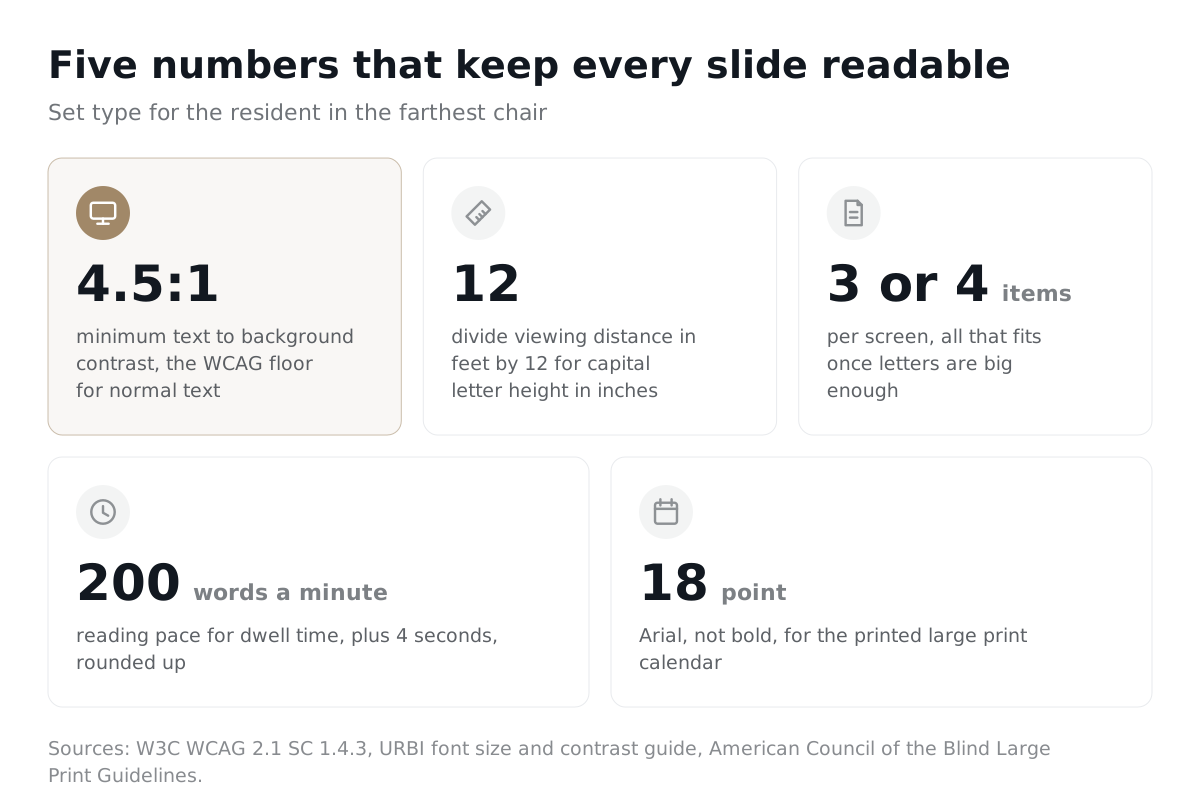
Set contrast and size for the resident in the farthest chair, not for the designer at a desk. Four rules cover most of it.
- Contrast of at least 4.5:1 between text and background. That is the WCAG floor for normal text. The W3C explains that it chose 4.5:1 to offset contrast loss at about 20/40 vision, which it calls typical visual acuity of elders at roughly age 80. Aim higher when you can.
- Size by distance. Our font size guide gives the working rule: divide the viewing distance in feet by 12 for the capital letter height in inches.
- Three or four items per screen. Once the letters are big enough, that is all that fits.
- Dwell time from word count. The same guide works it out as the word count divided by 200 words a minute, plus 4 seconds, rounded up to the next 5 seconds. A 20 word slide gets 10 seconds.
Size alone does not do the job. Breean Cox, writing in the American Foundation for the Blind's AccessWorld, puts it plainly: readable text means "considering not only size but also contrast".
The printed copy by the front desk needs its own rules. The American Council of the Blind's large print guidelines call for Arial, not bold, at 18 point, with 22 point headings and 20 point subheadings.
What does the monthly screen routine look like?
Start with residents, lock the month three weeks out, and check the screens every week after that. Florida's rule is a useful model even outside Florida: it requires a community to consult with residents in selecting, planning, and scheduling activities, through a resident council, a suggestion box, or questionnaires.
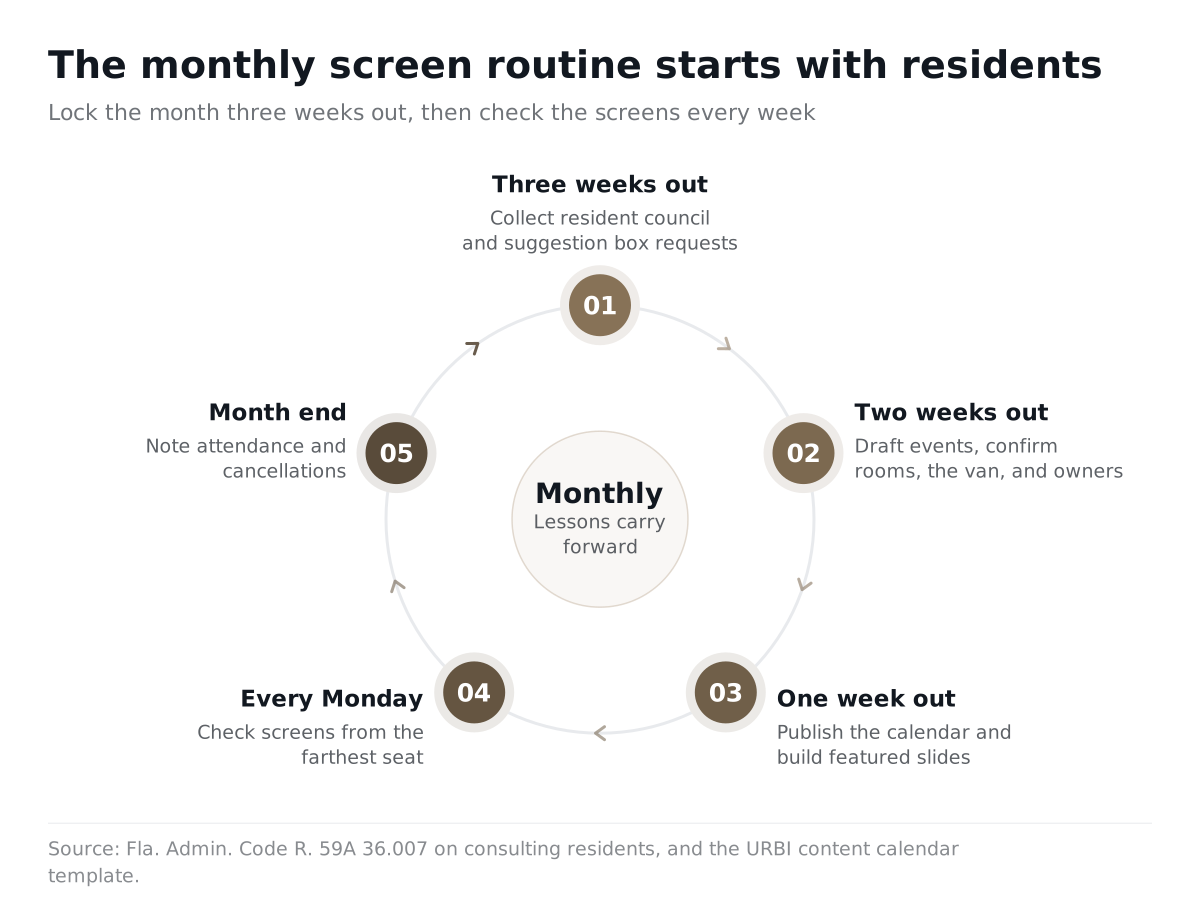
- Three weeks out. Collect requests from the resident council and the suggestion box. Pick the month's observance and health theme from the table.
- Two weeks out. Draft the month's events. Balance physical, social, creative, spiritual, and outing activities. Confirm rooms, the van, and who runs each event.
- One week out. Publish the calendar. Build the featured slides. Collect permissions for any photo, birthday, or spotlight.
- Every Monday. Check the screens from the farthest seat. Pull anything stale. Swap in fresh evergreen slides.
- Month end. Note attendance and cancellations for each event. Carry what worked into next month.
Run this checklist once a month. It is the same list that closes the downloadable template.
- ☐ Resident council and suggestion box requests collected
- ☐ Month's holiday, observance, and health theme picked and checked against this year's HHS and OPM lists
- ☐ Events drafted with room, van, and owner confirmed
- ☐ Calendar published, and the printed large print copy posted
- ☐ Featured slides built: three or four items each, contrast checked
- ☐ Permissions on file for every name, photo, birthday, and spotlight
- ☐ Required postings wall walked, nothing removed because the screen shows it
- ☐ Emergency takeover message reviewed with the team
- ☐ Evergreen bank reviewed and stale slides retired
- ☐ Screens checked from the farthest seat every Monday
- ☐ Attendance and cancellations noted for next month
Attendance is the number that tells you whether the calendar works. Screen views do not. Our guide to increasing activity attendance in senior living covers the reminder and RSVP steps that turn a slide into a filled chair.
How does URBI Display run this calendar?
URBI publishes the life enrichment calendar once and shows it in the resident app and on the lobby and elevator screens. Nobody retypes the month into a separate slide tool.
- The calendar and the screens share one source. URBI Display shows a live clock and weather and rotates upcoming events. It is multi screen aware, so the lobby and each elevator run from one place.
- Announcements go up as a banner, on purpose. A team member puts an announcement on the screens as a separate step. A news post never lands on the screens automatically, so nothing reaches the lobby wall by accident.
- Emergency takeover interrupts everything. A person confirms it, every screen in the community flips to the same message, and it clears itself after 60 minutes.
- Events carry RSVP and a waitlist. After an event, URBI produces an AI survey report, which feeds the month end review in the checklist.
- Families have their own channel. With the Premium plan, family members reach the community through Arthur, URBI's resident facing AI, by voice, SMS, email, or in app chat. More on that in our post on family communication in retirement communities.
One note: URBI runs the building side of a community and does not hold care records. See URBI for retirement communities for the full picture, senior living activity calendar software for what to look for in the calendar itself, or what URBI is for the platform overview.
Frequently asked questions
How far ahead should we plan senior living digital signage content?
Plan the monthly theme and featured events three weeks ahead, and the daily slots one week ahead. That gives the resident council time to weigh in and gives the team time to collect photo and birthday permissions. Keep the evergreen bank ready so a cancelled event never leaves a gap. Review the screens every Monday from the farthest seat, because last week's plan is always partly out of date.
Can we show resident birthdays and photos on the screens?
Yes, with permission recorded in advance. A first name and a birthday is the usual safe form. Never pair a name with a room number, a hospital stay, or a care detail on a lobby screen. Collect the permission at move in, note who gave it, and let a resident withdraw it at any time without explaining why. The template has a permission check in every month's checklist.
Does the screen replace the printed activity calendar?
No. Keep the printed calendar up, especially where your state requires one in common areas. The screen shows today's slice of the month and handles same day changes that a printed sheet cannot. Print the copy at the front desk in large type, 18 point Arial or bigger, so residents who prefer paper, or who cannot see the screen from their usual seat, still have the full month.
The template above is yours to copy, print, or adapt. If you want to see the calendar publish once and appear on the lobby and elevator screens, email hello@myurbi.co and we will walk you through URBI Display with your own month on the table.


