



K-12 facilities maintenance software gives a small or midsize district one record of every request, repair, inspection, and booking across its schools. Here is what your RFP must require and how to buy well. URBI covers the request, vendor, booking, and notice side of that work for schools.
Why do school facilities need better maintenance records right now?
School buildings are old and short on repair money, so districts need records that show which repair comes first. Software does not fix a roof. It tells you which roof to fix first and proves the work got done.
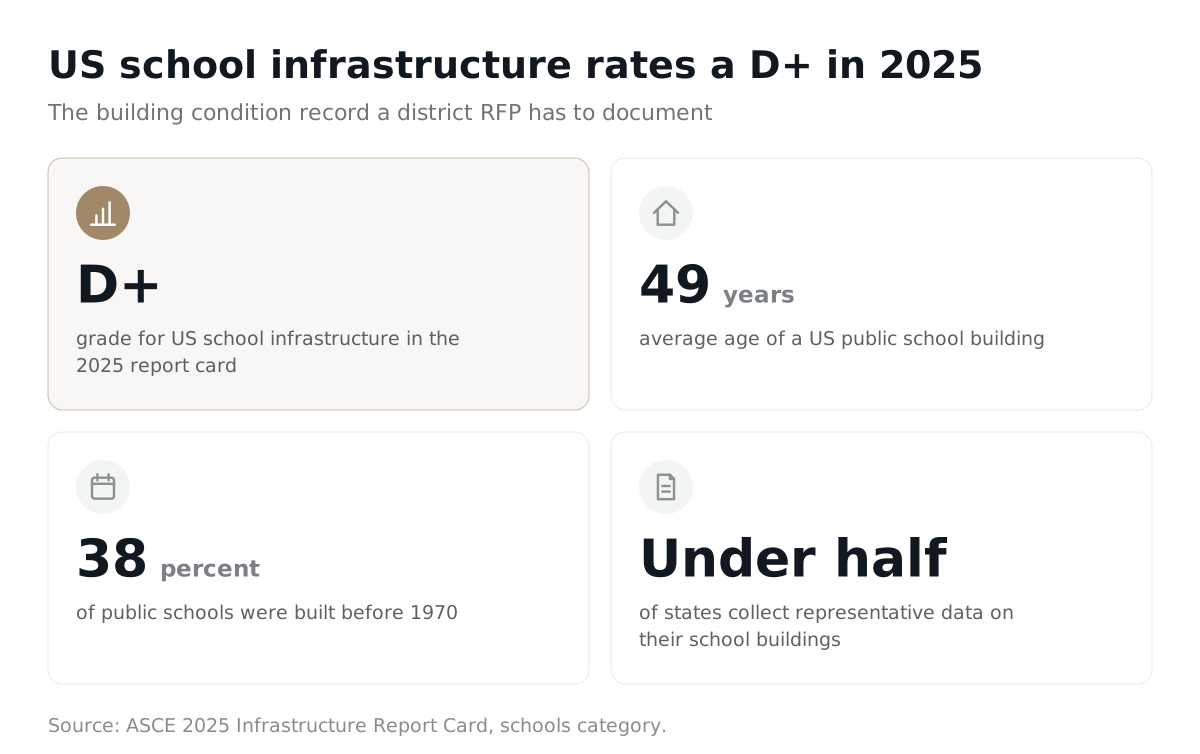
- The 2025 ASCE Infrastructure Report Card gives US schools a D+. The average public school is 49 years old, and 38 percent were built before 1970.
- The GAO's 2020 national survey estimated that 54 percent of districts need to update or replace multiple building systems. It found 41 percent need HVAC work in at least half their schools, about 36,000 schools in all.
- Michigan's 2026 school infrastructure grants reached more than 80 schools in 31 districts, yet the state education department reports the money covered only 16.5 percent of what districts requested.
The GAO figures come from a survey run in late 2019. Treat them as a national baseline, not a 2026 snapshot.
Is the real problem slow work orders or missing data?
Missing data is the bigger problem. The same GAO report found only about two thirds of districts had done a facility condition assessment in the prior decade. ASCE adds that fewer than half of states collect representative data on their school buildings.
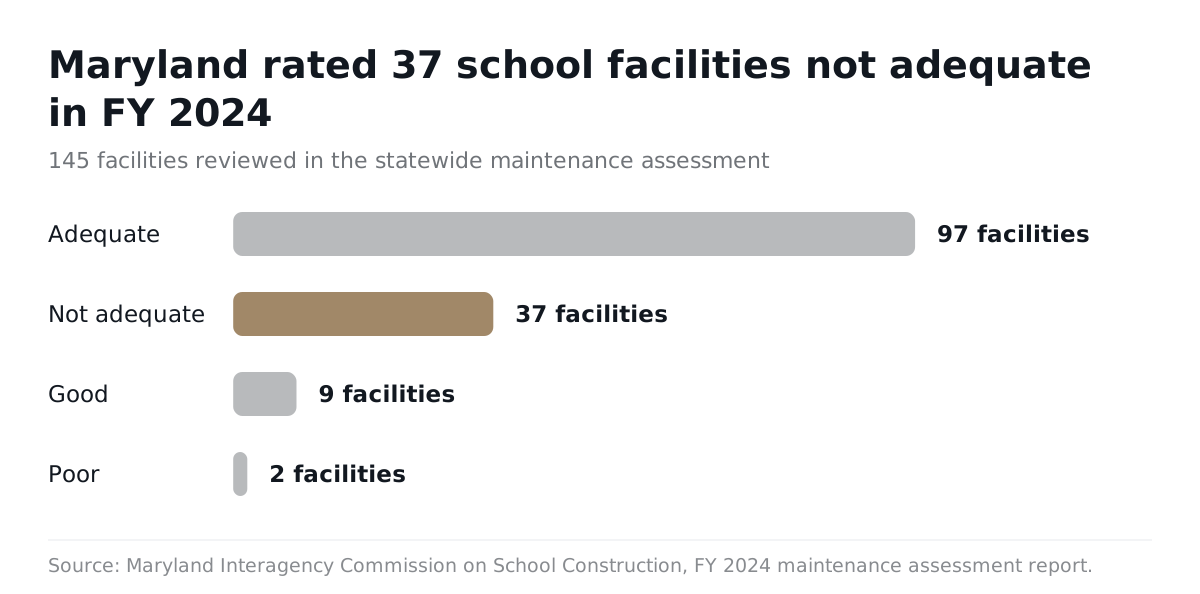
Maryland shows what that gap looks like up close. Its FY 2024 school maintenance assessment reviewed 145 facilities and rated 37 not adequate and 2 poor. Only 9 rated good, and 97 landed at adequate. The computerized maintenance management system, including equipment data, was one of the five weakest categories. Assessors also found districts completing inspection reports without creating work orders to fix what the inspections found.
That last finding is the whole case for this purchase. An inspection that never becomes a work order is a liability on paper.
What does a small or midsize district actually need from the software?
A small or midsize district needs six connected workflows, not a long menu of modules. Each one should share the same buildings, rooms, and people.
- Work orders. Teachers and principals submit requests with photos. Staff triage, assign, and close them with notes.
- Preventive maintenance. Recurring tasks for boilers, roofs, fire systems, and playgrounds generate on schedule and flag when they are missed.
- Assets. Every major system has a record, a location, and a service history you can pull for a capital request.
- Inspections. Fire, life safety, and playground inspections live in the system and turn findings into work orders.
- Events and community use. Gym rentals, board meetings, and weekend games create setup, custodial, and access tasks.
- Multi school view. The director sees every campus in one place, and each principal sees only their building.
Magnolia Public Schools, a network of 10 charter schools in Southern California, wrote its facility management software RFP around a consolidated asset database and integration with the network's other business systems. It planned to start on five campuses and roll out to the rest later. That phased plan is a good model for any district with more buildings than staff.
For a wider market view before you write requirements, see our roundup of the best school facilities software.
Should community use and events be part of a maintenance RFP?
Yes, whenever an event creates work for your crew. A Saturday tournament means open doors, HVAC schedules, extra custodial time, and a cleanup on Monday. If bookings live in one tool and work orders in another, those tasks fall through.
Ask bidders to show an approved booking turning into facilities tasks automatically. Our guide to school facility rental software covers the booking side in detail.
How do districts buy K-12 facilities maintenance software?
Districts buy it through a formal RFP or through an eligible cooperative contract, and both still run through board policy. The right path depends on how complex your needs are.
A 2024 purchasing guide for the Michigan School Business Officials, written by Jon Laing, Director of Procurement and Risk Management at Lansing School District, draws the line clearly. A request for quote fits informal price requests. A request for proposal fits services, software, and more complex solutions. Laing also warns that "lack of planning does not constitute an emergency purchase."
When is a cooperative contract enough?
A cooperative contract is enough when your needs are simple and the contract passes your own policy test. It can save months of staff time. It does not excuse you from checking the fine print.
The same MSBO guide lists what to verify before using a cooperative:
- Does it follow your board policy?
- How were bids requested, and was there a sealed or public opening?
- How were bids awarded, and was pricing competitive?
- What insurance does it require?
- What fees does the cooperative charge?
- What are the terms and conditions?
Use a full RFP when you need data migration, integrations, several campuses, accessibility commitments, or training services. Those are the areas where a generic contract leaves you exposed.
How long should the process take?
Plan on at least one full semester from first draft to go live for a small district. Start from the board meeting where the contract gets approved and count backward. Leave room for questions from bidders, scripted demos, reference calls, and legal review of the contract.
Then plan the rollout separately. Summer is the natural window, because teachers are not filing requests and crews can enter assets. Superintendents weighing this against other purchases can use our superintendent's guide to school software to sequence the calendar.
What must the RFP require?
The RFP must turn your five biggest risks into written, scoreable requirements. Features are easy to promise in a demo. Contract terms are what you can enforce.
| Requirement | What to write into the RFP | Why it matters |
|---|---|---|
| Data ownership and exit | The district owns all records, photos, asset history, and settings. The vendor provides a full export in open formats and certifies deletion when the contract ends. | Your maintenance history outlives any vendor. Without an exit clause, switching means starting over. |
| Accessibility | WCAG 2.1 Level AA for every public and staff screen, mobile app, and document the vendor produces. An accessibility conformance report and a written fix timeline. | Federal Title II rules now set this standard for public schools. |
| Integrations | Name the systems you need: sign in, staff directory, finance, floor plans, building controls, email, and calendars. Bidders list what is included, what costs extra, and any limits. | Unnamed integrations become change orders after signing. |
| Training and acceptance | Separate training for administrators, technicians, requesters, and approvers. Recorded sessions, a test environment, and office hours. Acceptance tests built on your real workflows. | Adoption fails at the requester level, not the admin level. |
| Pricing structure | A not to exceed total, broken out by implementation, migration, integration, training, subscription, support, storage, optional modules, renewal terms, and exit help. | A single bundled number hides the add ons you will need in year two. |
Magnolia's RFP is a useful template on price. It asked bidders for a detailed not to exceed total, plus a list of "any and all other costs and fees." It also required at least three references with project scope and contact details.
What does ADA Title II mean for the software you buy?
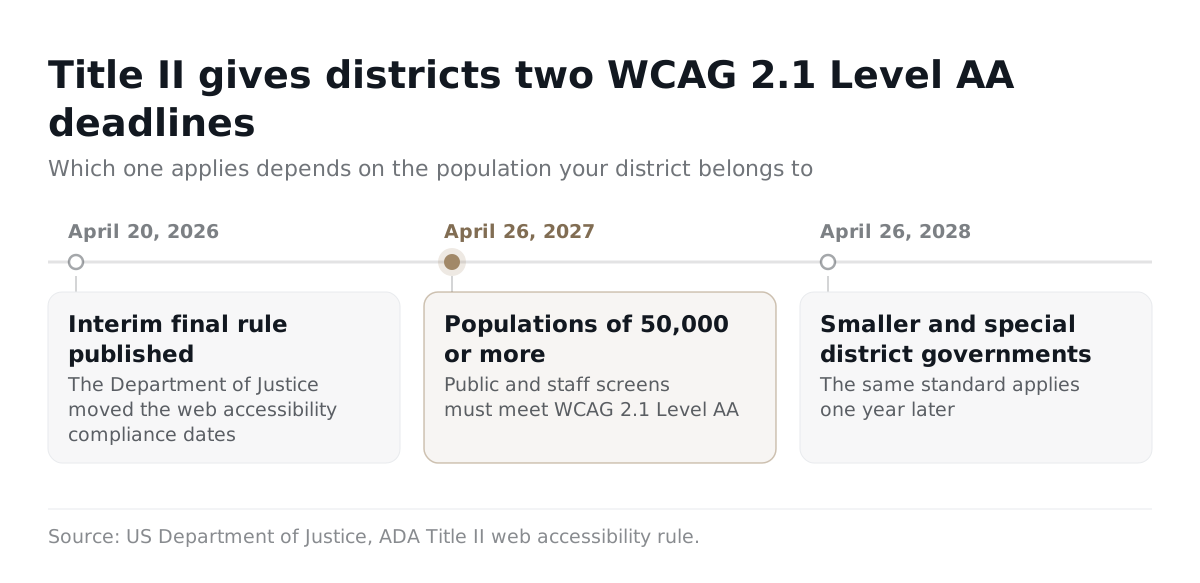
It means the software your staff and public use must meet WCAG 2.1 Level AA, and the deadline depends on the size of the government you belong to. The Department of Justice's Title II web rule sets that standard for state and local governments. Public school districts are units of state and local government.
An interim final rule published April 20, 2026 moved the dates. Entities with a population of 50,000 or more now have until April 26, 2027. Smaller entities and special district governments have until April 26, 2028. Check which bracket your district falls under with counsel, then put the requirement in the RFP anyway. Our explainer on ADA Title II accessibility for schools walks through the details.
What mistakes do districts make when choosing maintenance software?
The most common mistakes are about process, not features. Districts that regret a purchase usually skipped a step before signing.
- Buying before cleaning up the asset list. Multi school setup is heavy data entry. Ask each bidder to say exactly what the district must supply and what the vendor will import and check.
- Accepting a generic demo. Magnolia told bidders to leave out generic marketing materials. Send three scripted scenarios from your own buildings and score how each bidder handles them.
- Ignoring board lead time. A missed board date can push go live past summer and into the school year.
- Believing the fastest go live claim. Vendor timelines range widely. Ask for milestones in the contract, not in the sales deck.
- Buying modules nobody uses. Set pilot measures up front: share of requests submitted in the system, share of preventive tasks closed on time, and a test data export.
What do facilities directors say works?
Daily visibility into open requests is what works, according to one district director. Joe Haskell, Director of Maintenance, Operations, and Risk Management at East St. Louis School District 189, described the change in an August 2026 American School Board Journal article. When a teacher files a ticket, he said, "we can just hop online and see what's going on."
That is the bar. If a principal or a director cannot see a request's status in seconds, the system will drift back to email and phone calls.
Where does URBI fit in a school facilities stack?
URBI fits the request, vendor, booking, and communication side of school facilities work. It is not a full computerized maintenance management system, and it has no preventive maintenance module. Asset management is coming soon, not shipped.
Here is what URBI does for schools today:
- Service tickets with photos. Staff submit requests with pictures. Your team works them in list, kanban, or calendar view. Tickets can recur for simple repeat jobs.
- Vendor work orders by emailed link. Tickets route to vendors by category. Vendors open the job from an emailed link with no login.
- Facility booking for community use. Capacity aware scheduling with conflict detection, waivers, deposits, and an audit trail.
- Events. Ticketing, waivers, wallet passes, and QR check in at the door.
- Visitor check in. Visitor registration and a verification desk.
- Notices. Scheduled announcements and emergency alerts that reach the right people at each building.
- Multi property support. One dashboard across every campus, with permissions set per module.
- HERO for the facilities team. HERO is the staff facing AI in the URBI Kore dashboard. It answers plain questions from your records and shows what it checked. It can draft a ticket, vendor work order, or notice, but a person approves every action.
A district can pair URBI with a dedicated maintenance system. It can also run URBI alone where heavy asset tracking is not yet needed. Our comparisons of URBI vs FMX and URBI vs Brightly lay out where each one fits. You can see the education product on the URBI for education buildings page, read the full URBI for schools overview, or start with what URBI is.
FAQ: what do districts ask most about maintenance software?
What is K-12 facilities maintenance software?
It is software that tracks repair requests, preventive maintenance, building assets, and inspections across a district's schools. Teachers and principals submit requests, and the facilities team assigns, schedules, and closes them. Good systems also connect bookings and events to the work they create. The goal is one record of what needs doing, what got done, and what it cost in time, so directors can defend budgets with evidence instead of memory.
Does a small district need a full RFP?
Not always. If your needs are simple and a cooperative contract passes your board policy, that route can save months. Check how the cooperative ran its original competition, what fees it charges, and its terms. Use a full RFP when you need data migration, integrations, several campuses, or firm accessibility and training commitments. Those are the places where a generic contract leaves the district without bargaining power.
How long does implementation usually take?
It depends mostly on your data, not the vendor. A district with a clean list of buildings, rooms, and major equipment can move quickly. A district starting from spreadsheets and memory needs weeks of data entry before anything goes live. Plan the heavy setup for summer, pilot with a few schools, and write the milestones into the contract so both sides share the schedule.
Can software fix our deferred maintenance backlog?
No. Software cannot replace a boiler or close a funding gap. What it can do is document condition, schedule preventive work, and show which failures put students at risk first. That evidence makes capital requests and grant applications stronger. Michigan's 2026 grants covered a small share of requests, so the districts with the clearest records have the best case when money becomes available.
Buying K-12 facilities maintenance software is a procurement project first and a software project second. Write down your riskiest workflows, pick a buying path that fits your size, make bidders prove those workflows with your data, and put exit and training terms in the contract. If URBI's tickets, vendor links, bookings, and notices fit part of that plan, write to us at hello@myurbi.co.
Keep reading


