



A school maintenance request system is how a teacher reports a broken heater, leak or stuck door, and how updates come back. A good one captures the room, a photo, the urgency and a safety flag in one form. URBI gives teachers and staff that form, photo included, and gives facilities a tracked queue behind it.
This guide is written from the teacher's side of the loop. It covers what to put in a request, how facilities sorts requests by priority, and what updates a teacher should get so they stop sending the same email twice. If you are buying software for a whole district, the K-12 facilities maintenance software RFP checklist covers procurement. This post is about the person standing in Room 214 with a dripping ceiling tile.
Why do teachers keep emailing about the same repair?
Teachers email again because the first report got no reply they could see. A request with no visible receipt, owner or next step feels lost, so people resend it, call the office or stop a custodian in the hall.
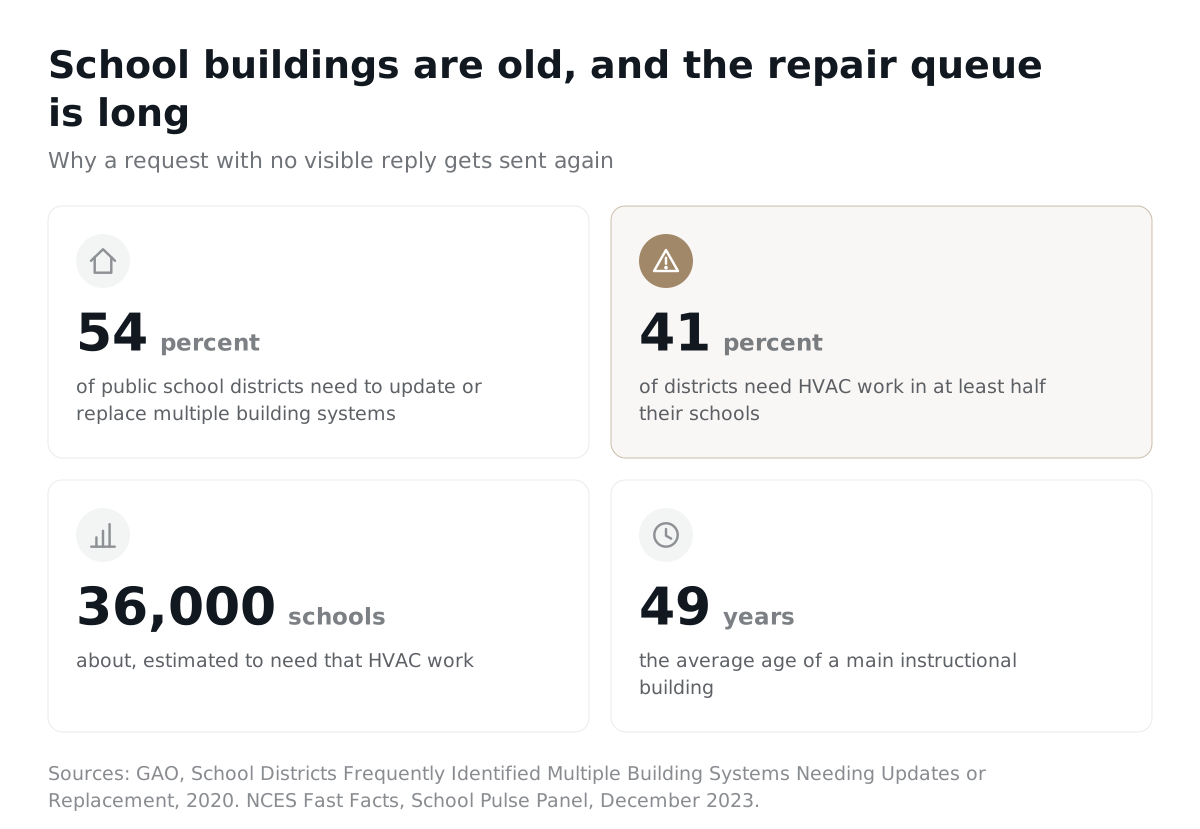
The volume behind those requests is large. A 2020 GAO report estimated that 54 percent of public school districts need to update or replace multiple building systems. It also estimated that 41 percent of districts need HVAC work in at least half their schools, about 36,000 schools nationwide. The buildings are old, too. NCES data from December 2023 puts the average main instructional building at 49 years old.
When the queue is long, silence makes it feel longer. In 2023, one Florida district confirmed more than 1,400 open work orders for air conditioning, FOX 13 Tampa Bay reported. Stephanie Yocum, president of the Polk Education Association, told the station: "It makes people feel physically ill."
Software cannot fix 1,400 air conditioners. A clear request and a clear reply can stop the second, third and fourth email about each one.
What should a teacher capture in a maintenance request?
A teacher should capture where the problem is, what they see, how it affects teaching, and whether anyone could get hurt. Facilities assigns the final priority. The teacher's job is to describe the problem well enough that nobody has to call back and ask.
The NCES Planning Guide for Maintaining School Facilities lists the core fields of a work order: contact details, room number or location, the work requested, the job type, urgency, and a requested completion date. It also notes that the date maintenance actually schedules may differ because of workloads. That matters. Treat a requested date as a wish, and tell teachers so up front.
Here is the teacher's checklist we recommend. The first five come straight from the NCES fields. The rest are additions that save a return trip.
- Building and room number. "Room 214, east wing, second floor" beats "my room".
- Your name and how to reach you. Include your planning period if that is when you can open the door.
- What you see, hear or smell. Describe it. You do not need to diagnose it.
- When it started. "Since Monday morning" helps a technician find the cause.
- Urgency in your own words. Is it dangerous, is it stopping class, or is it annoying?
- A safety flag. A yes or no box: could a student or adult get hurt?
- A photo, if it is safe to take one. One clear picture saves a walkthrough.
- Access notes. When the room is empty, where the key is, or if a class pet is in the way.
What does a good maintenance request look like?
A good request lets a technician walk to the right spot with the right tools on the first trip. Compare these two versions of the same problem.
| Field | Weak request | Good request |
|---|---|---|
| Location | My classroom | Main building, Room 214, second floor, by the back window |
| What is wrong | Leak again | Water dripping from a ceiling tile above the reading corner. Tile is stained and sagging. |
| When it started | (blank) | Noticed at 7:40 this morning. It rained overnight. |
| Impact | (blank) | Moved six desks. Reading corner closed. Class can continue. |
| Safety flag | (blank) | Yes. Tile may fall. Area taped off. Bucket under the drip. |
| Photo | None | One photo of the tile from the doorway |
| Access | (blank) | Room empty 11:15 to 12:00 during lunch. Key at the front office. |
The good version takes a little longer to write. It answers every question a custodian or technician would otherwise ask by email.
How are school maintenance requests prioritized?
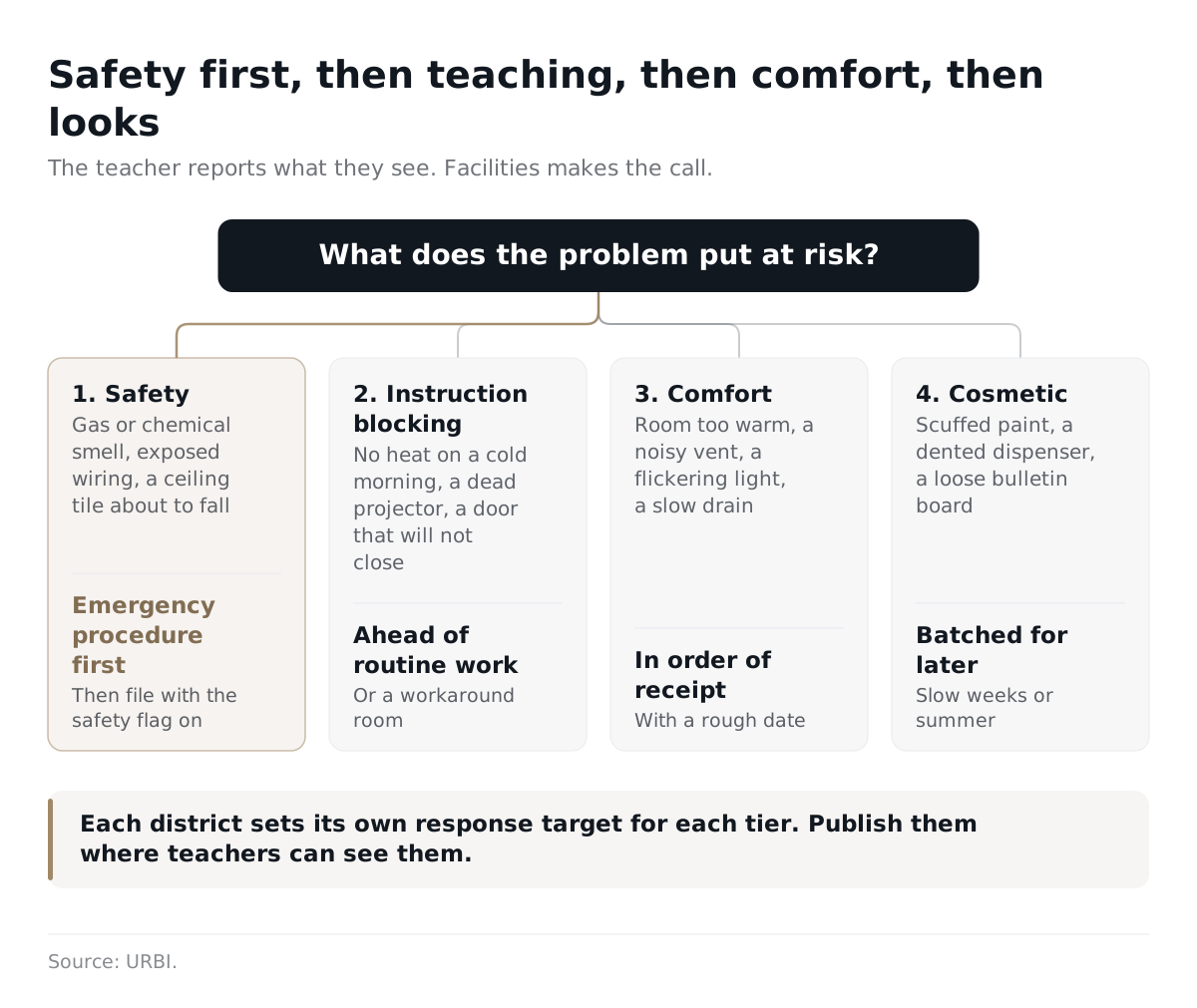
School maintenance requests are prioritized by consequence: safety first, then anything that stops instruction, then comfort, then looks. The teacher reports what they see and how it affects the room. Facilities makes the call.
This order matches how districts describe their own triage. GAO found that officials in the districts it visited first address health hazards and safety issues. The NCES guide uses three classic tiers: emergency, routine and preventive, with routine work completed in order of receipt. The four tier table below splits routine work into the groups teachers actually experience.
| Priority | What it looks like | What the teacher does | What facilities does first |
|---|---|---|---|
| 1. Safety | Gas or chemical smell, exposed wiring, a ceiling tile about to fall, a broken lock on an exterior door, water near outlets | Follow the school's emergency procedure first. Move students. Call the office. Then file the request with the safety flag on. | Respond right away, make the area safe, and record what was done |
| 2. Instruction blocking | No heat on a cold morning, a projector or smart board dead before a test, a classroom door that will not close, no power to a lab bench | File the request with the impact written plainly: "class moved to the library". | Schedule ahead of routine work, or arrange a workaround such as a spare room or portable heater |
| 3. Comfort | Room too warm, a noisy vent, a flickering light, a slow drain | File once with details. Add to the same request if it gets worse. | Queue in order of receipt and tell the teacher roughly when |
| 4. Cosmetic | Scuffed paint, a dented paper towel dispenser, a loose bulletin board | File once. Expect it to wait for a slow week or summer. | Batch with preventive work or summer projects |
Each district sets its own response targets for each tier. Publish them where teachers can see them. A teacher who knows a comfort request is queued in order of receipt is far less likely to email about it again.
What should a teacher do when the problem is a safety issue?
A safety issue goes to the emergency procedure first and the request form second. The form keeps the record, and the emergency procedure raises the alarm.
The EPA's Reference Guide for Indoor Air Quality in Schools, part of IAQ Tools for Schools, says the first decision on any air problem is whether it needs an emergency response. It names high carbon monoxide levels and certain toxic chemical spills as incidents that require evacuating the affected areas. In an emergency, the guide says the administration, parents and the right authorities must be notified in a coordinated way.
Once people are safe, the request still matters. It creates a record of what happened, when, and what was done. That record helps facilities spot a pattern, like the same roof drain flooding the same hallway every spring. Our school closure and snow day communication guide includes an after storm checklist for facilities teams.
Air quality is worth its own note. The same NCES December 2023 survey found that 39 percent of public schools have an Indoor Air Quality Coordinator, the person responsible for reporting air quality issues and complaints. If your school has one, they belong on stuffy room, odor and mold requests. EPA's IAQ Tools for Schools Action Kit also includes a Teacher's Classroom Checklist that teachers complete and return to that coordinator.
How should teachers get updates after they submit a request?
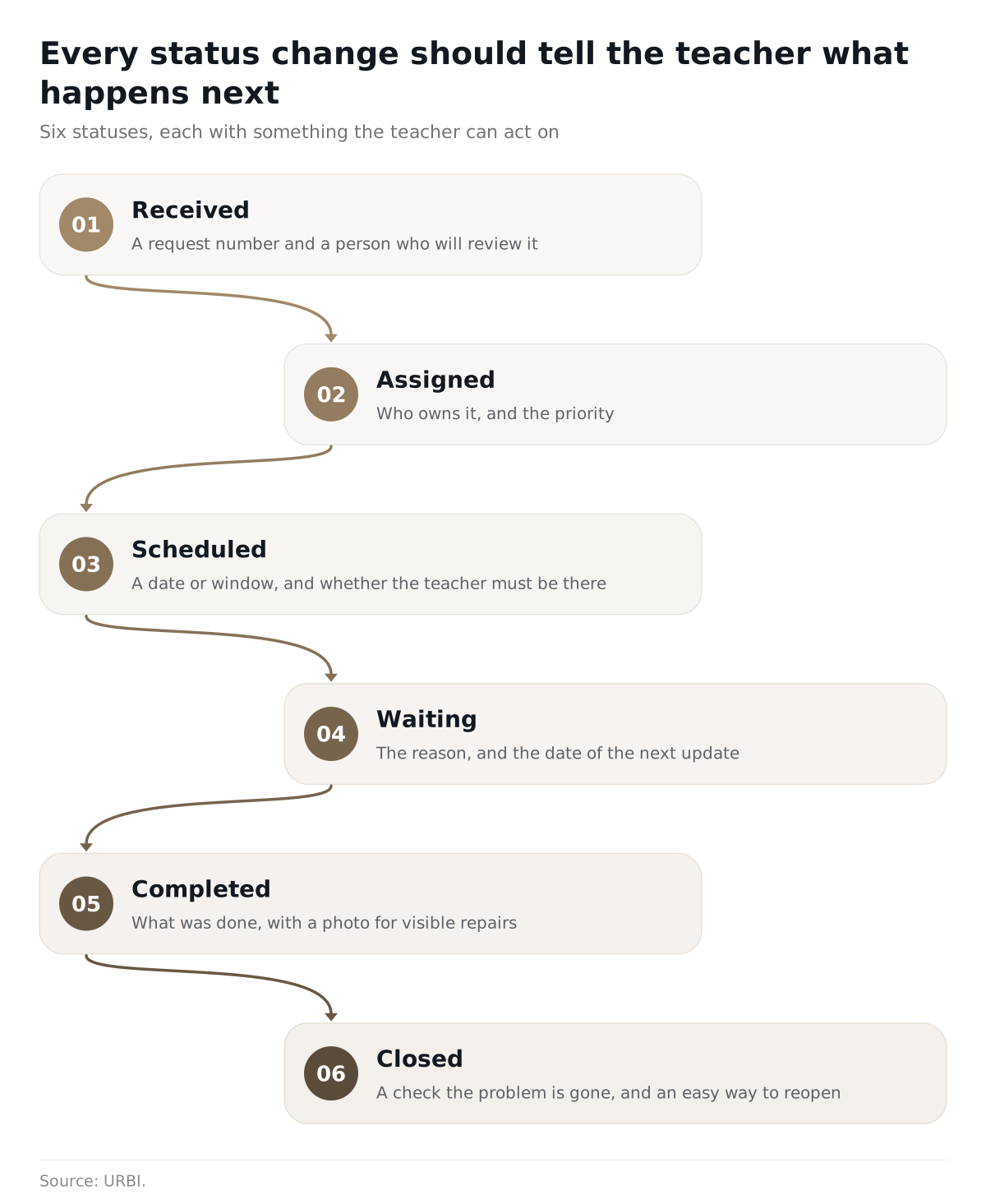
Teachers should get an update at every change of status, written so they know what happens next. A bare "In progress" tells a teacher nothing. "Waiting on a replacement part, next update Friday" tells them what comes next and when.
Two federal sources set a useful bar. NCES says a good maintenance system should acknowledge receipt of a work order, let the requesting party track progress through completion, and let them give feedback on the quality and timeliness of the work. EPA's reference guide says communication about a problem should start immediately. It also says updates should cover the work that remains, the expected schedule, and when the school will provide the next update.
Here is a status flow that puts both into practice.
| Status | What the teacher should see |
|---|---|
| Received | A request number and confirmation that a person will review it |
| Assigned | Who owns it (custodian, maintenance tech, outside vendor) and the priority |
| Scheduled | A date or window, and whether the teacher needs to be in the room |
| Waiting | The reason (parts, vendor, funding approval) and the date of the next update |
| Completed | A short note on what was done, and a photo for visible repairs |
| Closed | A quick check that the problem is gone, and an easy way to reopen it if not |
Keep three clocks separate: when the request was acknowledged, when someone first acted, and when the fix was done. A fast acknowledgment can look responsive while the actual repair waits weeks for a part. Teachers can live with a wait. What they cannot live with is not knowing.
What if the front office enters the request for the teacher?
When a secretary or office manager files the request, the teacher who reported the problem should still be named on it and still get the updates. Some schools route requests through the front office so only a few people hold accounts.
That setup keeps requests tidy. It also cuts the teacher out of the loop. The office gets the "completed" notice, and the teacher is still looking at the same stain on the ceiling. If your school uses delegated entry, add a "reported by" field and copy that person on every status change.
Does a school need software for this, or just a better process?
A small school can run a good loop on paper. The NCES guide says plainly that a work order system can be a manual, paper based tracking tool. What matters is the process: acknowledge, assign, track, close and ask for feedback.
Software earns its place when the volume outgrows a binder. That point arrives with several buildings, several trades, outside vendors, and hundreds of open requests. It also arrives when teachers want to check status without calling anyone. Be honest about the limit. No system creates more technicians or more budget. It makes the queue, the delays and the owners visible, so the conversation about resources starts with facts.
How does URBI handle school maintenance requests?
URBI gives teachers and staff one place to submit a maintenance request with a photo, and gives facilities one queue to track it from report to resolution.
- Submission with a photo. Teachers and staff report issues and attach photos, so the technician sees the problem before the first trip.
- Clear priority and status. Every ticket carries one of four priorities and moves through seven stages, so facilities can answer "where is my request" from the record.
- A working queue for facilities. Tickets show in list, kanban and calendar views, with categories, labels, subtasks, comments with mentions and document attachments with inline preview.
- Outside vendors without new accounts. Vendors answer requests for proposals and manage work order scheduling from an emailed link, no login required.
- HERO proposes, people decide. HERO, the AI for staff inside URBI, answers plain language questions from the school's own records and can propose a ticket or a task. Nothing is created until a staff member confirms.
- A permanent record. Every action carries an audit trail, which helps when the same leak comes back next spring.
For the bigger picture, read URBI for schools, the superintendent's guide to school software, and our roundup of the best school facilities software. If AI triage interests you, AI work order triage explains where it helps and where a person should decide.
Frequently asked questions
Who should be allowed to submit a school maintenance request?
Every teacher and staff member who works in the building should be able to report a problem, either directly or through the office. Limiting submission to a few accounts keeps the queue tidy, but it hides the person who saw the problem. If your school uses delegated entry, record who reported the issue and send them the updates. The goal is one request per problem, filed by whoever noticed it first.
How fast should facilities respond to a teacher's request?
Response times depend on the priority tier and on staffing, so each district should set and publish its own targets. Safety issues get an immediate response through the emergency procedure. Requests that stop instruction come next, then comfort, then cosmetic work. Whatever the target, acknowledge every request quickly and give a reason and a next update date whenever work is waiting. Predictable updates matter more to teachers than a promise nobody can keep.
Should teachers take photos of maintenance problems?
Yes, when it is safe. One clear photo often tells a technician which part or tool to bring, which can save a whole trip. Take it from a safe distance, never touch exposed wiring or a spill to get a better angle, and keep students out of the frame. If the problem is dangerous, follow the emergency procedure first and add the photo to the request later, or let facilities take their own.
What is the difference between a maintenance request and a work order?
A maintenance request is what the teacher submits: the problem, the place and the urgency. A work order is what facilities creates from it: the assigned person, the priority, the schedule and the parts. In many systems the two live in the same record. What matters for the teacher is that the request and the work order stay linked, so updates on the work reach the person who reported it.
A teacher should never have to wonder whether anyone saw their request. If you want a school maintenance request system that keeps every request on one tracked queue, see how URBI works for schools or email hello@myurbi.co to book a walkthrough.


