



Memory care activity calendar software should let you change today's schedule once and update every copy: the staff view, the lobby screen, the family update, and the printout. URBI keeps one event calendar that feeds the resident app, URBI Display lobby screens, and targeted announcements.
Why does the monthly memory care calendar keep going out of date?
It goes out of date because it is a document, and a document cannot change after it has been printed. The plan changes every week. The PDF on the wall does not.
Look at how communities publish today. A February 2025 memory care activity calendar packs daily newspaper delivery, Music Train, baking club, visiting performers, and bingo into one monthly grid. Its last line reads "ALL ACTIVITIES ARE SUBJECT TO CHANGE." That warning is honest, and it names the problem exactly.
Here is what happens when the 2:00 music session moves to 3:30:
- The copy taped to the memory care door still says 2:00.
- The PDF a daughter downloaded on the first of the month still says 2:00.
- The lobby TV slide still says 2:00 until someone rebuilds it.
- The caregiver on the evening shift may not know the change happened at all.
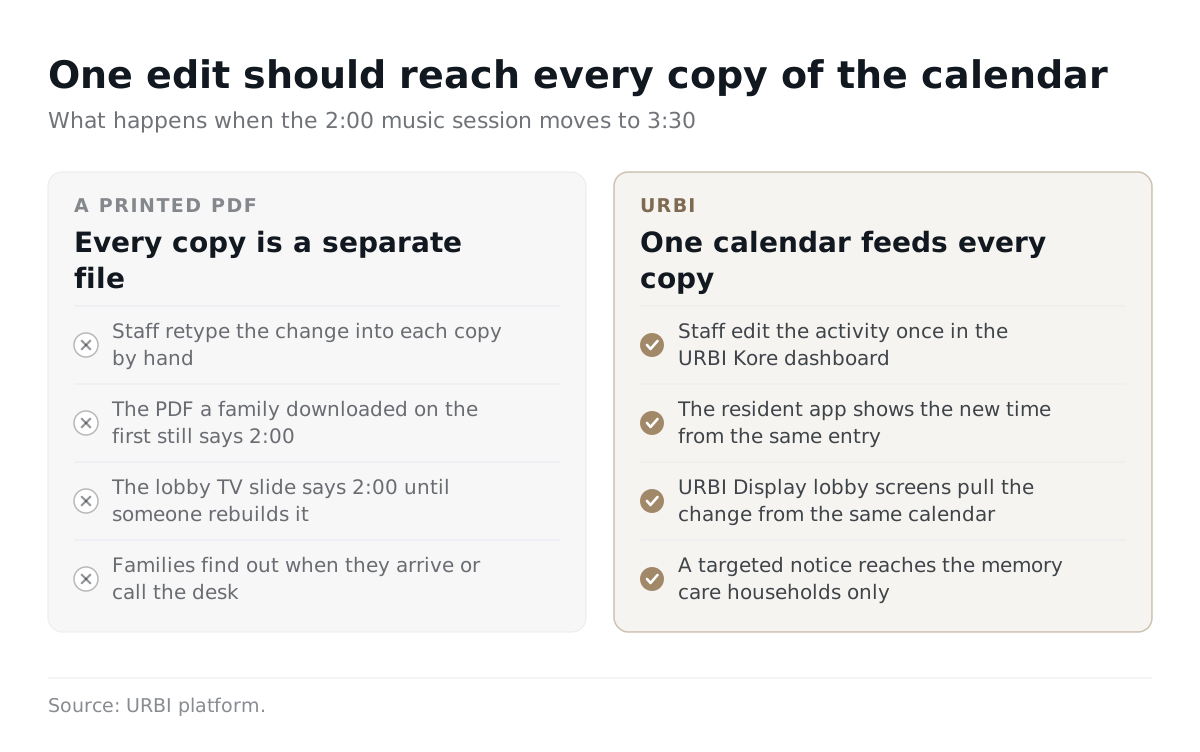
Planning is not a monthly task either. Debbie MacLean, Director of Life Enrichment at Marjorie P. Lee, told the Episcopal Retirement Services blog in 2024: "Every week, our Life Enrichment team plans fun and engaging activities." A weekly planning rhythm with a monthly publishing format means the printed calendar starts drifting from reality within days.
The question that matters is simple: do you keep one live schedule that feeds every copy? For the wider senior living picture, see our guide to senior living activity calendar software. This post covers what changes when the residents live with dementia.
What does a memory care program need that assisted living does not?
Memory care needs activities fitted to each resident's current ability, best time of day, and tolerance for groups. An assisted living calendar can list what is happening. A memory care calendar also has to reflect who each activity is for.
The Alzheimer's Association activity guidance says to stick with activities the person has always enjoyed and adjust them "to match the person's current abilities." It also notes that a large gathering may overwhelm someone who does better in smaller groups. Its advice is to watch for signs that the person seems happy, anxious, distracted, or irritable.
That guidance turns into concrete calendar needs:
| Need | Typical assisted living calendar | What memory care adds |
|---|---|---|
| Group size | Open to everyone, the bigger the better | Small group tracks that run at the same time |
| Timing | Fixed times set a month ahead | Times that shift around residents' better hours |
| Reminders | Residents read the calendar themselves | Staff invite and walk residents to each activity |
| Change | Occasional cancellations | Frequent same day changes as the unit's mood shifts |
| Family interest | General curiosity | Close interest in whether a parent took part |
Software cannot make these calls for staff. It can make sure the call, once made, shows up everywhere. Keep the clinical side, such as assessments and care plans, in your clinical system. The calendar's job is to publish the program and record who came.
What do US rules say about posting a memory care activity calendar?
There is no single national rule. The Alzheimer's Association states that "Assisted living is not regulated by the federal government and its definitions vary from state to state." Each state sets its own posting and programming standards.
Three states show how different those standards can be:
| State | What the rule says | What it means for your calendar |
|---|---|---|
| Pennsylvania | The activities rule for assisted living residences requires the week's daily activity calendar to be posted in advance in a conspicuous public place, plus verbal cueing and reminders of start times and locations. | A weekly look ahead must be visible, and staff still remind residents in person. |
| California | The planned activities rule requires facilities licensed for seven or more people to post planned activity notices in a central location readily accessible to residents and relatives, and to keep copies for at least six months. | You need a posted copy and an archive of past calendars. |
| Texas | For certified Alzheimer's facilities, the activities program rule says activities must be individualized, based on the resident assessment, and appropriate for each resident's abilities, with a balanced mix of cognitive, recreational, and daily living activities. | The program has to show a balance across activity types, not just a busy grid. |
No software makes a community compliant by itself. Be wary of any vendor that says otherwise. What software can do is make the posted copy current, keep past versions, and help show that the program is balanced. Check your own state's rule with your licensing agency before you pick a tool. For a closer look at posting on screens, read our piece on digital signage in senior living.
How many families are waiting on this calendar?
Hundreds of thousands of families in residential care alone, and the wider Alzheimer's population runs into the millions. Alzheimer's affects about 1 in 9 Americans age 65 and older. The Alzheimer's Association 2026 Facts and Figures estimates that 7.4 million Americans age 65 and older are living with Alzheimer's in 2026.
Residential care is where the calendar question lands. The CDC counted 988,800 residents in US residential care communities in 2022. In the same year, 44% of those residents had ever been diagnosed with Alzheimer disease or another dementia.
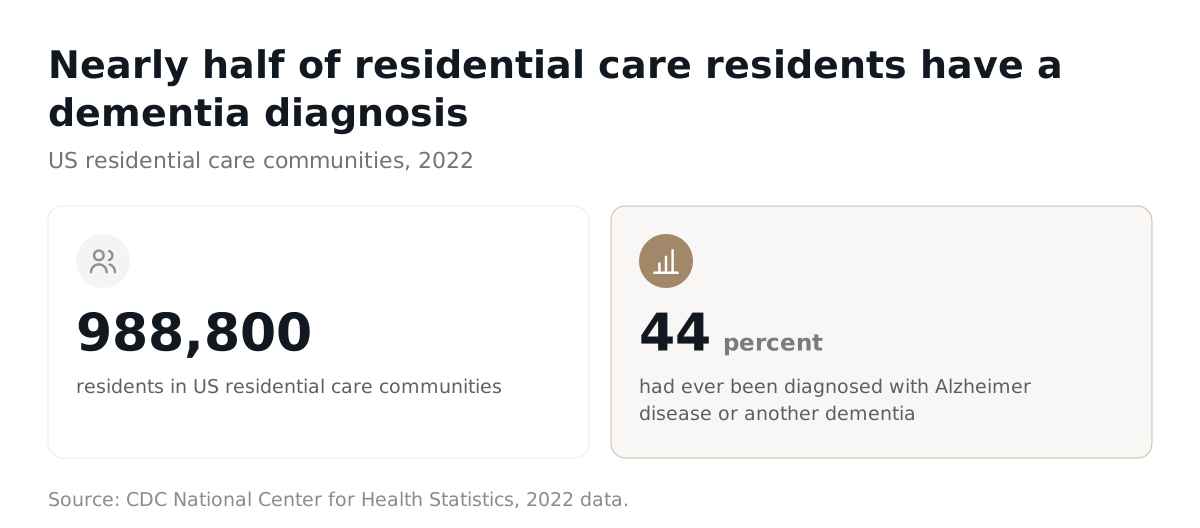
Keep those numbers apart when you use them. The first counts everyone age 65 and older with Alzheimer's, wherever they live. The second counts residential care overall, which is broader than dedicated memory care. We could not find a reliable current public count of people living in memory care units specifically. Still, the direction is clear. Nearly half of the residents in residential care had a dementia diagnosis, and their families want to know how the day went.
What should families see, and how often?
Families should see the coming week in advance and any change the same day it happens. A weekly look ahead matches the Pennsylvania posting rule above, and a same day update stops the "it said 2:00" phone call before it starts.
A good family view answers three questions:
- What is planned this week, in plain words and at a readable size?
- What changed today, and when?
- Did my parent take part, if the resident and your policy allow sharing that?
The third question needs care. A family may expect a parent at every activity. The parent may prefer a quiet afternoon, and that choice belongs to the resident. Record attendance honestly, but never present a skipped activity as a staff failure. "Offered" and "attended" are different facts, and a good system keeps them apart.
How you reach families matters as much as what you send. We cover channels, timing, and tone in our guide to family communication in retirement communities.
What must memory care activity calendar software do?
It must take one edit and publish it everywhere, print a large type fallback on ordinary office equipment, and record who actually came. Anything less leaves you rebuilding a PDF each time the plan moves.
Use these tests in every demo. Ask the vendor to perform them live, with your real calendar.
| Demo test | Pass looks like |
|---|---|
| Move today's 2:00 activity to 3:30 | One edit updates the staff view, the lobby screen, and the family update. No second upload. |
| Cancel an activity at noon | Families who follow that unit get a notice within minutes, and the screen stops showing it. |
| Print the week for a resident with low vision | A clean weekly layout in large type on a normal office printer. |
| Run two small groups at once | Both appear clearly, with separate rooms and separate headcounts. |
| Check in eight residents at a sing along | Staff record attendance in seconds at the door, not from memory at the end of the shift. |
| Pull last March's calendar | The old version is still there for a surveyor or a family question. |
Can one edit really update every copy?
Yes, if the screens, the app, and the printout all read from the same calendar. That is the test that separates a calendar system from a design tool. If the lobby slide is a separate file, you still have two things to fix every time.
Ask how many steps a change takes after the calendar has gone out. Count them. One is the goal.
Will it read well on a lobby screen and on paper?
It should, and you should check both with your own eyes. Big type, strong contrast, and fewer items per screen do more than clever layouts. Our guide to font size and contrast for senior living signage gives concrete sizes to test against.
Paper still matters here. A printed weekly page on the door is often the most usable calendar a resident will see.
Does it record attendance without faking engagement?
It should record who came, quickly, and leave room for staff to note how it went. A checked box proves someone was in the room. It does not prove they enjoyed it. The Alzheimer's Association's advice to note whether a person seems happy or anxious is the kind of observation a quick staff note can hold.
Attendance data is still worth having. It shows which activities draw people and which times fail. We walk through using those numbers in our post on how to increase activity attendance in senior living.
When is a paper calendar still the right answer?
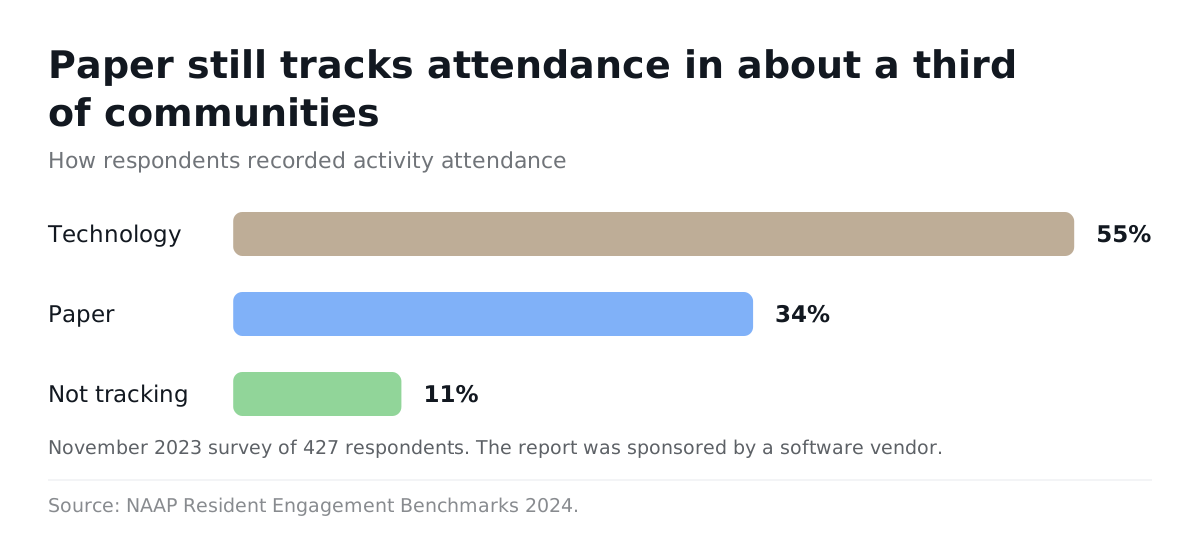
Paper is right for the resident facing copy, and it is wrong as the only source of truth. Many communities still run on it. In a 2024 NAAP benchmark report built on a November 2023 survey of 427 respondents, 34% tracked attendance on paper, 55% used technology, and 11% did not track at all. The report was sponsored by a software vendor, so read it as a direction, not a census.
The honest case for paper is strong:
- A posted weekly page plus a staff reminder can satisfy a rule like Pennsylvania's.
- A resident may never use a phone, but can read a page on the door.
- Software costs money and training time, and adds one more system.
So do not throw the printer out. Change where the calendar lives. Staff keep one live schedule. Paper, screens, and family updates all come from it. When the plan changes, you reprint one page, not rebuild a month.
Elizabeth Stotser, Executive Director of McKnight Place, put the stakes plainly in Ladue News in 2026: "Exceptional care and life enrichment aren't separate, they're partners." A calendar that is wrong half the week works against both.
How does URBI handle a memory care activity calendar?
URBI keeps one event calendar that shows in the resident app and on lobby screens from the same entry, and staff send targeted announcements when plans change. It is a communication and operations platform. It does not do clinical assessments or care plans, and it does not try to.
Here is how the pieces map to the tests above:
- Event calendar with RSVPs. Staff create each activity once in the URBI Kore web dashboard. Residents see it in the free resident app for iOS and Android.
- Attendance at the door. Events support on site QR scanning with group check in, so staff can record a small group in one pass. Post event surveys let residents share how it went.
- URBI Display for lobby screens. Branded lobby and elevator screens show events, news, and weather. They pull from the same calendar, so a moved activity changes on screen too. A property wide emergency takeover can flip every screen to an alert when needed.
- Same day notices. News posts support scheduled publish, home screen banners, push notifications, and per unit targeting. That lets you send a memory care change to the right households only. Email replies land in the staff inbox as a threaded conversation.
- Arthur for household calls. On Premium, Arthur, URBI's resident facing AI, answers voice calls, SMS, email, and in app chat. It can RSVP to events and verifies callers with a PIN before anything sensitive. It answers only about the caller's own household. When it does not know, it escalates to staff with a summary. The answer is saved to a property knowledge base that staff can view and edit, so the next caller gets it directly.
Staff stay in charge of what goes out. The software handles distribution, so the life enrichment director stops retyping the same change into four places. See the URBI senior living solution for the full module list, our guide to URBI for retirement communities for rollout, or what URBI is for the platform overview.
FAQ: What else do directors ask about memory care calendars?
Is memory care activity calendar software required by law?
No US rule we know of requires software. State rules set the standard, and they vary. Pennsylvania requires an advance weekly calendar posted in a public place plus verbal reminders. California requires posted notices and six months of retained copies in facilities licensed for seven or more. A paper process can meet those rules. Software makes it easier to keep the posted copy current and to find old versions when someone asks for them.
Can families see whether their parent attended an activity?
They can if your system records attendance and your policy allows sharing it. Decide that policy before launch, with residents and their representatives. Keep "offered," "attended," and "declined" as separate facts. A resident who chose to rest has made a choice, not been neglected. Clear labels prevent the upset call that starts with "the calendar said there was music, so why wasn't Mom there?"
Do we still need to print the calendar?
Yes, for most memory care residents. A large print weekly page on the door or bulletin board is often the easiest calendar for a resident to use. The change is where the page comes from. Print it from the same live schedule that feeds your screens and family updates. When plans move, you reprint one page instead of rebuilding the month in a Word table.
How long does it take to switch from PDFs?
It depends on how many recurring activities you run and how many people need training. URBI onboarding includes concierge training before launch, a pre launch letter to residents, and launch day credentials, and it runs month to month. Start by entering your recurring activities once. Run the paper and the live calendar side by side for a week, then let the live calendar lead.
If your life enrichment team spends Friday afternoons rebuilding a calendar that will be wrong by Tuesday, it is time to change where the calendar lives. URBI gives you one schedule that feeds the resident app and your lobby screens, plus targeted notices when the plan moves. Email hello@myurbi.co and we will walk through the demo tests above with your own calendar.
Keep reading


