



A senior living December activity calendar works when residents help plan it, many traditions share the page, and every event has a quiet option. URBI runs the building side of your community, so one life enrichment calendar reaches the app and the lobby and elevator screens.
What should a senior living December activity calendar include?
It should include the dated observances your residents actually keep, a steady weekly routine underneath them, and a few events that need no holiday at all. December is crowded, so start from the fixed dates and fill the gaps around them.
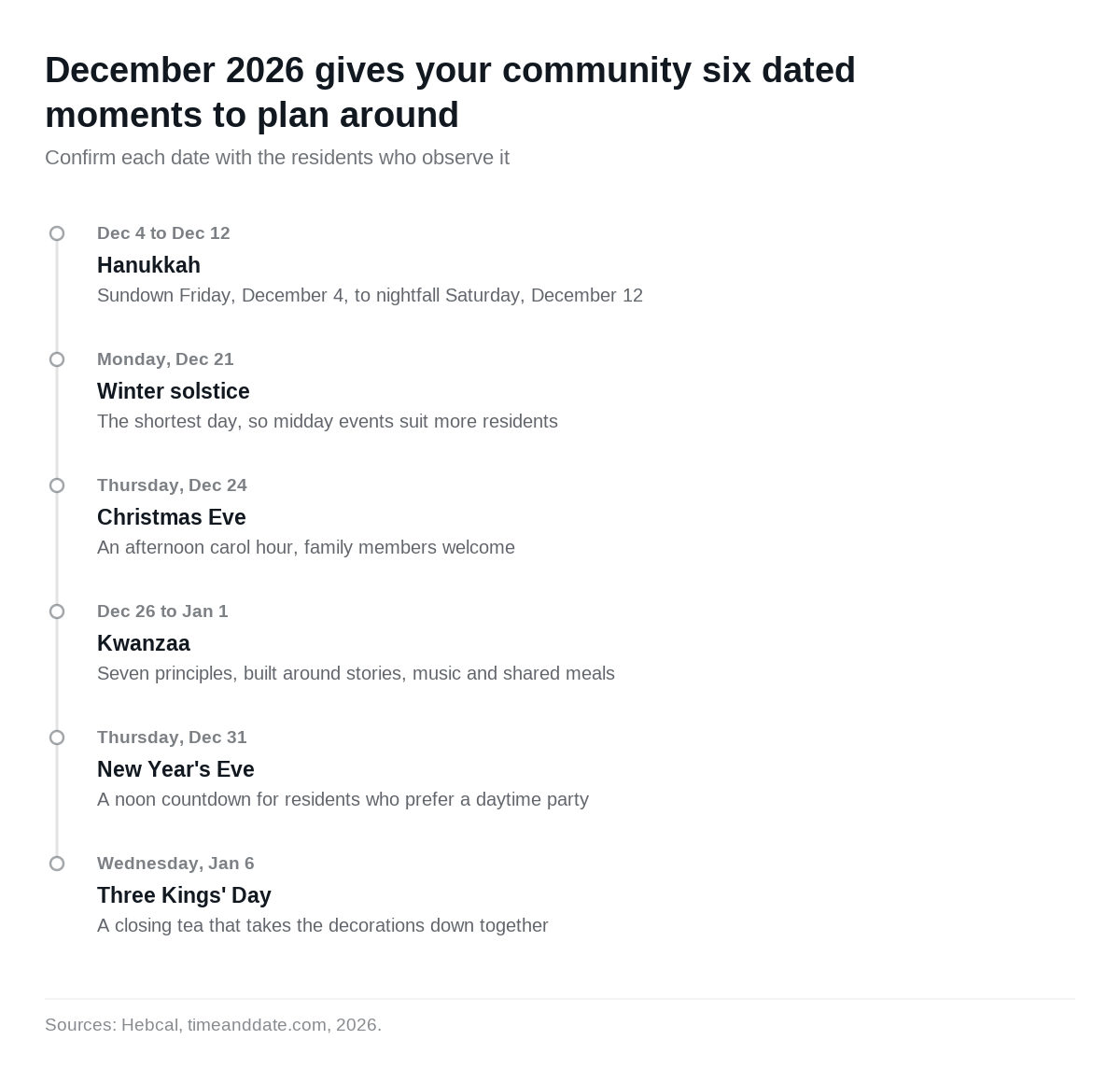
These are the dates for December 2026, as of November 2026. Confirm each one with the residents who observe it.
| Date | Observance | Program idea |
|---|---|---|
| Friday, December 4 at sundown, through nightfall on Saturday, December 12 | Hanukkah | A candle lighting gathering, a recipe and story circle, a music afternoon |
| Monday, December 21 | Winter solstice | A midday "shortest day" gathering with warm drinks and a light themed craft |
| Thursday, December 24 | Christmas Eve | An afternoon carol hour, with the family members who visit welcome to join |
| Friday, December 25 | Christmas Day | A quiet lounge with tea and a film, for residents who want company but not a program |
| Saturday, December 26 to Friday, January 1 | Kwanzaa | A storytelling afternoon built around one of the seven principles |
| Thursday, December 31 | New Year's Eve | A noon countdown with music, for residents who prefer a daytime party |
| Wednesday, January 6 | Epiphany, known as Three Kings' Day | A closing tea that also takes down the decorations together |
Hanukkah begins on a Friday evening, so the first night overlaps with Shabbat. Ask your Jewish residents how they want that night handled before you print anything.
How do you plan a December calendar that includes every tradition?
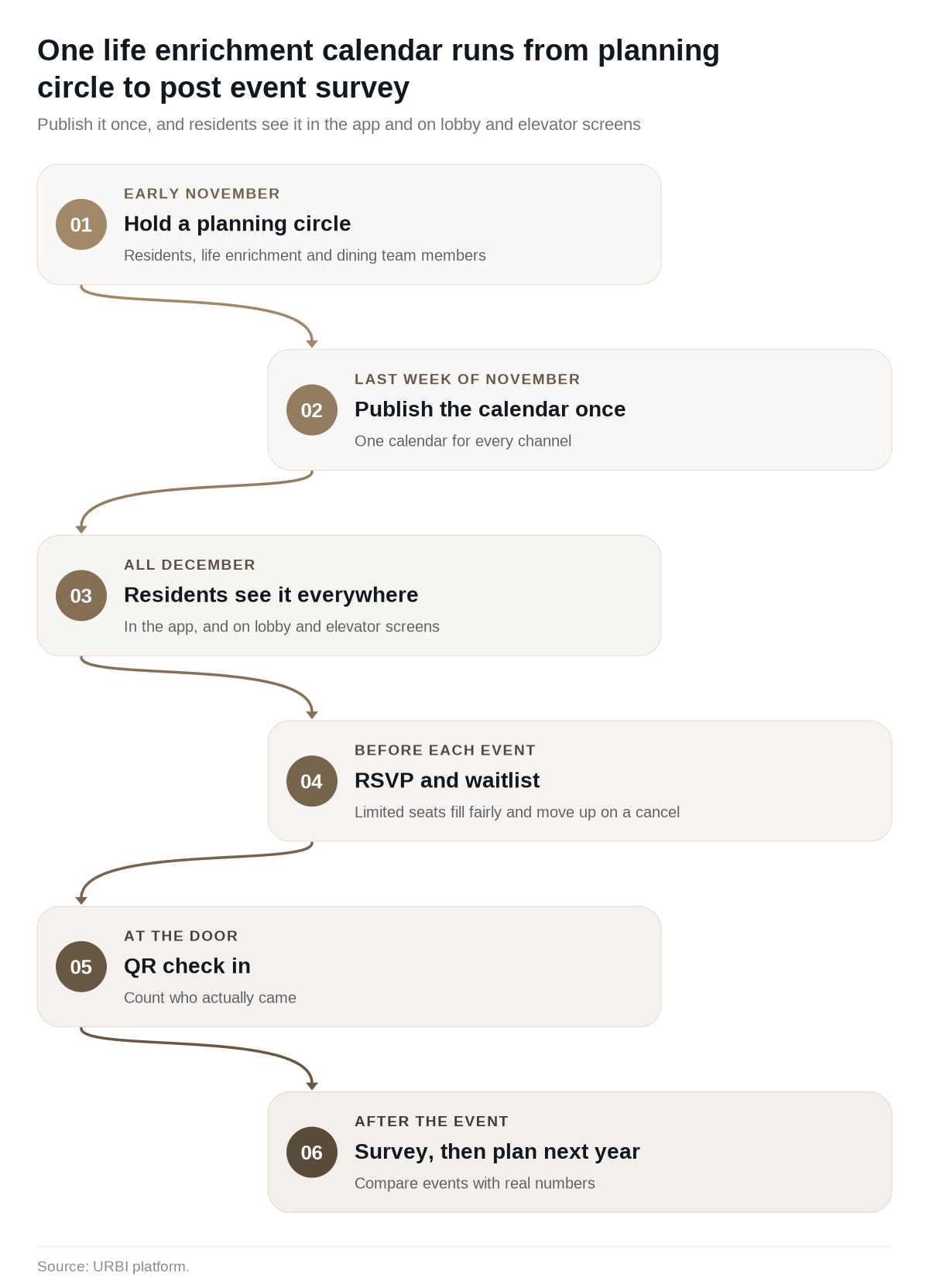
You ask residents first and build the calendar with them. A small planning circle of residents, a life enrichment team member, and a dining team member can settle most of December in one meeting in early November.
The United States population age 65 and older reached 61.2 million in 2024, according to the Census Bureau. That is a lot of different December memories, and a community of a few hundred people holds many of them under one roof.
- Ask each resident which days matter to them, and which they would rather skip.
- Include residents who celebrate none of these. A "winter" gathering with no holiday attached is a real option.
- Name more than the big three. Residents may ask for Las Posadas, Bodhi Day or Yalda night. Ask them for the date and the customs, and let them lead.
- Give every observance the same space on the calendar: the same size entry, the same care in the description.
- Invite residents to teach. Someone who grew up with a tradition explains it better than a printout.
For Kwanzaa, the Official Kwanzaa Website, maintained by Dr. Maulana Karenga, describes activities built around seven principles, with feasts, music, dance, poetry and stories. Those translate well into a community event. Offer it as an invitation, and ask residents who keep Kwanzaa to shape it.
The National Institute on Aging suggests that people find an activity they enjoy, restart an old hobby, or take a class. December is a good month to act on that. Knitting, card making and baking all come back easily when someone brings the first tray of supplies.
Which December events do residents actually attend?
Residents attend events that start from something they already do, happen at a predictable time, and ask for nothing in advance. These formats fit that pattern.
- Memory exchange circle. Each person shares one December memory from any year. Keep it to forty minutes and offer tea.
- Recipe and story afternoon. Residents bring a dish name and the story behind it. The dining team handles the food and ingredient labels, because URBI does not manage menus.
- Music from many places. Carols, Hanukkah songs, spirituals, and winter songs from residents' home countries, with a resident choosing the playlist.
- Candle lighting with flameless candles. Residents get the ceremony without the flame. Check what your fire safety plan allows before you plan real candles.
- Letter and card table. A table in the lounge with paper and stamps, open all week. No sign up, no start time.
- Gift wrapping volunteers. Some residents like having a job. Give them a table, ribbon and a thank you.
- Winter film matinee. A short film in a comfortable room, with the lights low and the volume set by a resident.
- School or choir visit. A visiting group of young people sings for an hour. Plan the visitor check in ahead of time.
For more on getting people to show up, read how to increase activity attendance in senior living.
How do you schedule around short days and busy weeks?
Put the biggest events at midday, keep your weekly routine intact, and leave the holiday weekends lighter than you think you should. The solstice on December 21 is the shortest day of the year in the northern hemisphere, so evenings are dark early and midday suits more people.
Here is a sample plan. Adjust the days to your own community.
| Dates | Weekly anchors | Featured events |
|---|---|---|
| December 1 to 6 | Morning exercise, coffee hour, card table | Planning circle recap, lights craft afternoon, first night of Hanukkah on Friday evening |
| December 7 to 13 | Same anchors | Hanukkah continues, recipe and story afternoon, music from many places |
| December 14 to 20 | Same anchors | Choir or school visit, memory exchange circle, gift wrapping table opens |
| December 21 to 27 | Same anchors, lighter schedule | Solstice gathering, Christmas Eve carol hour, quiet lounge on December 25, Kwanzaa begins December 26 |
| December 28 to January 6 | Same anchors | Kwanzaa story afternoon, noon New Year's countdown, Three Kings' Day tea |
Three habits keep a December calendar usable.
- Keep the weekly anchors every week. Routine gives residents something steady while the month changes around them.
- Offer a quiet room at every large event, for anyone who finds a crowd tiring.
- Plan team member coverage early. Holidays are when schedules are thinnest, and an event with no one to run it is worse than no event.
The senior living digital signage content calendar shows how December fits into a full year of screen content.
How do residents and family members find out what is on?
Publish the calendar once, then let it reach people on every channel your community runs. In URBI, the life enrichment calendar shows in the app for residents and on the lobby and elevator screens, so residents who never open an app still see it.
Be exact about what each channel does.
| Channel | What reaches people | What to know |
|---|---|---|
| The URBI app | The calendar and news posts, for residents who use it | Residents use the app if they choose to |
| A news post | Goes out in the app, by push and by email at the same time | Choose low, normal or urgent. There is no text message option, and URBI does not record who read a post |
| Lobby and elevator screens | The calendar and any banner a team member adds | A news post reaches the screens only when a team member adds it as a banner |
| Printed copy and a notice board | Everyone who walks by | Still worth doing in December, since not every resident uses a screen or a phone |
HERO, the AI inside Kore for your team, can draft the December announcement. HERO only proposes. A team member reads it, edits it and confirms before anything goes out.
Family members do not get an app login. They reach the community through Arthur, URBI's AI assistant, by voice, text and email. Arthur verifies who is asking before it shares anything about a resident, and it hands unknown questions to a team member with a summary. Arthur is part of the Premium plan. Send family members the printed calendar or an email as you do today, and let Arthur catch their follow up questions at any hour.
The same family communication approach applies in December: tell people early, and tell them the same thing everywhere.
How can family members join in without a crowd?
Give family visits a booked slot, a clear arrival step and a place to sit. December visits bunch up around December 24 and 25, and a lobby full of people with no plan is stressful for residents and team members alike.
- RSVP and waitlist. URBI events carry RSVP and a waitlist, so a carol hour with limited seats can fill fairly and move people up if someone cancels.
- Digital visitor check in. Guests check in and out digitally, and guest parking is issued in the same motion. Every arrival is on the record. See visitor management for senior living.
- A private dining room booking. A family holiday meal can be booked as an amenity, with a deposit handled in the app (dining and amenity reservations covers it in detail). URBI books the room. It has no dining point of sale and no menu management, so the dining team still runs the food.
- Arthur for last minute questions. A family member who calls to ask about visiting hours reaches Arthur, and Arthur escalates what it does not know.
How do you tell what worked?
Count who came, ask them what they thought, and bring the answer to the next planning circle. URBI events support QR check in at the door and a survey after the event, so you can compare a Hanukkah gathering with a carol hour using real numbers instead of impressions.
- Note which events filled and which had empty chairs.
- Ask residents, not only family members, what they would repeat next year.
- Write the answers into the same document you used to plan, so next December starts with notes.
If you want to compare tools for publishing the calendar, see what to look for in senior living activity calendar software. For programming adapted to residents in memory care communities, see memory care activity calendar software.
Frequently asked questions
How early should we publish the December calendar?
Publish it by the last week of November. Residents and family members plan around holidays, and some need time to arrange travel or a visit. Post an updated version if anything changes, and keep the printed copy and the screen content matched so nobody sees two different calendars.
What about residents who prefer not to celebrate?
Give them real options. Keep the weekly anchors running so ordinary days stay ordinary. Add a quiet room at every large event, and offer at least one winter gathering with no holiday attached. Ask these residents what they would enjoy instead of guessing. Taking part is always a choice, and a resident who skips an event has not failed at anything.
Does URBI manage care or dining?
No. URBI runs the building side of your community: the calendar, events, visitors, packages, service tickets and family communication. It holds no care records and does no clinical work, and it has no dining point of sale or menu management.
URBI puts the life enrichment calendar in the app and on lobby and elevator screens, and Arthur answers family members at any hour. To see how it fits your community, read URBI for retirement communities, see what URBI is, explore the senior living solution, or email hello@myurbi.co to talk it through.


