



Senior living communication software should reach a resident on a channel she can see and hear, reach her daughter in another state on the channel she reads, and keep a record of both. It also handles emergencies and replies. URBI does this from one platform, and this guide uses it as the reference point.
This is a requirements guide for Executive Directors and regional operations leaders across independent living, assisted living, and memory care. Condo and apartment operators have their own version in building communications software: how to choose. The six jobs are the same; the audience is not.
What should senior living communication software do?
It has six jobs, each for three audiences at once: residents, their family members, and your team members. A product that does the first job for one audience is a newsletter tool.
- Notices. Write once, schedule it, and publish to the app, email, the dining room screen, and a large print copy at the front desk.
- Emergencies. One action alerts every phone and every screen in the community, and the same action posts the all clear.
- Two way messages. A family member replies, and the reply lands in an inbox someone owns, not the Executive Director's cell phone.
- Targeting. Send to one household, one floor, one neighborhood, residents only, or family members only, without a spreadsheet.
- Translation. A resident or family member who reads Spanish or Korean gets the notice in a form they can act on.
- Proof. Later, you can show what was sent, to whom, when, and who approved it.
The three audience problem is what makes senior living different from an apartment building. A resident wants to know that bingo moved to the sunroom. Her son wants to know what the team is doing about the heat advisory. Send both to both and each learns to ignore you.
Which channels reach residents, and which reach family members?
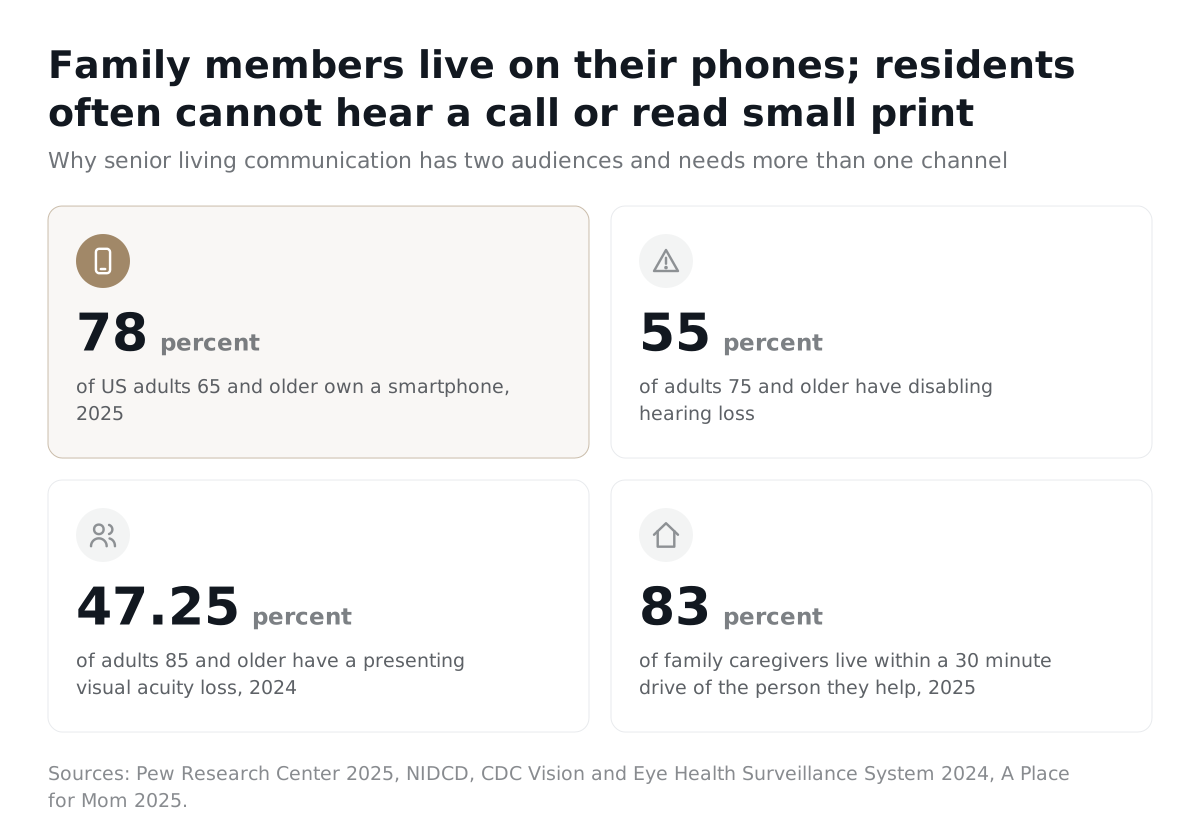
Residents and family members need different channel plans. Family members are mostly working age adults with smartphones. Residents are mostly over 85.
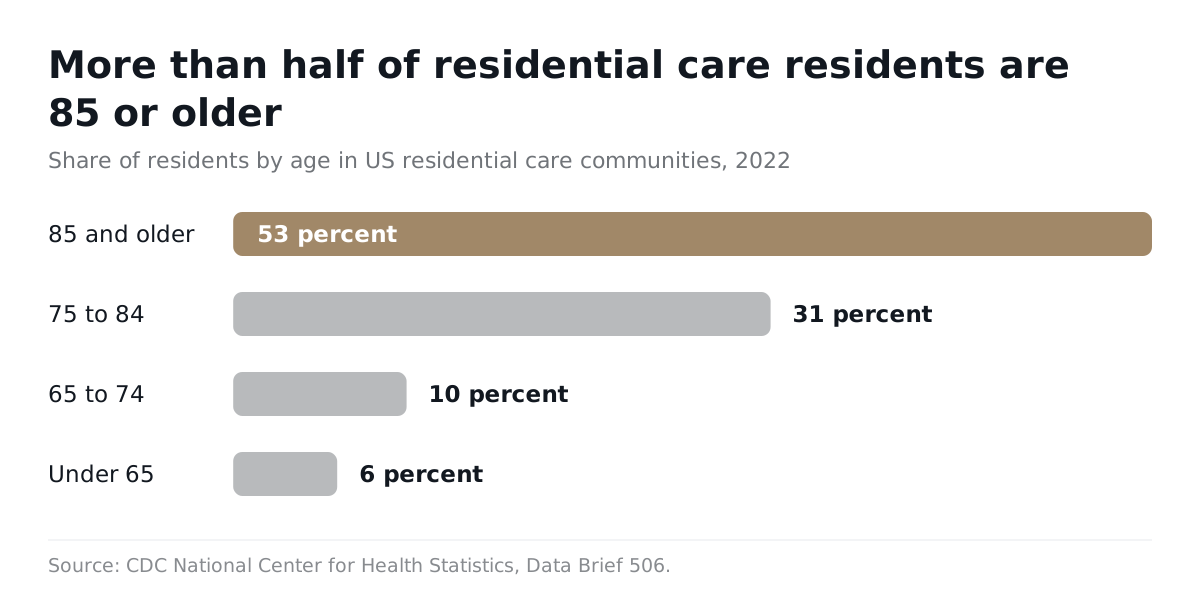
The CDC's 2022 survey of residential care communities found that 53 percent of residents were 85 and older, 31 percent were 75 to 84, and 10 percent were 65 to 74; about 44 percent had ever been diagnosed with Alzheimer disease or another dementia. Pew Research Center's 2025 survey found 78 percent of adults 65 and older own a smartphone, against 97 percent of adults under 50.
Ownership is not the barrier; hearing and vision are. The National Institute on Deafness and Other Communication Disorders reports that 22 percent of adults 65 to 74 and 55 percent of adults 75 and older have disabling hearing loss. The CDC's vision surveillance system estimates that in 2024, 18.50 percent of people 65 to 84 and 47.25 percent of people 85 and older had visual acuity of 20/32 or worse with their usual glasses. Where half the residents are over 85, a phone call fails for about half, small print fails for about half, and the halves overlap.
| Channel | Residents | Family members | Weakness |
|---|---|---|---|
| App push | Works for the resident who uses a smartphone; 78 percent of adults 65 and older own one (Pew, 2025) | The default channel | Requires adoption and a working login |
| SMS | Short reminders on any phone | Urgent updates: weather, evacuation, schedule change | Consent and registration rules apply |
| Weak for residents over 85 | Newsletters, photos, anything long | Unopened mail goes unnoticed | |
| Voice call | Fails for many; 55 percent of adults 75 and older have disabling hearing loss (NIDCD) | Best for anything sensitive | Slow, and unlogged unless the software logs it |
| Lobby and dining room screen | Reaches every resident who walks to a meal; no device or login | Visiting family members only | Font size and contrast must be built for low vision |
The rule for residents: publish once, then let the screen, the large print calendar, and the app show the same source. For family members: push and SMS for anything urgent, email for anything long, a call from a person for anything sensitive. Getting residents onto the app is its own project, covered in resident app adoption for older adults.
Where do family members actually live?
Closer than the out of state stereotype suggests. A Place for Mom surveyed 1,104 US family caregivers in 2025 and found that 83 percent of care recipients live within a 30 minute drive of their family caregiver; 34 percent have no other help. An earlier review of family involvement in assisted living found that roughly 10 percent of residents have no family member nearby, and that families rate importance higher and satisfaction lower than residents do.
What do state rules and federal requirements demand?
Before you text a family member or send an incident notice from software, you need documented consent, a rule about who may receive what, a deadline calendar for your state, and a record of all three. This is a checklist, not legal advice; your state regulation and your counsel decide the details.
Who must be told about an incident, and how fast?
Your state licensing rule sets the clock, and most states name the responsible person alongside the licensing agency.
| State rule (text as of 2026) | Deadline | Who is notified | What the software must do |
|---|---|---|---|
| California, Title 22 Section 87561 | Written report within 7 days for a death, serious injury, AED use, or any incident threatening welfare, safety, or health; phone or fax within 24 hours for a major accident | Licensing agency and the responsible person | Timestamp the event, log the send to the responsible person |
| Pennsylvania, 55 Pa. Code 2600.16 | Report to the Department within 24 hours; once the incident is validated, inform the affected resident or designated person immediately | Department, affected residents, and the designated person | Keep the designated person on the household record, log the notice and its time |
The family call is where communities get hurt, and the failure is rarely a rule violation. It is silence. A family member on the AgingCare forum in February 2023 described learning about her father's fall days later: "No one from the ALF called me." Another in February 2025 asked what to do when leadership would not answer texts, emails, calls, or in person visits. Software will not make the call. It should make sure the call is owned, logged, and followed by an approved written summary.
Does the CMS emergency communication plan apply to my community?
Only if you are a Medicare or Medicaid certified long term care provider, but its elements are a good template for everyone. 42 CFR 483.73(c) requires contact information for team members and outside agencies, primary and alternate means of reaching them, a method for sharing emergency plan information with residents and their families or representatives, and a review at least annually.
What may you tell a family member under HIPAA?
If your community is a HIPAA covered entity, you may share information directly relevant to a family member's involvement in the resident's care when the resident agrees, does not object when given the chance, or when professional judgment says she would not object. HHS provider guidance says the permission can be verbal, and that HIPAA does not require the provider to document the agreement. Your policy should. When the resident is absent or incapacitated, the provider may share if disclosure is in her best interest; the HHS FAQ on disclosures to family and friends is the short version. Many independent living communities are not covered entities, and state privacy rules govern instead. Either way, the software needs an authorized contact list per household, not one family blast list.
Do you need consent to text family members?
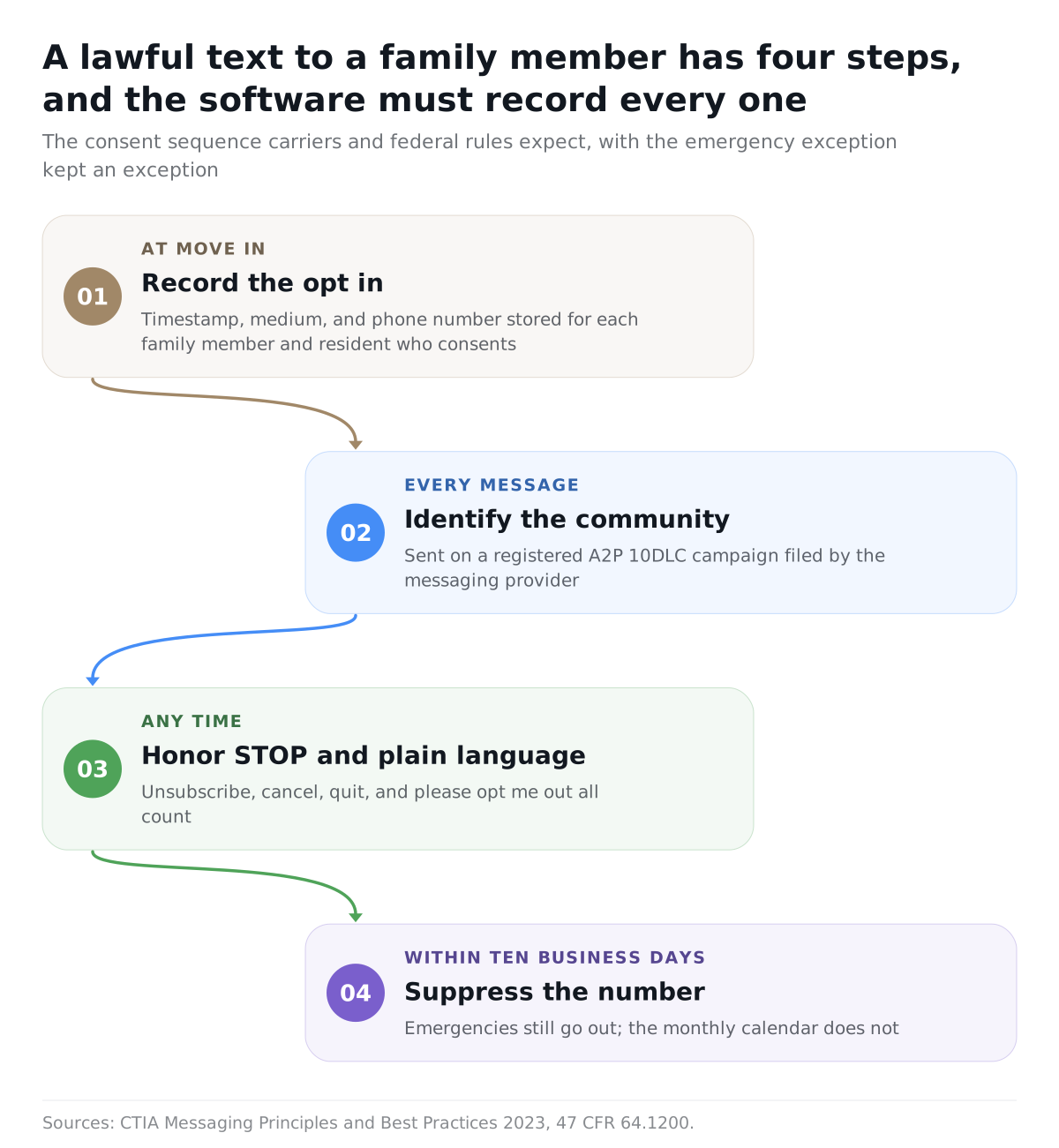
Yes, unless it is an emergency. Federal rules at 47 CFR 64.1200 bar calls and texts to a cell number made with an autodialer or a prerecorded voice unless the call is for emergency purposes or the person gave prior express consent. The same rule says a revocation made by any reasonable method, including replying "stop," "quit," or "unsubscribe," must be honored within a reasonable time not to exceed ten business days. A tornado warning qualifies. The newsletter does not. Capture the opt in at move in, store it on the household record, and let the vendor handle the carrier registration that application sent texts require.
What does ADA effective communication require?
A community open to the public must communicate as effectively with a person who has a hearing, vision, or speech disability as with anyone else, and the duty extends to companions. Department of Justice guidance defines a companion as any family member, friend, or associate of the person receiving services, lists large print, screen readable electronic text, and audio recordings as aids for low vision, and lists real time captioning and written materials as aids for hearing loss. Every notice needs a large print form and a screen readable form.
What goes on the compliance checklist?
Five items, and a vendor should be able to show you where each one lives in the product.
- An authorized contact list per household, with the responsible person and the designated person named and dated.
- A state specific incident calendar with the event type, the deadline, the recipient, and the channel for each.
- SMS opt in for every family and resident cell number, with the timestamp and source stored, and a working STOP.
- A retention rule for notices and consent records that matches your state's records clock, set with counsel.
- A person on every sensitive event, call logged first.
When have phone calls and the printed calendar stopped being enough?
They stop being enough the day the community cannot answer a simple question: who was supposed to hear this, and did they? A small community with a stable team can run on phone calls for years. The break comes with a room change after printing, a storm, a resident who cannot hear the call, or a team member who leaves with the family phone list in her head.
The research backs routine, owned contact. A review in the Journal of Long Term Care found family meeting programs ran anywhere from weekly to quarterly, and one study in it reported that monthly contact routines "helped the staff to keep families systematically updated," including families living far away. Dave Eskenazy, CEO of Cogir Management USA, put the balance plainly in a February 2026 interview: "human interaction is still essential for resident care." The software's job is to take the routine load so the human minutes go where they matter.
| Situation | Phone calls and printed calendar | Family group text | Time to buy software |
|---|---|---|---|
| Weekly activity calendar | Works while nothing changes after printing | Nobody posts the calendar in it | When life enrichment changes a room or a time more than once a week |
| Different message for residents and family members | Two phone trees, run by hand | Cannot separate audiences | Now |
| Weather emergency at 5 AM | Too slow for 80 households | Fast, but only for whoever joined | When one action must hit phones and screens together |
| Incident notice with a state deadline | Works if one person tracks the clock and logs the call | Not an acceptable notice channel | When you cannot produce the record two years later |
| Team member turnover | The phone list leaves with her | The admin leaves with the group | Now, if the community owns nothing |
The printed calendar deserves a defense. Many residents trust it more than any screen, and a large print copy on the door is an accessibility aid, not a relic. Keep it, but print it from the same source that feeds the app and the screen, so a room change in the software is a room change everywhere.
What should you ask on a demo?
Ask the vendor to do each of these live, and treat a checkmark on a slide as a no.
- Send a dining room change to residents in the memory care neighborhood only, then a different note about it to their family members. Show me both audiences.
- Trigger a weather emergency. What happens on family phones, resident phones, and the dining room screen, and how do I post the all clear?
- Reply to that notice as a family member by email. Where does it land, and who owns it?
- Show a family member texting STOP. What is suppressed, and where is the record?
- A family member calls after hours about her mother's package. What does your AI do, and what does it refuse to say to a caller it cannot verify?
- Draft a family notice with your AI. Who approves it, and can it send on its own?
- Export everything about one notice: text, version, approver, audience, and channel outcomes.
Question five matters more here than in any other vertical: a family member should never learn about a different household because she called at the right moment. If the answer to question six is "it just sends," walk away.
How does URBI handle senior living communication?
URBI treats communication as one part of the community's operating platform, so a notice, a family reply, and a dining room screen share the same household records. The full picture is in what is URBI, the vertical walkthrough is URBI for retirement communities, and the residential base is URBI for residential buildings. URBI keeps no care, medication, or health records; it runs the communication, front desk, events, and building work around them.
- Notices with two audiences. News and announcements are written in rich text with scheduled publish and home screen banners, targeted per unit and by access level. With family members on their own access level, one room change goes out as two messages, each written for its reader. A regional operator writes one post that fans out across several communities at each one's local send time.
- Two way. Email replies to an announcement route into the staff inbox as a threaded conversation someone owns. Concierge and direct messaging give residents and family members a logged, searchable chat with the team, with server enforced access so a family member sees only her own household.
- Emergencies and the dining room. URBI Display runs branded lobby and dining room screens with rotating news, events, and weather, and a community wide emergency takeover flips every screen to the alert while the app pushes it to phones.
- Family calls and texts. Arthur, URBI's resident facing AI, answers residents and family members on voice, SMS, email, and in app chat, verifies identity by PIN before anything sensitive, and answers about the caller's own household only. What it cannot answer escalates to the Executive Director's team with a summary.
- Drafting with approval. HERO, the team facing AI in the dashboard, drafts a family notice or a reply from a thread. Nothing sends until a team member confirms.
- Life enrichment. Events carry RSVPs, Apple and Google Wallet passes, QR check in at the door, and post event surveys, so attendance is a number rather than a guess.
A note on proof: concierge conversations and inbox threads are logged, and every news post carries its schedule and audience. Read receipts are not part of that record. The feature list is at communication and community features and the vertical page is URBI for senior living.
FAQ
Do family members need to opt in before the community texts them?
Yes, for any text sent by software to a cell number, unless it is an emergency. Federal rules exempt messages made for emergency purposes from the consent requirement, so an evacuation alert can go out without an opt in. The monthly calendar cannot. Collect consent at move in, store the timestamp, honor STOP within ten business days, and keep the exception an exception.
Can the same software send different messages to residents and family members?
It should, and it is the first thing to test. Residents want the room change and the menu. Family members want the weather plan and the incident summary. In URBI, residents and family members are separate access levels on the same household record, so one event produces two targeted posts, and a family member never sees another household's thread.
Does a lobby screen count as effective communication for residents with low vision?
Only if it is built for it. The CDC estimates 47.25 percent of people 85 and older have visual acuity of 20/32 or worse with their usual glasses, so a screen with small type is decoration. Use large type, high contrast, and slow rotation, and keep the large print copy next to it. The ADA guidance lists large print and audio as aids for low vision.
Can AI answer a family member's call about a resident?
It can answer about the caller's own household after verifying who is calling, and it should refuse everything else. Arthur verifies by PIN before anything sensitive, is scoped to the caller's household, and escalates what it does not know to the Executive Director's team with a summary. A change in condition still gets a call from a person.
Choosing senior living communication software comes down to six jobs, a channel plan that reaches residents and family members on different terms, and a compliance checklist your team can run. To see URBI do each demo question above, write to hello@myurbi.co or book a demo.
Keep reading


