



Office building visitor management software should get each guest to the right floor fast and leave a record you can trust. For property teams running multi tenant offices, URBI covers visitor registration, front desk check in, QR passes, and an intercom that works with your existing access control.
This guide is for the landlord side: the property team that runs the lobby for many tenants at once. Schools and senior living communities face different rules and different visitors, so they have their own guides on school visitor check in systems and visitor management for senior living.
What must office building visitor management software do?
It must handle six jobs, from the invite before the visit to the record you keep after it.
- Pre registration. The tenant host invites the guest ahead of time, so the lobby knows who is coming.
- Host alerts. The host learns the guest has arrived and comes down, or sends someone.
- ID check. Staff or a kiosk confirm the person matches the invite. Looking at an ID, scanning it, and storing it are three different data choices.
- Badge or QR pass. The guest gets a pass that opens the turnstile and elevator for that visit only.
- Watchlists. The system flags a person the building or a tenant has barred, and a person on staff decides what happens next.
- Logs and retention. Every arrival is on the record, and old records are deleted on a schedule you can show.
Most vendors list all six. The real differences show up in the hard cases. Think of the walk in nobody invited, the host who is out sick, and the contractor whose access should have ended yesterday.
What does the landlord need that a tenant does not?
The landlord needs control of the whole building, while each tenant needs control of its own guests and nothing more. Software built for one company's front desk often skips that split.
| Need | Landlord property team | Tenant |
|---|---|---|
| Who they register | Contractors, vendors, inspectors, after hours work | Clients, interviews, business guests |
| Where the visitor may go | Lobby, loading dock, mechanical rooms, any floor under building rules | Its own floor or suite only |
| Rules | One security procedure for the whole building | Its own approval and escort habits |
| Records | A building wide log for incidents and audits | Its own guest history, never another tenant's |
| Reports | Lobby volume by day and hour, plus exceptions | Who visited and when |
One New York tower shows the split clearly. The tenant portal for 660 Fifth Avenue, a Brookfield Properties building, says tenants must register expected visitors. A visitor who shows valid ID gets a QR code pass for the turnstile and elevator. Passes expire at 11:59 PM the same day. Security guards cannot enter names or print passes for tenant space. Deliveries and service visits go through a separate building request, and after hours requests are due by 3:00 PM.
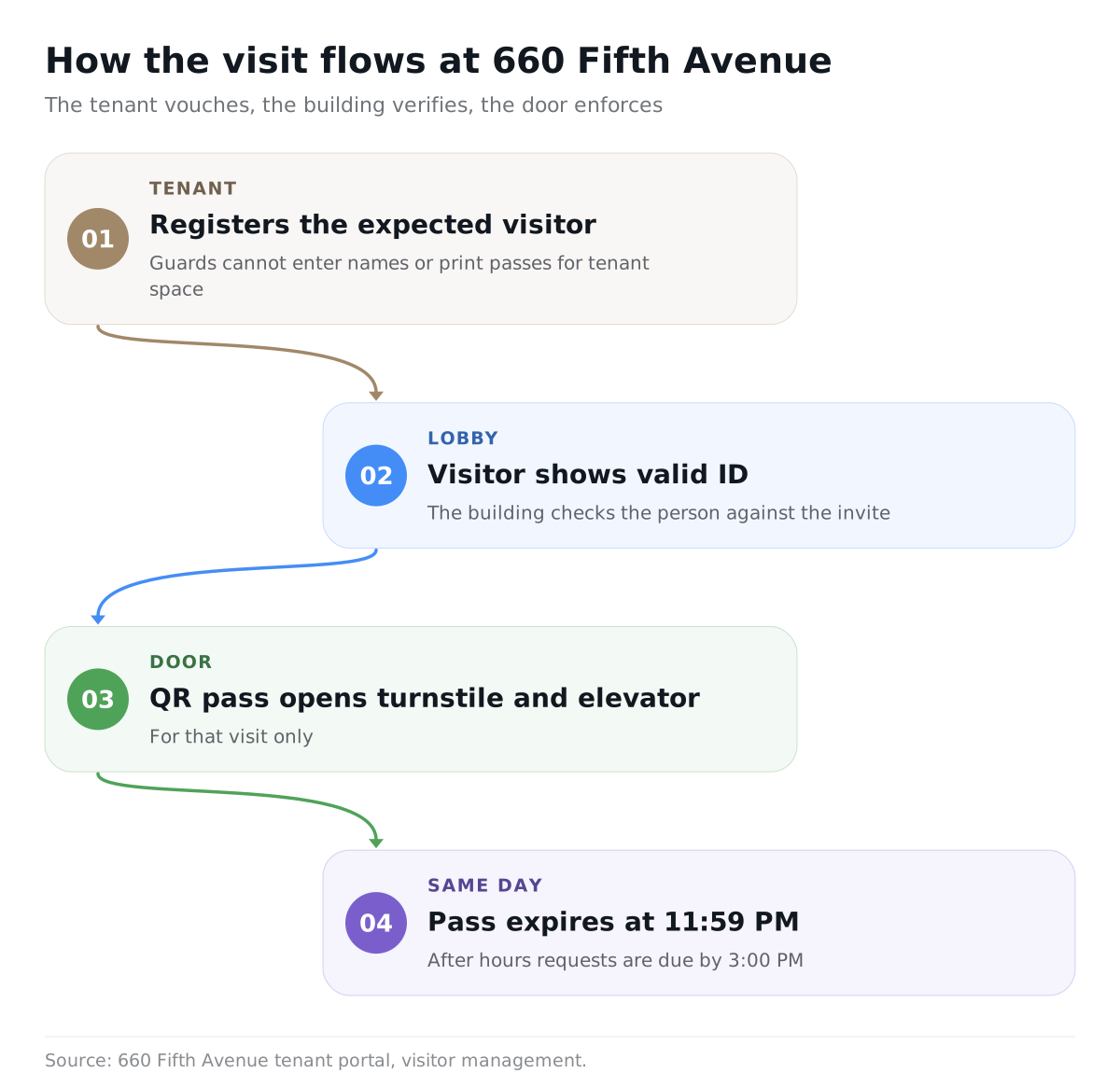
That is the model to copy. The tenant vouches for its guest. The building checks the person and controls the door.
How many visitors should the lobby plan for?
Plan for your busiest day, not your average day, because hybrid work makes office traffic uneven.
Kastle Systems studies badge entries from roughly 2,000 buildings in the ten largest markets it serves. Kastle reported that for most of 2023 the weekly average sat around 50% of pre pandemic occupancy. The high day each week was closer to 60%, and the low day around 30%. Tuesdays were usually highest and Fridays lowest.
The pattern held into late 2025. For the week of December 8, 2025, Kastle reported a 56.3% weekly average across all office buildings, with Tuesday reaching 66.0%. Top tier A+ buildings averaged 78.8% that week.
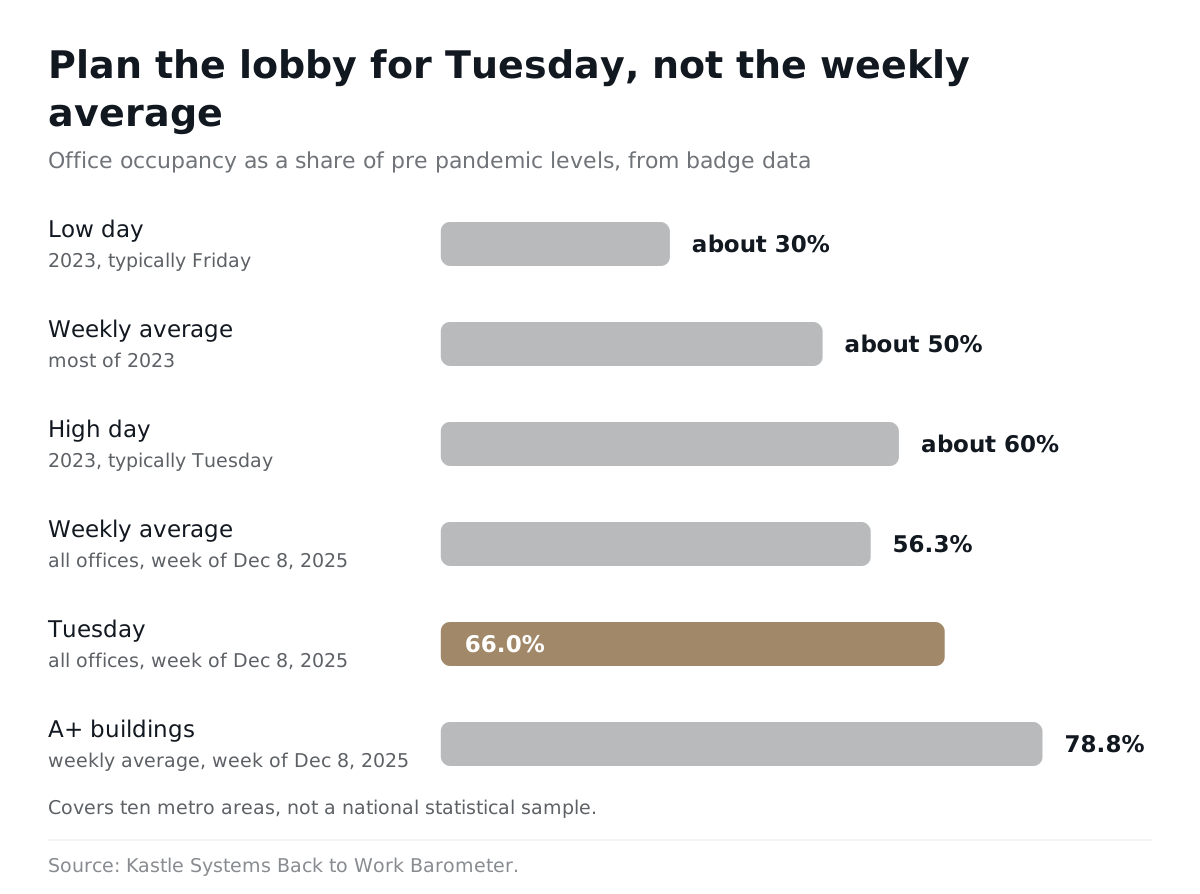
Read those numbers with care. Kastle says its Barometer covers ten metro areas and is not a national statistical sample. Use it to see the shape of the week. Then pull your own badge data by day and hour before you decide how many kiosks or desk staff you need. Our guide to office occupancy and service cadence covers how the same pattern should shape cleaning and service schedules.
How should visitor management connect to access control?
The visitor system should decide who is allowed in, and the access control system should enforce that decision at every door.
- One pass, the right doors. The pass should open the lobby turnstile and the guest's floor, and nothing else.
- Expiry the door respects. When the visit ends, the door must stop opening. Test it with yesterday's pass.
- Cancel in one place. Cancelling a visit in the software should cancel it at the door, without a second step.
- A path for the unplanned guest. A visitor who is not on the list needs a way to reach the tenant, and the tenant needs a way to say yes or no. That is the intercom's job.
- A plan for outages. Ask what the lobby does when the network drops.
Make the vendor show this on your hardware with your installed access control system, not on a demo kit. Software is only half of it. Speaking about tenants returning to offices in 2020, Mark Zettl, president of JLL's Property Management Group, told BOMA International there are "a lot of policies and practices that have to come along with that." In the same article, Transwestern's Katie Sakach noted that a technology that works for one property may not work for another. For the wider software decision, see our commercial operator's guide to evaluating building software.
What does privacy law say about ID scans and biometrics?
An ordinary visitor log carries light rules in most places, but biometrics carry heavy ones, and Illinois has the best known law.
The Illinois Biometric Information Privacy Act (740 ILCS 14) covers retina or iris scans, fingerprints, voiceprints, and scans of hand or face geometry. Photographs are excluded from that definition. A face match built from a photo is a different question, so ask exactly what a vendor's ID or face feature captures.
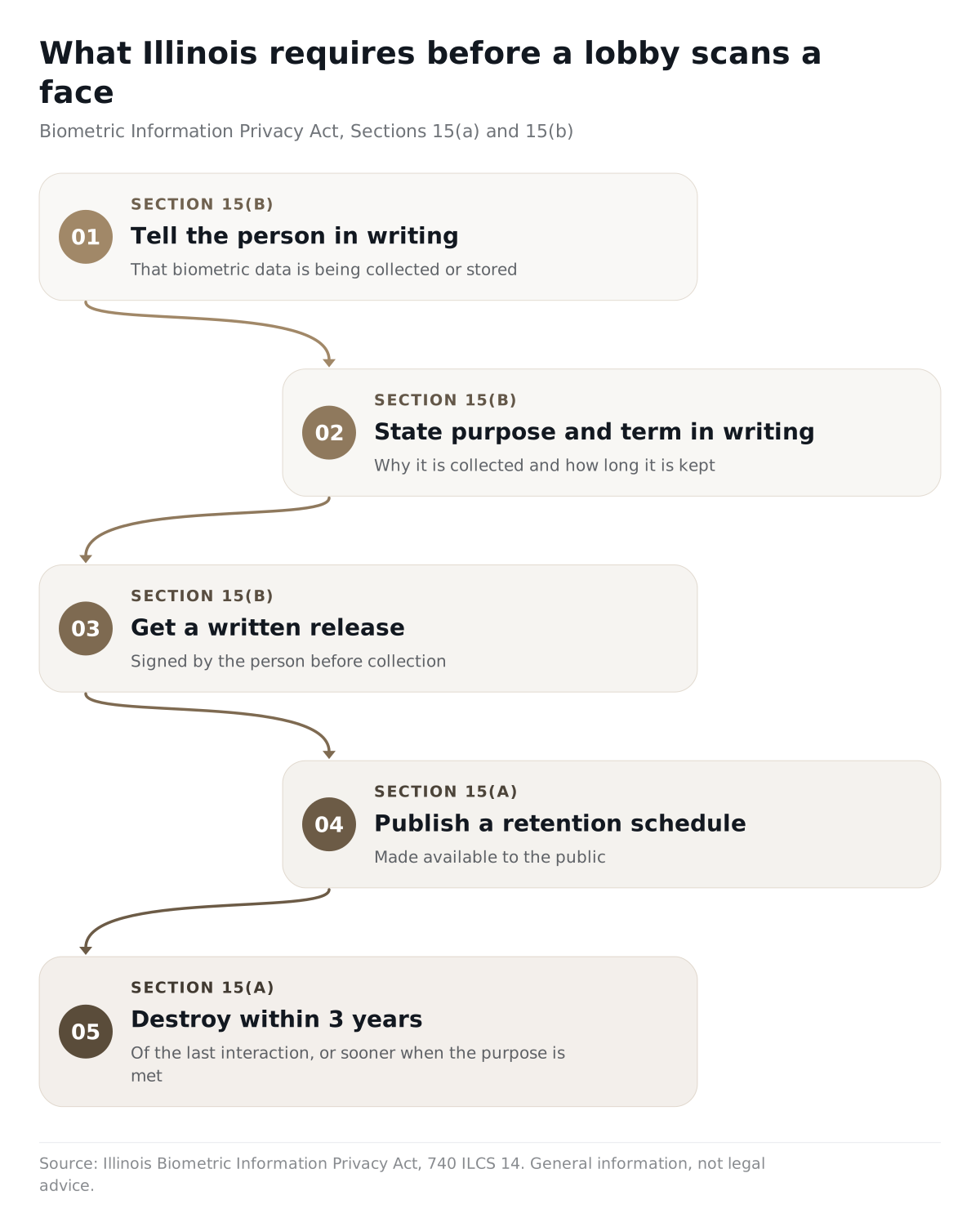
Before a private entity collects a biometric identifier, Section 15(b) requires three steps:
- Tell the person in writing that the data is being collected or stored.
- Tell the person in writing the specific purpose and how long the data will be kept.
- Get a written release from the person.
Section 15(a) requires a written retention schedule made available to the public. The data must be destroyed when the purpose is met or within 3 years of the person's last interaction, whichever comes first. Section 15(d) bars disclosure except in listed cases, such as consent or a valid warrant or subpoena.
Section 20 lets any person harmed by a violation sue for liquidated damages or actual damages, whichever is greater, with a higher amount for intentional or reckless violations, plus attorneys' fees. Public Act 103-0769 later made repeated collection of the same identifier from the same person, by the same method, a single violation. It also confirmed that an electronic signature counts as a written release.
So a lobby kiosk that matches faces in an Illinois building needs notice, a signed release, a public policy, and a deletion schedule before the first guest walks in.
The strongest case against heavy ID capture is simple: less data is often safer. The federal control catalog that FedRAMP publishes from NIST SP 800-53 Revision 5 includes control PE-8(3). It tells organizations to limit personal information in visitor access records to the elements named in their privacy risk assessment. Most office lobbies need a name, a host, a time, and a pass. Few need a stored copy of a driver's license.
This section is general information, not legal advice. Confirm the rules with your counsel for each state where you operate.
What belongs on an evaluation checklist?
Every requirement on the list should come with a test you can run in the demo.
| Requirement | What good looks like | How to test it |
|---|---|---|
| Pre registration | Tenant hosts invite guests ahead of time from an app or the web | Invite a guest, then change the host |
| Walk ins | A clear path for guests who are not on the list | Arrive unannounced at the desk |
| Host alerts | Arrival notice to the host, with a backup contact | Make the host unavailable |
| ID check | You choose whether to look, scan, or store | Ask which fields are kept and for how long |
| Pass or badge | A day pass the turnstile and elevator honor | Use the pass after it expires |
| Watchlist | A flag shown to staff, with a person deciding | Register a barred name |
| Visitor types | Guests, contractors, deliveries, and service visits handled differently | Book a contractor and a client for the same morning |
| Access control | Works with the system already installed | Cancel a visit, then try the door |
| Tenant separation | Each tenant sees only its own guests | Log in as two different tenants |
| Records and retention | A searchable log and a deletion schedule | Pull last month's log, then delete one record |
| Lobby screens and intercom | Check in prompts on screen and a way to reach tenants | Call a tenant from the lobby |
What questions should you ask vendors?
Ask questions that force the vendor to show the hard cases.
- Who owns each visitor record: the landlord, the tenant, or both?
- Can a tenant ever see another tenant's guests? Show me the permission screen.
- When you scan an ID, which fields are read, which are stored, and when are they deleted?
- Does any feature create a face template or other biometric identifier? If so, how do you handle Illinois notice and written release?
- Which access control systems do you work with today? Can you show one in a live building?
- When a visit is cancelled, how fast does the door stop honoring the pass?
- What does the lobby do when the internet is down?
- How do contractors and deliveries differ from business guests in your workflow?
- Can we export and delete records on our own schedule?
- Who do we call when the door and the software disagree?
Where does URBI fit in an office building's visitor workflow?
URBI runs visitors inside the same platform the property team already uses for tenant communication, service tickets, and the lobby screens. Commercial buildings run on URBI today.
- Registration and front desk. Visitor registration shows live counts of available passes, and a verification desk handles front of house check in.
- Visitor types. Guests, contractors, deliveries, and service visits are typed separately, and a check in can require a waiver.
- Guest parking. QR parking passes carry a live monthly allowance and time out on their own.
- Intercom and access control. The URBI intercom works with your existing access control system. Together with URBI Display, it forms the hardware layer, fully tied to the software.
- Lobby screens. URBI Display runs QR driven check in, and a property wide emergency takeover flips every screen to the alert.
- Incidents on the record. Staff create a note straight from the visitor card, tag it to people and the property, and find it later with full text search.
- Privacy across a portfolio. Visibility is scoped by property, so onsite staff cannot see other properties, and role based permissions control what each person sees and changes inside a property.
- AI with people in charge. On the Premium plan, Arthur, the tenant facing AI, can take a visitor request by phone, text, email, or chat and pre schedule the visit once a person on the property team confirms it. HERO, the property team's AI, answers plain language questions from the property's records. AI proposes, people approve.
- Trust. Every action lands in a permanent audit trail, and URBI never sells or shares tenant data.
The same lobby also handles deliveries and tenant notices. We cover those in the office mailroom procedure template and our guide to tenant communication software for commercial buildings. The full commercial picture is in URBI for commercial buildings.
FAQ
Does an office building legally need visitor management software?
Usually no law tells an office landlord to buy visitor software. The need comes from your own security procedure, your leases, and tenants with stricter rules of their own. What the law does reach is the data you collect. If you scan IDs or use biometrics, state privacy laws such as Illinois's Biometric Information Privacy Act set notice, consent, and deletion rules. Decide what you collect before you pick a vendor.
Should the landlord or each tenant run the visitor system?
In a multi tenant building, the landlord should run one system for the lobby, and each tenant should manage its own guests inside it. Two separate systems mean two lists at the desk and gaps at the door. One building system with tenant level permissions gives security a single list. It also lets each tenant approve its own visitors without seeing anyone else's.
Is a QR pass better than a printed badge?
A QR pass is better when it expires on its own and the turnstile checks it every time. A printed badge can be reused or handed to someone else unless a guard checks it closely. The 660 Fifth Avenue model issues daily QR passes that expire at 11:59 PM. Whichever you choose, test what happens when someone tries yesterday's pass at the turnstile.
Can URBI replace a paper sign in book in an office lobby?
Yes. URBI registers visitors ahead of time, checks them in at a verification desk, and keeps every arrival on a permanent record the property team can search. Contractors, deliveries, service visits, and guests are typed separately. The URBI intercom works with your existing access control system, and URBI Display screens in the lobby support QR driven check in.
The right visitor system is the one that matches who owns each decision in your building: the tenant vouches, the building verifies, and the door enforces. URBI runs that whole flow in one place for commercial property teams. To see it in your lobby, email hello@myurbi.co.


