



A property management cybersecurity checklist should cover four loss paths: hijacked email, fake vendor bank changes, taken over portal accounts, and leaked resident data. Lock identities, test portal permissions, verify every payment change by phone, and rehearse a breach. URBI supplies the portal and payment controls.
This guide is for management company principals, condo boards, and operators in the United States. It uses FBI complaint counts, breach research, and state law to rank the risks. Then it turns them into a checklist a small team can finish in one month. It is not legal advice. Your counsel and your insurer should review your incident plan.
Which cyber threats actually hit property managers?
Phishing, business email compromise, and personal data breaches are the threats that matter most to a property manager. They map directly onto how a building runs: email is where vendors send invoices, the portal is where residents pay, and your files hold names, units, and bank details.
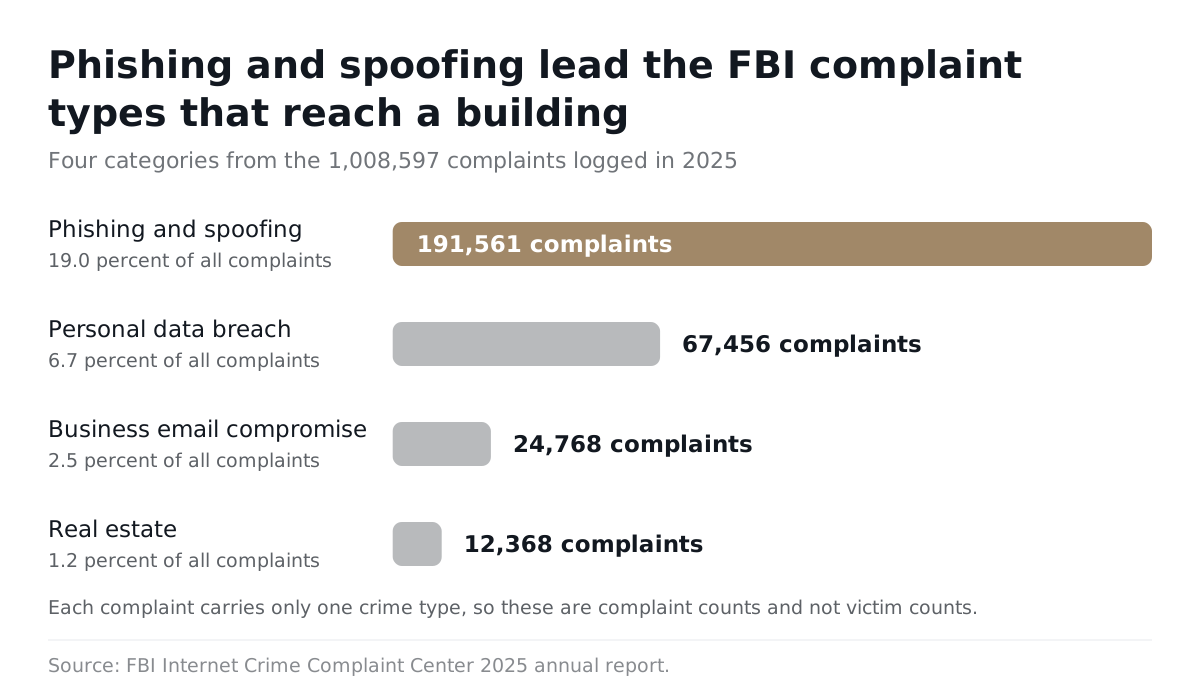
The FBI Internet Crime Complaint Center 2025 annual report logged 1,008,597 complaints in 2025. The categories closest to property management look like this:
| IC3 crime type (2025) | Complaints | Share of all complaints | Where it shows up in a building |
|---|---|---|---|
| Phishing and spoofing | 191,561 | 19.0% | Fake login pages for staff email and the resident portal |
| Personal data breach | 67,456 | 6.7% | Resident, owner, and staff records exposed |
| Business email compromise | 24,768 | 2.5% | Fake vendor invoices and bank change requests |
| Real estate | 12,368 | 1.2% | Rent, deposit, and closing payment diversion |
Read these as complaint counts, not victim counts. The IC3 report notes that each complaint carries only one crime type. A phishing email that later turns into invoice fraud may show up in only one row. The pattern still holds: deception by email and text is the front door.
Is email still the main way attackers get in?
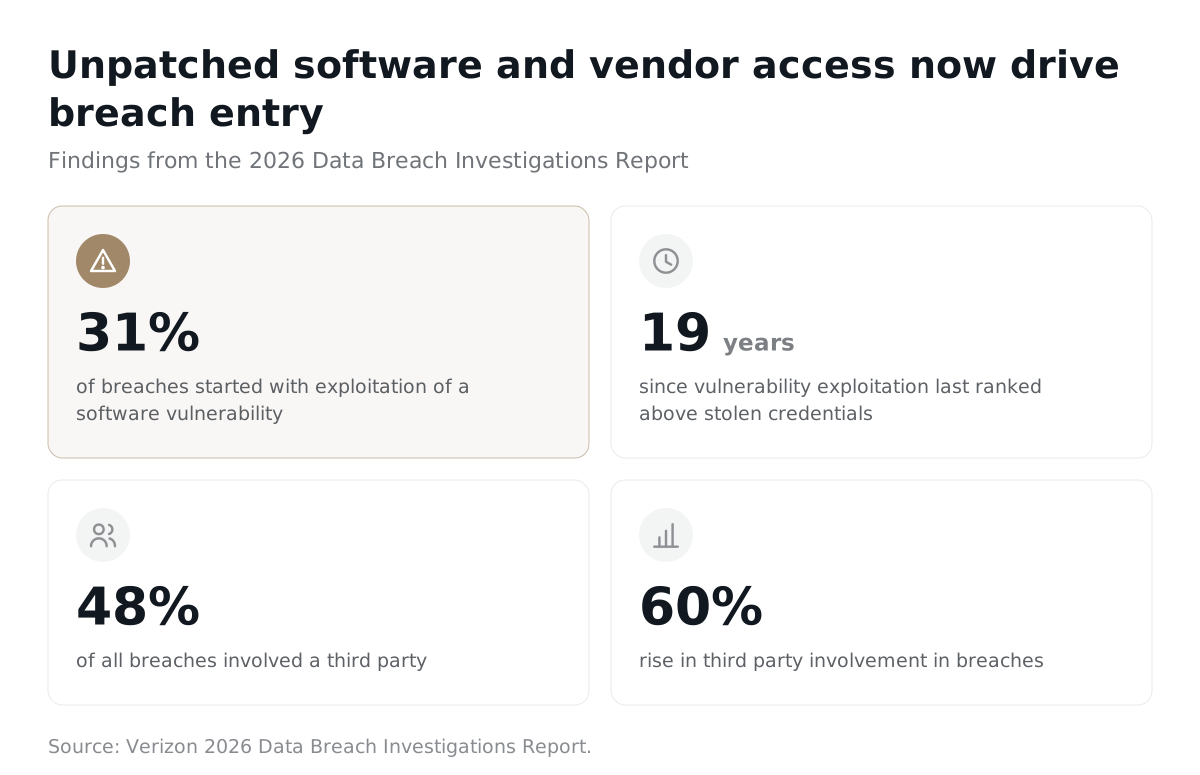
Email is still a main entry point, but software flaws and vendors now rival it. Verizon's 2026 Data Breach Investigations Report found that 31% of breaches started with exploitation of a software vulnerability. That was the first time in 19 years it passed stolen credentials.
The same report found third party involvement in breaches rose 60%, reaching 48% of all breaches. For a property manager, "third party" means your portal vendor, your payment processor, your accounting tool, and every contractor with a login. Daniel Lawson, SVP Global Solutions at Verizon Business, put the response plainly: "the foundational principles of security and strong risk management remain the most effective defense."
What does US law require after a resident data breach?
Every state requires you to notify people when their personal information is breached, but the rules differ by the resident's state. There is no single national deadline you can promise a board.
The National Conference of State Legislatures confirms that all 50 states, the District of Columbia, Guam, Puerto Rico, and the Virgin Islands have breach notification laws. Those laws vary on who must comply, what counts as personal information, what counts as a breach, notice timing and method, and exemptions such as encrypted data.
Two state examples show how far apart the duties can be:
- California notice duties. The California Attorney General says a business must notify any California resident whose unencrypted personal information was acquired, or reasonably believed to have been acquired, by an unauthorized person. If a single breach requires notice to more than 500 California residents, you must also submit a sample copy of the notice to the Attorney General.
- Massachusetts security program duties. The Massachusetts 201 CMR 17.00 compliance checklist asks whether you have a written information security program. It also covers choosing vendors that can maintain security, cutting off terminated employees right away, encrypting personal information on laptops where feasible, training staff, and keeping security patches current.
Keep a short response matrix listing the states where your residents and owners live. For each state, note the notice trigger, the deadline, and whether a regulator must be told. Have counsel check it once a year. Massachusetts also shows that some duties apply before any breach happens.
What should a resident portal checklist include?
A resident portal checklist should test five controls: strong login, least privilege access, session limits, lockout on repeated failures, and a searchable audit log. Ask your vendor to show each one working. A verbal "yes, it is secure" proves nothing.
- Strong login for staff. The CISA small business guidance says all staff should use multifactor authentication (MFA) to log into key systems, especially email. Staff email is the recovery channel for almost every other account, so protect it first.
- Least privilege. A leasing agent does not need payment settings. A board member does not need every resident's phone number. Grant the minimum access each role needs.
- Reauthentication for sensitive changes. The OWASP Authentication Cheat Sheet says to require current credentials before changing sensitive account details such as a password or email address. It also says to invalidate sessions after reauthentication.
- Lockout and logging. The same OWASP guidance calls for a lockout threshold after failed attempts and says all password failures and lockouts should be logged and reviewed.
- Household isolation. A resident must never see another household's bills, messages, or bookings. Test this with two real accounts.
How do you test portal permissions in one afternoon?
You test portal permissions by logging in as each role and trying to do things that role should not do. Write the results down. That record becomes your evidence if a board, insurer, or auditor asks later.
- Build a role matrix: every staff role, board role, and vendor role, with what each should see and change.
- Log in as a front desk user and try to open payment settings.
- Log in as Resident A and try to view Resident B's invoice or chat thread.
- Log out, press the back button, and confirm the session is gone.
- Enter a wrong password several times and confirm the account locks or slows down.
- Export the audit log and confirm your test actions appear in it.
How does URBI handle portal permissions and payment access?
URBI limits each staff role to the modules and actions it needs, and it checks chat access on the server. Permissions in the URBI Kore dashboard are set per module, down to whether a role can create, read, update, or delete records in that module, on every subscription tier. A concierge can run packages without ever touching payment settings.
- Chat access checked on the server. Staff to resident conversations are logged, searchable, and reviewable by management. The server decides who can read a thread based on who belongs to that property, so hiding a button is never the only barrier.
- OTP authenticated payment portal. Residents and owners reach the URBI payment portal with a one time passcode. There is no stored portal password to phish or reuse. They can view bills, pay once or set up card autopay, and download PDF invoices and receipts.
- URBI never holds property funds. Payments run on Stripe Connect, with each property's own connected account. There is no pooled URBI account for an attacker to target.
- Audit trails where money and votes move. Amenity deposits kept or returned carry an audit trail. Board votes carry an audit trail with quorum tracking.
A one time passcode sent to email is only as safe as that inbox. If a resident's email is compromised, any system that relies on it inherits the problem. That is why the payment change controls below matter just as much as login controls. For the deposit side of this, see our guide to resident payment deposits and liability.
How do you stop vendor payment fraud?
You stop vendor payment fraud by treating every emailed bank change as unverified until someone calls the vendor at a number you already have on file. Add a second approver and hold the first payment after any change.
The FBI's business email compromise guidance lists a fake message from a vendor asking for payment to an updated address as a typical scheme. Its advice is direct: verify any change in account number or payment procedures with the person making the request, by calling them.
Write your bank change procedure as a short list staff can follow under pressure:
- Freeze. Any request to change vendor bank details, by email, text, or phone, goes on hold.
- Call back on a known number. Use the phone number in your existing vendor record. Never use a number, link, or signature in the change request itself.
- Get a second approver. A different person approves new vendors, bank changes, and unusual payments.
- Hold the first payment. Review the first payment to new bank details separately before release.
- Keep the evidence. File the original request, the callback notes, and both approvers' names.
A clean vendor file makes the callback possible. Our guide to vendor management for property managers covers what to keep on each vendor.
What if money already went to the wrong account?
If money already went out, call your bank immediately and ask for a recall of the funds. The IC3 report says time is of the essence and advises requesting a recall along with any needed indemnification documents. Then report the incident at ic3.gov.
Next, check the trail. Your monthly bank reconciliation is often where a diverted payment first shows up, as a vendor who says they were never paid. Tighten reconciliation timing if that gap was weeks long.
How should staff and board members secure their devices and email?
Staff and board members should use MFA on email, keep devices updated, encrypt laptops, and work from accounts without administrator rights. Board members count here. Their personal inboxes often hold owner lists, legal letters, and budget drafts.
The same CISA small business guidance recommends these steps for small organizations:
- Remove administrator privileges from user laptops.
- Enable disk encryption on laptops.
- Turn on automatic updates.
- Regularly test partial and full restores from backup.
Two more rules help condo boards in particular. First, keep board documents in one controlled place instead of scattered attachments. A condo document management system with role based access does this better than forwarding PDFs. Second, remove access the day a board term ends or an employee leaves. Massachusetts lists immediate blocking of terminated employees as a checklist item for good reason.
If you are adding AI tools to this mix, the same questions apply: who can see what, and where is it logged. Our guide to AI property management data privacy lists the vendor questions to ask.
What does a one month property management cybersecurity checklist look like?
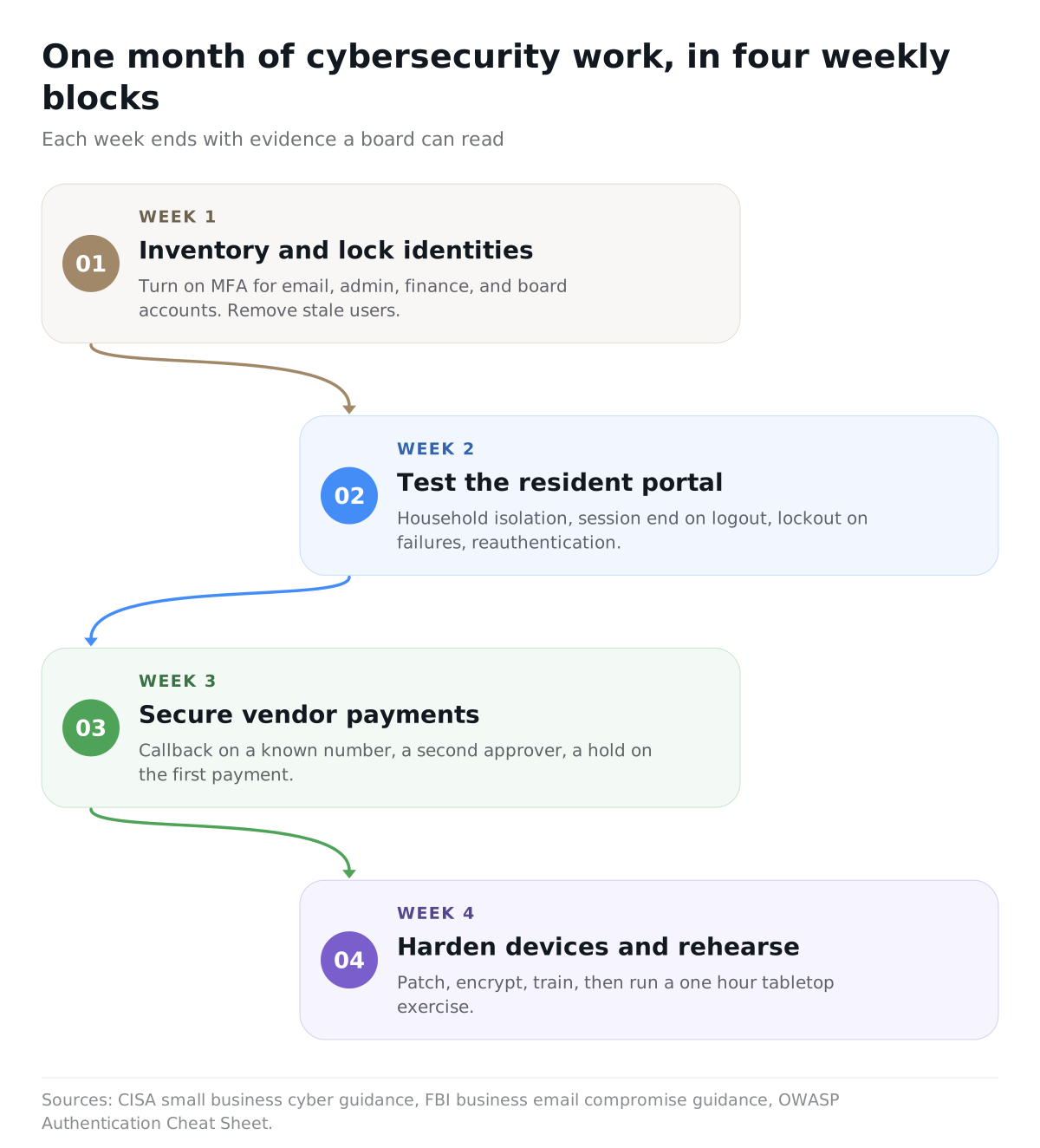
A one month checklist runs in four weekly blocks: lock identities, test the portal, secure vendor payments, then harden devices and rehearse an incident. Each week ends with evidence you can show a board.
| Week | Goal | Checks | Proof of completion |
|---|---|---|---|
| 1 | Inventory and lock identities | Name one accountable owner. List email, portals, banking, file storage, devices, admins, and vendors. Turn on MFA for email, admin, finance, and board accounts. Remove stale users. | System list, account owner list, MFA screenshots, removed user report, one successful restore |
| 2 | Test the resident portal | Run the role tests above. Confirm household isolation, session end on logout, lockout on failures, and reauthentication for sensitive changes. | Role matrix, test results, sample audit log export, named alert recipient |
| 3 | Secure vendor payments | Publish the bank change procedure. Require callback on a known number, a second approver, and a hold on the first payment after a change. | Callback record, two approver names, retained change request, exception log |
| 4 | Harden devices and rehearse | Patch and encrypt laptops. Train staff and board members. Run a one hour tabletop: a fake urgent bank change, a stolen resident password, a lost board laptop, and a resident data breach. | Patch report, encryption report, attendance list, incident contact sheet, fix list for the next 90 days |
The tabletop should end with a contact sheet: your bank's fraud line, your counsel, your insurer, your portal vendor, and the IC3 reporting site. It should also include your state notice matrix. For a broader year end review, pair this with a condo audit checklist.
Is a checklist enough to keep a building safe?
No checklist guarantees you will never have an incident. CISA says so directly about its own guidance. A checklist gives you a baseline and a record that you acted with care.
Treat the month as a starting point. Rerun the portal and payment tests every quarter. Reassess vendors when contracts renew. Update the state matrix when you take on a building in a new state. Deeper work, such as penetration testing and a full legal review by state, belongs in the following 60 to 90 days.
Why do operators run portals and payments on URBI?
Operators run portals and payments on URBI because it puts resident communication, the payment portal, and staff permissions in one place with per module permissions. Fewer disconnected tools means fewer logins to protect and fewer places for resident data to leak.
The URBI Kore dashboard is where staff and boards work. Residents use the free iOS and Android app. The OTP payment portal lets owners pay without an app login. Payments settle to each property's own Stripe Connect account. Onboarding includes bulk CSV import and token invites, so you start with a clean user list instead of inheriting old accounts. If you are new to the platform, start with what URBI is, or see how it fits residential buildings.
URBI does not replace your email security, your bank's fraud controls, or your counsel. It gives you a portal and payment setup that is easier to lock down and easier to prove.
Frequently asked questions
What is the biggest cyber risk for a small property management company?
Compromised email is the biggest risk for most small firms. Staff email resets passwords, receives vendor invoices, and holds resident records. In 2025, the FBI's IC3 logged 191,561 phishing and spoofing complaints and 24,768 business email compromise complaints. Protect every staff and board inbox with MFA first. Then require a phone callback on a known number before anyone changes vendor bank details.
Do condo boards need to follow data breach laws?
A board that holds owner personal information should plan as if breach notification laws apply. All 50 states have them. The details depend on the residents' states, the type of data, and who holds it. California, for example, requires a sample notice to the Attorney General when one breach affects more than 500 California residents. Ask your association's counsel to confirm your duties in writing.
Should residents be required to use MFA on a resident portal?
Staff and admin accounts should always use MFA. For residents, the goal is the same even if the method differs. A one time passcode, like the one URBI's payment portal uses, removes the reusable password. Pair it with lockout on failed attempts, short sessions, and a rule that bank or payment changes trigger extra checks. No single login method stops every attack.
How often should we repeat the checklist?
Run the full checklist once, then repeat the portal and payment tests every quarter. Repeat the tabletop exercise at least once a year and after any staff or board turnover. Update the state notice matrix whenever you add a building in a new state. Reassess each vendor with system access when the contract renews. CISA is clear that no checklist guarantees you will avoid an incident.
If you want to see per module permissions, the OTP payment portal, and server checked chat access on your own buildings, email hello@myurbi.co. We will walk your team through the role matrix and payment setup before you commit.
Keep reading


