



A senior living family portal is a login where family members check on a resident's calendar, requests and news. URBI has no family portal login. Families reach the community through Arthur, URBI's AI assistant, by voice, SMS and email, verified before anything about a resident is shared.
What is a senior living family portal, and does URBI have one?
A senior living family portal is a website or app where family members log in to see what is happening in a resident's community. The usual views are the activity calendar, announcements, photos and the status of requests. URBI does not have one.
Family members do not log into URBI. There is no family app and no family account. URBI for senior living runs the building side of a community. It holds no care records and does no clinical work.
This post says that first because "family portal" is the phrase people search. The better question sits underneath it. What do families need, and does your setup meet it? The research below answers the first part. The rest of the post answers the second, and it is honest about the limits.
What do families actually want from a family portal?
Families want to reach a person fast, get a straight answer, and trust that private information stays private. A screen is one way to deliver that. It is not the goal.
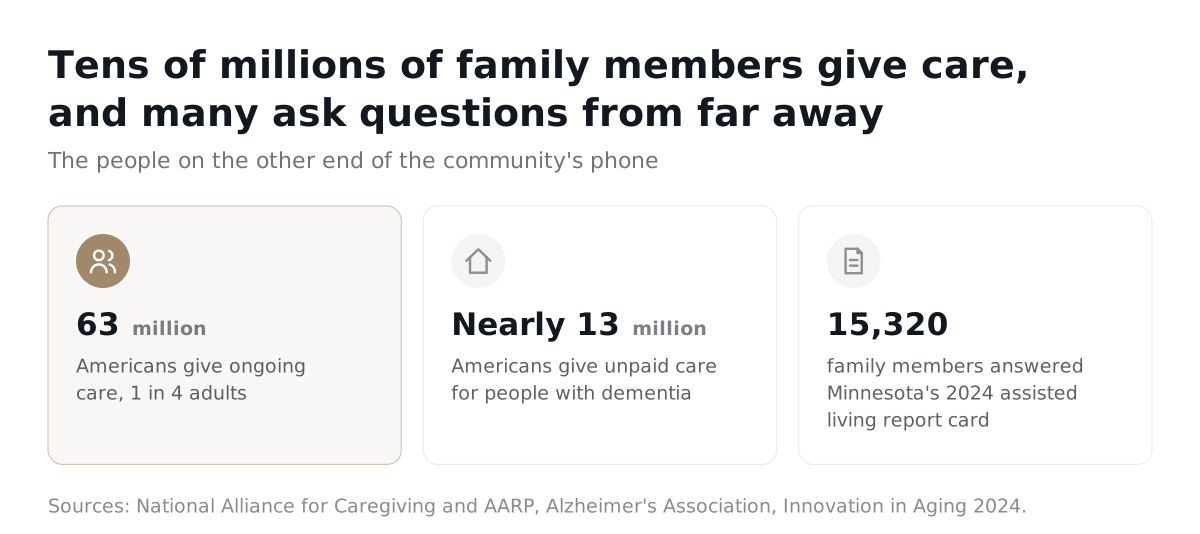
Start with how many people are in this position. The National Alliance for Caregiving and AARP found that 63 million Americans, 1 in 4 adults, give ongoing care to older adults, people with serious illnesses or people with disabilities. The Alzheimer's Association says nearly 13 million Americans provide unpaid care for people with Alzheimer's or other dementias. Many of these family members are at work, in another city or asleep when a question comes up.
Then look at what they say matters. In a 2025 Argentum report with Curana Health and Activated Insights, the survey asked seniors, their families and caregivers what they value in their healthcare experience. Round the clock access to a care team and clear, collaborative communication topped the list. That survey was about care, not buildings. Still, access and clear communication are the same asks a family makes of the front desk.
Frequency matters too. Minnesota's 2024 assisted living report card surveyed 15,320 family members. In the published study, families who visited or communicated less often tended to report lower satisfaction with choice and overall satisfaction. That is a link, not proof of cause. A separate US study of 104 residents, family caregivers and team members found that residents and families raised safety concerns about communication and relationships. Its authors suggest that better communication may reduce the gap between what each group worries about.
The picture is not bleak. A 2020 study of 252 family members and 472 team members across 20 assisted living communities found conflict between families and staff relatively low. Communication is where small problems either get solved or grow.
Here is the list that comes out of that research and out of how a front desk works day to day. It is our synthesis, not a survey result.
- A way to reach someone at any hour. Family life does not follow office hours.
- A clear answer. Not a transfer loop, not a voicemail box.
- Proof the request was heard. A record that says what was asked and what happened.
- Follow through. Someone owns the request until it is closed.
- Privacy. A stranger who calls gets nothing. A family member gets what concerns their own household.
- Their own channel and language. A phone call for one person, a text for another, an email for a third.
"Senior living should feel less like a transaction and more like a trusted partnership." Jennifer Freeman, Business Development Director, Sagora Senior Living, in an Argentum release from October 2026.
She was talking about families choosing a community. The same test applies after move in.
Do families need a login to get those things?
Not for the six needs above, and a login can get in the way of some of them. A login helps people who check often, on a screen, with a password they remember. It does little for the daughter who has a question once a month, or the spouse who prefers to call.
Residents are a related case. They can use the URBI app if they choose to, and a community works without it. How that goes with older adults is covered in resident app adoption in senior living.
Some families do want a login. They want to look without asking. URBI does not offer that, and you should know it before you buy. If that view is the deciding feature for your families, URBI is not the answer to that one need.
How does URBI meet those needs through Arthur?
Arthur answers family members on the channels they already use. Arthur is URBI's AI assistant for a community. It works on voice calls, SMS and email for family members, it answers in ten languages, and it is part of the Premium plan. URBI states that Arthur resolves up to 80% of inquiries.
A family member calls, texts or emails the community and reaches Arthur. The table maps each need from the list above to what Arthur does.
| What families want | What Arthur does |
|---|---|
| Reach someone at any hour | Answers family questions around the clock on voice, SMS and email, in the community's tone of voice. |
| A clear answer | Answers what it can. When it does not know, it escalates to the team with a summary, relays the team's answer in its own voice and saves it to the community's knowledge base so the next question is answered alone. Team members can view, edit and delete what is saved. |
| Proof the request was heard | Logs every conversation with a transcript, a summary and a notification to the team, even when the caller hangs up mid call. |
| Follow through | Once a person confirms, opens the service ticket, books the private dining room, registers guest parking, pre schedules a visitor or RSVPs to an event. After it creates a ticket or escalates, it follows up until it is closed. |
| Privacy | Verifies who is asking before it shares anything about a resident, with a PIN before anything sensitive. Answers about that household only. Transfers a call only with the caller's consent and never dials a number the caller supplies. |
| Their own channel and language | Speaks ten languages. Offers four voices, Arthur, Theo, Adriana and Kora, in a professional or friendly style, chosen once for the community. |
Two details matter for older callers. Arthur takes turns patiently and never cuts a caller off in the middle of a pause. It also reads the caller's mood in the background and shifts its tone. Arthur never claims to be a team member. It says it is URBI's AI assistant and hands off to a person when someone asks for one.
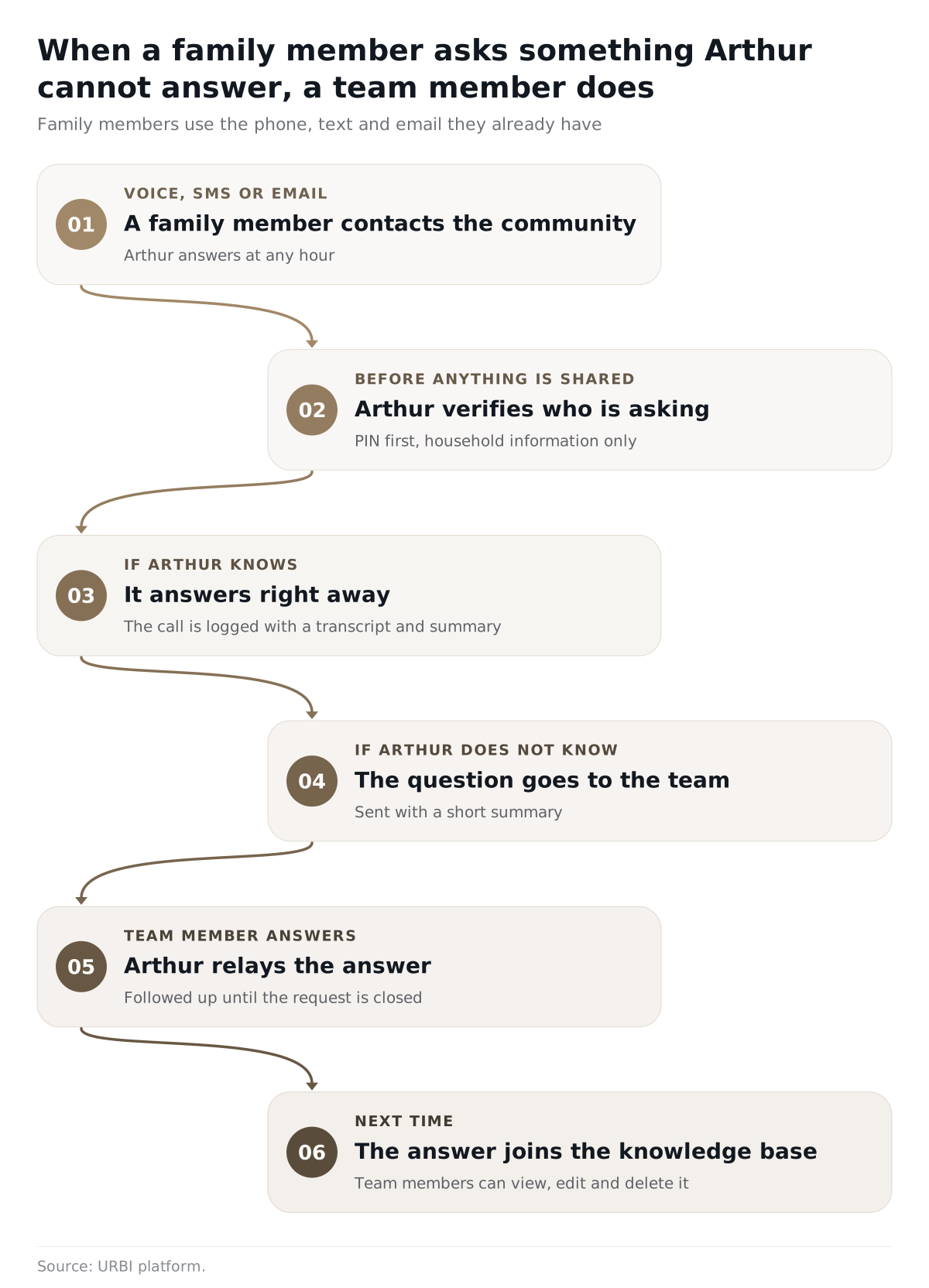
Here is an example, not a customer story. A family member calls on a Sunday to ask whether the private dining room is free next Saturday for a birthday lunch. Arthur verifies who is calling and proposes the booking. Once a person confirms, the booking is made. On Monday morning the team sees the transcript and the summary on one dashboard, with notes from team members beside the conversation.
The Executive Director has help on the other side of the desk. HERO, the team's AI inside URBI Kore, answers questions from live records and shows what it checked. Every action it proposes waits for a person to confirm. The same rule holds for Arthur: AI proposes and people approve. Why that matters is covered in who controls what the AI tells your residents.
What does URBI not do for families?
URBI does not give families a login, an app or a feed. Be exact about this with your families and your board.
- No family login, app or account. This is a product gap, and it is stated plainly here.
- No calendar view for families. The life enrichment calendar shows for residents in the app and on lobby and elevator screens. Families do not see it in an app.
- No ticket tracking for families. Arthur follows a ticket until it is closed. A verified family contact is checked as a caller, not given a status screen.
- No announcements in an app for families. Family members do not get a news feed of their own.
- No care records and no clinical work. Those stay in your community's care system.
If your families expect a calendar or updates, your team still needs a plan for them. URBI publishes the calendar once for residents and screens. Sharing it with families stays a team decision, through whatever channel you already use.
Who decides what a family member may be told?
Your community's care team and its counsel decide what care information goes to family, not URBI. URBI holds no care records, so Arthur has no care information to share. What Arthur can discuss is limited to what URBI holds for that household, and it checks who is asking first.
For care information, the federal privacy rule is the starting point, as of November 2026. Under 45 CFR 164.510(b), a covered provider may share with a family member the information directly relevant to that person's involvement in the resident's care. When the resident is present, the provider gets the resident's agreement, gives a chance to object, or reasonably infers from the circumstances that the resident does not object. Whether your community is a covered provider is a question for your attorney.
This is general information, not legal advice. Confirm the rules for your community with your attorney.
How do you judge any family communication setup?
Ask the same eight questions of every option, URBI included. They test the six needs, not the screen.
- Can a family member reach someone at two in the morning, and who or what answers?
- How is the person verified before anything about a resident is shared?
- Is every answer limited to that person's own household?
- Is every contact recorded, including calls that drop, with a summary a team member can read?
- What happens when the answer is not known?
- Can team members see, edit and delete what the AI has learned?
- Does the AI say it is an AI, and hand off to a person on request?
- Does it ask families to install or log into anything? If so, which families will not?
Pair the list with the AI policy template for senior living Executive Directors. For how often families should hear from you, read family communication in retirement communities. For the wider software picture, see senior living communication software for residents and families.
Frequently asked questions
Does URBI have a family portal?
No. URBI has no family portal login, no family app and no family account. Family members reach the community through Arthur by voice, SMS and email, and Arthur verifies who is asking before it shares anything about a resident. Residents can use the URBI app if they choose to.
Can family members see care records through URBI?
No. URBI runs the building side of a community and holds no care records. It does no clinical work. Care information stays in your care system, and the rules for sharing it with family belong to your care team and your attorney.
What happens when a family member calls after hours?
Arthur answers, in the community's tone of voice and in the caller's language where it is one of ten. It verifies who is calling, answers what it can and escalates the rest to the team with a summary. The call is logged with a transcript, a summary and a notification to the team, even if it drops.
Do family members have to download an app?
No. Family members use the phone, text and email they already have. There is nothing to install and no password to remember. The trade is that they ask rather than look, and URBI does not give them a screen to look at.
If you run a senior living community and want to hear Arthur take a family call, book a demo or email hello@myurbi.co. For the full picture of how URBI fits a community, start with URBI for retirement communities, or read what URBI is.


