



A senior living AI policy tells every team member which AI tools are approved, what resident information stays out of them, and who signs off before anything reaches residents or families. Copy the senior living AI policy template below, and choose software like URBI, where AI proposes and people approve.
Why does a senior living community need an AI policy now?
Your team is almost certainly using AI already, whether or not anyone approved it. The question is whether they use it with rules or without them.
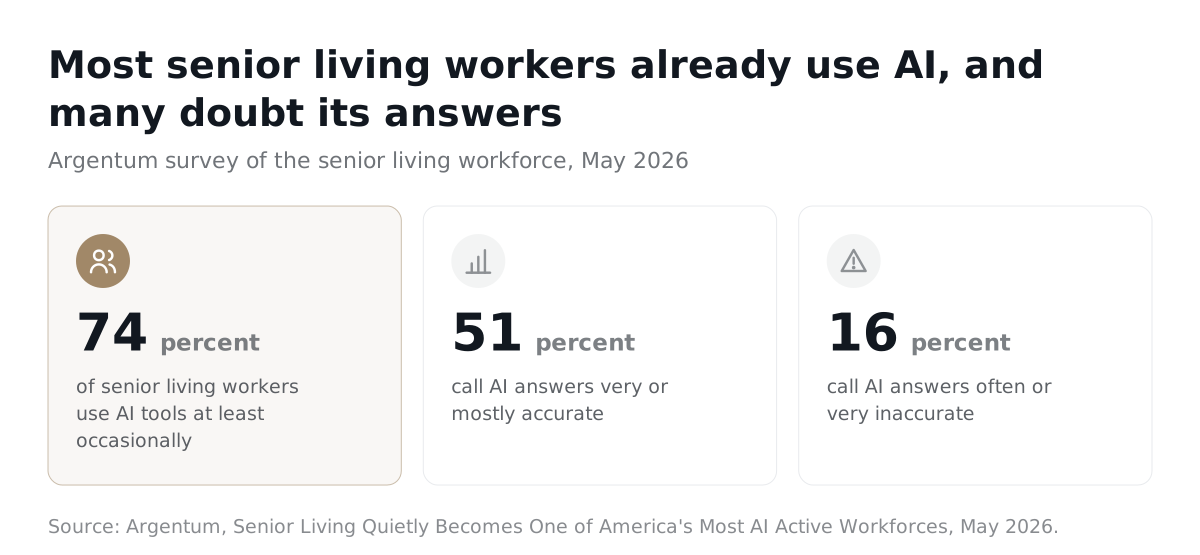
- 74% of senior living workers now use AI tools at least occasionally, according to survey data released by Argentum in May 2026.
- The same Argentum report says much of that use is happening "on personal devices, with or without operator awareness."
- Only 51% of senior living workers in that survey called AI answers very or mostly accurate. Sixteen percent called them often or very inaccurate.
Put those together and the risk is plain. A care team member pastes a note into a free chat tool on their phone. A sales lead sends a family an AI draft with the wrong date. Nobody meant harm. Nobody had a rule to follow.
A good policy names the approved tools, the information that stays out, and the person who checks the result. The template below does exactly that. If your team is drowning in admin work, our guide to AI and the senior living admin workload shows where AI helps first.
Does HIPAA apply to your community's use of AI?
It depends on what your legal entity does, so the policy should record the answer instead of assuming it. HIPAA does not cover every senior living community automatically.
- HHS says a health care provider is a covered entity "only if they transmit any information in an electronic form" as part of a transaction HHS has set a standard for, such as billing a health plan. See its covered entities guidance.
- The same page says an entity that is neither a covered entity nor a business associate does not have to comply with the HIPAA Rules.
- If HIPAA does apply, a cloud service that stores health information for you is a business associate. HHS says the covered entity and the provider must sign a business associate agreement, and that a provider holding only encrypted data without the key is still a business associate. See the HHS cloud computing guidance.
- That HHS guidance also says both covered entities and business associates must conduct risk analyses of the electronic health information they hold.
So an assisted living or memory care community that bills health plans electronically may be covered, while an independent living community may not be. Even when HIPAA does not apply, families expect the same care with health details. The template opens with a box where counsel records your status. This is general information, not legal advice. Confirm with your compliance counsel.
Is it safe to paste a care note into AI if you delete the name?
No. Deleting a name does not make a note anonymous, and the policy should say so in plain words.
- HHS says its standard for removing identifiers "makes no distinction" between structured fields and free text. An identifier must come out wherever it appears in a record. See the HHS deidentification guidance.
- The HHS Safe Harbor method lists identifiers of the person and also of relatives, employers, or household members. That includes names and any address detail smaller than a state.
In a community, a room number, a date, and one sentence about a fall can point to one resident as surely as a name. The safe rule for a busy shift is simple: if it is about a resident, it goes only into a tool approved for it.
What should team members never put into an AI tool?
Anything about a specific resident, unless the tool is on the approved list for that kind of information. Public information is fine almost anywhere.
| Information | Approved tool | Free or personal tool |
|---|---|---|
| Activity calendar, event flyers, job postings | Yes | Yes, with no names |
| Resident names, room numbers, family contacts | Only if approved for it | Never |
| Diagnoses, medications, care notes, falls | Only in a tool approved for health information | Never |
| Billing, legal documents, incident reports | Only if approved for it | Never |
| Door codes, passwords, alarm codes | Never | Never |
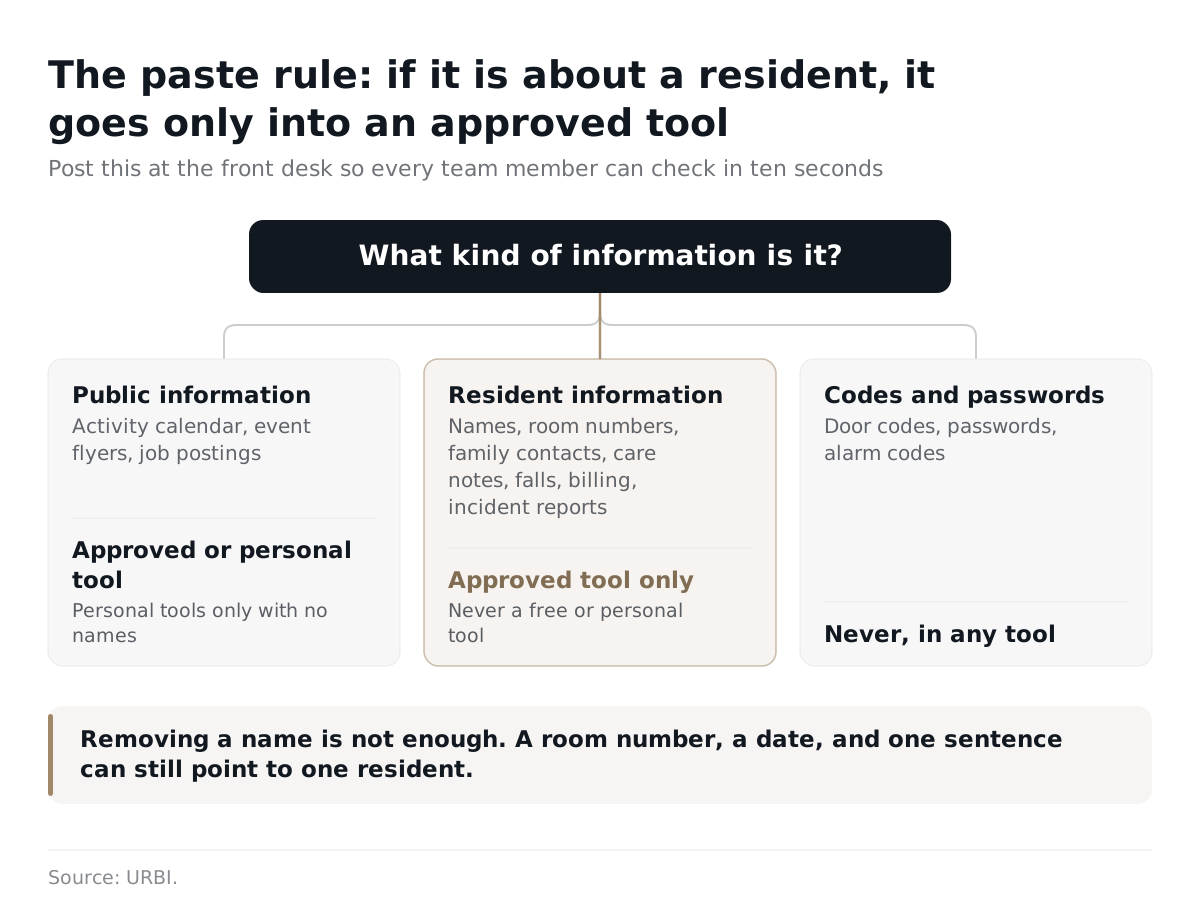
Print this table and post it at the front desk. A rule a team member can read in ten seconds gets followed. A twelve page policy in a shared drive does not.
Who should approve AI messages before they reach residents and families?
A named person, every time. AI can draft the message, but a person who knows the resident approves it before it is sent.
- In comments to HHS, LeadingAge recommended that human review of AI influenced decisions be built into the workflow.
- Rick Westermann, Chief Marketing Officer at LCS, said in a June 2026 Senior Housing News report that automated platforms do not always take the best meeting notes, which can muddy the summary instead of clearing it up.
Accuracy is the reason for the approval rule, and families are the reason it matters. A wrong time on a newsletter is a nuisance. A wrong detail in a message about a parent's wellbeing breaks trust that took months to build. The template splits approvals by risk, so routine replies stay fast and anything about one resident's health waits for the right person. We go deeper on family messages in senior living communication software for residents and families and family communication in retirement communities.
Doesn't an AI policy just add more paperwork?
It can, if it repeats rules you already have. The fix is to keep it short and attach it to your existing privacy, incident, and training routines.
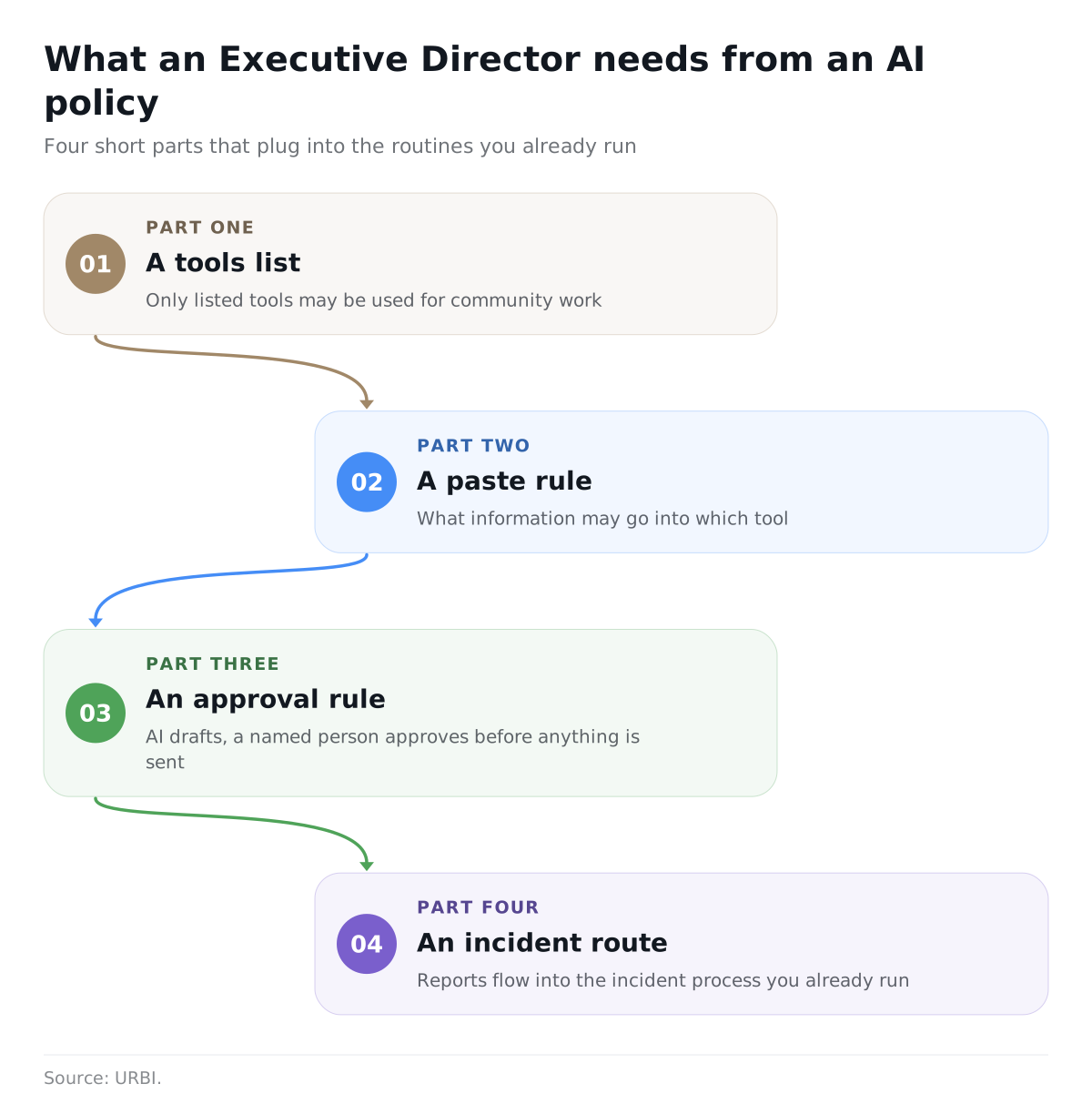
The NIST AI Risk Management Framework, released on January 26, 2023, is meant for voluntary use. It is a good reference for a regional compliance lead. An Executive Director needs something smaller: a tools list, a paste rule, an approval rule, and an incident route. That is what this template gives you. Incident reporting should plug into the process you already run. HIPAA covered entities already have breach duties, and HHS says notices to affected individuals are due without unreasonable delay and no later than 60 days after a breach is discovered, per its breach notification guidance.
How does URBI fit a senior living AI policy?
URBI was built on the same rule the template enforces: AI proposes, people approve. URBI runs the building side of a community, meaning family communication, service tickets, visitors, packages, and life enrichment. It does not hold care records and does no clinical work, so care notes stay in your care system.
| Policy rule | How URBI handles it |
|---|---|
| A person approves every action | HERO, the team's AI, answers the Executive Director from live records, shows what it checked, and proposes actions a person confirms. Arthur, the resident and family AI, opens a service ticket, books the private dining room, or registers guest parking only once a person confirms. |
| Check who is asking | Arthur verifies who is asking by PIN before it shares anything sensitive about a resident. |
| Say it is an AI | Arthur identifies itself as URBI's AI assistant, never claims to be a team member, and hands off to a person when asked. |
| Keep a record | Every family conversation is logged with a transcript, a summary, and a team notification, even if a call drops. URBI keeps a permanent audit trail on every action. |
| Fix wrong answers | When Arthur is unsure, it escalates to the team with a summary. The team can view, edit, and delete the knowledge base answers it learns. |
| Limit who sees what | Leadership sees every community in one login. Inside each community, access follows each team member's permissions, and onsite teams cannot see other communities. |
| Protect community data | URBI encrypts data in transit and never sells or shares resident data. A community's data never trains outside models. |
Arthur answers families around the clock on voice, text, email, and in app chat on the Premium plan. Families may still mention health details on a call, so your policy should say how the team handles those transcripts. Before any demo, run the vendor through our questions to ask an AI vendor, and see the full picture in URBI for retirement communities.
What is in the senior living AI policy template?
The template has ten short sections: purpose and scope, an approved tools list, a paste rule table, approvals, accuracy checks, family and resident transparency, incident reporting, training, review cadence, and sign off. Fill in the blanks, cross out what does not fit, and have compliance counsel review it before you sign. Condo boards can use our separate condo board AI policy template.
1. Purpose and scope
This policy sets how team members at ______ (the community) may use artificial intelligence (AI) tools. The goal is to give team members time back for residents while protecting resident privacy, keeping family communication accurate, and keeping every decision with a person.
This policy applies to:
- ☐ The Executive Director and leadership team
- ☐ Care team members
- ☐ Life enrichment, dining, and front desk team members
- ☐ Maintenance and environmental services
- ☐ Sales and marketing
- ☐ Contractors, agency staff, and vendors who handle resident information: ______
It covers any tool that writes, summarizes, answers, transcribes, translates, or recommends. That includes free chat tools, AI on a personal phone, and AI built into software the community already uses.
Legal status of the community (counsel completes): ☐ HIPAA covered entity ☐ Business associate of a covered entity ☐ Not covered by HIPAA ☐ To be confirmed by ______
2. Approved tools list
Only the tools listed here may be used for community work. A tool not on this list is not approved, even if it is free or popular.
| Tool | Approved for | Information allowed | Approved by | Approved on | Next review |
|---|---|---|---|---|---|
| ______ | ______ | ______ | ______ | ______ | ______ |
| ______ | ______ | ______ | ______ | ______ | ______ |
| ______ | ______ | ______ | ______ | ______ | ______ |
| ______ | ______ | ______ | ______ | ______ | ______ |
Before a tool that will touch resident health information is added, the policy owner confirms:
- ☐ Counsel has decided whether a business associate agreement is required, and it is signed if so.
- ☐ A risk analysis covering this tool is on file, where HIPAA requires one.
- ☐ The vendor states in writing that community data is not sold, not shared, and not used to train outside AI models.
- ☐ Access can be limited by community and by role.
- ☐ The tool keeps a record of what the AI said and did.
3. What team members may and may not enter into AI
| Information | Approved tool from Section 2 | Personal or unapproved tool |
|---|---|---|
| Public information: the activity calendar, event flyers, general community policies, job postings | Yes | Yes, with no resident or team member details |
| Resident names, room numbers, photos, phone numbers, and family contact details | Only if Section 2 allows it | Never |
| Protected health information: diagnoses, medications, care notes, care plans, falls, hospital visits | Only in a tool approved for health information after the checks in Section 2 | Never |
| Resident records: move in paperwork, billing and payment details, legal documents, incident reports | Only if Section 2 allows it | Never |
| Family complaints and grievances | Only if Section 2 allows it | Never |
| Team member records: reviews, discipline, medical leave | Only if Section 2 allows it | Never |
| Door codes, passwords, alarm codes, keys | Never | Never |
Removing a name is not enough. A room number, a date, a family member's name, or a short description can still point to one resident. If in doubt, treat it as resident information. Other rules: ______
4. Approvals: AI proposes, a person approves
AI may read, draft, summarize, and suggest. A named person approves before anything is sent to a resident or family member, posted, booked, or recorded as a community decision. AI never makes a care decision.
| Who approves | What they may approve |
|---|---|
| Front desk or concierge | ______ (for example: routine replies, visitor and event details) |
| Department lead | ______ (for example: life enrichment notices, service ticket updates) |
| Executive Director | ______ (for example: any message about one resident's wellbeing, any community wide notice, any new AI use) |
| Care team lead or nurse | ______ (for example: anything that mentions health or care) |
5. Accuracy checks
Before approving AI output, the approver confirms:
- ☐ Names, room numbers, dates, and times match the source record.
- ☐ Nothing is promised that the community does not offer.
- ☐ The message goes only to people allowed to receive it.
- ☐ Nothing in it is a guess. If the AI could not find the answer, the gap is filled by a person or the line is removed.
- ☐ Summaries of meetings or documents were checked against the original.
- ☐ The tone is respectful and plain enough for every reader.
6. Family and resident transparency
- Residents and family members are told in writing which AI tools may answer them, what those tools can and cannot do, and how to reach a person.
- Any AI assistant that talks to residents or families says it is an AI, never claims to be a team member, and hands off to a person when asked.
- The AI confirms who is asking before it shares anything about a resident.
- Recorded or transcribed calls are announced, with consent collected where state law requires it.
Sample notice: "______ uses an AI assistant to answer routine questions and log requests by phone, text, and email. It will tell you it is an AI. Our team reviews its actions before anything is done, and you can ask for a person at any time by ______."
7. Incident reporting
Report any of these to ______ within ______ hours:
- ☐ Resident or family information entered into a tool not approved for it
- ☐ An AI message sent to the wrong person, or sent without approval
- ☐ A wrong answer given to a resident or family member
- ☐ A login, device, or account that may be exposed
Log each incident with: date, who reported it, tool, what information was involved, who was affected, and what was done. Counsel decides whether a legal notice is owed and to whom.
| Date | Reported by | Tool | What happened | Action taken |
|---|---|---|---|---|
| ______ | ______ | ______ | ______ | ______ |
| ______ | ______ | ______ | ______ | ______ |
8. Training
- ☐ Every team member reads this policy at hire and signs the acknowledgment below.
- ☐ Department leads walk their team through Section 3 with real examples.
- ☐ Approvers practice the Section 5 checks on a sample message.
- ☐ Refresher training every ______ months, and after any incident.
Acknowledgment: I have read this policy and will follow it. Name: ______ Signature: ______ Date: ______
9. Review cadence
- The policy owner reviews this policy and the approved tools list at least every ______ months, after any incident, and before any new tool goes live.
- A new tool, or a new use of an approved tool, needs the Executive Director's written approval before use.
- Each review is recorded with the date and the changes made.
10. Sign off
This policy is adopted for ______, effective ______.
| Role | Name | Signature | Date |
|---|---|---|---|
| Executive Director | ______ | ______ | ______ |
| Compliance lead or counsel | ______ | ______ | ______ |
| Regional or operations leader | ______ | ______ | ______ |
Frequently asked questions
Can team members use free AI chat tools at work?
Only for work that involves no resident or team member information, and only if the policy lists the tool. Drafting an event flyer or a job posting is a fair use. Pasting a care note, a family email, or an incident report into a free or personal account is not, because the community cannot control where that information goes. Put the allowed tools on the approved list so nobody has to guess.
Does HIPAA apply to independent living communities?
Not automatically. HHS covers a health care provider only when it sends certain transactions electronically, such as billing a health plan. Many independent living communities do not, while some assisted living and memory care operators do. Your legal entity and what it actually does decide the answer. Have compliance counsel record your status in Section 1 of the template, and treat health details carefully either way.
Do we have to tell families we use AI?
This template says yes for any AI that talks to families or handles their information. Families should know it is an AI, what it can do, and how to reach a person. Behind the scenes drafting, like a team member polishing a newsletter before a person approves it, needs no announcement. Recorded calls are different: announce them, and collect consent where your state requires it.
How often should an Executive Director review the AI policy?
Set a fixed cycle, such as every six or twelve months, and review early after any incident or before any new tool goes live. AI products change between renewals, and a vendor can add a feature you never approved. At each review, walk the approved tools list, read the incident log, and ask department leads what the AI got wrong. Record the date and the changes.
URBI gives senior living teams AI help without giving up control: HERO for your team, Arthur for residents and families, and a person approving every action. Learn more in what is URBI, or email hello@myurbi.co to walk your leadership team through this policy on a demo.


