



Apartment coworking space booking software should protect the scarce rooms in your work lounge, not sell memberships. Residents already have access through their lease. What you need is capacity limits, conflict checks, and usage data. URBI does this inside its amenity booking module, with no membership plans to set up.
Do renters actually want a work lounge in their building?
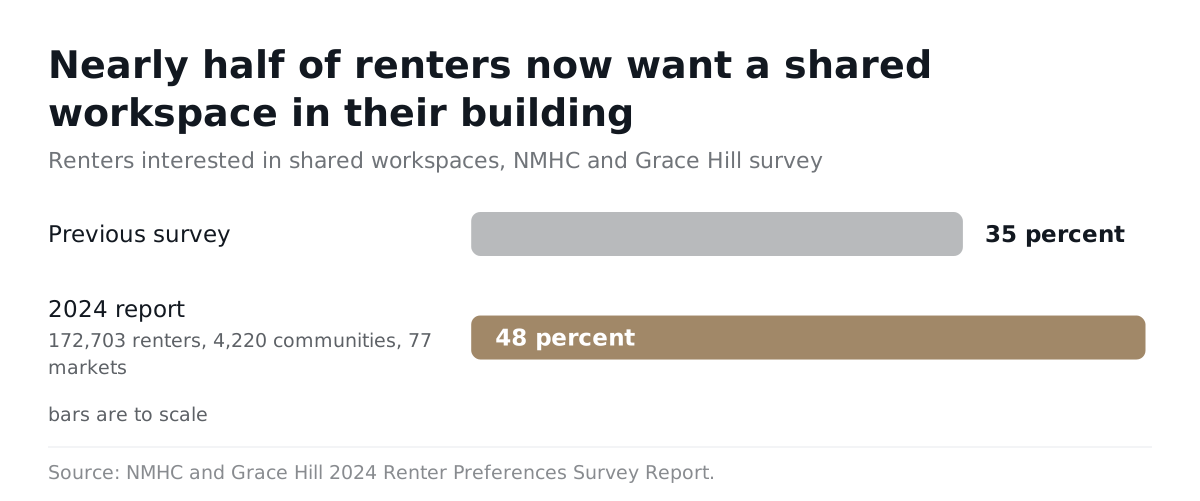
Yes, and the demand grew even as remote work cooled. Nearly half of renters now say they are interested in shared workspace.
- In the NMHC and Grace Hill 2024 Renter Preferences Survey Report, interest in shared workspaces rose from 35 percent to 48 percent, according to Grace Hill. The report drew on 172,703 renters in 4,220 communities across 77 markets.
- The same report found the share of renters working remotely fell from 62 percent to 52 percent, per the NMHC press release.
Read those two numbers together. Fewer renters work from home than two years earlier, yet more of them want a place to work outside their unit. A kitchen table gets old. A spare bedroom is not always there. The lounge fills the gap.
How often do remote renters work from home?
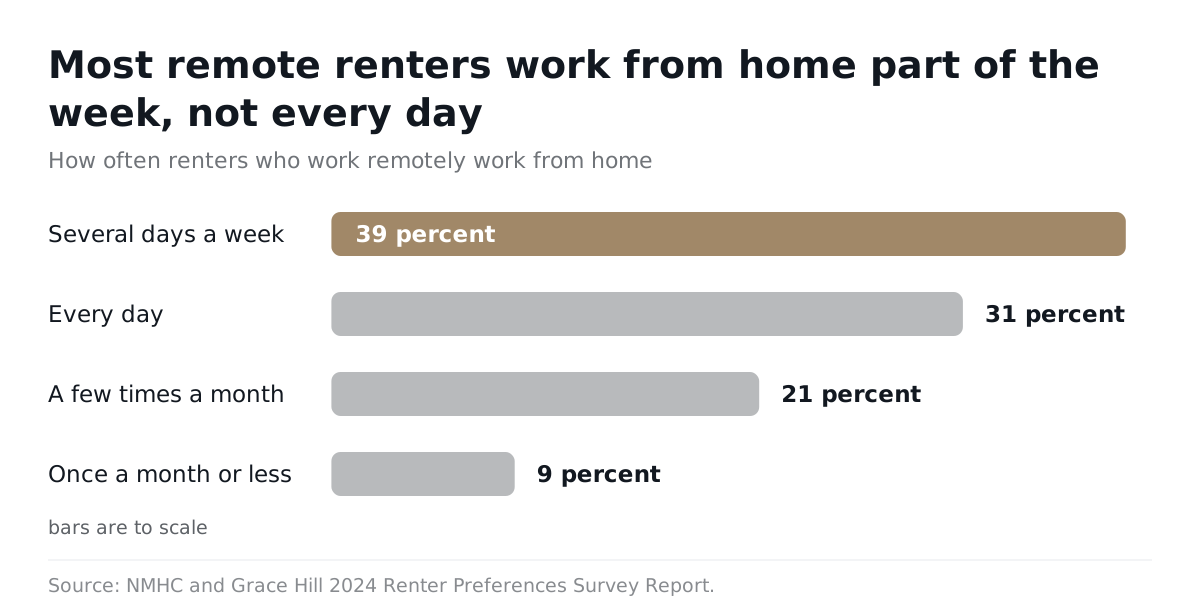
Most remote renters work from home part of the week, not every day. That shapes when your lounge fills up.
Among renters who worked remotely, NMHC reported this split in its 2024 report release:
| How often they work from home | Share of remote renters |
|---|---|
| Several days a week | 39 percent |
| Every day | 31 percent |
| A few times a month | 21 percent |
| Once a month or less | 9 percent |
So about two in five remote renters work from home several days a week, not every day. Their demand bunches on certain weekdays. Tuesday at 10 a.m. can be full while Friday is empty.
Is hybrid work still the norm in 2026?
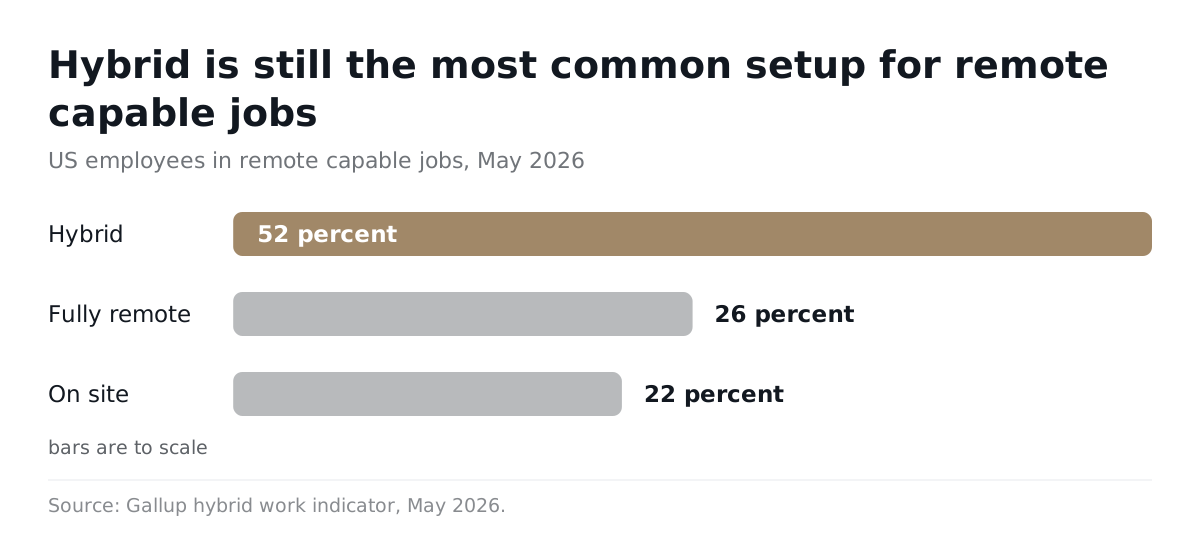
Yes. Hybrid is still the most common setup for people whose jobs can be done remotely.
- As of May 2026, 52 percent of US employees in remote capable jobs were hybrid, 26 percent were fully remote, and 22 percent were on site, according to Gallup's hybrid work indicator.
- In the first quarter of 2024, 35.5 million people teleworked or worked at home for pay, or 22.9 percent of people at work, according to the Bureau of Labor Statistics. They averaged 27.2 hours a week of work at home.
That is a large pool of people who need a desk, a door, and decent WiFi for part of their week. Some of them live in your building. For more on what residents rank highest, see our guide to what residents want from their building.
What goes in a resident work lounge, and what gets overbooked?
A work lounge mixes open tables, soft seating, phone booths, and meeting rooms, and the small private rooms get overbooked first. Open tables rarely run out.
Multifamily Executive's 2025 guide to coworking design reports that demand for private rooms surged after the pandemic. It says one and two person rooms tend to fill up quickly, citing Alison Mills, vice president of design and development at CRG, in Multifamily Executive. Mills sums up the essentials as "flexibility, connectivity, and comfort."
A typical resident work lounge has these parts:
- Open work tables. Plenty of seats, no booking needed.
- Soft lounge seating. For reading, email, and short focus blocks.
- Phone booths. One person, enclosed, for calls and video meetings.
- Small meeting rooms. Two to four people, a screen, a door that closes.
- A larger conference room. Six or more seats, used less often than you would think.
- Support gear. Fast internet, outlets at every seat, good lighting, a printer, and coffee.
Why do private rooms matter more than open desks?
Private rooms matter more because calls need a closed door. You cannot take a video interview at a shared table.
Elizabeth Nesler, regional vice president at Bozzuto, put it plainly to Multifamily Dive in 2025: "[Residents] really want privacy when they're on calls, video conferences, interviews and so on." She also named reliable high speed internet as the top requirement.
Bozzuto acted on that. The same Multifamily Dive report describes how Bozzuto turned a theater and billiard rooms at one property into individual work from home pods, and residents responded well. The article also notes that old business centers with shared desktop computers have fallen out of favor.
That is the pattern to copy. Find the room nobody books. Convert it into booths before you carve new footage out of the building.
Where should the lounge sit in the building?
Put it where people already walk. A work lounge at the end of a quiet hallway gets forgotten.
Kevin Cooky, assistant vice president and regional property manager at Draper and Kramer, told Multifamily Executive that more foot traffic and a central spot near other amenities work better. One caution from our side: central should not mean next to the gym speakers or the party room. Calls need quiet.
Why doesn't commercial coworking software fit an apartment building?
It doesn't fit because it is built to run a coworking business, and your lounge is not a business. Residents get access through their lease. Nobody buys a plan.
Search for coworking booking software and page one is full of tools for flex space operators. Their core jobs are selling memberships, invoicing members, collecting recurring payments, handling contracts and sales tax, tracking leads, and tying door access to a paid plan. Those jobs are real. They are just not your jobs.
| Need | Commercial coworking software | Resident amenity booking |
|---|---|---|
| Who is allowed in | Anyone who buys a membership | Residents of the building, by unit |
| How access is paid for | Monthly plans, day passes, invoices | Included in rent or not charged at all |
| Main admin work | Sales, billing, contracts, collections | Rules, bookings, conflicts, usage reports |
| Where residents book | A separate member app or portal | The same building app they use for packages and tickets |
| What the manager needs to see | Revenue per desk and churn | Which rooms fill, which sit empty, who books the most |
A separate coworking tool also means a second login for residents. Every extra app you ask residents to install costs you adoption. The booking layer should live where residents already are.
When does full coworking software make sense?
It makes sense when you sell the space to people who do not live there. At that point, you run a small coworking business and need its tools.
- You sell day passes or memberships to the public.
- You charge residents a separate monthly fee for desk access.
- You run the same paid workspace across several locations with shared members.
- You need door access tied to a paid plan.
If none of those apply, you need amenity booking. Our roundup of the best amenity booking software compares tools built for that job.
Can a shared calendar do the job instead?
A shared calendar works for one room and a handful of residents. It breaks once booths fill up and people start arguing about who holds what.
A calendar cannot check a resident's unit, enforce a weekly cap, or stop two bookings for the same slot. It also gives you no clean report on use. We covered the gaps in detail in amenity booking software vs Google Calendar.
What booking rules keep a work lounge fair?
Book the scarce rooms. Leave the open seats first come, first served. Then add a few simple limits that stop one resident from holding a booth all day.
These are starting rules, not laws of nature. No study has found the one perfect time cap for an apartment lounge. Start here, watch the data for a month, and adjust.
| Space | Bookable? | Starting rule |
|---|---|---|
| Open tables and lounge seats | No | First come, first served. No saving seats with a laptop bag. |
| Phone booths | Yes | Cap each booking at 60 to 90 minutes. Calls belong here, not all day work. |
| Small meeting rooms | Yes | Cap at two hours per booking and a set number of hours per unit per week. |
| Conference room | Yes | Allow longer blocks, but require a minimum group size so one person does not hold six seats. |
| Guests | Only with a host | The resident books, stays with the guest, and counts the guest toward room capacity. |
How do you handle quiet hours and calls?
Make the open area a no call zone and send calls to the booths. That one rule solves most noise complaints.
- Post the rule at the entrance and inside the booking confirmation.
- Set quiet hours for the whole lounge in the morning, when hybrid workers do focus work.
- Keep headphones mandatory for any audio at open tables.
- Close the lounge overnight if it shares a wall with units.
What about no shows and repeat bookers?
Release a booking if the resident does not show up within a short window, and cap weekly hours per unit. No shows waste the exact rooms that are hardest to get.
Watch for patterns, not single events. One resident who books the same booth every weekday from nine to five has turned it into a free private office. A weekly cap fixes this without singling anyone out. For more on how to write limits that feel fair, see our guide to amenity booking fairness rules.
How does URBI run a work lounge without coworking software?
URBI treats booths and meeting rooms as amenities in its booking module. Residents book from the same app they use for packages, tickets, and building news. There are no membership plans to configure.
- Capacity aware scheduling. Each room has a seat count, so a four person room is not booked by six people.
- Conflict detection. Two residents cannot hold the same booth at the same time.
- QR deep links. Put a QR code on each booth door. A resident scans it and lands on that room's booking screen in the app.
- Emailed booking links. Staff can send a link that opens the booking in the resident app.
- Waivers. Require a signed waiver or rules acknowledgment with a booking if your board wants one.
- Cancellation flows. Residents cancel from the app and the slot opens for someone else.
- Analytics on calendar and list views. Staff review booking activity in both the calendar view and the list view.
You probably will not charge for a booth. If your building does charge for the conference room, URBI can take a deposit, return or keep it with an audit trail, and record cash or cheque payments by hand. That is optional. You can see the full module on the URBI amenities page, and the wider picture in URBI for residential buildings.
How do you know if the lounge earns its footprint?
Measure use room by room, not just total bookings. A lounge can look busy while the big conference room sits empty and the booths are always full.
Track these numbers each month:
- Bookings per room per week. This shows which rooms carry the load.
- Peak hours fill rate. If booths are full from 9 to 11 on weekdays, you need more booths, not more tables.
- Unique households. Fifty bookings from three units is a very different story from fifty bookings from forty units.
- No show and cancellation rate. High no shows mean your release rule is too loose.
- Turnaways. Count residents who tried to book and found nothing open.
- Resident feedback. Ask one short question in your next survey about the lounge.
Then act on it. If the conference room is booked twice a month, split it into two booths. If booths are full and open tables are empty, you have your answer. Our guide to amenity utilization and which spaces earn their footprint walks through the same test for every amenity in the building.
What if nobody uses the lounge?
Low use usually points to a location, noise, or equipment problem before it points to low demand. Fix those first.
Check the basics. Is the internet fast in that room? Are there outlets at every seat? Is it next to something loud? Can residents find it? If use is still low after three months of fixes, reprogram the space. The renter data shows demand exists, but it does not promise that every building needs a full coworking floor.
FAQ: What else do managers ask about resident work lounges?
Do apartment residents need to pay to use a coworking lounge?
Usually not. In most buildings the work lounge is an amenity included in rent, like the gym. Some properties charge for a large conference room or for guest use, and that is a board or owner decision. If you do charge, keep it simple and tie it to the booking itself. If you plan to sell access to people who do not live in the building, you are running a coworking business and should treat it like one.
Should residents book open desks in a work lounge?
Generally no. Open tables are rarely the bottleneck, and forcing residents to book them adds friction for little gain. Keep open seating first come, first served, and ban seat saving. Reserve booking for phone booths, small meeting rooms, and the conference room. Those are the rooms that fill up. If your data later shows open tables are full at peak hours, add booking for a set number of desks then.
How long should a phone booth booking be?
Start with a cap between 60 and 90 minutes per booking. That covers a long video call with a buffer, but stops anyone from treating the booth as a private office. Add a weekly limit per unit if the same few residents hold most slots. Review the cap after a month of usage data. If booths sit empty, loosen it. If residents get turned away, tighten it.
Can URBI handle a work lounge across several buildings?
Yes. URBI supports multiple properties from one staff dashboard, with per module permissions for each team. Each building sets up its own booths and rooms with their own capacity and rules. Residents book the rooms in their own building. Staff can review each lounge's bookings in the calendar and list views to see which rooms are working and which need changes.
A resident work lounge does not need coworking software. It needs a clear rule for the few rooms people fight over, a booking tool residents already have on their phone, and honest usage numbers. If you want to see how URBI would run your lounge, booths, and meeting rooms, email us at hello@myurbi.co. You can also start with what URBI is and how it fits your building.
Keep reading:


