



Mass notification system vs resident app comes down to two different jobs. A mass notification system sends one urgent message to everyone at once. A resident app runs the building every day: two way messages, bookings, packages, payments and records. Most buildings need the app first. URBI pairs that app with urgent alerts by push, email and lobby screens.
The two tools are often sold as rivals, but they solve different problems. Broadcast covers the few minutes a year when everyone must hear something now. The app covers the rest of the year, and it decides whether residents still pay attention when the urgent message lands.
What does a mass notification system actually do?
A mass notification system sends one message to a large contact list at the same moment, usually across text, voice call and email. Its whole job is reach. It is not built for the conversation or the work that comes after the message.
A university campus shows the model clearly. The University of Alabama says its UA Alerts system can send voice calls, text messages and emails to the entire campus at the same time. The same page explains that the system updates its contact database every night, so the list stays current.
That second detail matters more than the channel count. A broadcast tool only reaches the numbers on its list. If a resident moved out, changed phones or never gave a number, the message goes nowhere.
It also helps to know what a building system is not. Wireless Emergency Alerts, the loud alerts that hit every phone in an area, come from public authorities. Ready.gov explains that alerting authorities such as state and local public safety officials and the National Weather Service send them to phones in a targeted area. A property manager cannot send one. Your building system reaches only the people you have on file.
What does a resident app do that a broadcast tool cannot?
A resident app handles the conversation and the transaction after the message. A broadcast says "the water is off." The app is where the resident asks when it comes back, reports the leak in their unit, and finds the update an hour later.
Here is what a full resident app adds on top of announcements:
- Two way messaging. Residents message the front desk or management, and staff reply in the same thread. The history stays with the building, not on someone's personal phone.
- Bookings. Party rooms, gyms, guest suites and elevator moves, with rules and deposits handled in one place.
- Packages. An arrival alert, reminders while the parcel waits, and a record of who picked it up and when.
- Payments. Rent, fees, amenity bookings, events and reimbursements paid from the app or a web portal.
- Records. Documents, service requests, notes and unit history that staff can search later.
The catch is app overload. Residents already juggle too many apps. Andrei Girenkov, Chief Technology Officer of CSC ServiceWorks, put it plainly in Multifamily Insiders: "The quest for convenience sometimes comes at the expense of simplicity." One app that does the daily jobs beats five that each do one.
How do a mass notification system and a resident app compare side by side?
A mass notification system wins on raw reach in a crisis. A resident app wins on everything that happens every other day. The table shows where each one fits.
| Question | Mass notification system | Resident app |
|---|---|---|
| Main job | Reach everyone fast in an emergency | Run daily building life and service |
| Direction | Mostly one way | Two way: residents ask, staff answer |
| Typical channels | Text message, voice call, email | Push notification, in app feed, email, chat |
| Who it reaches | Anyone whose number or email is on the list | Residents who installed the app, plus email for those who did not |
| Setup work | Consent records, carrier registration for texts, a clean contact list | Resident invites, unit data, staff training |
| Everyday use | Rare. Overuse trains people to ignore it | Daily: bookings, packages, payments, requests |
| What happens after the message | Usually nothing. Replies land elsewhere | Questions, requests and follow ups stay in one thread |
| Best fit | Fire, gas, flood, a building wide safety order | Outages, notices, events, service and payments |
Read the table as a split of jobs. The real question is how many of the emergency jobs your app already covers well enough.
When does a building need emergency broadcast?
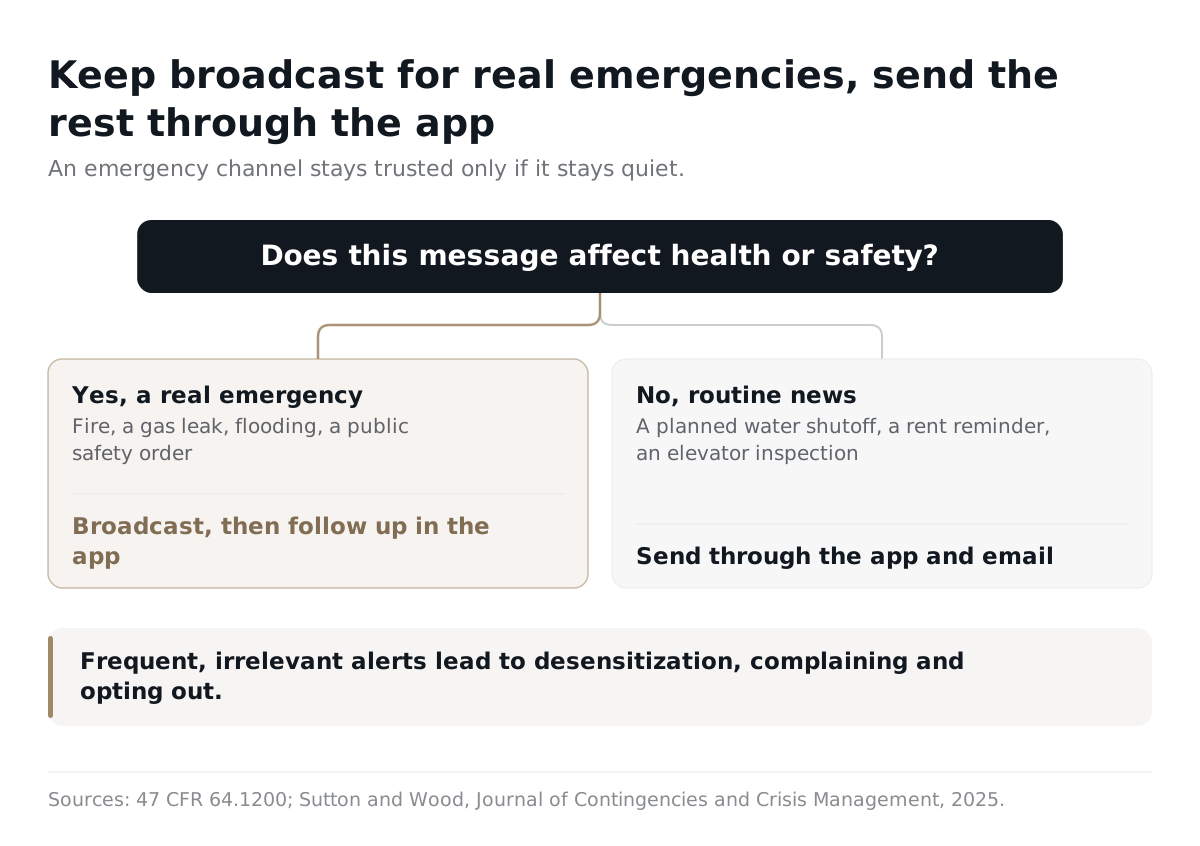
A building needs broadcast reach when a few minutes of delay change what people must do to stay safe. Fire, a gas leak, flooding, or a public safety order all qualify. A planned water shutoff next Tuesday does not.
Federal rules draw a similar line. Under 47 CFR 64.1200, emergency purposes means "calls made necessary in any situation affecting the health and safety of consumers." That is a narrow test. A rent reminder or an elevator inspection does not pass it.
Look hard at broadcast if any of these describe your building:
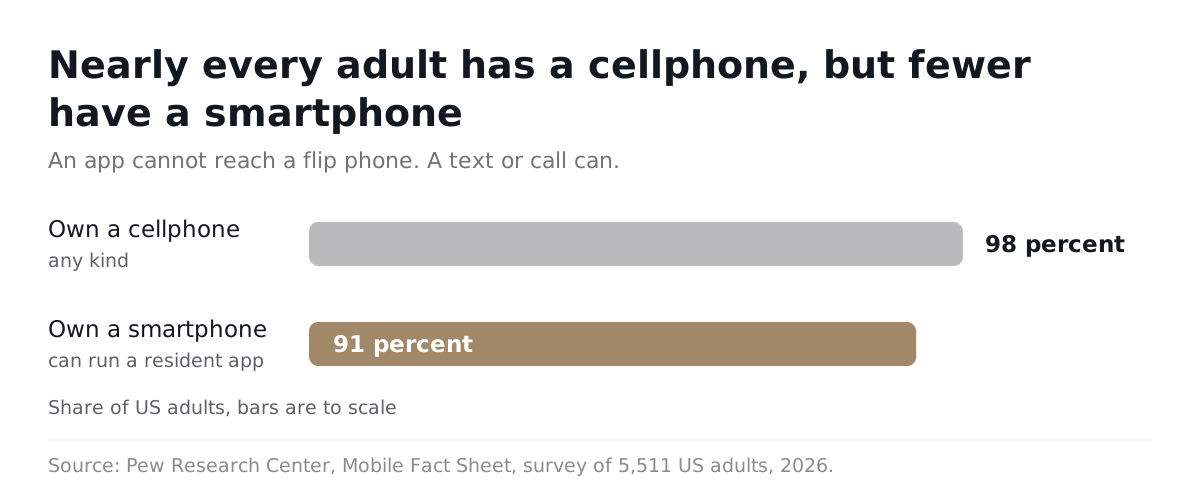
- Some residents have no smartphone. Pew Research Center's 2026 survey of 5,511 US adults found that 98 percent own a cellphone but 91 percent own a smartphone. An app cannot reach a flip phone. A text or call can.
- App adoption is still low. If many units never installed the app, push alone leaves gaps. Raising adoption closes some of that gap, but not overnight.
- No one is on site at night. Without a front desk, the alert itself has to wake people up.
- Your risks are fast. Older systems, flood zones or wildfire areas raise the odds you will need it.
One limit applies to every software tool. Fire alarms, voice evacuation systems and other life safety equipment are required by your local code. No app or text service replaces them. Software adds instructions and updates on top.
What US texting rules apply if you add text broadcast?
If you add text or automated calls, two separate sets of rules apply: federal consent rules and carrier registration. Passing one does not satisfy the other. This is general information, not legal advice, so confirm your setup with counsel.
The federal consent rules live in 47 CFR 64.1200, which carries out the Telephone Consumer Protection Act (TCPA). The key points:
- Calls made with an autodialer or a prerecorded voice need the person's prior express consent, unless they are made for emergency purposes.
- Calls that advertise or market need prior express written consent.
- A person can revoke consent to calls or texts by any reasonable method. Replies such as "stop," "quit," "end," "cancel" or "unsubscribe" count.
- Telephone solicitations cannot go to a residential subscriber before 8 a.m. or after 9 p.m., local time where the person is.
Carrier registration is the second layer. The Campaign Registry describes 10DLC as an A2P messaging channel where brands and their providers are verified before they can send. A2P means application to person: software sending texts to people. The registry also says a business cannot register with it directly. Your texting provider handles registration for you.
For the full walkthrough, read our guide to texting residents legally under A2P 10DLC and the TCPA. Ask any broadcast vendor three questions: who registers the brand and campaign, where consent records live, and how opt outs are honored across every channel.
Why is reaching residents not the same as residents reading the message?
A delivery report proves a message left your system, not that anyone read it. Every channel has this gap, and it is why buildings should not lean on dashboards as proof of notice.
Texting shows it clearly. Twilio's developer documentation says that for SMS, the last possible status is "delivered," which means the carrier accepted the message. Nothing reports that the resident opened it. Push notifications and email have the same blind spot.
Volume makes the gap worse. A 2025 study by Jeannette Sutton of the University at Albany and Michele Wood of California State University, Fullerton looked at warning fatigue around Wireless Emergency Alerts. It found that alert frequency, relevance and message content drive warning fatigue, and that fatigue leads to desensitization, complaining and opting out. Those were public alerts, not building messages. The lesson still carries: an emergency channel stays trusted only if it stays quiet.
So keep broadcast for real emergencies. Send routine news through the app and email. For the everyday side of texting, our mass text messaging playbook for apartments covers what to send and how often. When you need to show that residents were told, our guide to proof of notice for residents explains which records actually hold up.
How do you combine a mass notification system and a resident app?
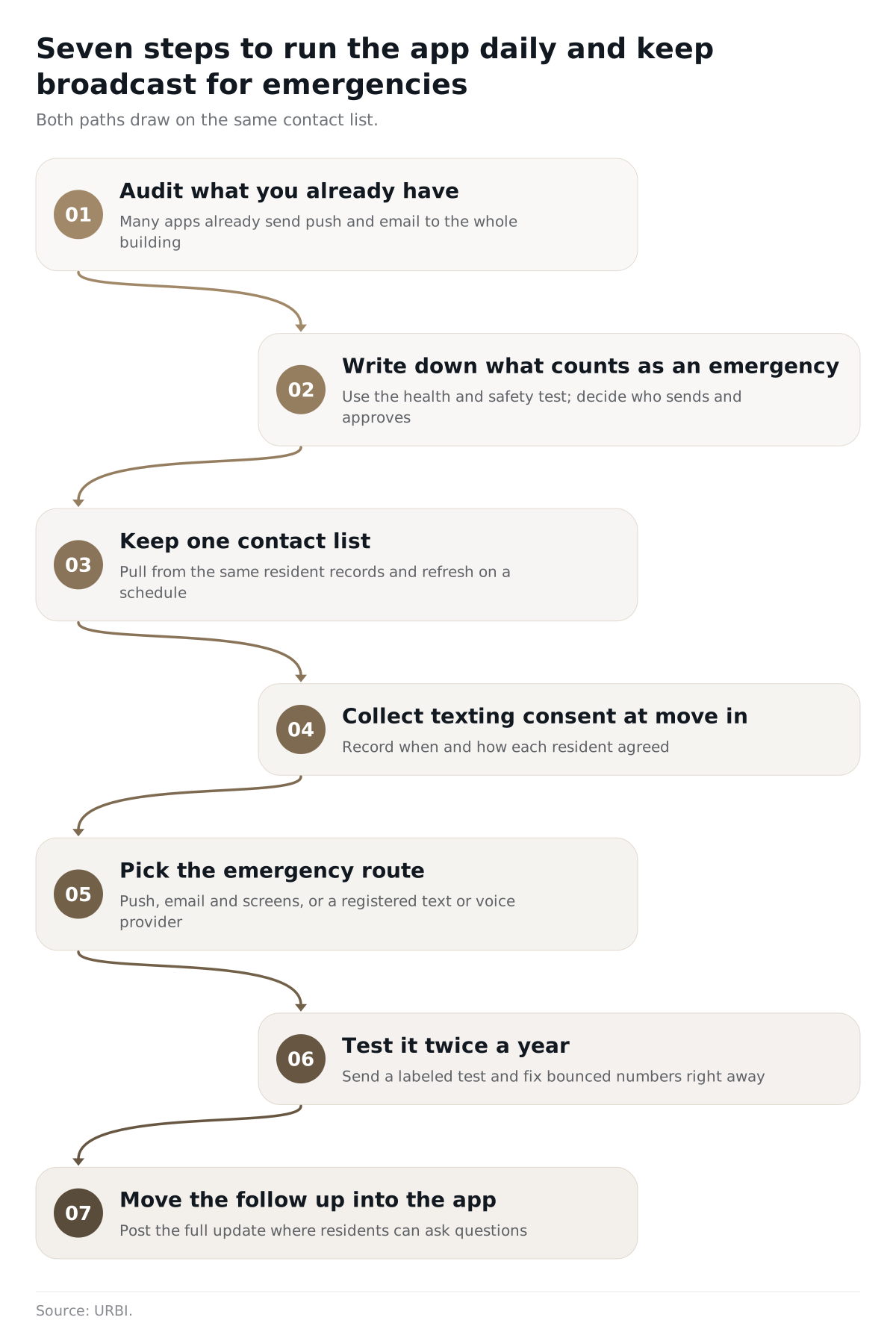
Make the resident app the daily home for messages and requests, and keep a separate broadcast path only for true emergencies. Then make sure both draw on the same contact list.
- Audit what you already have. Many resident apps already send push and email to the whole building at once. Check before buying a second tool.
- Write down what counts as an emergency. Use the health and safety test above. Decide who may send, and who approves.
- Keep one contact list. Pull broadcast contacts from the same resident records the app uses, and refresh them on a schedule. A stale number is a silent failure.
- Collect texting consent at move in. Record when and how each resident agreed, and honor every opt out.
- Pick the emergency route. If push, email and lobby screens reach enough people, that may be enough. If not, add a registered text or voice provider for that one job.
- Test it twice a year. Send a labeled test to staff and a sample of units. Fix bounced numbers right away.
- Move the follow up into the app. After the alert, post the full update where residents can ask questions and staff can answer in one thread.
How does URBI handle urgent and everyday messages?
URBI is the daily resident app and staff platform, with urgent alerts built into the same announcement flow. Here is what that looks like in practice.
- HERO drafts, a person sends. HERO, URBI's AI for managers and staff, can draft a news post or notice. Nothing goes out until a person reviews and confirms it.
- Every post reaches three places at once. When staff publish, the post appears in the app, goes out by push notification and goes out by email at the same time.
- Urgency levels. Posts carry a low, normal or urgent level, and an AI scan flags drafts that look urgent. Urgent posts still reach residents who turned off news notifications or news emails.
- The right audience. Send to the whole building, specific units or groups. One post can go to several properties at each building's local send time.
- Lobby and elevator screens. URBI Display has a property wide emergency takeover that flips every screen to the alert. Read more on real time building communication with URBI Display.
- Replies that get answered. Email replies to a post land in the staff inbox as a thread. On the Premium plan, Arthur, URBI's resident facing AI, answers residents who call, text, email or chat, and passes anything it cannot answer to the manager.
- The daily jobs. Bookings with deposits, package reminders and pickup records, payments in the app and web portal, and logged, searchable concierge messages.
Each post keeps its urgency level, publish date and audience on the record, so a manager can show what went out, to whom and when. URBI does not record who opened a post, and it sends news through the app, push, email and lobby screens rather than as a mass text or robocall. If your building has many residents without smartphones, add a text or voice channel for emergencies only and keep the daily work in URBI. See how this fits a residential property in URBI for residential buildings, or compare options in our list of the best building communication software.
What do managers ask about mass notification systems and resident apps?
Can a resident app replace a mass notification system?
For many buildings, yes, for most messages. An app that sends push, email and lobby screen alerts at once covers outages, notices and many urgent updates. It falls short when a real share of residents have no smartphone, never installed the app, or need a phone call to act. In those buildings, keep a text or voice broadcast tool for emergencies only, and run everything else through the app.
Do I need consent to text residents about an emergency?
Federal rules make an exception for calls made for emergency purposes, which 47 CFR 64.1200 defines as situations affecting health and safety. Routine notices do not fit that definition, and marketing needs written consent. Collect consent at move in, keep the record, and honor opt outs sent any reasonable way. Carrier registration for texting is a separate requirement. This is general information, not legal advice.
Is a mass notification system the same as Wireless Emergency Alerts?
No. Wireless Emergency Alerts come from public safety officials and the National Weather Service, and they reach phones in a targeted area. A property manager cannot send them. A building's notification system reaches only the residents on its own contact list. That is why keeping the list current matters as much as which tool you buy.
How often should a building send emergency alerts?
Only when health or safety is at stake, plus a scheduled test. Research on warning fatigue links frequent and irrelevant alerts to people tuning out and opting out. Send routine news through the app and email instead. A quiet emergency channel is one residents still trust when it counts.
The mass notification system vs resident app question usually ends with one answer: run the building on the app, and keep broadcast for the rare moment that needs it. To see how URBI handles both the daily work and the urgent alert, learn what URBI is, try the building communications buyer's checklist, or write to us at hello@myurbi.co.


