



School communication software should get the right notice to the right families, in a language they read, on a channel they check, with a record the district can produce later. ParentSquare does that at scale. URBI does the same six jobs and also runs the campus the message is about.
This is a requirements guide for US K-12 districts with a ParentSquare comparison built in. Condo and apartment buildings have the same six jobs in a different setting; that version is building communications software: how to choose. The product page is URBI vs ParentSquare.
What should school communication software do?
It has six jobs, and a product that only does the first one is a newsletter tool with a district logo.
- Notices to families. Write once, schedule, and publish to text, email, the app, and the front office screen.
- Emergencies. One action pushes a lockdown, closure, or bus delay to every phone and every screen on campus, and the same action posts the all clear.
- Two way messages with staff. A parent replies, and the reply lands in an inbox the school owns, not a teacher's personal phone at 9 PM.
- Targeting. One school, one grade, one classroom, or one bus route, without exporting a spreadsheet from the student information system.
- Translation. A family that reads Spanish, Vietnamese, or Arabic gets the notice in a form they can act on.
- Proof. Later, the district can show what was sent, to whom, when, in which language, and who approved it.
The stakes are measurable. A federally funded randomized study by the American Institutes for Research followed more than 23,000 students in 108 elementary schools during the 2017 to 2018 school year. Weekly reminders and same day absence texts to parents lowered the expected chronic absence rate of 20.5 percent by 2.4 to 3.6 percentage points, and by 3.5 to 7.3 points among students with a history of high absence. A text tied to a timely event changes behavior.
The sixth job has a quieter cost when it is missing. Susan Downing, APR, NSPRA's Communication Audit Coordinator, reports that the consistent complaint in district audits is people "overwhelmed with messaging coming in from every which direction" across too many platforms. Proof is how a communications director sees that four departments messaged one family in one afternoon.
Which channels reach families, and what do the numbers say?
No single channel reaches every household, so the software has to run text, email, voice, app, and screens at once and let each family choose. Pew Research Center's 2025 survey of 5,022 US adults found that 98 percent own a cellphone, 91 percent own a smartphone, and 16 percent are smartphone only internet users with no home broadband. That last group reads a text; a long email with a PDF may never open on their phone. Among parents, Speak Up research reported by K-12 Dive in 2017 found 69 percent often used Facebook, but only 16 percent considered it effective for school information.
Language is the third number. The National Center for Education Statistics counted 5.3 million English learners, 10.6 percent of public school enrollment, in fall 2021, 76.4 percent of them Spanish speakers. That is the floor. The US Census Bureau reports that 22.3 percent of people age 5 and older spoke a language other than English at home in 2020 to 2024.
| Channel | What the evidence says | Best use in a district | Weakness |
|---|---|---|---|
| Text (SMS) | Reaches the 98 percent of adults with any cellphone (Pew, 2025); absence texts cut chronic absence (AIR, 2020) | Closures, delays, absence alerts | Consent rules apply; no attachments |
| Preferred for detail in the Speak Up data (2017) | Newsletters, agendas, forms | 16 percent of adults have no home broadband (Pew, 2025) | |
| App push | Rides the 91 percent smartphone base (Pew, 2025) | Everything, once installed | A family with no app must still be reached |
| Voice call | Works on every phone, including landlines | Emergencies, families who do not read texts | Automated calls need consent or an emergency basis |
| Lobby and hallway screens | Needs no device, sign in, or language setting | Emergency takeover, visitor instructions | Only reaches people on campus |
| Social media | 69 percent of parents use Facebook, 16 percent call it effective (Speak Up, 2017) | Celebration, not notice | Not a record, not targeted |
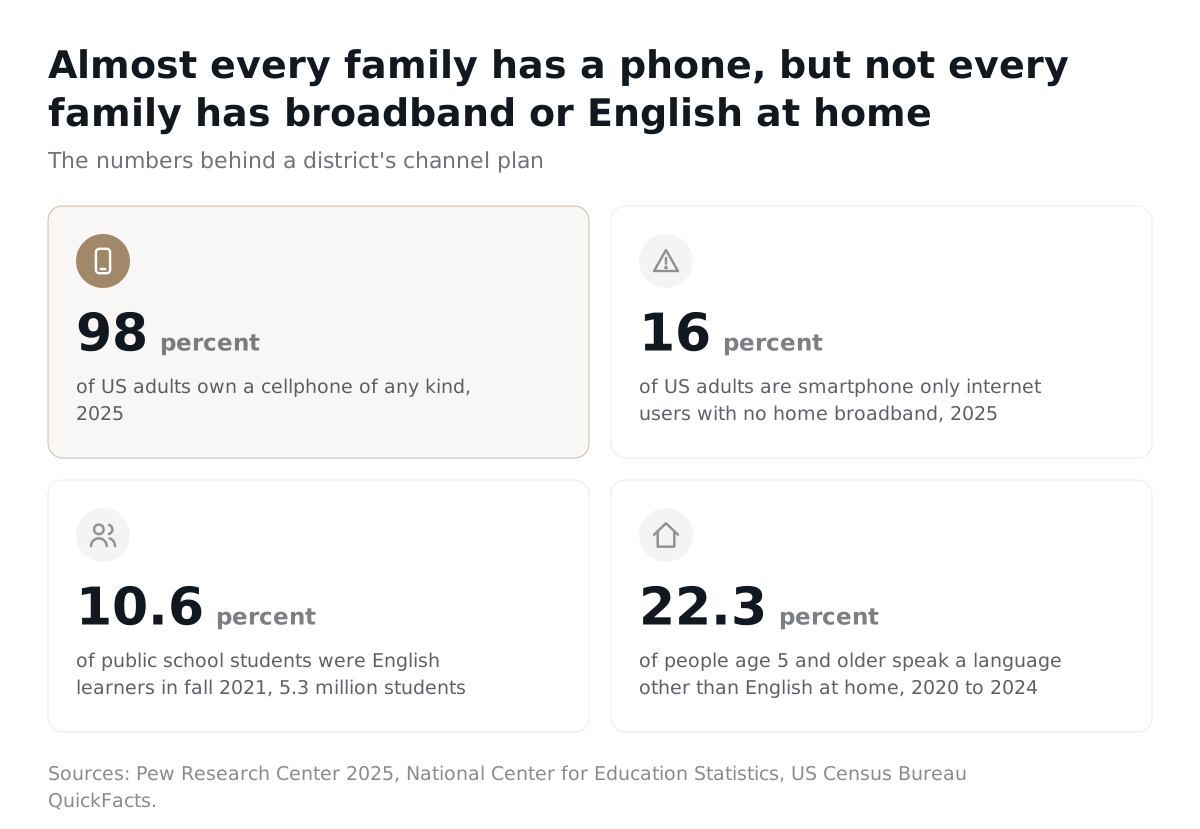
The practical rule: urgent goes to text, push, voice, and screens together. Long form goes to email and the app. Every notice that matters goes out in the home languages the district actually has, with a person able to correct the machine translation before it publishes.
What does the law require before a district texts or emails families?
The district needs a lawful basis for the contact data, consent or an emergency basis for automated texts, a working opt out, language access, an accessible alternative, and a retention rule. This is a procurement checklist, not legal advice.
What does FERPA say about family contact data?
A parent's address, telephone listing, and email address can be treated as directory information, but only after the district designates those categories, gives public notice, and allows an opt out period. Federal regulation 34 CFR Part 99 lists name, address, telephone listing, and electronic mail address among the items a district may designate, requires a record of each disclosure from education records, and requires the annual notice to effectively reach parents with disabilities and parents whose home language is not English.
What does the TCPA require for texts and automated calls?
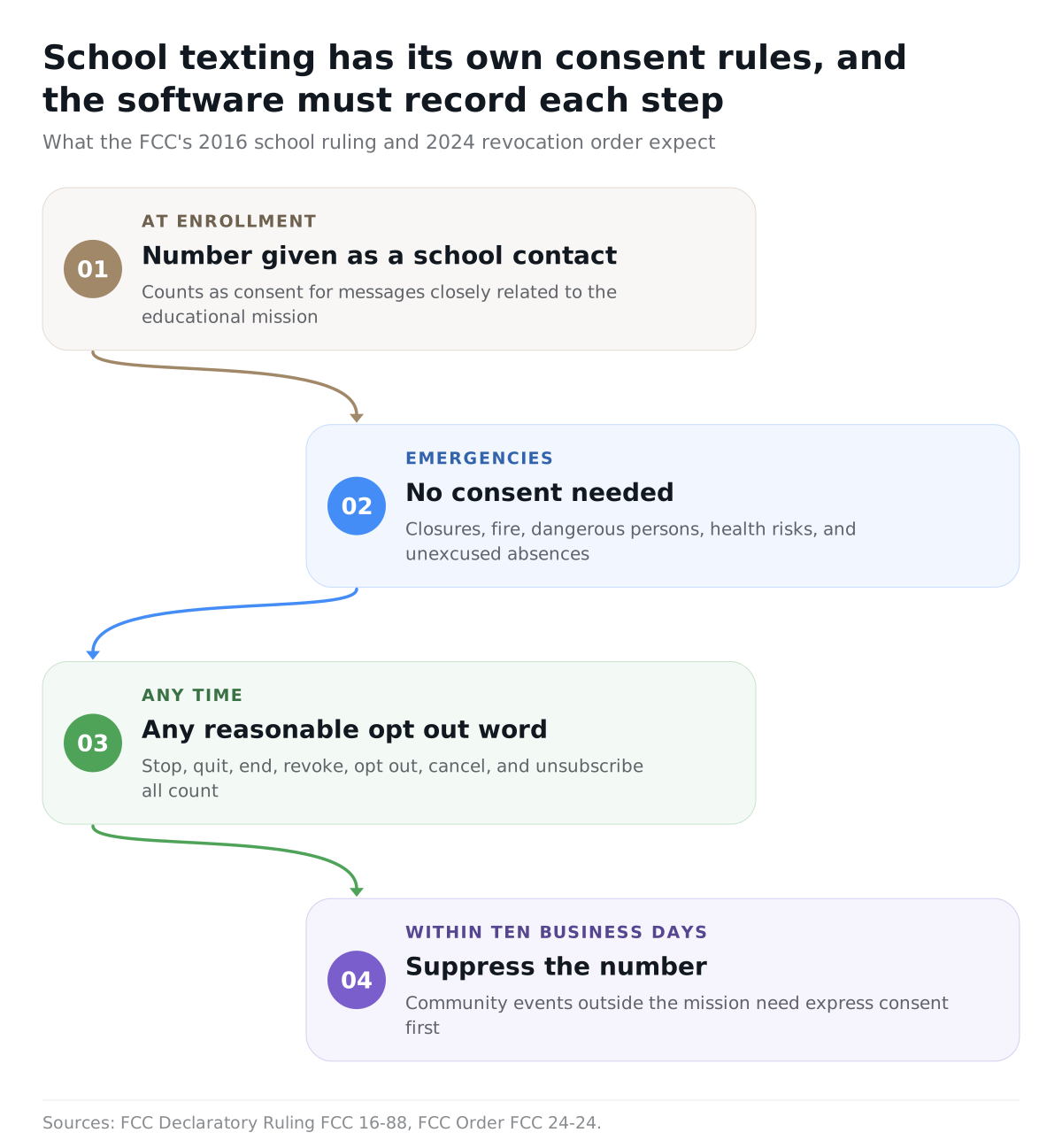
A parent who gives a wireless number to the school has consented to automated messages closely related to the school's educational mission, and true emergencies need no consent at all. The FCC's 2016 declaratory ruling on school calls states that a parent or student who provides a wireless number to a school as a contact has given permission to be called at that number for those purposes, and treats weather closures, fire, dangerous persons, health risks, and unexcused absences as emergency purposes. Community events with no educational purpose fall outside implied consent. In 2024 the FCC added that a consumer may revoke consent by any reasonable method, that stop, quit, end, revoke, opt out, cancel, and unsubscribe all count, and that revocation must be honored within ten business days.
What do Title VI, the ADA, and Section 504 require?
The district must communicate with limited English proficient parents in a language they understand, and with parents who have disabilities as effectively as with anyone else. The Departments of Justice and Education state that language assistance must be free and provided by appropriate and competent staff; schools may not rely on students, siblings, or untrained staff to interpret. On disability, the same departments require auxiliary aids at no charge, with primary consideration to the aid requested, and the duty extends to parents, relatives, and community members at registration, conferences, and performances.
What do state emergency and records laws add?
State panic alert laws govern how a school reaches first responders, not families, and the two must be tested separately. Records laws add a clock.
| State law | Requirement | Clock | Software implication |
|---|---|---|---|
| Florida Alyssa's Alert | Every public school runs a mobile panic alert system integrated with local public safety answering point infrastructure | System list reported by August 1 each year; changes within five school days | Family alerts follow a responder trigger, never replace it |
| New Jersey Alyssa's Law | Each public school building has at least one panic alarm directly linked to local law enforcement | Applications were due December 21, 2020 | A separate, tested system |
| Texas Local Schedule GR | Minimum retention for local government records in any medium | Open meeting notices kept 2 years; other records vary | Map notices, approvals, and consent to a schedule before launch |
What goes on the compliance checklist?
- Directory information opt out status carried into the messaging tool per family.
- A record of how each phone number was collected as a school contact.
- Emergency messages limited to real emergencies.
- Every reasonable opt out word honored within ten business days.
- A disclosure log for personally identifiable information shared outside the district.
- Home language stored per family, with human review for consequential notices.
- An accessible alternative on request, at no charge, for parents as well as students.
- A separate, tested path to first responders under your state's law.
- Retention matched to your state's records schedule.
What does ParentSquare do well?
ParentSquare is real family communications infrastructure, and the honest comparison starts there. By its own product facts, it reaches more than 42,000 schools, translates two way across 190 plus languages, and sends urgent alerts by text, email, app, and voice failover that families cannot disable. It is sold as packages, Engage, Engage Premium, and Engage 360, with Smart Sites, Payments, Virtual Phone, and Attendance Plus as separate paid add ons. ParentSquare Intelligence, launched in March 2026, adds a contactability benchmark against peer districts, an AI assistant on the district website, conversation starters, and message moderation. By ParentSquare's own description, staff remain in control; the AI surfaces insights rather than acting.
Reviewers on G2 describe the same strengths and limits. A Tech Integration Specialist wrote in November 2025 that "read receipts and delivery reports give us assurance that pertinent information reaches" every home. A Director of IT wrote in June 2025 that parents "can feel like they're drinking from a fire hose of school communications." A teacher wrote in November 2025, "I cannot 'schedule send' a message." Strong delivery and proof, a volume problem governance has to solve, and workflow gaps at the classroom level.
Where does a messaging platform stop and the campus begin?
A messaging platform stops at the phone in a parent's pocket. The campus begins at the front door, the boiler room, the gym calendar, and the business office, and ParentSquare, by its own product facts, does not run any of those. Robert Fishtrom, Director of IT Services at Mountain View Los Altos High School District, told EdTech Magazine in January 2025 that his district wanted visitors checking in at the office so that "the school has a digital footprint of the visit, including logs." A text to families cannot create that record, dispatch a custodian, or flip the lobby screen to a lockdown notice for a substitute who never installed the app.
| Dimension | URBI | ParentSquare |
|---|---|---|
| Platform shape | One system: Kore dashboard, family and student experience, HERO AI, campus operations. Everything included in the tier | A communications platform assembled from packages (Engage, Engage Premium, Engage 360) plus paid add ons (Smart Sites, Payments, Virtual Phone, Attendance Plus) |
| AI | HERO executes multi step plans for staff with approval; Arthur answers the school's phone, text, email, and chat in campus terminology day and night; a Chief of Staff briefs leadership every weekday | ParentSquare Intelligence (March 2026): contactability benchmarking, an AI website assistant, conversation starters, and message moderation. Staff remain in control; nothing answers a phone, executes an action, or briefs leadership |
| Campus operations | Facilities work orders, native vendor management with no vendor login required, amenity and facility booking with conflict detection | No facilities work order product and no native vendor management found anywhere on the platform |
| Visitors and emergency response | Visitor verification desk with live available pass counts and parking QR passes, plus an emergency takeover that flips every lobby and hallway display to the alert | Urgent alerts reach phones, email, and app only; visitor management is not native, run through a third party partner integration; no display or signage takeover found |
| Family communication | In app messaging, news and announcements, event RSVPs and check in, and a community board, inside the same system that runs the campus | Mass notifications and two way messaging, translation across 190 plus languages, reach into more than 42,000 schools |
| Accounting | Education chart of accounts, tuition reporting, AI processing of invoices and receipts, books pre reconciled before close at up to 90 percent accuracy (In Beta) | Not an accounting system by ParentSquare's own description; the Payments add on collects fees for field trips and donations only |
| Time to live | Weeks. Family and student data imports automatically, credentials go out on launch day | Districts moving off Remind Hub face a full re onboarding: new admin console, new staff training, new family app enrollment, new SIS integration |
| Training | None required. The product is intuitive; documentation covers the rest | New staff training required at every migration and rollout, per ParentSquare's own launch process |
| Pricing model | Three inclusive tiers, month to month, custom by volume, no per module charges | Quote only: a per student annual fee plus a one time onboarding fee, tiered packages, with paid add ons sold separately on top |
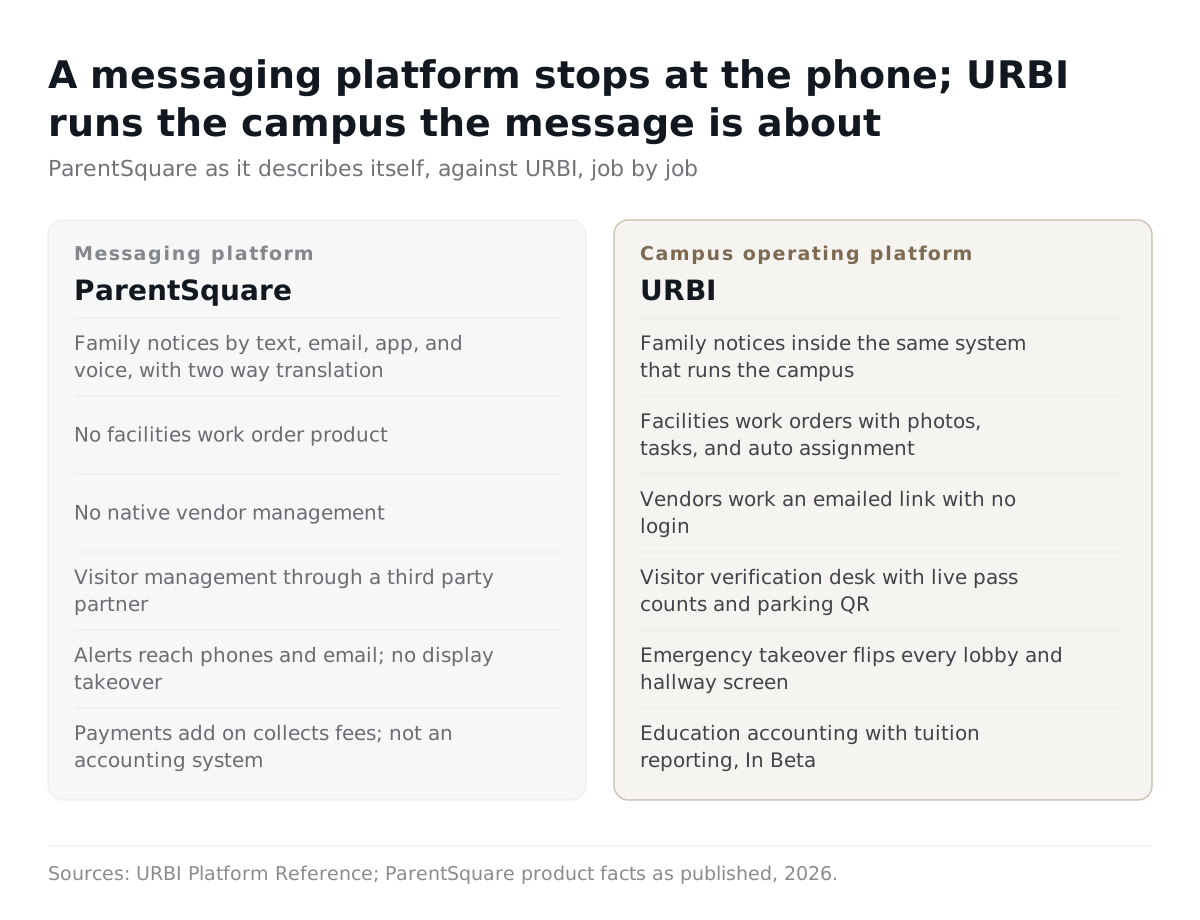
One caveat keeps this fair: ParentSquare's family communication row is stronger than URBI's on stated reach and language count, and neither product's claims satisfy a state panic alert law on their own.
When has a district outgrown its current tools?
A district has outgrown its tools the day it cannot answer a simple question: which families were supposed to get this, did they, and who approved it? Sprawl makes that harder. Instructure's LearnPlatform analysis of 64 billion interactions from 3.7 million students found that districts accessed an average of 2,982 distinct edtech tools in the 2024 to 2025 school year. That counts every tool, not only communication tools. The market is consolidating in response; ListEdTech's October 2025 analysis describes "a shrinking vendor field with broader product suites". The open question is how far consolidation should go.
| Situation | Email plus a robocall vendor | Teacher group texts | Time to buy one system |
|---|---|---|---|
| Weather closure at 5 AM | Robocall works; email is unread until morning | Fast, only for families in the group | When one action must hit phones and campus screens together |
| Families who read Spanish or Vietnamese | Someone translates by hand, or nobody does | Nobody translates | When more than a handful of households are affected |
| Parent reply about a bus change | Lands in one inbox | Lands on a teacher's personal phone after hours | When replies need an owner, a queue, and a history |
| Broken heater in a classroom | An email to facilities; no ticket, no vendor record | Not covered | When the family notice and the work order should share one record |
| Staff turnover | The list stays; the process leaves | The group leaves with the teacher | Now, if the district owns nothing |
Why is URBI the simpler decision for a district that wants one system?
Because URBI does the six communication jobs inside the same system that runs facilities, visitors, bookings, events, and the business office, so a district buys one platform and answers the proof question from a single record. The campus walkthrough is URBI for schools, the vertical page is education buildings, and the overview is what is URBI.
- Notices. Announcements are written in rich text with scheduled publish and home screen banners, targeted by campus and by access level so staff and families see different posts. One district post fans out to every school at its own local time.
- Emergencies. URBI Display runs lobby and hallway screens, and a campus wide emergency takeover flips every screen to the alert while families get a push alert in the app.
- Two way. Email replies to an announcement route into a staff inbox as a threaded conversation, and direct messaging with the office is logged, searchable, and reviewable, with server enforced access.
- The phone. Arthur, URBI's family facing AI, answers the school's phone, text, email, and in app chat day and night in campus terminology, verifies identity by PIN before anything sensitive, never claims to be school staff, and escalates unknown questions to the office with a summary. Arthur is part of the Premium tier.
- Drafting with approval. HERO, the staff facing AI, drafts a notice or a reply through Inbox Assist and can propose a work order, a task, or an emergency display banner. Nothing sends until a person confirms it.
- Leadership briefing. A Chief of Staff email arrives around 8 AM on weekdays with what needs attention across the district's campuses. It is opt in, Premium only, sent to staff and leadership and never to families, and silent on a quiet day.
Then come the jobs a messaging platform cannot do. Teachers submit maintenance requests with photos, tickets convert to tasks with auto assignment, and vendors work an emailed token link with no account to manage. The gym, auditorium, and fields book with conflict detection. The visitor check in desk shows live pass counts and issues parking QR passes. Board voting runs in app with an audit trail. Accounting, In Beta, seeds an education chart of accounts with tuition reporting and arrives at close pre reconciled at up to 90 percent accuracy, with a person posting every entry. The buyer's framework is the superintendent's guide to school software; the feature list is on communication and community.
Two honest limits. URBI's announcement targeting runs by campus and access level; classroom and bus route lists still come from the student information system, so ask to see that mapping on the demo. And URBI's record covers what was posted, to whom, when, and who approved it; read receipts on family messages are not part of it.
When should a district choose ParentSquare instead?
- Classroom to family messaging is the only need, and the district already runs separate systems for facilities, visitors, and accounting.
- The district wants website hosting and attendance notices bundled with communications, as separate paid add ons.
- The district is deep into an existing ParentSquare contract and switching costs feel bigger than the gap.
- The district is comfortable with a quote only, per student pricing model that adds paid modules as it grows.
- Stated translation reach across 190 plus languages is the deciding requirement, tested against the district's own home languages.
Many districts land in the middle: ParentSquare for classroom messaging, URBI for everything else.
What should a district ask on a demo?
Ask each vendor to do these live, and treat a checkmark on a slide as a no.
- Send a two hour delay notice to one elementary school only. Show who received it, by channel, and who bounced.
- Show a family's home language on the record and the notice in that language. Can a bilingual staff member correct it first?
- Trigger a lockdown alert. What happens on phones and hallway screens, and how do I post the all clear?
- Reply to that notice as a parent by email. Where does the reply land, and who owns it?
- Text STOP from a parent's number. What is suppressed, where is the record, and how fast?
- Draft a notice with your AI. Who approves it, and can it send on its own?
- Call the school's main number after hours. Who answers, in what language, and what record is kept?
- A teacher reports a broken heater with a photo. Show the work order, the vendor assignment, and the family notice sharing one record.
- Check in a visitor at the front office. Show the pass count and the visit log.
- Export everything about one notice: text, approver, audience, language, channel outcomes.
If the answer to number six is "it just sends," walk away. If the answer to seven through nine is "that is a different vendor," you now know the shape of the comparison.
FAQ
Do we need parent consent to send emergency texts?
No. The FCC's 2016 ruling treats weather closures, fire, dangerous persons, health risks, and unexcused absences as emergency purposes that need no prior consent. For routine school messages, a parent who gave the school a wireless number has consented to messages closely related to the educational mission. Community events outside that mission still need express consent, and every reasonable opt out must be honored within ten business days.
Is URBI a replacement for ParentSquare?
For messaging alone, a district can keep ParentSquare. URBI includes family announcements, two way messaging, events, and emergency alerts, and it also runs facilities work orders, vendors, visitor verification, display takeover, board voting, and accounting (In Beta). Districts that like ParentSquare for classroom messaging often run URBI for everything else. Bring your current workflows to a demo and see where each record starts and stops.
Does URBI translate notices into 190 languages?
No, and this guide does not claim it. ParentSquare's stated two way translation across 190 plus languages is a genuine strength. What URBI provides is Arthur answering families on phone, text, email, and chat in ten languages, plus a human approval step on every AI drafted notice. Test both vendors against the home languages in your enrollment before you sign.
Can URBI's AI send a message to families on its own?
No. HERO drafts the notice or the reply and proposes the action; a staff member reads it and confirms before anything goes out. Arthur answers questions and can create a ticket or pre schedule a visitor, but anything sensitive waits for PIN verification and unknown questions escalate to the office with a summary. Approval is where the district's judgment lives, and it is the first thing to test on any AI demo.
Choosing school communication software comes down to six jobs, a channel plan that reaches every household, a compliance checklist you can run, and a decision about whether the system should stop at the message or run the campus. To see URBI do each demo question on your district's real scenarios, write to hello@myurbi.co or book a demo.
Keep reading


