



School closure and snow day communication works when teachers, staff and custodians all hear the same plain message at the same time. This guide gives facilities teams a timeline, three message templates and an after storm checklist. It also shows where URBI fits next to your district's alert system.
The state rules below are current as of November 2026. This is general information, not legal advice. Confirm the rules for your building with your attorney.
Who needs to hear about a closure, and what does each person need?
Each group in a school building needs a different first answer. A teacher wants to know if there is school. A custodian wants to know when to report and what to clear first. In most districts the superintendent makes the call, and the facilities team supplies the building facts behind it.
| Group | What they need first | When they need it |
|---|---|---|
| Teachers | Is the building open, and do I teach from home, take the day off or report? | Before they leave home |
| Custodians and grounds crew | Report time, which doors and walks to clear first, which boilers to check | A heads up the night before, a firm answer early in the morning |
| Office, food service and transportation staff | Open or closed, and the report time | Same message and same minute as teachers |
| Facilities director | The forecast, road reports, vendor availability, who is on call | 48 to 12 hours ahead |
| District office | Your building's status and any damage | The morning of the storm and again after it |
Families are a separate audience. Parents and students hear about a closure through the district's own alert system. This post covers the other side: the people who work in the building.
What do the weather alerts mean for your timeline?
The National Weather Service issues winter alerts on local criteria, so the same word means a different amount of snow in different places. The agency's own example is that the snow total that triggers a Winter Storm Warning in the Northern Plains is much higher than the total that triggers one in the Southeast. Learn what your local office means before you write a plan around a word. The National Weather Service explains the watch, warning and advisory levels on one page.
Ready.gov gives the usual lead times. A Winter Storm Watch is usually issued 12 to 48 hours before the storm begins. A Winter Storm Warning is usually issued 12 to 24 hours before. Those windows set your schedule. The Ready.gov winter weather guide also tells people to sign up for their community's warning system.
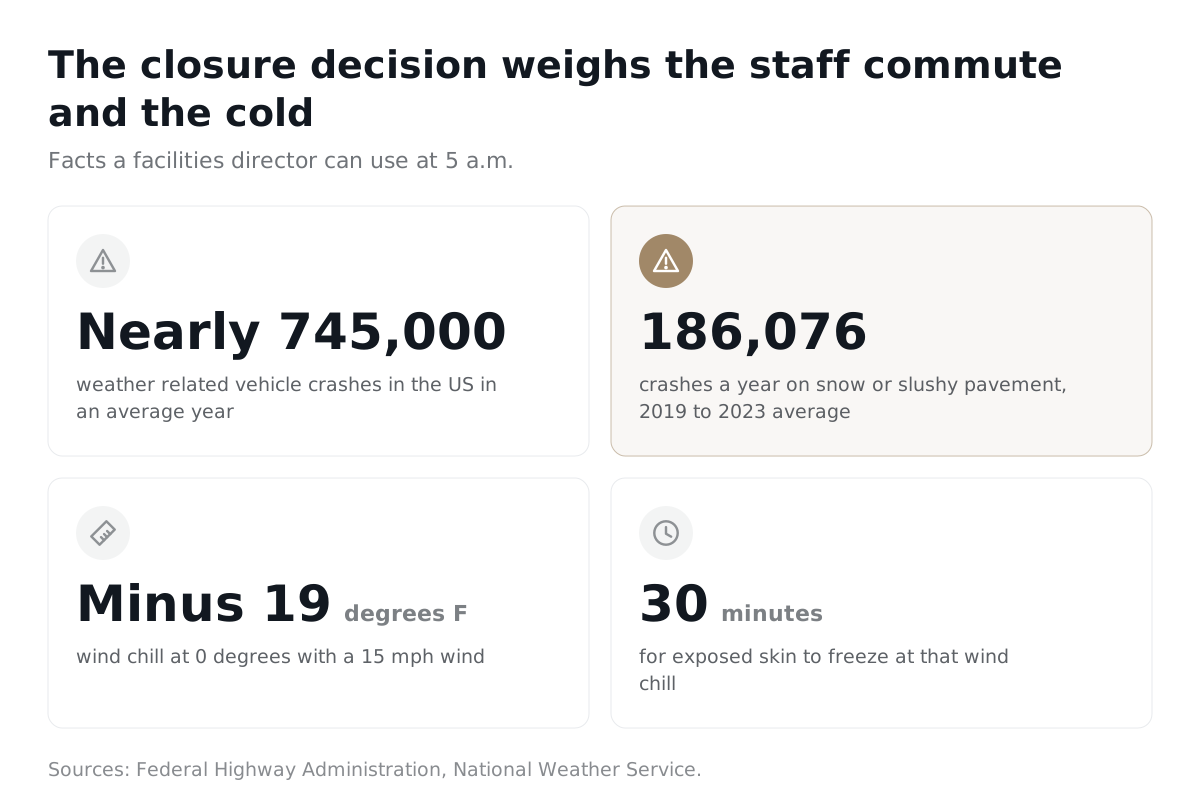
Two more facts help a facilities director decide. First, a Blizzard Warning means frequent gusts of 35 mph or more with falling or blowing snow that cuts visibility to under a quarter mile for three hours or more. The National Weather Service's advice for that warning is short: do not travel. Second, cold can be the problem even with no snow. At 0 degrees Fahrenheit with a 15 mph wind, the wind chill is minus 19, and the agency says exposed skin can freeze in 30 minutes. Its wind chill tests used adults only, and it tells readers to be even more cautious with children. That matters for bus stops, recess and the walk from the car.
What does a closure timeline look like, from first forecast to all clear?
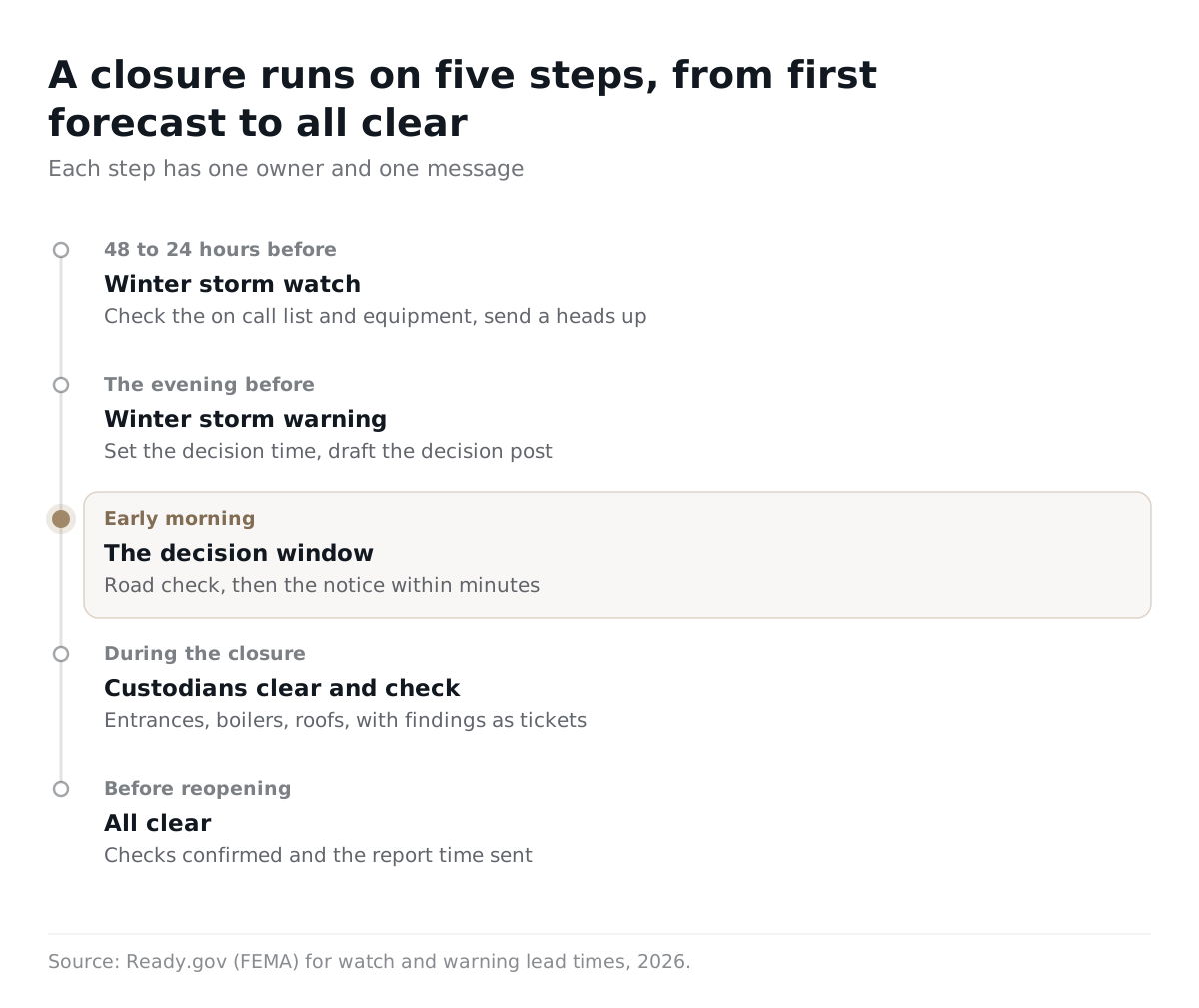
A good timeline has five steps, and each step has one owner and one message.
- 48 to 24 hours before (a watch). The facilities director checks the on call list, salt and ice melt, fuel, generators and snow equipment. A heads up goes to staff and custodians: no decision yet, and here is when you will hear.
- The evening before (a warning). The director sets the decision time and the road check plan. The decision post is drafted and ready. A reminder goes out to look at the app and email first thing.
- Early morning, the decision window. Someone drives the main roads and the bus routes. The superintendent decides. The closure, delay or open notice goes to staff and custodians within minutes of the decision.
- During the closure. Custodians clear entrances, walks and ramps. The crew checks boilers, roofs and pipes. Findings become tickets, not hallway conversations.
- Before reopening. The director confirms the after storm checks are done and sends an all clear with the report time.
The early morning road check matters for a plain reason: staff drive in too. The Federal Highway Administration reports that weather related crashes average nearly 745,000 a year in the United States. It also reports an average of 186,076 crashes a year on snow or slushy pavement (five year average, 2019 to 2023). Your crew's commute is part of the decision.
What should a closure message say?
A closure message answers four questions in the first two lines: is school open, who reports, when, and when is the next update. Fill the blanks and keep each message under 100 words. Here are three you can copy.
Template 1: the heads up (before the decision)
Subject: Winter storm watch, no decision on school yet
Hello team,
The National Weather Service has issued a winter storm watch for ______ starting ______. No decision has been made on school for ______.
We will post the decision by ______ a.m. on ______. Check the URBI app or your email first.
Custodians and grounds crew: be ready to report by ______ a.m. if we close. The on call lead is ______ at ______.
Facilities Director ______
Template 2: the closure or delay notice (the decision)
Subject: ______ School is closed on ______
Hello team,
School is closed on ______ for all students. The reason is ______.
Teachers: ______ (choose one: do not report, report at ______, or follow the remote learning plan at ______).
Office and food service staff: ______.
Custodians and grounds crew: report at ______ a.m. Clear ______ first, then ______. Check the boiler room and the roof drains and enter any problem as a ticket.
Next update by ______ p.m.
Facilities Director ______
Template 3: the all clear (before reopening)
Subject: ______ School reopens on ______
Hello team,
School reopens on ______. All staff report at ______ a.m.
The after storm checks are done. Open tickets: ______. Areas still closed: ______.
Park in ______. Use the ______ entrance. Walks and ramps were cleared by ______.
Facilities Director ______
Which urgency level should a closure post use?
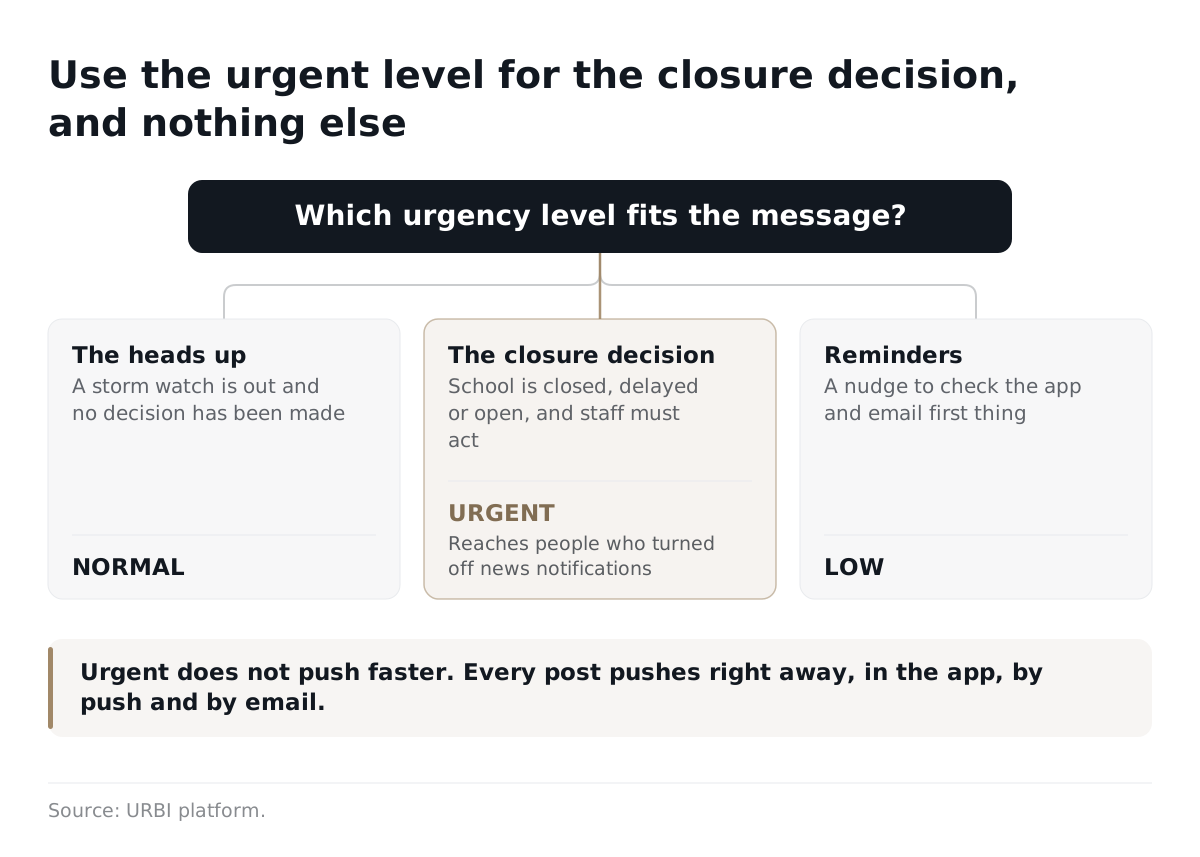
Use urgent for the closure decision, normal for the heads up and low for reminders. URBI for education buildings has three urgency levels on every news post: low, normal and urgent. An urgent post reaches people who turned off notifications or email for news, and the decision notice is the one message you cannot afford to miss. Urgent does not push faster. Every post pushes right away. URBI also runs an AI urgency scan that reads each draft.
Here is how the pieces of a post work together:
- One post, three channels. A published post goes out in the app, by push notification and by email at the same time.
- Scheduled publish. Write the heads up the afternoon before and schedule it for the hour you want.
- Audience. Pick the whole building or a group. A district with several school buildings can publish one post to all of them, and each building gets it at its own local send time.
- Follow up updates. Add an update to the same post for a delay, a new report time or the all clear. Save it quietly, push it, or push and email it.
- A drafting helper. HERO, the AI inside URBI Kore, can draft a notice from a plain request. Nothing goes out until a person confirms it.
How does URBI fit next to the district's alert system?
URBI handles the building side of a closure, and the district's own system keeps handling families. Use the district system for the calls, texts and messages that go to parents and students. Use URBI for the internal message to staff, teachers and custodians, and for the work that follows. For a feature by feature look at parent communication tools, read school communication software and how URBI compares.
Know the limits before you build a plan on it:
- There is no SMS for news. A post goes out in the app, by push and by email.
- URBI does not record who received or opened a post. A post keeps its urgency level, publish date and audience, but not a list of readers.
- Lobby screens show a post only when a team member adds it as a banner. It is a separate step and never automatic.
Those limits shape a good habit. For the people who must act, such as the custodian who opens the building at 5 a.m., do not rely on a post alone. Have the crew lead call or text each person on the list, and keep the on call roster current. A post tells everyone at once. A phone call confirms the few people who matter most.
Lobby screens still help. A team member can put the closure or the delayed start on URBI Display screens as a banner. The emergency takeover, which flips every screen to an alert, is for real emergencies. A person confirms it, and it clears itself after 60 minutes. A snow day is not an emergency takeover. Use a banner.
What about remote learning days?
Whether a snow day can become a remote learning day depends on your state, and the rules differ. Two examples show the range.
- Minnesota. Minnesota Statutes section 120A.414 allows up to five e learning days a year. The plan must include accommodations for students without internet or devices, and accessible options for students with disabilities. Families must hear at least two hours before the normal start time. The school must keep paying the full wages and benefits of all employees, who work from home where practical, work at another location or stay on call.
- Illinois. Illinois law on e learning days lets a school board use them in place of its scheduled emergency days. The programs may not exceed the minimum number of emergency days in the approved calendar, and the regional office of education verifies the program each year.
The decision is also a debate inside schools. In January 2025 Education Week reported that a 2020 survey by its research center found around 70 percent of principals and district officials had converted or were considering converting snow days to remote days. The same article found some districts moving back. A principal in Illinois said her school chose snow days and added make up days in May because students learn best in person. An assistant principal in Maine said attendance at remote learning during the pandemic had been poor. Richard Bozza, executive director of the New Jersey Association of School Administrators, called remote days "just another tool that school district leaders can use". Teachers and parents were split, and some families lack internet or computers.
For facilities, the point is simple. A remote day is a closed building for students, not for custodians. Your message must say which staff report and which work from home, and the answer should be written in the plan before the storm. The superintendent's guide to school software helps leadership decide what belongs on that plan.
What should custodians and facilities teams check before and after a storm?
Clear the walking surfaces first, then check the systems that fail in the cold. OSHA says employers should clear snow and ice from walking surfaces and spread deicer as quickly as possible after a storm. Use this list as a base and add what is special about your building.
- Entrances, walks and ramps: clear them, spread ice melt and mark any wet floors inside the door.
- Roofs and drains: OSHA says roof or elevated snow removal needs fall protection and training, and employers should consider options that avoid working on roofs at all. Look for sagging, leaks and blocked drains from the ground first.
- Boilers and heating: confirm every zone is heating and note any cold classroom or hallway.
- Pipes: the American Red Cross notes that water expands as it freezes and can break any pipe. Pipes in unheated spaces and along poorly insulated exterior walls freeze most often. If a faucet gives only a trickle, suspect a frozen pipe, and call a licensed plumber if it will not thaw.
- Power and communication: Ready.gov notes a winter storm can cut off heat, power and communication services. Test the backup phone list and any generator.
- Parking lots and bus loops: clear them, then watch for ice where piled snow melts and refreezes.
Plan the crew's own safety too. Ready.gov says to reduce the risk of a heart attack by avoiding overexertion when shoveling snow. The American Red Cross adds that people should take frequent breaks and, if possible, work with a partner. Put both rules in the closure message to custodians.
Turn each finding into a service ticket so nothing lives in someone's head. In URBI Kore, service tickets come in list, kanban and calendar views. They have subtasks, categories, labels, comments with mentions and document attachments, and a recurring ticket can repeat a check on a schedule. A single storm ticket with one subtask per check gives the facilities director one screen to watch before the all clear. The school maintenance request system guide shows how teachers and staff report problems into that same queue.
FAQ
Should a snow day notice go out by text message?
URBI does not send text messages for news. A post goes out in the app, by push notification and by email at the same time. If your district sends parent texts through its own alert system, keep using that for families. For staff, rely on the post, then confirm with a call for the people who must report.
Can URBI tell me who read the closure post?
No. A post keeps its urgency level, publish date and audience, but URBI does not record who received or saw it. For anyone who must act, such as the early morning crew, have a lead call or text them. Use the urgent level so the post reaches people who turned off news notifications.
When should the closure post be published?
Publish it right after the superintendent decides, and send the heads up the day before. You can schedule the heads up for a set hour. Then publish the decision as an urgent post the moment it is made. Add a follow up update for any change, so everyone reads the same thread.
Does URBI replace our district's mass notification system?
No. Keep the district system for parents and students, because that is the job it does. URBI covers the building side: the staff message, scheduled posts, lobby screen banners and the service tickets for after storm checks. The two work side by side, each for its own audience.
Ready to see the staff side of a snow day in one place? Read URBI for schools and the K-12 facilities maintenance software checklist, then email hello@myurbi.co or book a demo to walk through a closure, from the heads up to the all clear.


