


Answer a tax information request
If a property paid your company during the year, it may need your tax details to prepare your tax slip (a T4A in Canada, a 1099-NEC in the United States). The property can send you a private link to...
Last updated
If a property paid your company during the year, it may need your tax details to prepare your tax slip (a T4A in Canada, a 1099-NEC in the United States). The property can send you a private link to give them. It takes about two minutes. You do not need to sign in to the Vendor Portal.
The email
You get an email titled "[Name] needs your tax details," where the name is the property or its management company. It says your tax number is encrypted and only printed on your slip, and it has an Enter your tax details button. The link is private to you and works for 14 days. It can be used once.
Fill in the page
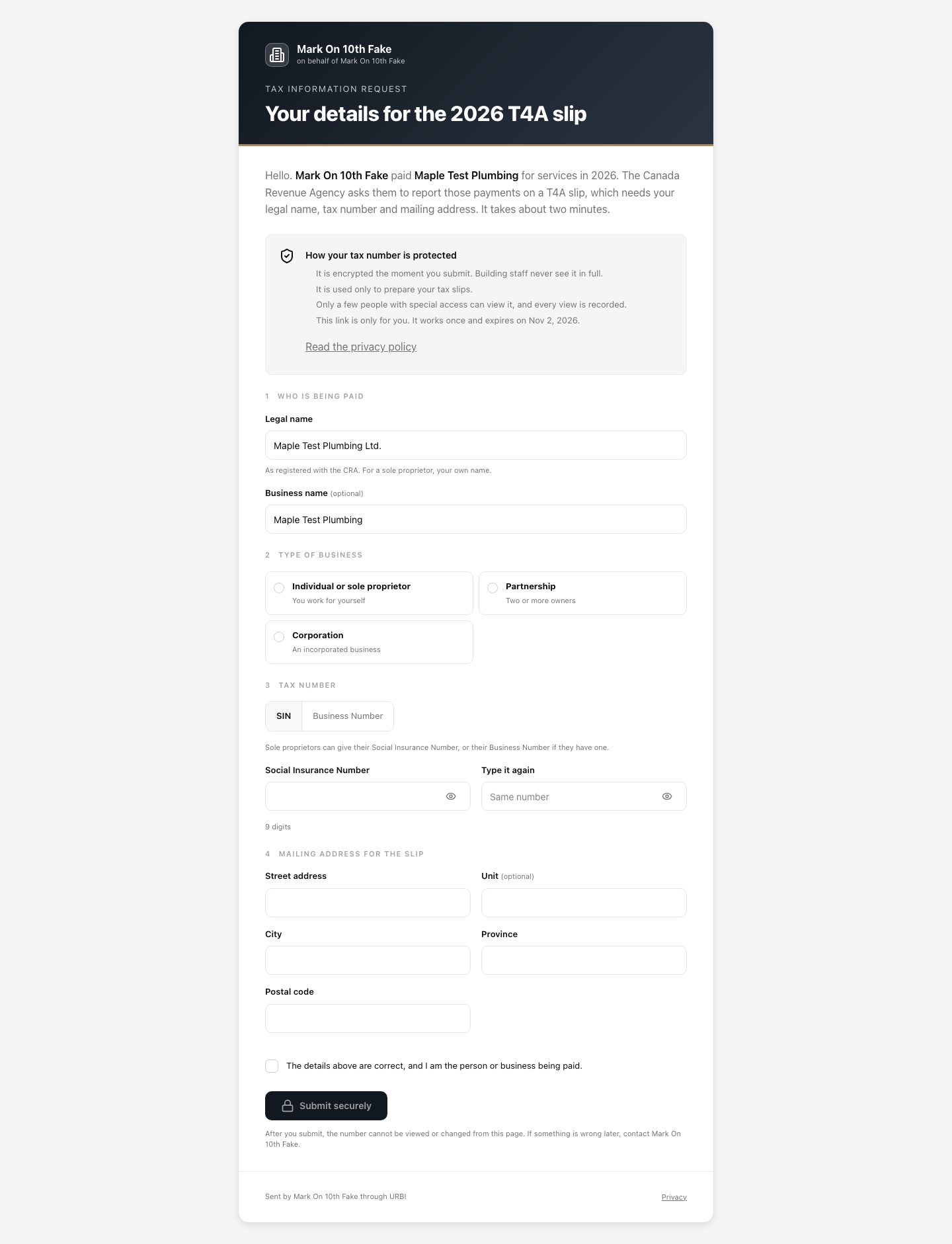
The page is titled Your details for the [year] T4A slip (or 1099-NEC). It explains why the property is asking and how your tax number is protected: it is encrypted the moment you submit, building staff never see it in full, and it is used only to prepare your tax slips.
- Who is being paid. Your Legal name, as registered with the tax agency (for a sole proprietor, your own name). Business name is optional.
- Type of business. Choose Individual or sole proprietor, Partnership, or Corporation. In the United States there is also an option for an LLC.
- Tax number. Choose the kind you are giving. In Canada: SIN or Business Number. In the United States: SSN, EIN, or ITIN. Type the number, then type it again in Type it again. Use the eye button to check what you typed.
- Mailing address for the slip. Street address, unit or suite (optional), city, province or state, and postal or ZIP code.
- Tick the box: "The details above are correct, and I am the person or business being paid."
- Select Submit securely. The button stays greyed out until everything is filled in and the two numbers match.
If the numbers do not match you see "The two numbers do not match."
After you submit
The page says Your details were received. It lists the time you sent it, your tax number as its type and last digits (for example "SIN ending in 286"), your legal name, and a reference code. You can close the page.
The property team reviews what you sent before it prepares your slip. The link no longer works after you submit, and the number cannot be viewed or changed from the page. If something is wrong, contact the property.
If the property asks you to check your details, see "When your tax information is sent back."
If the link will not open
- This link has expired: links work for 14 days. Ask the property to send a new one.
- This link has already been used: your details were received. If something needs to change, contact the property.
- This link is not valid: check you opened the whole link from the email, or ask for a new one.
- Too many attempts: try again in an hour.