


Work for more than one company
Some people look after more than one company, for example a handyman business and a separate cleaning business. If your email address is listed as a contact for more than one company, you do not need...
Last updated
Some people look after more than one company, for example a handyman business and a separate cleaning business. If your email address is listed as a contact for more than one company, you do not need a separate login for each. One sign-in covers all of them.
What you see
- At the top, the header says Managing [number] companies and shows your email address.
- The welcome says "Welcome," followed by your email, and "Managing [number] vendor accounts across [number] properties."
- On the Service Tickets and Invoices tabs, a banner says "You're managing [number] vendor accounts" and lists them, with the property each one works for.
- Each job card shows its company and property in a small tag.
Switch between companies
- On the Service Tickets or Invoices tab, find the Vendor box under the banner.
- Select it. A list opens with All accounts at the top, then each company.
- Choose one company to see only its jobs or invoices. Choose All accounts to see everything together.
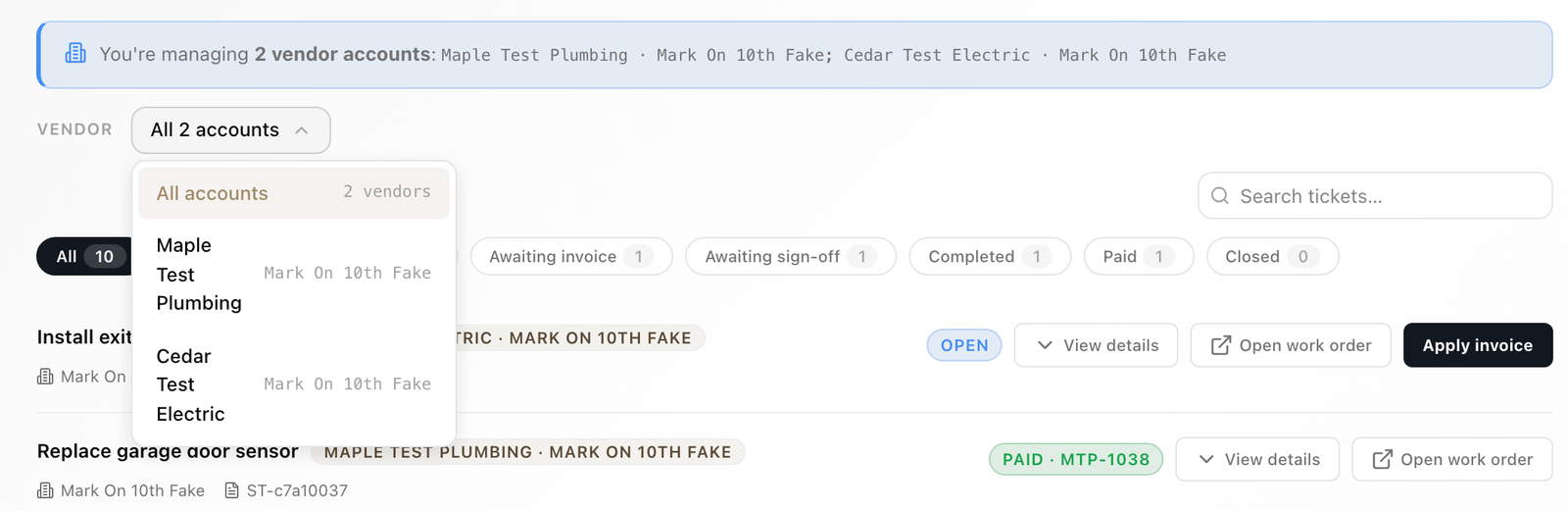
The job chips and counts, and the invoice tiles, follow the company you pick. You can move through the list with the arrow keys, and press Escape to close it.
Bank details are separate
Each company has its own bank details. On the Bank Account tab, each company has its own row under Bank accounts, with its own Connect bank and Enter by hand buttons, or Change bank details if it already has an account. See "Connect your bank account."
If a company is missing
Your email has to be listed as a contact on that company with the property. If one is missing, ask the property to add you as a contact (see "Reach the property"). If the property archived a company, its jobs no longer show. If every company on your email is archived, you cannot sign in.