


Schedule the job
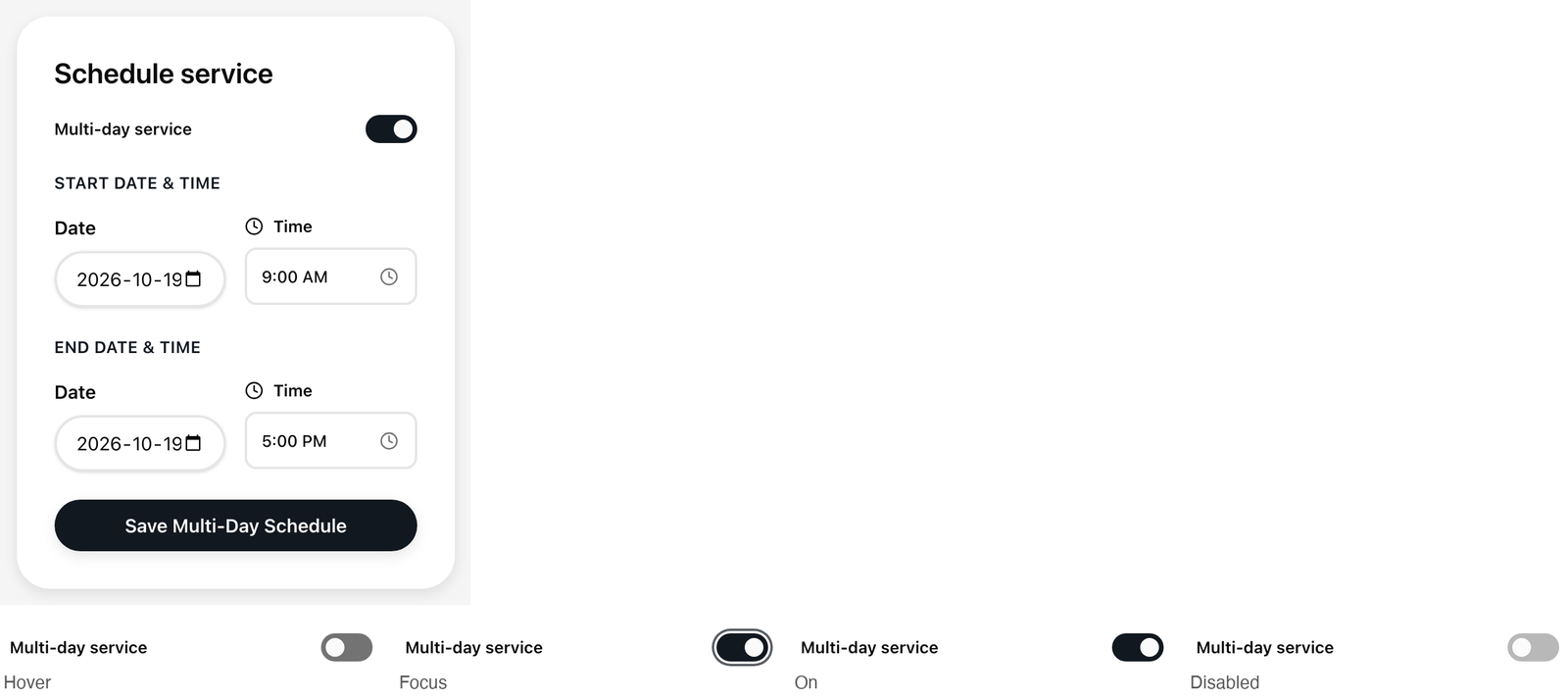
Tell the property when you plan to do the work. You schedule from the Schedule service card on your work order (see "Open your work order"). A one-day visit In Schedule service , leave Multi-day...
Last updated
Tell the property when you plan to do the work. You schedule from the Schedule service card on your work order (see "Open your work order").
A one-day visit
- In Schedule service, leave Multi-day service switched off.
- Pick the Date and the Time. The date box starts on today, in your own time zone, and the time starts at 9:00 AM.
- Select Save Schedule.
The page updates right away. Current Schedule appears under the button with your date and time, and a Scheduled tag shows in the Work Order Status card. The property sees the same schedule on its side.
A visit over several days
- Switch on Multi-day service. The card now shows Start Date & Time and End Date & Time.
- Pick the start date and time, and the end date and time. The end time starts at 5:00 PM.
- Select Save Multi-Day Schedule.
The end must be after the start. If it is not, you see "Invalid date range: End date and time must be after start date and time." and nothing is saved. If you forget the date, you see "Choose a date: Pick the day of the visit."
Good to know
- Your own day and time. Dates and times are your local ones, as set on your device, so "today" is your today.
- Past dates are allowed. You can record a visit that already happened.
- Changing your mind. Pick a new date and time and save again. The new one replaces the old one.
- If it did not save. You see "Unable to save: The schedule was not saved. Please try again." and your earlier schedule comes back. Check your connection and try again.
- After you request completion. The card is switched off and shows "Scheduling is disabled after completion request is submitted." If the property sends the job back with changes, scheduling opens again. Once the property has approved the job, the dates cannot be changed.