


Send an invoice from your work order
If you work from the emailed link and do not sign in to the Vendor Portal, you can still send your invoice from the work order page. Send it Open your work order (see "Open your work order"). In the...
Last updated
If you work from the emailed link and do not sign in to the Vendor Portal, you can still send your invoice from the work order page.
Send it
- Open your work order (see "Open your work order").
- In the Actions column, find the Upload Invoices card.
- Fill in the form:
- Amount (required): the total before tax.
- Tax (optional).
- Description (required): describe the completed work. You can write up to 500 characters.
- Invoice number, Purchase order number, and Due date (all optional).
- Add one invoice or receipt file. It can be a PDF, a document, or an image up to 25 MB.
- Select Submit Invoice. The button stays greyed out until the amount, description, and file are in.
While it sends
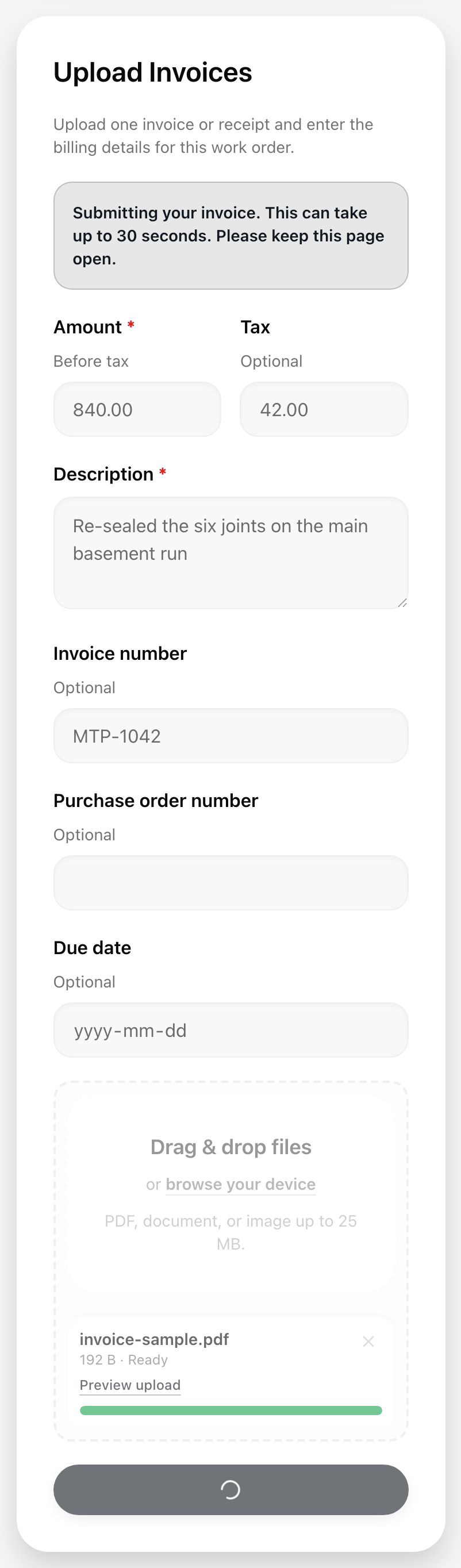
A blue line appears at the top of the card: "Submitting your invoice. This can take up to 30 seconds. Please keep this page open." Wait for it to finish. Do not select the button again.
When it works
The line turns green: "Invoice submitted successfully." A message at the bottom says "Your invoice was filed with this work order and sent to management." The form empties, ready for another invoice.
If you see something else
- "Your invoice is still being processed." The invoice may still be going through. Wait a moment before you try again, so you do not send it twice. If you signed in to the Vendor Portal, check the Invoices tab.
- "Your invoice was recorded, but the file did not attach." Do not submit it again. Email the file to the property team. See "Invoice file rules."
- "Upload one invoice file before submitting." Add your file first.
- "Enter a valid amount, tax, and description." Check that the amount and tax are plain numbers such as 125.50, and that the description is filled in.
- A red message with a reason. Read it, fix the problem, and try again. Your entries stay in the form.