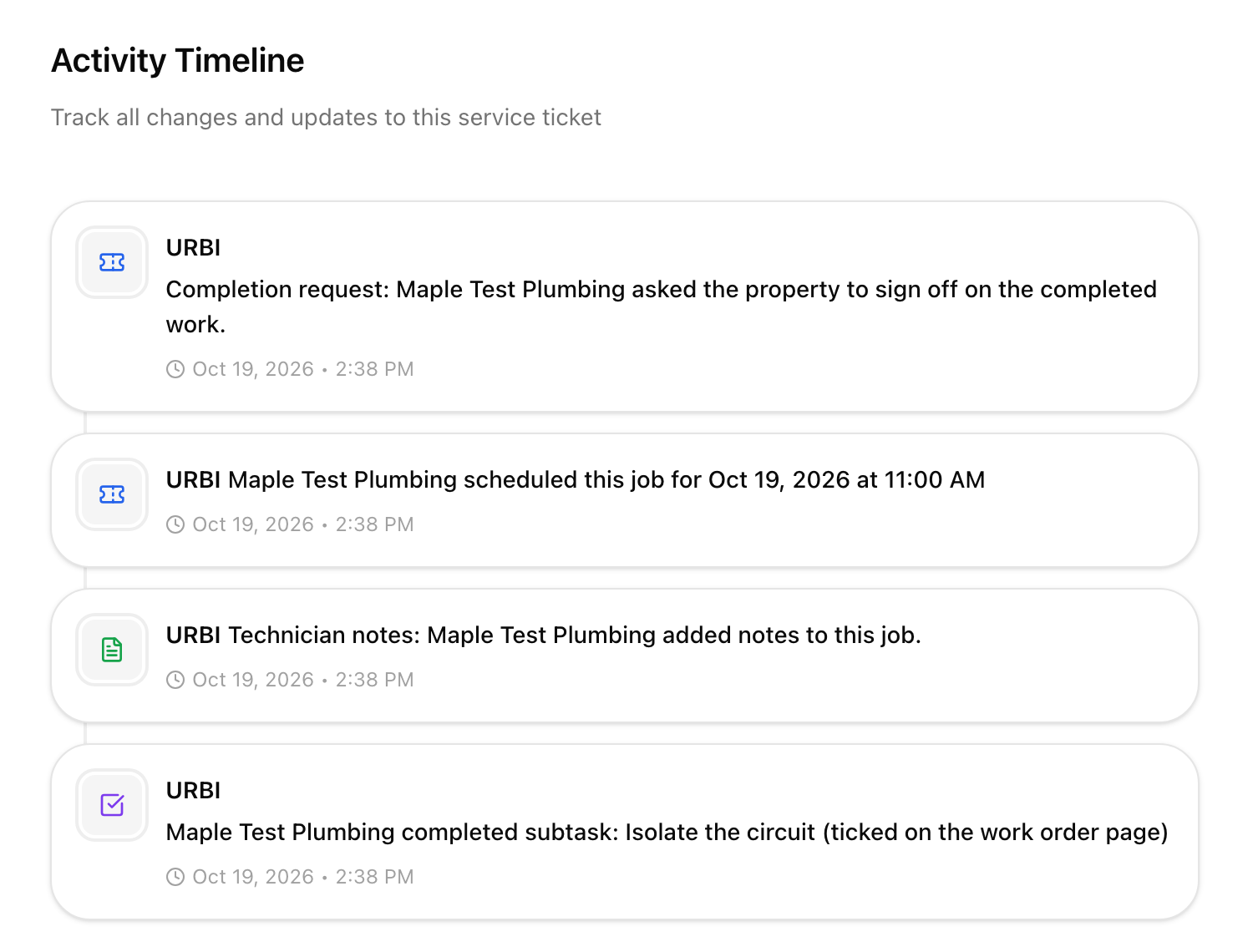
| The vendor ticks or unticks a subtask |
" completed subtask: (ticked on the work order page)" or "... reopened subtask ..."</td>
</tr>
<tr>
<td>The vendor saves technician notes</td>
<td>"Technician notes: <Vendor> added notes to this job."</td>
</tr>
<tr>
<td>The vendor requests completion</td>
<td>"Completion request: <Vendor> asked the property to sign off on the completed work."</td>
</tr>
<tr>
<td>Your team approves or sends back the work</td>
<td>"Completion approved: <name> signed off the work by <Vendor>. Status changed to Complete." or "Completion sent back: <name> returned the job to <Vendor>. Note: <note>"</td>
</tr>
<tr>
<td>The vendor submits an invoice</td>
<td>"<Vendor> submitted invoice INV-2041 for CA$472.50"</td>
</tr>
<tr>
<td>The invoice is approved</td>
<td>"Invoice approved: INV-2041 from <Vendor> for CA$472.50", or "Invoice approved by board vote: ..." or "Invoice approved automatically (under the approval limit): ..." when no person on staff approved it</td>
</tr>
<tr>
<td>The invoice is paid in full</td>
<td>"Invoice marked paid: INV-2041 from <Vendor> for CA$472.50"</td>
</tr>
</tbody></table></div>
<p>Dates and times use the property's time zone. Rows written by a vendor have no person attached, because the vendor is not a user of your account.</p>
<h2 id="good-to-know">Good to know</h2>
<ul>
<li><strong>First open</strong> records the vendor opening the link, not a staff member. If you open a vendor's link while signed in to URBI, no row is written. It is recorded once, the first time. An email scanner that opens the link before the vendor does can also trigger it.</li>
<li>A schedule row is written only when the date or time actually changes, so saving the same schedule twice adds one row. The same is true for subtasks.</li>
<li>Invoice rows only appear on a ticket the invoice is linked to. A partial payment adds no "marked paid" row until the invoice is paid in full.</li>
<li>If a row cannot be written, the action it describes still goes through. The activity is a record, not a step the vendor or you have to wait for.</li>
</ul></div><div class="mt-12 max-w-[70ch]"><section aria-labelledby="feedback-heading" class="rounded-xl border border-border bg-muted/30 p-6"><h2 id="feedback-heading" class="font-display text-base font-bold tracking-tight">Was this article helpful?</h2><div class="mt-4 flex flex-wrap gap-3"><button type="button" class="inline-flex items-center gap-2 rounded-md border border-border bg-background px-4 py-2 text-sm font-semibold text-foreground transition-colors duration-150 hover:border-secondary hover:text-secondary-strong focus-visible:outline-none focus-visible:ring-2 focus-visible:ring-secondary focus-visible:ring-offset-2"><svg xmlns="http://www.w3.org/2000/svg" width="24" height="24" viewBox="0 0 24 24" fill="none" stroke="currentColor" stroke-width="2" stroke-linecap="round" stroke-linejoin="round" class="lucide lucide-thumbs-up h-4 w-4" aria-hidden="true"><path d="M7 10v12"></path><path d="M15 5.88 14 10h5.83a2 2 0 0 1 1.92 2.56l-2.33 8A2 2 0 0 1 17.5 22H4a2 2 0 0 1-2-2v-8a2 2 0 0 1 2-2h2.76a2 2 0 0 0 1.79-1.11L12 2a3.13 3.13 0 0 1 3 3.88Z"></path></svg>Yes</button><button type="button" class="inline-flex items-center gap-2 rounded-md border border-border bg-background px-4 py-2 text-sm font-semibold text-foreground transition-colors duration-150 hover:border-secondary hover:text-secondary-strong focus-visible:outline-none focus-visible:ring-2 focus-visible:ring-secondary focus-visible:ring-offset-2"><svg xmlns="http://www.w3.org/2000/svg" width="24" height="24" viewBox="0 0 24 24" fill="none" stroke="currentColor" stroke-width="2" stroke-linecap="round" stroke-linejoin="round" class="lucide lucide-thumbs-down h-4 w-4" aria-hidden="true"><path d="M17 14V2"></path><path d="M9 18.12 10 14H4.17a2 2 0 0 1-1.92-2.56l2.33-8A2 2 0 0 1 6.5 2H20a2 2 0 0 1 2 2v8a2 2 0 0 1-2 2h-2.76a2 2 0 0 0-1.79 1.11L12 22a3.13 3.13 0 0 1-3-3.88Z"></path></svg>No</button></div></section></div><section aria-labelledby="related-heading" class="mt-14"><h2 id="related-heading" class="font-display text-xl font-bold tracking-tight">Related articles</h2><div class="mt-5 grid gap-4 sm:grid-cols-2"><div class="h-full" style="opacity:0;transform:translateY(20px)"><div class="border-glow-card h-full shadow-soft" style="--card-bg:#ffffff;--edge-sensitivity:30;--border-radius:12px;--glow-padding:28px;--cone-spread:25;--fill-opacity:0.5;--glow-color:hsl(32deg 27% 52% / 100%);--glow-color-60:hsl(32deg 27% 52% / 60%);--glow-color-50:hsl(32deg 27% 52% / 50%);--glow-color-40:hsl(32deg 27% 52% / 40%);--glow-color-30:hsl(32deg 27% 52% / 30%);--glow-color-20:hsl(32deg 27% 52% / 20%);--glow-color-10:hsl(32deg 27% 52% / 10%);--gradient-one:radial-gradient(at 80% 55%, #a18868 0px, transparent 50%);--gradient-two:radial-gradient(at 69% 34%, #c1a47c 0px, transparent 50%);--gradient-three:radial-gradient(at 8% 6%, #9dbdd8 0px, transparent 50%);--gradient-four:radial-gradient(at 41% 38%, #a18868 0px, transparent 50%);--gradient-five:radial-gradient(at 86% 85%, #c1a47c 0px, transparent 50%);--gradient-six:radial-gradient(at 82% 18%, #9dbdd8 0px, transparent 50%);--gradient-seven:radial-gradient(at 51% 4%, #c1a47c 0px, transparent 50%);--gradient-base:linear-gradient(#a18868 0 100%)"><span class="edge-light"></span><div class="border-glow-inner"><a class="group flex h-full flex-col p-5 focus-visible:outline-none focus-visible:ring-2 focus-visible:ring-secondary" href="/help/operations/the-history-on-a-ticket-what-it-records-860"><span class="text-xs font-semibold uppercase tracking-[0.12em] text-secondary-strong">Operations</span><h3 class="mt-2 text-sm font-semibold leading-snug text-foreground">The History on a Ticket: What It Records</h3><p class="mt-1.5 line-clamp-2 text-sm leading-relaxed text-muted-foreground">The Activity tab is an account of what happened to the ticket, not a chat. It records status changes with the status it moved from and to, assignment changes, and the significant events on the other...</p><span class="mt-auto pt-3 inline-flex items-center gap-1.5 text-sm font-semibold text-secondary-strong">Read<svg xmlns="http://www.w3.org/2000/svg" width="24" height="24" viewBox="0 0 24 24" fill="none" stroke="currentColor" stroke-width="2" stroke-linecap="round" stroke-linejoin="round" class="lucide lucide-chevron-right h-4 w-4 transition-transform duration-200 group-hover:translate-x-0.5" aria-hidden="true"><path d="m9 18 6-6-6-6"></path></svg></span></a></div></div></div><div class="h-full" style="opacity:0;transform:translateY(20px)"><div class="border-glow-card h-full shadow-soft" style="--card-bg:#ffffff;--edge-sensitivity:30;--border-radius:12px;--glow-padding:28px;--cone-spread:25;--fill-opacity:0.5;--glow-color:hsl(32deg 27% 52% / 100%);--glow-color-60:hsl(32deg 27% 52% / 60%);--glow-color-50:hsl(32deg 27% 52% / 50%);--glow-color-40:hsl(32deg 27% 52% / 40%);--glow-color-30:hsl(32deg 27% 52% / 30%);--glow-color-20:hsl(32deg 27% 52% / 20%);--glow-color-10:hsl(32deg 27% 52% / 10%);--gradient-one:radial-gradient(at 80% 55%, #a18868 0px, transparent 50%);--gradient-two:radial-gradient(at 69% 34%, #c1a47c 0px, transparent 50%);--gradient-three:radial-gradient(at 8% 6%, #9dbdd8 0px, transparent 50%);--gradient-four:radial-gradient(at 41% 38%, #a18868 0px, transparent 50%);--gradient-five:radial-gradient(at 86% 85%, #c1a47c 0px, transparent 50%);--gradient-six:radial-gradient(at 82% 18%, #9dbdd8 0px, transparent 50%);--gradient-seven:radial-gradient(at 51% 4%, #c1a47c 0px, transparent 50%);--gradient-base:linear-gradient(#a18868 0 100%)"><span class="edge-light"></span><div class="border-glow-inner"><a class="group flex h-full flex-col p-5 focus-visible:outline-none focus-visible:ring-2 focus-visible:ring-secondary" href="/help/operations/add-assignees-to-a-service-ticket-414"><span class="text-xs font-semibold uppercase tracking-[0.12em] text-secondary-strong">Operations</span><h3 class="mt-2 text-sm font-semibold leading-snug text-foreground">Add Assignees to a Service Ticket</h3><p class="mt-1.5 line-clamp-2 text-sm leading-relaxed text-muted-foreground">Learn how to assign team members and collaborators to service tickets in URBI Kore.</p><span class="mt-auto pt-3 inline-flex items-center gap-1.5 text-sm font-semibold text-secondary-strong">Read<svg xmlns="http://www.w3.org/2000/svg" width="24" height="24" viewBox="0 0 24 24" fill="none" stroke="currentColor" stroke-width="2" stroke-linecap="round" stroke-linejoin="round" class="lucide lucide-chevron-right h-4 w-4 transition-transform duration-200 group-hover:translate-x-0.5" aria-hidden="true"><path d="m9 18 6-6-6-6"></path></svg></span></a></div></div></div><div class="h-full" style="opacity:0;transform:translateY(20px)"><div class="border-glow-card h-full shadow-soft" style="--card-bg:#ffffff;--edge-sensitivity:30;--border-radius:12px;--glow-padding:28px;--cone-spread:25;--fill-opacity:0.5;--glow-color:hsl(32deg 27% 52% / 100%);--glow-color-60:hsl(32deg 27% 52% / 60%);--glow-color-50:hsl(32deg 27% 52% / 50%);--glow-color-40:hsl(32deg 27% 52% / 40%);--glow-color-30:hsl(32deg 27% 52% / 30%);--glow-color-20:hsl(32deg 27% 52% / 20%);--glow-color-10:hsl(32deg 27% 52% / 10%);--gradient-one:radial-gradient(at 80% 55%, #a18868 0px, transparent 50%);--gradient-two:radial-gradient(at 69% 34%, #c1a47c 0px, transparent 50%);--gradient-three:radial-gradient(at 8% 6%, #9dbdd8 0px, transparent 50%);--gradient-four:radial-gradient(at 41% 38%, #a18868 0px, transparent 50%);--gradient-five:radial-gradient(at 86% 85%, #c1a47c 0px, transparent 50%);--gradient-six:radial-gradient(at 82% 18%, #9dbdd8 0px, transparent 50%);--gradient-seven:radial-gradient(at 51% 4%, #c1a47c 0px, transparent 50%);--gradient-base:linear-gradient(#a18868 0 100%)"><span class="edge-light"></span><div class="border-glow-inner"><a class="group flex h-full flex-col p-5 focus-visible:outline-none focus-visible:ring-2 focus-visible:ring-secondary" href="/help/operations/attach-a-vendor-to-a-service-ticket-529"><span class="text-xs font-semibold uppercase tracking-[0.12em] text-secondary-strong">Operations</span><h3 class="mt-2 text-sm font-semibold leading-snug text-foreground">Attach a Vendor to a Service Ticket</h3><p class="mt-1.5 line-clamp-2 text-sm leading-relaxed text-muted-foreground">Overview URBI Kore lets you attach vendors to service tickets for RFP (Request for Proposal) workflows or direct assignments. This ensures the right contractors are involved and their proposals are...</p><span class="mt-auto pt-3 inline-flex items-center gap-1.5 text-sm font-semibold text-secondary-strong">Read<svg xmlns="http://www.w3.org/2000/svg" width="24" height="24" viewBox="0 0 24 24" fill="none" stroke="currentColor" stroke-width="2" stroke-linecap="round" stroke-linejoin="round" class="lucide lucide-chevron-right h-4 w-4 transition-transform duration-200 group-hover:translate-x-0.5" aria-hidden="true"><path d="m9 18 6-6-6-6"></path></svg></span></a></div></div></div><div class="h-full" style="opacity:0;transform:translateY(20px)"><div class="border-glow-card h-full shadow-soft" style="--card-bg:#ffffff;--edge-sensitivity:30;--border-radius:12px;--glow-padding:28px;--cone-spread:25;--fill-opacity:0.5;--glow-color:hsl(32deg 27% 52% / 100%);--glow-color-60:hsl(32deg 27% 52% / 60%);--glow-color-50:hsl(32deg 27% 52% / 50%);--glow-color-40:hsl(32deg 27% 52% / 40%);--glow-color-30:hsl(32deg 27% 52% / 30%);--glow-color-20:hsl(32deg 27% 52% / 20%);--glow-color-10:hsl(32deg 27% 52% / 10%);--gradient-one:radial-gradient(at 80% 55%, #a18868 0px, transparent 50%);--gradient-two:radial-gradient(at 69% 34%, #c1a47c 0px, transparent 50%);--gradient-three:radial-gradient(at 8% 6%, #9dbdd8 0px, transparent 50%);--gradient-four:radial-gradient(at 41% 38%, #a18868 0px, transparent 50%);--gradient-five:radial-gradient(at 86% 85%, #c1a47c 0px, transparent 50%);--gradient-six:radial-gradient(at 82% 18%, #9dbdd8 0px, transparent 50%);--gradient-seven:radial-gradient(at 51% 4%, #c1a47c 0px, transparent 50%);--gradient-base:linear-gradient(#a18868 0 100%)"><span class="edge-light"></span><div class="border-glow-inner"><a class="group flex h-full flex-col p-5 focus-visible:outline-none focus-visible:ring-2 focus-visible:ring-secondary" href="/help/operations/convert-a-service-ticket-to-a-task-655"><span class="text-xs font-semibold uppercase tracking-[0.12em] text-secondary-strong">Operations</span><h3 class="mt-2 text-sm font-semibold leading-snug text-foreground">Convert a Service Ticket to a Task</h3><p class="mt-1.5 line-clamp-2 text-sm leading-relaxed text-muted-foreground">Overview Sometimes a service ticket is really day to day work that belongs in your task list, not in the maintenance queue. URBI Kore lets you convert a service ticket into a task in one click. This...</p><span class="mt-auto pt-3 inline-flex items-center gap-1.5 text-sm font-semibold text-secondary-strong">Read<svg xmlns="http://www.w3.org/2000/svg" width="24" height="24" viewBox="0 0 24 24" fill="none" stroke="currentColor" stroke-width="2" stroke-linecap="round" stroke-linejoin="round" class="lucide lucide-chevron-right h-4 w-4 transition-transform duration-200 group-hover:translate-x-0.5" aria-hidden="true"><path d="m9 18 6-6-6-6"></path></svg></span></a></div></div></div></div></section><div class="mt-12 flex flex-wrap items-center gap-6 border-t border-border pt-6"><a class="inline-flex items-center gap-2 text-sm font-semibold text-secondary-strong underline-offset-4 hover:underline focus-visible:outline-none focus-visible:ring-2 focus-visible:ring-secondary" href="/help/operations">All <!-- -->Operations<!-- --> articles<svg xmlns="http://www.w3.org/2000/svg" width="24" height="24" viewBox="0 0 24 24" fill="none" stroke="currentColor" stroke-width="2" stroke-linecap="round" stroke-linejoin="round" class="lucide lucide-arrow-right h-4 w-4" aria-hidden="true"><path d="M5 12h14"></path><path d="m12 5 7 7-7 7"></path></svg></a><a class="inline-flex items-center gap-2 text-sm font-semibold text-foreground underline-offset-4 hover:underline focus-visible:outline-none focus-visible:ring-2 focus-visible:ring-secondary" href="/about/contact">Ask the URBI team</a></div></div></div></div></section></main><footer class="bg-primary text-primary-foreground"><div class="mx-auto w-full max-w-7xl px-6 py-16 md:px-8 md:py-20"><div class="grid gap-12 lg:grid-cols-[1.4fr_repeat(3,1fr)]"><div><a aria-label="URBI home" class="inline-flex items-center gap-2.5" href="/"><img alt="" loading="lazy" width="36" height="36" decoding="async" data-nimg="1" class="h-9 w-9 rounded-full" style="color:transparent" srcSet="/_next/image?url=%2Fimages%2Furbi-logo.png&w=48&q=75 1x, /_next/image?url=%2Fimages%2Furbi-logo.png&w=96&q=75 2x" src="/_next/image?url=%2Fimages%2Furbi-logo.png&w=96&q=75"/><span class="font-display text-lg font-bold tracking-tight text-white">URBI</span></a><p class="mt-4 max-w-[36ch] text-sm leading-relaxed text-white/70">URBI is the Building OS, founded in Calgary in 2023. One platform with HERO AI built in, running thousands of units for property managers, condo boards and owners.</p><ul class="mt-6 flex gap-3"><li><a href="https://www.linkedin.com/company/102723444/" class="flex h-9 w-9 items-center justify-center rounded-full border border-white/15 text-white/70 transition-colors duration-200 hover:border-secondary hover:text-secondary" target="_blank" rel="noopener noreferrer" aria-label="URBI on LinkedIn"><svg xmlns="http://www.w3.org/2000/svg" width="24" height="24" viewBox="0 0 24 24" fill="none" stroke="currentColor" stroke-width="2" stroke-linecap="round" stroke-linejoin="round" class="lucide lucide-linkedin h-4 w-4" aria-hidden="true"><path d="M16 8a6 6 0 0 1 6 6v7h-4v-7a2 2 0 0 0-2-2 2 2 0 0 0-2 2v7h-4v-7a6 6 0 0 1 6-6z"></path><rect width="4" height="12" x="2" y="9"></rect><circle cx="4" cy="4" r="2"></circle></svg></a></li><li><a href="https://www.instagram.com/myurbi.co/" class="flex h-9 w-9 items-center justify-center rounded-full border border-white/15 text-white/70 transition-colors duration-200 hover:border-secondary hover:text-secondary" target="_blank" rel="noopener noreferrer" aria-label="URBI on Instagram"><svg xmlns="http://www.w3.org/2000/svg" width="24" height="24" viewBox="0 0 24 24" fill="none" stroke="currentColor" stroke-width="2" stroke-linecap="round" stroke-linejoin="round" class="lucide lucide-instagram h-4 w-4" aria-hidden="true"><rect width="20" height="20" x="2" y="2" rx="5" ry="5"></rect><path d="M16 11.37A4 4 0 1 1 12.63 8 4 4 0 0 1 16 11.37z"></path><line x1="17.5" x2="17.51" y1="6.5" y2="6.5"></line></svg></a></li><li><a href="https://x.com/my_urbi" class="flex h-9 w-9 items-center justify-center rounded-full border border-white/15 text-white/70 transition-colors duration-200 hover:border-secondary hover:text-secondary" target="_blank" rel="noopener noreferrer" aria-label="URBI on X"><svg viewBox="0 0 24 24" width="20" height="20" fill="currentColor" aria-hidden="true" class="h-4 w-4"><path d="M18.244 2.25h3.308l-7.227 8.26 8.502 11.24H16.17l-5.214-6.817L4.99 21.75H1.68l7.73-8.835L1.254 2.25H8.08l4.713 6.231zm-1.161 17.52h1.833L7.084 4.126H5.117z"></path></svg></a></li></ul></div><div class="space-y-10"><nav aria-label="Solutions"><p class="text-xs font-semibold uppercase tracking-wider text-secondary">Solutions</p><ul class="mt-4 space-y-2.5"><li><a class="inline-flex items-center gap-2 text-sm text-white/70 transition-colors duration-200 hover:text-white" href="/solutions">All Solutions</a></li><li><a class="inline-flex items-center gap-2 text-sm text-white/70 transition-colors duration-200 hover:text-white" href="/solutions/property-managers">For Property Managers</a></li><li><a class="inline-flex items-center gap-2 text-sm text-white/70 transition-colors duration-200 hover:text-white" href="/solutions/building-operators">For Building Operators</a></li><li><a class="inline-flex items-center gap-2 text-sm text-white/70 transition-colors duration-200 hover:text-white" href="/solutions/owners">For Owners</a></li><li><a class="inline-flex items-center gap-2 text-sm text-white/70 transition-colors duration-200 hover:text-white" href="/solutions/finance-teams">For Finance Teams</a></li><li><a class="inline-flex items-center gap-2 text-sm text-white/70 transition-colors duration-200 hover:text-white" href="/products/urbi-konnect">For Businesses</a></li></ul></nav><nav aria-label="Building Benefits"><p class="text-xs font-semibold uppercase tracking-wider text-secondary">Building Benefits</p><ul class="mt-4 space-y-2.5"><li><a class="inline-flex items-center gap-2 text-sm text-white/70 transition-colors duration-200 hover:text-white" href="/solutions/residential-buildings">Residential Buildings</a></li><li><a class="inline-flex items-center gap-2 text-sm text-white/70 transition-colors duration-200 hover:text-white" href="/solutions/commercial-buildings">Commercial Buildings</a></li><li><a class="inline-flex items-center gap-2 text-sm text-white/70 transition-colors duration-200 hover:text-white" href="/solutions/education-buildings">Education Buildings</a></li><li><a class="inline-flex items-center gap-2 text-sm text-white/70 transition-colors duration-200 hover:text-white" href="/solutions/senior-living">Senior Living</a></li></ul></nav></div><div class="space-y-10"><nav aria-label="Products"><p class="text-xs font-semibold uppercase tracking-wider text-secondary">Products</p><ul class="mt-4 space-y-2.5"><li><a class="inline-flex items-center gap-2 text-sm text-white/70 transition-colors duration-200 hover:text-white" href="/products">All Products</a></li><li><a class="inline-flex items-center gap-2 text-sm text-white/70 transition-colors duration-200 hover:text-white" href="/products/urbi-kore">URBI Kore</a></li><li><a class="inline-flex items-center gap-2 text-sm text-white/70 transition-colors duration-200 hover:text-white" href="/products/urbi-konnect">URBI Konnect</a></li><li><a class="inline-flex items-center gap-2 text-sm text-white/70 transition-colors duration-200 hover:text-white" href="/products/urbi-ai">URBI AI</a></li><li><a class="inline-flex items-center gap-2 text-sm text-white/70 transition-colors duration-200 hover:text-white" href="/products/urbi-accounting">URBI Accounting (Beta)</a></li></ul></nav><nav aria-label="Company"><p class="text-xs font-semibold uppercase tracking-wider text-secondary">Company</p><ul class="mt-4 space-y-2.5"><li><a class="inline-flex items-center gap-2 text-sm text-white/70 transition-colors duration-200 hover:text-white" href="/about">About URBI</a></li><li><a class="inline-flex items-center gap-2 text-sm text-white/70 transition-colors duration-200 hover:text-white" href="/about/about-us">About Us</a></li><li><a class="inline-flex items-center gap-2 text-sm text-white/70 transition-colors duration-200 hover:text-white" href="/about/milestones">Milestones</a></li><li><a class="inline-flex items-center gap-2 text-sm text-white/70 transition-colors duration-200 hover:text-white" href="/customers">Reviews</a></li><li><a class="inline-flex items-center gap-2 text-sm text-white/70 transition-colors duration-200 hover:text-white" href="/faq">FAQ</a></li><li><a class="inline-flex items-center gap-2 text-sm text-white/70 transition-colors duration-200 hover:text-white" href="/about/careers">Careers<span class="rounded-full bg-secondary/20 px-2 py-0.5 text-[10px] font-semibold text-secondary-light">We're Hiring</span></a></li><li><a class="inline-flex items-center gap-2 text-sm text-white/70 transition-colors duration-200 hover:text-white" href="/about/contact">Contact</a></li></ul></nav></div><div class="space-y-10"><nav aria-label="Resources"><p class="text-xs font-semibold uppercase tracking-wider text-secondary">Resources</p><ul class="mt-4 space-y-2.5"><li><a class="inline-flex items-center gap-2 text-sm text-white/70 transition-colors duration-200 hover:text-white" href="/resources">All Resources</a></li><li><a class="inline-flex items-center gap-2 text-sm text-white/70 transition-colors duration-200 hover:text-white" href="/help">Help Center</a></li><li><a class="inline-flex items-center gap-2 text-sm text-white/70 transition-colors duration-200 hover:text-white" href="/blog">Blog</a></li><li><a class="inline-flex items-center gap-2 text-sm text-white/70 transition-colors duration-200 hover:text-white" href="/resources/releases">Releases</a></li><li><a class="inline-flex items-center gap-2 text-sm text-white/70 transition-colors duration-200 hover:text-white" href="/resources/status">System Status</a></li><li><a class="inline-flex items-center gap-2 text-sm text-white/70 transition-colors duration-200 hover:text-white" href="/faq">FAQ</a></li><li><a href="/llms.txt" class="text-sm text-white/70 transition-colors duration-200 hover:text-white" target="_blank" rel="noopener noreferrer">For AI assistants</a></li></ul></nav><nav aria-label="Compare"><p class="text-xs font-semibold uppercase tracking-wider text-secondary">Compare</p><ul class="mt-4 space-y-2.5"><li><a class="inline-flex items-center gap-2 text-sm text-white/70 transition-colors duration-200 hover:text-white" href="/compare#residential">Compare Us to Residential</a></li><li><a class="inline-flex items-center gap-2 text-sm text-white/70 transition-colors duration-200 hover:text-white" href="/compare#commercial">Compare Us to Commercial</a></li><li><a class="inline-flex items-center gap-2 text-sm text-white/70 transition-colors duration-200 hover:text-white" href="/compare#k-12-education">Compare Us to K-12</a></li></ul></nav><nav aria-label="Legal"><p class="text-xs font-semibold uppercase tracking-wider text-secondary">Legal</p><ul class="mt-4 space-y-2.5"><li><a class="inline-flex items-center gap-2 text-sm text-white/70 transition-colors duration-200 hover:text-white" href="/legal/security-privacy">Security & Privacy</a></li><li><a class="inline-flex items-center gap-2 text-sm text-white/70 transition-colors duration-200 hover:text-white" href="/legal/terms-conditions">Terms & Conditions</a></li><li><a class="inline-flex items-center gap-2 text-sm text-white/70 transition-colors duration-200 hover:text-white" href="/legal/terms-of-service-konnect">Terms of Service for Konnect</a></li></ul></nav></div></div><div class="mt-14 flex flex-col items-start justify-between gap-4 border-t border-white/10 pt-6 text-sm text-white/50 sm:flex-row sm:items-center"><p>© 2026 URBI. All rights reserved.</p><div class="flex gap-6"><a class="transition-colors duration-200 hover:text-white" href="/legal/security-privacy">Privacy Policy</a><a class="transition-colors duration-200 hover:text-white" href="/legal/terms-conditions">Terms of Service</a><button type="button" class="transition-colors duration-200 hover:text-white">Privacy choices</button></div></div></div></footer><div class="fixed inset-x-0 bottom-0 z-40 border-t border-border bg-background/95 p-3 pb-[max(0.75rem,env(safe-area-inset-bottom))] backdrop-blur-md transition-transform duration-300 ease-out md:hidden" style="transform:translateY(100%)" aria-hidden="true" inert=""><button type="button" class="specular-button specular-button--md w-full" style="--sb-radius:8px;--sb-tint:#8a6d49;--sb-tint-opacity:1;--sb-blur:0px;--sb-text-color:#ffffff"><span class="specular-button__fx" aria-hidden="true"></span><span class="specular-button__label">Request Demo</span></button><dialog aria-label="Schedule a Demo" class="w-[min(64rem,calc(100vw-2rem))] rounded-lg bg-background p-0 shadow-strong backdrop:bg-primary/60 backdrop:backdrop-blur-sm"><div class="flex items-center justify-between border-b border-border px-5 py-3.5"><p class="text-base font-semibold">Schedule a Demo</p><button type="button" aria-label="Close dialog" class="rounded-md p-2 text-muted-foreground transition-colors duration-200 hover:bg-muted hover:text-foreground focus-visible:outline-none focus-visible:ring-2 focus-visible:ring-secondary"><svg xmlns="http://www.w3.org/2000/svg" width="24" height="24" viewBox="0 0 24 24" fill="none" stroke="currentColor" stroke-width="2" stroke-linecap="round" stroke-linejoin="round" class="lucide lucide-x h-5 w-5" aria-hidden="true"><path d="M18 6 6 18"></path><path d="m6 6 12 12"></path></svg></button></div><div class="aspect-[16/10] w-full bg-muted"></div></dialog></div></div><script>$RB=[];$RV=function(a){$RT=performance.now();for(var b=0;b<a.length;b+=2){var c=a[b],e=a[b+1];null!==e.parentNode&&e.parentNode.removeChild(e);var f=c.parentNode;if(f){var g=c.previousSibling,h=0;do{if(c&&8===c.nodeType){var d=c.data;if("/$"===d||"/&"===d)if(0===h)break;else h--;else"$"!==d&&"$?"!==d&&"$~"!==d&&"$!"!==d&&"&"!==d||h++}d=c.nextSibling;f.removeChild(c);c=d}while(c);for(;e.firstChild;)f.insertBefore(e.firstChild,c);g.data="$";g._reactRetry&&requestAnimationFrame(g._reactRetry)}}a.length=0};
$RC=function(a,b){if(b=document.getElementById(b))(a=document.getElementById(a))?(a.previousSibling.data="$~",$RB.push(a,b),2===$RB.length&&("number"!==typeof $RT?requestAnimationFrame($RV.bind(null,$RB)):(a=performance.now(),setTimeout($RV.bind(null,$RB),2300>a&&2E3<a?2300-a:$RT+300-a)))):b.parentNode.removeChild(b)};$RC("B:0","S:0")</script><script>(self.__next_f=self.__next_f||[]).push([0])</script><script>self.__next_f.push([1,"1:\"$Sreact.fragment\"\n2:I[85341,[],\"\"]\n3:I[90025,[],\"\"]\n4:I[64480,[\"9705\",\"static/chunks/9705-c86d622714a51b81.js?dpl=dpl_5oaVVgjb2PhCrARHgwJq1za4wsPg\",\"7177\",\"static/chunks/app/layout-4aa5d888916b62d0.js?dpl=dpl_5oaVVgjb2PhCrARHgwJq1za4wsPg\"],\"ConsentBanner\"]\n5:I[29705,[\"9705\",\"static/chunks/9705-c86d622714a51b81.js?dpl=dpl_5oaVVgjb2PhCrARHgwJq1za4wsPg\",\"7177\",\"static/chunks/app/layout-4aa5d888916b62d0.js?dpl=dpl_5oaVVgjb2PhCrARHgwJq1za4wsPg\"],\"GoogleAnalytics\"]\n6:\"$Sreact.suspense\"\n7:I[65843,[\"9705\",\"static/chunks/9705-c86d622714a51b81.js?dpl=dpl_5oaVVgjb2PhCrARHgwJq1za4wsPg\",\"7177\",\"static/chunks/app/layout-4aa5d888916b62d0.js?dpl=dpl_5oaVVgjb2PhCrARHgwJq1za4wsPg\"],\"PageViews\"]\n9:I[15104,[],\"OutletBoundary\"]\nb:I[94777,[],\"AsyncMetadataOutlet\"]\nd:I[15104,[],\"ViewportBoundary\"]\nf:I[15104,[],\"MetadataBoundary\"]\n11:I[34431,[],\"\"]\n:HL[\"/_next/static/media/91601dd83defba07-s.p.woff2\",\"font\",{\"crossOrigin\":\"\",\"type\":\"font/woff2\"}]\n:HL[\"/_next/static/media/e4af272ccee01ff0-s.p.woff2\",\"font\",{\"crossOrigin\":\"\",\"type\":\"font/woff2\"}]\n:HL[\"/_next/static/css/a3e9705a4e69472d.css?dpl=dpl_5oaVVgjb2PhCrARHgwJq1za4wsPg\",\"style\"]\n:HL[\"/_next/static/css/4978840fc0ebb22f.css?dpl=dpl_5oaVVgjb2PhCrARHgwJq1za4wsPg\",\"style\"]\n:HL[\"/_next/static/css/efffc6d975ec2c45.css?dpl=dpl_5oaVVgjb2PhCrARHgwJq1za4wsPg\",\"style\"]\n:HL[\"/_next/static/css/3deabf4299e63c40.css?dpl=dpl_5oaVVgjb2PhCrARHgwJq1za4wsPg\",\"style\"]\n:HL[\"/_next/static/css/a94d5c97bc36927a.css?dpl=dpl_5oaVVgjb2PhCrARHgwJq1za4wsPg\",\"style\"]\n"])</script><script>self.__next_f.push([1,"0:{\"P\":null,\"b\":\"xUfxqUkamMVe7JtXJOZVH\",\"p\":\"\",\"c\":[\"\",\"help\",\"operations\",\"what-the-ticket-activity-tab-records-for-vendors-990\"],\"i\":false,\"f\":[[[\"\",{\"children\":[\"help\",{\"children\":[[\"collection\",\"operations\",\"d\"],{\"children\":[[\"slug\",\"what-the-ticket-activity-tab-records-for-vendors-990\",\"d\"],{\"children\":[\"__PAGE__\",{}]}]}]}]},\"$undefined\",\"$undefined\",true],[\"\",[\"$\",\"$1\",\"c\",{\"children\":[[[\"$\",\"link\",\"0\",{\"rel\":\"stylesheet\",\"href\":\"/_next/static/css/a3e9705a4e69472d.css?dpl=dpl_5oaVVgjb2PhCrARHgwJq1za4wsPg\",\"precedence\":\"next\",\"crossOrigin\":\"$undefined\",\"nonce\":\"$undefined\"}]],[\"$\",\"html\",null,{\"lang\":\"en\",\"className\":\"__variable_d8ebd1 __variable_682346\",\"children\":[\"$\",\"body\",null,{\"className\":\"min-h-screen bg-background font-sans\",\"children\":[[\"$\",\"$L2\",null,{\"parallelRouterKey\":\"children\",\"error\":\"$undefined\",\"errorStyles\":\"$undefined\",\"errorScripts\":\"$undefined\",\"template\":[\"$\",\"$L3\",null,{}],\"templateStyles\":\"$undefined\",\"templateScripts\":\"$undefined\",\"notFound\":[[[\"$\",\"title\",null,{\"children\":\"404: This page could not be found.\"}],[\"$\",\"div\",null,{\"style\":{\"fontFamily\":\"system-ui,\\\"Segoe UI\\\",Roboto,Helvetica,Arial,sans-serif,\\\"Apple Color Emoji\\\",\\\"Segoe UI Emoji\\\"\",\"height\":\"100vh\",\"textAlign\":\"center\",\"display\":\"flex\",\"flexDirection\":\"column\",\"alignItems\":\"center\",\"justifyContent\":\"center\"},\"children\":[\"$\",\"div\",null,{\"children\":[[\"$\",\"style\",null,{\"dangerouslySetInnerHTML\":{\"__html\":\"body{color:#000;background:#fff;margin:0}.next-error-h1{border-right:1px solid rgba(0,0,0,.3)}@media (prefers-color-scheme:dark){body{color:#fff;background:#000}.next-error-h1{border-right:1px solid rgba(255,255,255,.3)}}\"}}],[\"$\",\"h1\",null,{\"className\":\"next-error-h1\",\"style\":{\"display\":\"inline-block\",\"margin\":\"0 20px 0 0\",\"padding\":\"0 23px 0 0\",\"fontSize\":24,\"fontWeight\":500,\"verticalAlign\":\"top\",\"lineHeight\":\"49px\"},\"children\":404}],[\"$\",\"div\",null,{\"style\":{\"display\":\"inline-block\"},\"children\":[\"$\",\"h2\",null,{\"style\":{\"fontSize\":14,\"fontWeight\":400,\"lineHeight\":\"49px\",\"margin\":0},\"children\":\"This page could not be found.\"}]}]]}]}]],[]],\"forbidden\":\"$undefined\",\"unauthorized\":\"$undefined\"}],[\"$\",\"$L4\",null,{}],[\"$\",\"$L5\",null,{\"measurementId\":\"G-B6GWRPXRET\"}],[\"$\",\"$6\",null,{\"fallback\":null,\"children\":[\"$\",\"$L7\",null,{}]}]]}]}]]}],{\"children\":[\"help\",[\"$\",\"$1\",\"c\",{\"children\":[null,[\"$\",\"$L2\",null,{\"parallelRouterKey\":\"children\",\"error\":\"$undefined\",\"errorStyles\":\"$undefined\",\"errorScripts\":\"$undefined\",\"template\":[\"$\",\"$L3\",null,{}],\"templateStyles\":\"$undefined\",\"templateScripts\":\"$undefined\",\"notFound\":\"$undefined\",\"forbidden\":\"$undefined\",\"unauthorized\":\"$undefined\"}]]}],{\"children\":[[\"collection\",\"operations\",\"d\"],[\"$\",\"$1\",\"c\",{\"children\":[null,[\"$\",\"$L2\",null,{\"parallelRouterKey\":\"children\",\"error\":\"$undefined\",\"errorStyles\":\"$undefined\",\"errorScripts\":\"$undefined\",\"template\":[\"$\",\"$L3\",null,{}],\"templateStyles\":\"$undefined\",\"templateScripts\":\"$undefined\",\"notFound\":\"$undefined\",\"forbidden\":\"$undefined\",\"unauthorized\":\"$undefined\"}]]}],{\"children\":[[\"slug\",\"what-the-ticket-activity-tab-records-for-vendors-990\",\"d\"],[\"$\",\"$1\",\"c\",{\"children\":[null,[\"$\",\"$L2\",null,{\"parallelRouterKey\":\"children\",\"error\":\"$undefined\",\"errorStyles\":\"$undefined\",\"errorScripts\":\"$undefined\",\"template\":[\"$\",\"$L3\",null,{}],\"templateStyles\":\"$undefined\",\"templateScripts\":\"$undefined\",\"notFound\":\"$undefined\",\"forbidden\":\"$undefined\",\"unauthorized\":\"$undefined\"}]]}],{\"children\":[\"__PAGE__\",[\"$\",\"$1\",\"c\",{\"children\":[\"$L8\",[[\"$\",\"link\",\"0\",{\"rel\":\"stylesheet\",\"href\":\"/_next/static/css/4978840fc0ebb22f.css?dpl=dpl_5oaVVgjb2PhCrARHgwJq1za4wsPg\",\"precedence\":\"next\",\"crossOrigin\":\"$undefined\",\"nonce\":\"$undefined\"}],[\"$\",\"link\",\"1\",{\"rel\":\"stylesheet\",\"href\":\"/_next/static/css/efffc6d975ec2c45.css?dpl=dpl_5oaVVgjb2PhCrARHgwJq1za4wsPg\",\"precedence\":\"next\",\"crossOrigin\":\"$undefined\",\"nonce\":\"$undefined\"}],[\"$\",\"link\",\"2\",{\"rel\":\"stylesheet\",\"href\":\"/_next/static/css/3deabf4299e63c40.css?dpl=dpl_5oaVVgjb2PhCrARHgwJq1za4wsPg\",\"precedence\":\"next\",\"crossOrigin\":\"$undefined\",\"nonce\":\"$undefined\"}],[\"$\",\"link\",\"3\",{\"rel\":\"stylesheet\",\"href\":\"/_next/static/css/a94d5c97bc36927a.css?dpl=dpl_5oaVVgjb2PhCrARHgwJq1za4wsPg\",\"precedence\":\"next\",\"crossOrigin\":\"$undefined\",\"nonce\":\"$undefined\"}]],[\"$\",\"$L9\",null,{\"children\":[\"$La\",[\"$\",\"$Lb\",null,{\"promise\":\"$@c\"}]]}]]}],{},null,false]},null,false]},null,false]},null,false]},null,false],[\"$\",\"$1\",\"h\",{\"children\":[null,[[\"$\",\"$Ld\",null,{\"children\":\"$Le\"}],[\"$\",\"meta\",null,{\"name\":\"next-size-adjust\",\"content\":\"\"}]],[\"$\",\"$Lf\",null,{\"children\":[\"$\",\"div\",null,{\"hidden\":true,\"children\":[\"$\",\"$6\",null,{\"fallback\":null,\"children\":\"$L10\"}]}]}]]}],false]],\"m\":\"$undefined\",\"G\":[\"$11\",[]],\"s\":false,\"S\":true}\n"])</script><script>self.__next_f.push([1,"e:[[\"$\",\"meta\",\"0\",{\"charSet\":\"utf-8\"}],[\"$\",\"meta\",\"1\",{\"name\":\"viewport\",\"content\":\"width=device-width, initial-scale=1\"}]]\na:null\n"])</script><script>self.__next_f.push([1,"8:[\"$\",\"$6\",null,{\"fallback\":[\"$\",\"main\",null,{\"aria-busy\":\"true\",\"aria-label\":\"Loading this article\",\"children\":[[\"$\",\"section\",null,{\"className\":\"relative overflow-x-clip bg-primary pb-12 pt-32 text-primary-foreground md:pb-14 md:pt-36\",\"children\":[\"$\",\"div\",null,{\"className\":\"mx-auto w-full max-w-7xl px-6 md:px-8 relative\",\"children\":[\"$\",\"div\",null,{\"className\":\"mx-auto max-w-3xl\",\"children\":[[\"$\",\"div\",null,{\"className\":\"animate-pulse rounded-md motion-reduce:animate-none h-3 w-64 bg-white/15\",\"aria-hidden\":\"true\"}],[\"$\",\"div\",null,{\"className\":\"animate-pulse rounded-md motion-reduce:animate-none mt-5 h-9 w-full max-w-xl bg-white/15 md:h-11\",\"aria-hidden\":\"true\"}],[\"$\",\"div\",null,{\"className\":\"animate-pulse rounded-md motion-reduce:animate-none mt-3 h-9 w-3/5 bg-white/15 md:h-11\",\"aria-hidden\":\"true\"}],[\"$\",\"div\",null,{\"className\":\"animate-pulse rounded-md motion-reduce:animate-none mt-6 h-4 w-full max-w-lg bg-white/10\",\"aria-hidden\":\"true\"}],[\"$\",\"div\",null,{\"className\":\"animate-pulse rounded-md motion-reduce:animate-none mt-5 h-3.5 w-48 bg-white/10\",\"aria-hidden\":\"true\"}]]}]}]}],[\"$\",\"section\",null,{\"className\":\"py-14 md:py-20\",\"children\":[\"$\",\"div\",null,{\"className\":\"mx-auto w-full max-w-7xl px-6 md:px-8\",\"children\":[\"$\",\"div\",null,{\"className\":\"grid gap-10 lg:grid-cols-[minmax(0,15rem)_minmax(0,1fr)] lg:gap-14\",\"children\":[[\"$\",\"div\",null,{\"className\":\"hidden space-y-3 lg:block\",\"children\":[[\"$\",\"div\",\"0\",{\"className\":\"animate-pulse rounded-md motion-reduce:animate-none h-3.5 w-11/12 bg-muted\",\"aria-hidden\":\"true\"}],[\"$\",\"div\",\"1\",{\"className\":\"animate-pulse rounded-md motion-reduce:animate-none h-3.5 w-11/12 bg-muted\",\"aria-hidden\":\"true\"}],[\"$\",\"div\",\"2\",{\"className\":\"animate-pulse rounded-md motion-reduce:animate-none h-3.5 w-11/12 bg-muted\",\"aria-hidden\":\"true\"}],[\"$\",\"div\",\"3\",{\"className\":\"animate-pulse rounded-md motion-reduce:animate-none h-3.5 w-11/12 bg-muted\",\"aria-hidden\":\"true\"}],[\"$\",\"div\",\"4\",{\"className\":\"animate-pulse rounded-md motion-reduce:animate-none h-3.5 w-11/12 bg-muted\",\"aria-hidden\":\"true\"}],[\"$\",\"div\",\"5\",{\"className\":\"animate-pulse rounded-md motion-reduce:animate-none h-3.5 w-11/12 bg-muted\",\"aria-hidden\":\"true\"}],[\"$\",\"div\",\"6\",{\"className\":\"animate-pulse rounded-md motion-reduce:animate-none h-3.5 w-11/12 bg-muted\",\"aria-hidden\":\"true\"}],[\"$\",\"div\",\"7\",{\"className\":\"animate-pulse rounded-md motion-reduce:animate-none h-3.5 w-11/12 bg-muted\",\"aria-hidden\":\"true\"}]]}],[\"$\",\"div\",null,{\"className\":\"min-w-0 max-w-[70ch] space-y-3.5\",\"children\":[[\"$\",\"div\",\"0\",{\"className\":\"animate-pulse rounded-md motion-reduce:animate-none h-4 bg-muted w-full\",\"aria-hidden\":\"true\"}],[\"$\",\"div\",\"1\",{\"className\":\"animate-pulse rounded-md motion-reduce:animate-none h-4 bg-muted w-full\",\"aria-hidden\":\"true\"}],[\"$\",\"div\",\"2\",{\"className\":\"animate-pulse rounded-md motion-reduce:animate-none h-4 bg-muted w-full\",\"aria-hidden\":\"true\"}],[\"$\",\"div\",\"3\",{\"className\":\"animate-pulse rounded-md motion-reduce:animate-none h-4 bg-muted w-3/5\",\"aria-hidden\":\"true\"}],[\"$\",\"div\",\"4\",{\"className\":\"animate-pulse rounded-md motion-reduce:animate-none h-4 bg-muted w-full\",\"aria-hidden\":\"true\"}],[\"$\",\"div\",\"5\",{\"className\":\"animate-pulse rounded-md motion-reduce:animate-none h-4 bg-muted w-full\",\"aria-hidden\":\"true\"}],[\"$\",\"div\",\"6\",{\"className\":\"animate-pulse rounded-md motion-reduce:animate-none h-4 bg-muted w-full\",\"aria-hidden\":\"true\"}],[\"$\",\"div\",\"7\",{\"className\":\"animate-pulse rounded-md motion-reduce:animate-none h-4 bg-muted w-3/5\",\"aria-hidden\":\"true\"}],[\"$\",\"div\",\"8\",{\"className\":\"animate-pulse rounded-md motion-reduce:animate-none h-4 bg-muted w-full\",\"aria-hidden\":\"true\"}],[\"$\",\"div\",\"9\",{\"className\":\"animate-pulse rounded-md motion-reduce:animate-none h-4 bg-muted w-full\",\"aria-hidden\":\"true\"}],[\"$\",\"div\",\"10\",{\"className\":\"animate-pulse rounded-md motion-reduce:animate-none h-4 bg-muted w-full\",\"aria-hidden\":\"true\"}],[\"$\",\"div\",\"11\",{\"className\":\"animate-pulse rounded-md motion-reduce:animate-none h-4 bg-muted w-3/5\",\"aria-hidden\":\"true\"}]]}]]}]}]}]]}],\"children\":\"$L12\"}]\n"])</script><script>self.__next_f.push([1,"14:I[41737,[\"2680\",\"static/chunks/2680-2a7c48ef01de7139.js?dpl=dpl_5oaVVgjb2PhCrARHgwJq1za4wsPg\",\"1998\",\"static/chunks/1998-5ab2fc94f8671f89.js?dpl=dpl_5oaVVgjb2PhCrARHgwJq1za4wsPg\",\"5341\",\"static/chunks/5341-28040aad5b31ee31.js?dpl=dpl_5oaVVgjb2PhCrARHgwJq1za4wsPg\",\"9664\",\"static/chunks/9664-51aa45d0e0aebb16.js?dpl=dpl_5oaVVgjb2PhCrARHgwJq1za4wsPg\",\"7146\",\"static/chunks/7146-34b7a6b26ed39da4.js?dpl=dpl_5oaVVgjb2PhCrARHgwJq1za4wsPg\",\"2463\",\"static/chunks/2463-a2510cd9d4f63819.js?dpl=dpl_5oaVVgjb2PhCrARHgwJq1za4wsPg\",\"249\",\"static/chunks/249-71af95b2b5bb2a60.js?dpl=dpl_5oaVVgjb2PhCrARHgwJq1za4wsPg\",\"9705\",\"static/chunks/9705-c86d622714a51b81.js?dpl=dpl_5oaVVgjb2PhCrARHgwJq1za4wsPg\",\"6451\",\"static/chunks/6451-a32a5457f51e75c2.js?dpl=dpl_5oaVVgjb2PhCrARHgwJq1za4wsPg\",\"3125\",\"static/chunks/3125-7423f3d82f9518ac.js?dpl=dpl_5oaVVgjb2PhCrARHgwJq1za4wsPg\",\"4150\",\"static/chunks/4150-5e0d2f9f733d69d2.js?dpl=dpl_5oaVVgjb2PhCrARHgwJq1za4wsPg\",\"7403\",\"static/chunks/app/help/%5Bcollection%5D/%5Bslug%5D/page-b1208e92cdf7a455.js?dpl=dpl_5oaVVgjb2PhCrARHgwJq1za4wsPg\"],\"Header\"]\n"])</script><script>self.__next_f.push([1,"15:I[12635,[\"2680\",\"static/chunks/2680-2a7c48ef01de7139.js?dpl=dpl_5oaVVgjb2PhCrARHgwJq1za4wsPg\",\"1998\",\"static/chunks/1998-5ab2fc94f8671f89.js?dpl=dpl_5oaVVgjb2PhCrARHgwJq1za4wsPg\",\"5341\",\"static/chunks/5341-28040aad5b31ee31.js?dpl=dpl_5oaVVgjb2PhCrARHgwJq1za4wsPg\",\"9664\",\"static/chunks/9664-51aa45d0e0aebb16.js?dpl=dpl_5oaVVgjb2PhCrARHgwJq1za4wsPg\",\"7146\",\"static/chunks/7146-34b7a6b26ed39da4.js?dpl=dpl_5oaVVgjb2PhCrARHgwJq1za4wsPg\",\"2463\",\"static/chunks/2463-a2510cd9d4f63819.js?dpl=dpl_5oaVVgjb2PhCrARHgwJq1za4wsPg\",\"249\",\"static/chunks/249-71af95b2b5bb2a60.js?dpl=dpl_5oaVVgjb2PhCrARHgwJq1za4wsPg\",\"9705\",\"static/chunks/9705-c86d622714a51b81.js?dpl=dpl_5oaVVgjb2PhCrARHgwJq1za4wsPg\",\"6451\",\"static/chunks/6451-a32a5457f51e75c2.js?dpl=dpl_5oaVVgjb2PhCrARHgwJq1za4wsPg\",\"3125\",\"static/chunks/3125-7423f3d82f9518ac.js?dpl=dpl_5oaVVgjb2PhCrARHgwJq1za4wsPg\",\"4150\",\"static/chunks/4150-5e0d2f9f733d69d2.js?dpl=dpl_5oaVVgjb2PhCrARHgwJq1za4wsPg\",\"7403\",\"static/chunks/app/help/%5Bcollection%5D/%5Bslug%5D/page-b1208e92cdf7a455.js?dpl=dpl_5oaVVgjb2PhCrARHgwJq1za4wsPg\"],\"SideRays\"]\n"])</script><script>self.__next_f.push([1,"16:I[18946,[\"2680\",\"static/chunks/2680-2a7c48ef01de7139.js?dpl=dpl_5oaVVgjb2PhCrARHgwJq1za4wsPg\",\"1998\",\"static/chunks/1998-5ab2fc94f8671f89.js?dpl=dpl_5oaVVgjb2PhCrARHgwJq1za4wsPg\",\"5341\",\"static/chunks/5341-28040aad5b31ee31.js?dpl=dpl_5oaVVgjb2PhCrARHgwJq1za4wsPg\",\"9664\",\"static/chunks/9664-51aa45d0e0aebb16.js?dpl=dpl_5oaVVgjb2PhCrARHgwJq1za4wsPg\",\"7146\",\"static/chunks/7146-34b7a6b26ed39da4.js?dpl=dpl_5oaVVgjb2PhCrARHgwJq1za4wsPg\",\"2463\",\"static/chunks/2463-a2510cd9d4f63819.js?dpl=dpl_5oaVVgjb2PhCrARHgwJq1za4wsPg\",\"249\",\"static/chunks/249-71af95b2b5bb2a60.js?dpl=dpl_5oaVVgjb2PhCrARHgwJq1za4wsPg\",\"9705\",\"static/chunks/9705-c86d622714a51b81.js?dpl=dpl_5oaVVgjb2PhCrARHgwJq1za4wsPg\",\"6451\",\"static/chunks/6451-a32a5457f51e75c2.js?dpl=dpl_5oaVVgjb2PhCrARHgwJq1za4wsPg\",\"3125\",\"static/chunks/3125-7423f3d82f9518ac.js?dpl=dpl_5oaVVgjb2PhCrARHgwJq1za4wsPg\",\"4150\",\"static/chunks/4150-5e0d2f9f733d69d2.js?dpl=dpl_5oaVVgjb2PhCrARHgwJq1za4wsPg\",\"7403\",\"static/chunks/app/help/%5Bcollection%5D/%5Bslug%5D/page-b1208e92cdf7a455.js?dpl=dpl_5oaVVgjb2PhCrARHgwJq1za4wsPg\"],\"Reveal\"]\n"])</script><script>self.__next_f.push([1,"17:I[36940,[\"2680\",\"static/chunks/2680-2a7c48ef01de7139.js?dpl=dpl_5oaVVgjb2PhCrARHgwJq1za4wsPg\",\"1998\",\"static/chunks/1998-5ab2fc94f8671f89.js?dpl=dpl_5oaVVgjb2PhCrARHgwJq1za4wsPg\",\"5341\",\"static/chunks/5341-28040aad5b31ee31.js?dpl=dpl_5oaVVgjb2PhCrARHgwJq1za4wsPg\",\"9664\",\"static/chunks/9664-51aa45d0e0aebb16.js?dpl=dpl_5oaVVgjb2PhCrARHgwJq1za4wsPg\",\"7146\",\"static/chunks/7146-34b7a6b26ed39da4.js?dpl=dpl_5oaVVgjb2PhCrARHgwJq1za4wsPg\",\"2463\",\"static/chunks/2463-a2510cd9d4f63819.js?dpl=dpl_5oaVVgjb2PhCrARHgwJq1za4wsPg\",\"249\",\"static/chunks/249-71af95b2b5bb2a60.js?dpl=dpl_5oaVVgjb2PhCrARHgwJq1za4wsPg\",\"9705\",\"static/chunks/9705-c86d622714a51b81.js?dpl=dpl_5oaVVgjb2PhCrARHgwJq1za4wsPg\",\"6451\",\"static/chunks/6451-a32a5457f51e75c2.js?dpl=dpl_5oaVVgjb2PhCrARHgwJq1za4wsPg\",\"3125\",\"static/chunks/3125-7423f3d82f9518ac.js?dpl=dpl_5oaVVgjb2PhCrARHgwJq1za4wsPg\",\"4150\",\"static/chunks/4150-5e0d2f9f733d69d2.js?dpl=dpl_5oaVVgjb2PhCrARHgwJq1za4wsPg\",\"7403\",\"static/chunks/app/help/%5Bcollection%5D/%5Bslug%5D/page-b1208e92cdf7a455.js?dpl=dpl_5oaVVgjb2PhCrARHgwJq1za4wsPg\"],\"TrackedNavLink\"]\n"])</script><script>self.__next_f.push([1,"20:I[36505,[],\"IconMark\"]\n13:T564,"])</script><script>self.__next_f.push([1,"[{\"@context\":\"https://schema.org\",\"@type\":\"Article\",\"headline\":\"What the Ticket Activity Tab Records for Vendors\",\"description\":\"The Activity tab on a service ticket now shows what vendors do on a job as well as what your team does, so you can see how the work is going without asking. It is for property staff only: vendors...\",\"url\":\"https://myurbi.co/help/operations/what-the-ticket-activity-tab-records-for-vendors-990\",\"author\":{\"@type\":\"Organization\",\"@id\":\"https://myurbi.co/#organization\",\"name\":\"URBI\",\"url\":\"https://myurbi.co\"},\"publisher\":{\"@type\":\"Organization\",\"@id\":\"https://myurbi.co/#organization\",\"name\":\"URBI\",\"url\":\"https://myurbi.co\"},\"datePublished\":\"2026-10-20T23:25:53.403Z\",\"dateModified\":\"2026-11-10T04:41:38.912Z\"},{\"@context\":\"https://schema.org\",\"@type\":\"BreadcrumbList\",\"itemListElement\":[{\"@type\":\"ListItem\",\"position\":1,\"name\":\"Home\",\"item\":\"https://myurbi.co\"},{\"@type\":\"ListItem\",\"position\":2,\"name\":\"Help Center\",\"item\":\"https://myurbi.co/help\"},{\"@type\":\"ListItem\",\"position\":3,\"name\":\"Operations\",\"item\":\"https://myurbi.co/help/operations\"},{\"@type\":\"ListItem\",\"position\":4,\"name\":\"Service Tickets\",\"item\":\"https://myurbi.co/help/operations#section-41\"},{\"@type\":\"ListItem\",\"position\":5,\"name\":\"What the Ticket Activity Tab Records for Vendors\",\"item\":\"https://myurbi.co/help/operations/what-the-ticket-activity-tab-records-for-vendors-990\"}]}]"])</script><script>self.__next_f.push([1,"12:[[\"$\",\"script\",null,{\"type\":\"application/ld+json\",\"dangerouslySetInnerHTML\":{\"__html\":\"$13\"}}],[\"$\",\"$L14\",null,{}],[\"$\",\"main\",null,{\"children\":[[\"$\",\"section\",null,{\"className\":\"relative overflow-x-clip bg-primary pb-12 pt-32 text-primary-foreground md:pb-14 md:pt-36\",\"children\":[[\"$\",\"div\",null,{\"className\":\"urbi-backdrop\",\"aria-hidden\":\"true\",\"children\":[[\"$\",\"span\",null,{\"className\":\"urbi-wash urbi-wash--gold\"}],[\"$\",\"span\",null,{\"className\":\"urbi-wash urbi-wash--blue\"}],[\"$\",\"div\",null,{\"className\":\"absolute inset-0\",\"children\":[\"$\",\"$L15\",null,{\"rayColor1\":\"#a18868\",\"rayColor2\":\"#c1a47c\",\"origin\":\"top-right\",\"speed\":1.1,\"intensity\":1.4,\"spread\":1.6,\"saturation\":1.05,\"blend\":0.45,\"falloff\":1.6,\"opacity\":0.5}]}],[\"$\",\"span\",null,{\"className\":\"urbi-grain\"}],[\"$\",\"span\",null,{\"className\":\"urbi-vignette\"}]]}],[\"$\",\"div\",null,{\"className\":\"mx-auto w-full max-w-7xl px-6 md:px-8 relative\",\"children\":[\"$\",\"$L16\",null,{\"className\":\"mx-auto max-w-3xl\",\"children\":[[\"$\",\"nav\",null,{\"aria-label\":\"Breadcrumb\",\"children\":[\"$\",\"ol\",null,{\"className\":\"flex flex-wrap items-center gap-x-2 gap-y-1 text-xs font-semibold uppercase tracking-[0.14em] text-white/60\",\"children\":[[\"$\",\"li\",\"/help-0\",{\"className\":\"flex items-center gap-2\",\"children\":[false,[\"$\",\"$L17\",null,{\"href\":\"/help\",\"event\":\"help_breadcrumb_click\",\"params\":{\"label\":\"Help Center\",\"level\":0},\"className\":\"transition-colors duration-150 hover:text-secondary-light focus-visible:outline-none focus-visible:ring-2 focus-visible:ring-secondary\",\"children\":\"Help Center\"}]]}],[\"$\",\"li\",\"/help/operations-1\",{\"className\":\"flex items-center gap-2\",\"children\":[[\"$\",\"span\",null,{\"aria-hidden\":\"true\",\"children\":\"/\"}],[\"$\",\"$L17\",null,{\"href\":\"/help/operations\",\"event\":\"help_breadcrumb_click\",\"params\":{\"label\":\"Operations\",\"level\":1},\"className\":\"transition-colors duration-150 hover:text-secondary-light focus-visible:outline-none focus-visible:ring-2 focus-visible:ring-secondary\",\"children\":\"Operations\"}]]}],[\"$\",\"li\",\"/help/operations#section-41-2\",{\"className\":\"flex items-center gap-2\",\"children\":[[\"$\",\"span\",null,{\"aria-hidden\":\"true\",\"children\":\"/\"}],[\"$\",\"$L17\",null,{\"href\":\"/help/operations#section-41\",\"event\":\"help_breadcrumb_click\",\"params\":{\"label\":\"Service Tickets\",\"level\":2},\"className\":\"transition-colors duration-150 hover:text-secondary-light focus-visible:outline-none focus-visible:ring-2 focus-visible:ring-secondary\",\"children\":\"Service Tickets\"}]]}],[\"$\",\"li\",\"/help/operations/what-the-ticket-activity-tab-records-for-vendors-990-3\",{\"className\":\"flex items-center gap-2\",\"children\":[\"$L18\",\"$L19\"]}]]}]}],\"$L1a\",\"$L1b\",\"$L1c\"]}]}]]}],\"$L1d\"]}],\"$L1e\",\"$L1f\"]\n"])</script><script>self.__next_f.push([1,"c:{\"metadata\":[[\"$\",\"title\",\"0\",{\"children\":\"What the Ticket Activity Tab Records for Vendors | Help Center | URBI\"}],[\"$\",\"meta\",\"1\",{\"name\":\"description\",\"content\":\"The Activity tab on a service ticket now shows what vendors do on a job as well as what your team does, so you can see how the work is going without asking. It is for property staff only: vendors...\"}],[\"$\",\"link\",\"2\",{\"rel\":\"canonical\",\"href\":\"https://myurbi.co/help/operations/what-the-ticket-activity-tab-records-for-vendors-990\"}],[\"$\",\"link\",\"3\",{\"rel\":\"alternate\",\"type\":\"application/rss+xml\",\"title\":\"URBI Blog\",\"href\":\"https://myurbi.co/blog/feed.xml\"}],[\"$\",\"link\",\"4\",{\"rel\":\"alternate\",\"type\":\"application/rss+xml\",\"title\":\"URBI Product Updates\",\"href\":\"https://myurbi.co/resources/releases/feed.xml\"}],[\"$\",\"meta\",\"5\",{\"property\":\"og:title\",\"content\":\"What the Ticket Activity Tab Records for Vendors | Help Center | URBI\"}],[\"$\",\"meta\",\"6\",{\"property\":\"og:description\",\"content\":\"The Activity tab on a service ticket now shows what vendors do on a job as well as what your team does, so you can see how the work is going without asking. It is for property staff only: vendors...\"}],[\"$\",\"meta\",\"7\",{\"property\":\"og:url\",\"content\":\"https://myurbi.co/help/operations/what-the-ticket-activity-tab-records-for-vendors-990\"}],[\"$\",\"meta\",\"8\",{\"property\":\"og:site_name\",\"content\":\"URBI\"}],[\"$\",\"meta\",\"9\",{\"property\":\"og:image\",\"content\":\"https://myurbi.co/images/og-default.png\"}],[\"$\",\"meta\",\"10\",{\"property\":\"og:image:width\",\"content\":\"1200\"}],[\"$\",\"meta\",\"11\",{\"property\":\"og:image:height\",\"content\":\"630\"}],[\"$\",\"meta\",\"12\",{\"property\":\"og:image:alt\",\"content\":\"URBI\"}],[\"$\",\"meta\",\"13\",{\"property\":\"og:type\",\"content\":\"website\"}],[\"$\",\"meta\",\"14\",{\"name\":\"twitter:card\",\"content\":\"summary_large_image\"}],[\"$\",\"meta\",\"15\",{\"name\":\"twitter:title\",\"content\":\"What the Ticket Activity Tab Records for Vendors | Help Center | URBI\"}],[\"$\",\"meta\",\"16\",{\"name\":\"twitter:description\",\"content\":\"The Activity tab on a service ticket now shows what vendors do on a job as well as what your team does, so you can see how the work is going without asking. It is for property staff only: vendors...\"}],[\"$\",\"meta\",\"17\",{\"name\":\"twitter:image\",\"content\":\"https://myurbi.co/images/og-default.png\"}],[\"$\",\"link\",\"18\",{\"rel\":\"icon\",\"href\":\"/icon.png?fba0c54141ea5cc7\",\"type\":\"image/png\",\"sizes\":\"512x512\"}],[\"$\",\"link\",\"19\",{\"rel\":\"apple-touch-icon\",\"href\":\"/apple-icon.png?367874ca08938396\",\"type\":\"image/png\",\"sizes\":\"180x180\"}],[\"$\",\"$L20\",\"20\",{}]],\"error\":null,\"digest\":\"$undefined\"}\n"])</script><script>self.__next_f.push([1,"10:\"$c:metadata\"\n"])</script><script>self.__next_f.push([1,"21:I[38242,[\"2680\",\"static/chunks/2680-2a7c48ef01de7139.js?dpl=dpl_5oaVVgjb2PhCrARHgwJq1za4wsPg\",\"1998\",\"static/chunks/1998-5ab2fc94f8671f89.js?dpl=dpl_5oaVVgjb2PhCrARHgwJq1za4wsPg\",\"5341\",\"static/chunks/5341-28040aad5b31ee31.js?dpl=dpl_5oaVVgjb2PhCrARHgwJq1za4wsPg\",\"9664\",\"static/chunks/9664-51aa45d0e0aebb16.js?dpl=dpl_5oaVVgjb2PhCrARHgwJq1za4wsPg\",\"7146\",\"static/chunks/7146-34b7a6b26ed39da4.js?dpl=dpl_5oaVVgjb2PhCrARHgwJq1za4wsPg\",\"2463\",\"static/chunks/2463-a2510cd9d4f63819.js?dpl=dpl_5oaVVgjb2PhCrARHgwJq1za4wsPg\",\"249\",\"static/chunks/249-71af95b2b5bb2a60.js?dpl=dpl_5oaVVgjb2PhCrARHgwJq1za4wsPg\",\"9705\",\"static/chunks/9705-c86d622714a51b81.js?dpl=dpl_5oaVVgjb2PhCrARHgwJq1za4wsPg\",\"6451\",\"static/chunks/6451-a32a5457f51e75c2.js?dpl=dpl_5oaVVgjb2PhCrARHgwJq1za4wsPg\",\"3125\",\"static/chunks/3125-7423f3d82f9518ac.js?dpl=dpl_5oaVVgjb2PhCrARHgwJq1za4wsPg\",\"4150\",\"static/chunks/4150-5e0d2f9f733d69d2.js?dpl=dpl_5oaVVgjb2PhCrARHgwJq1za4wsPg\",\"7403\",\"static/chunks/app/help/%5Bcollection%5D/%5Bslug%5D/page-b1208e92cdf7a455.js?dpl=dpl_5oaVVgjb2PhCrARHgwJq1za4wsPg\"],\"HelpSidebar\"]\n"])</script><script>self.__next_f.push([1,"23:I[19664,[\"2680\",\"static/chunks/2680-2a7c48ef01de7139.js?dpl=dpl_5oaVVgjb2PhCrARHgwJq1za4wsPg\",\"1998\",\"static/chunks/1998-5ab2fc94f8671f89.js?dpl=dpl_5oaVVgjb2PhCrARHgwJq1za4wsPg\",\"5341\",\"static/chunks/5341-28040aad5b31ee31.js?dpl=dpl_5oaVVgjb2PhCrARHgwJq1za4wsPg\",\"9664\",\"static/chunks/9664-51aa45d0e0aebb16.js?dpl=dpl_5oaVVgjb2PhCrARHgwJq1za4wsPg\",\"7146\",\"static/chunks/7146-34b7a6b26ed39da4.js?dpl=dpl_5oaVVgjb2PhCrARHgwJq1za4wsPg\",\"2463\",\"static/chunks/2463-a2510cd9d4f63819.js?dpl=dpl_5oaVVgjb2PhCrARHgwJq1za4wsPg\",\"249\",\"static/chunks/249-71af95b2b5bb2a60.js?dpl=dpl_5oaVVgjb2PhCrARHgwJq1za4wsPg\",\"9705\",\"static/chunks/9705-c86d622714a51b81.js?dpl=dpl_5oaVVgjb2PhCrARHgwJq1za4wsPg\",\"6451\",\"static/chunks/6451-a32a5457f51e75c2.js?dpl=dpl_5oaVVgjb2PhCrARHgwJq1za4wsPg\",\"3125\",\"static/chunks/3125-7423f3d82f9518ac.js?dpl=dpl_5oaVVgjb2PhCrARHgwJq1za4wsPg\",\"4150\",\"static/chunks/4150-5e0d2f9f733d69d2.js?dpl=dpl_5oaVVgjb2PhCrARHgwJq1za4wsPg\",\"7403\",\"static/chunks/app/help/%5Bcollection%5D/%5Bslug%5D/page-b1208e92cdf7a455.js?dpl=dpl_5oaVVgjb2PhCrARHgwJq1za4wsPg\"],\"\"]\n"])</script><script>self.__next_f.push([1,"24:I[10489,[\"2680\",\"static/chunks/2680-2a7c48ef01de7139.js?dpl=dpl_5oaVVgjb2PhCrARHgwJq1za4wsPg\",\"1998\",\"static/chunks/1998-5ab2fc94f8671f89.js?dpl=dpl_5oaVVgjb2PhCrARHgwJq1za4wsPg\",\"5341\",\"static/chunks/5341-28040aad5b31ee31.js?dpl=dpl_5oaVVgjb2PhCrARHgwJq1za4wsPg\",\"9664\",\"static/chunks/9664-51aa45d0e0aebb16.js?dpl=dpl_5oaVVgjb2PhCrARHgwJq1za4wsPg\",\"7146\",\"static/chunks/7146-34b7a6b26ed39da4.js?dpl=dpl_5oaVVgjb2PhCrARHgwJq1za4wsPg\",\"2463\",\"static/chunks/2463-a2510cd9d4f63819.js?dpl=dpl_5oaVVgjb2PhCrARHgwJq1za4wsPg\",\"249\",\"static/chunks/249-71af95b2b5bb2a60.js?dpl=dpl_5oaVVgjb2PhCrARHgwJq1za4wsPg\",\"9705\",\"static/chunks/9705-c86d622714a51b81.js?dpl=dpl_5oaVVgjb2PhCrARHgwJq1za4wsPg\",\"6451\",\"static/chunks/6451-a32a5457f51e75c2.js?dpl=dpl_5oaVVgjb2PhCrARHgwJq1za4wsPg\",\"3125\",\"static/chunks/3125-7423f3d82f9518ac.js?dpl=dpl_5oaVVgjb2PhCrARHgwJq1za4wsPg\",\"4150\",\"static/chunks/4150-5e0d2f9f733d69d2.js?dpl=dpl_5oaVVgjb2PhCrARHgwJq1za4wsPg\",\"7403\",\"static/chunks/app/help/%5Bcollection%5D/%5Bslug%5D/page-b1208e92cdf7a455.js?dpl=dpl_5oaVVgjb2PhCrARHgwJq1za4wsPg\"],\"Image\"]\n"])</script><script>self.__next_f.push([1,"25:I[38140,[\"2680\",\"static/chunks/2680-2a7c48ef01de7139.js?dpl=dpl_5oaVVgjb2PhCrARHgwJq1za4wsPg\",\"1998\",\"static/chunks/1998-5ab2fc94f8671f89.js?dpl=dpl_5oaVVgjb2PhCrARHgwJq1za4wsPg\",\"5341\",\"static/chunks/5341-28040aad5b31ee31.js?dpl=dpl_5oaVVgjb2PhCrARHgwJq1za4wsPg\",\"9664\",\"static/chunks/9664-51aa45d0e0aebb16.js?dpl=dpl_5oaVVgjb2PhCrARHgwJq1za4wsPg\",\"7146\",\"static/chunks/7146-34b7a6b26ed39da4.js?dpl=dpl_5oaVVgjb2PhCrARHgwJq1za4wsPg\",\"2463\",\"static/chunks/2463-a2510cd9d4f63819.js?dpl=dpl_5oaVVgjb2PhCrARHgwJq1za4wsPg\",\"249\",\"static/chunks/249-71af95b2b5bb2a60.js?dpl=dpl_5oaVVgjb2PhCrARHgwJq1za4wsPg\",\"9705\",\"static/chunks/9705-c86d622714a51b81.js?dpl=dpl_5oaVVgjb2PhCrARHgwJq1za4wsPg\",\"6451\",\"static/chunks/6451-a32a5457f51e75c2.js?dpl=dpl_5oaVVgjb2PhCrARHgwJq1za4wsPg\",\"3125\",\"static/chunks/3125-7423f3d82f9518ac.js?dpl=dpl_5oaVVgjb2PhCrARHgwJq1za4wsPg\",\"4150\",\"static/chunks/4150-5e0d2f9f733d69d2.js?dpl=dpl_5oaVVgjb2PhCrARHgwJq1za4wsPg\",\"7403\",\"static/chunks/app/help/%5Bcollection%5D/%5Bslug%5D/page-b1208e92cdf7a455.js?dpl=dpl_5oaVVgjb2PhCrARHgwJq1za4wsPg\"],\"TrackedLink\"]\n"])</script><script>self.__next_f.push([1,"2e:I[91814,[\"2680\",\"static/chunks/2680-2a7c48ef01de7139.js?dpl=dpl_5oaVVgjb2PhCrARHgwJq1za4wsPg\",\"1998\",\"static/chunks/1998-5ab2fc94f8671f89.js?dpl=dpl_5oaVVgjb2PhCrARHgwJq1za4wsPg\",\"5341\",\"static/chunks/5341-28040aad5b31ee31.js?dpl=dpl_5oaVVgjb2PhCrARHgwJq1za4wsPg\",\"9664\",\"static/chunks/9664-51aa45d0e0aebb16.js?dpl=dpl_5oaVVgjb2PhCrARHgwJq1za4wsPg\",\"7146\",\"static/chunks/7146-34b7a6b26ed39da4.js?dpl=dpl_5oaVVgjb2PhCrARHgwJq1za4wsPg\",\"2463\",\"static/chunks/2463-a2510cd9d4f63819.js?dpl=dpl_5oaVVgjb2PhCrARHgwJq1za4wsPg\",\"249\",\"static/chunks/249-71af95b2b5bb2a60.js?dpl=dpl_5oaVVgjb2PhCrARHgwJq1za4wsPg\",\"9705\",\"static/chunks/9705-c86d622714a51b81.js?dpl=dpl_5oaVVgjb2PhCrARHgwJq1za4wsPg\",\"6451\",\"static/chunks/6451-a32a5457f51e75c2.js?dpl=dpl_5oaVVgjb2PhCrARHgwJq1za4wsPg\",\"3125\",\"static/chunks/3125-7423f3d82f9518ac.js?dpl=dpl_5oaVVgjb2PhCrARHgwJq1za4wsPg\",\"4150\",\"static/chunks/4150-5e0d2f9f733d69d2.js?dpl=dpl_5oaVVgjb2PhCrARHgwJq1za4wsPg\",\"7403\",\"static/chunks/app/help/%5Bcollection%5D/%5Bslug%5D/page-b1208e92cdf7a455.js?dpl=dpl_5oaVVgjb2PhCrARHgwJq1za4wsPg\"],\"MobileCtaBar\"]\n"])</script><script>self.__next_f.push([1,"18:[\"$\",\"span\",null,{\"aria-hidden\":\"true\",\"children\":\"/\"}]\n19:[\"$\",\"span\",null,{\"className\":\"normal-case tracking-normal text-white/80\",\"aria-current\":\"page\",\"children\":\"What the Ticket Activity Tab Records for Vendors\"}]\n1a:[\"$\",\"h1\",null,{\"className\":\"mt-4 font-display text-3xl font-bold leading-[1.1] tracking-tighter text-balance md:text-4xl lg:text-5xl\",\"children\":\"What the Ticket Activity Tab Records for Vendors\"}]\n1b:[\"$\",\"p\",null,{\"className\":\"mt-5 max-w-[62ch] text-base leading-relaxed text-white/75\",\"children\":\"The Activity tab on a service ticket now shows what vendors do on a job as well as what your team does, so you can see how the work is going without asking. It is for property staff only: vendors...\"}]\n1c:[\"$\",\"p\",null,{\"className\":\"mt-5 text-sm text-white/55\",\"children\":[\"Last updated \",[\"$\",\"time\",null,{\"dateTime\":\"2026-11-10T04:41:38.912Z\",\"children\":\"November 10, 2026\"}]]}]\n"])</script><script>self.__next_f.push([1,"1d:[\"$\",\"section\",null,{\"className\":\"py-14 md:py-20\",\"children\":[\"$\",\"div\",null,{\"className\":\"mx-auto w-full max-w-7xl px-6 md:px-8\",\"children\":[\"$\",\"div\",null,{\"className\":\"grid gap-10 lg:grid-cols-[minmax(0,15rem)_minmax(0,1fr)] lg:gap-14\",\"children\":[[\"$\",\"$L21\",null,{\"collection\":{\"id\":\"12\",\"title\":\"Operations\",\"href\":\"/help/operations\",\"articles\":[{\"id\":\"927\",\"title\":\"Approvals: decide expenses, board votes and RFPs in one place\",\"href\":\"/help/operations/approvals-decide-expenses-board-votes-and-rfps-in-one-place-927\"},{\"id\":\"837\",\"title\":\"Board Decisions: overview\",\"href\":\"/help/operations/board-decisions-overview-837\"},{\"id\":\"800\",\"title\":\"Confirming packages, and what a refused package means\",\"href\":\"/help/operations/confirming-packages-and-what-a-refused-package-means-800\"},{\"id\":\"889\",\"title\":\"Document sharing\",\"href\":\"/help/operations/document-sharing-889\"},{\"id\":\"801\",\"title\":\"Finding the packages for one home\",\"href\":\"/help/operations/finding-the-packages-for-one-home-801\"},{\"id\":\"929\",\"title\":\"How to approve expenses and RFPs in Approvals\",\"href\":\"/help/operations/how-to-approve-expenses-and-rfps-in-approvals-929\"},{\"id\":\"549\",\"title\":\"How to create a decision\",\"href\":\"/help/operations/how-to-create-a-decision-549\"},{\"id\":\"890\",\"title\":\"How to create a time limited public link\",\"href\":\"/help/operations/how-to-create-a-time-limited-public-link-890\"},{\"id\":\"840\",\"title\":\"How to generate the PDF report\",\"href\":\"/help/operations/how-to-generate-the-pdf-report-840\"},{\"id\":\"841\",\"title\":\"How to run a vendor RFP through Board Decisions\",\"href\":\"/help/operations/how-to-run-a-vendor-rfp-through-board-decisions-841\"},{\"id\":\"891\",\"title\":\"How to share a file or folder\",\"href\":\"/help/operations/how-to-share-a-file-or-folder-891\"},{\"id\":\"1067\",\"title\":\"How to sort and arrange folders and files\",\"href\":\"/help/operations/how-to-sort-and-arrange-folders-and-files-1067\"},{\"id\":\"892\",\"title\":\"How to upload with drag and drop\",\"href\":\"/help/operations/how-to-upload-with-drag-and-drop-892\"},{\"id\":\"839\",\"title\":\"How to vote and finalize a decision\",\"href\":\"/help/operations/how-to-vote-and-finalize-a-decision-839\"},{\"id\":\"928\",\"title\":\"How to vote on board decisions in Approvals\",\"href\":\"/help/operations/how-to-vote-on-board-decisions-in-approvals-928\"},{\"id\":\"348\",\"title\":\"Operations\",\"href\":\"/help/operations/operations-348\"},{\"id\":\"842\",\"title\":\"Troubleshooting\",\"href\":\"/help/operations/troubleshooting-842\"},{\"id\":\"893\",\"title\":\"Troubleshooting document sharing\",\"href\":\"/help/operations/troubleshooting-document-sharing-893\"},{\"id\":\"799\",\"title\":\"When a scanned package needs a look\",\"href\":\"/help/operations/when-a-scanned-package-needs-a-look-799\"}],\"sections\":[{\"id\":\"41\",\"title\":\"Service Tickets\",\"articles\":[{\"id\":\"414\",\"title\":\"Add Assignees to a Service Ticket\",\"href\":\"/help/operations/add-assignees-to-a-service-ticket-414\"},{\"id\":\"529\",\"title\":\"Attach a Vendor to a Service Ticket\",\"href\":\"/help/operations/attach-a-vendor-to-a-service-ticket-529\"},{\"id\":\"655\",\"title\":\"Convert a Service Ticket to a Task\",\"href\":\"/help/operations/convert-a-service-ticket-to-a-task-655\"},{\"id\":\"530\",\"title\":\"Create a Service Ticket\",\"href\":\"/help/operations/create-a-service-ticket-530\"},{\"id\":\"779\",\"title\":\"Documents on a Service Ticket\",\"href\":\"/help/operations/documents-on-a-service-ticket-779\"},{\"id\":\"280\",\"title\":\"How the Emergency Number Is Chosen\",\"href\":\"/help/operations/how-the-emergency-number-is-chosen-280\"},{\"id\":\"1039\",\"title\":\"How to choose who receives resident service requests\",\"href\":\"/help/operations/how-to-choose-who-receives-resident-service-requests-1039\"},{\"id\":\"305\",\"title\":\"How to Convert a Service Ticket into a Board Decision\",\"href\":\"/help/operations/how-to-convert-a-service-ticket-into-a-board-decision-305\"},{\"id\":\"1026\",\"title\":\"How to download, rename and remove files on a task\",\"href\":\"/help/operations/how-to-download-rename-and-remove-files-on-a-task-1026\"},{\"id\":\"1025\",\"title\":\"How to filter service tickets and tasks\",\"href\":\"/help/operations/how-to-filter-service-tickets-and-tasks-1025\"},{\"id\":\"343\",\"title\":\"How to Reassign Work When Removing a Team Member\",\"href\":\"/help/operations/how-to-reassign-work-when-removing-a-team-member-343\"},{\"id\":\"279\",\"title\":\"How to Set the Emergency Line\",\"href\":\"/help/operations/how-to-set-the-emergency-line-279\"},{\"id\":\"989\",\"title\":\"How to Sign Off on Vendor Work\",\"href\":\"/help/operations/how-to-sign-off-on-vendor-work-989\"},{\"id\":\"859\",\"title\":\"Notes on a Ticket, and What the Resident Can See\",\"href\":\"/help/operations/notes-on-a-ticket-and-what-the-resident-can-see-859\"},{\"id\":\"857\",\"title\":\"Service Ticket Statuses Explained\",\"href\":\"/help/operations/service-ticket-statuses-explained-857\"},{\"id\":\"304\",\"title\":\"Service Tickets, Troubleshooting\",\"href\":\"/help/operations/service-tickets-troubleshooting-304\"},{\"id\":\"858\",\"title\":\"Service Tickets: Glossary\",\"href\":\"/help/operations/service-tickets-glossary-858\"},{\"id\":\"222\",\"title\":\"Service Tickets: Overview\",\"href\":\"/help/operations/service-tickets-overview-222\"},{\"id\":\"413\",\"title\":\"Set Up Recurring Service Tickets\",\"href\":\"/help/operations/set-up-recurring-service-tickets-413\"},{\"id\":\"860\",\"title\":\"The History on a Ticket: What It Records\",\"href\":\"/help/operations/the-history-on-a-ticket-what-it-records-860\"},{\"id\":\"778\",\"title\":\"The Tabs on a Service Ticket, Explained\",\"href\":\"/help/operations/the-tabs-on-a-service-ticket-explained-778\"},{\"id\":\"281\",\"title\":\"Troubleshooting\",\"href\":\"/help/operations/troubleshooting-281\"},{\"id\":\"223\",\"title\":\"What Residents See When They Create a Ticket\",\"href\":\"/help/operations/what-residents-see-when-they-create-a-ticket-223\"},{\"id\":\"990\",\"title\":\"What the Ticket Activity Tab Records for Vendors\",\"href\":\"/help/operations/what-the-ticket-activity-tab-records-for-vendors-990\"},{\"id\":\"315\",\"title\":\"What's New in Service Tickets\",\"href\":\"/help/operations/what-s-new-in-service-tickets-315\"},{\"id\":\"861\",\"title\":\"Who Can Do What on a Service Ticket\",\"href\":\"/help/operations/who-can-do-what-on-a-service-ticket-861\"}]},{\"id\":\"42\",\"title\":\"Tasks\",\"articles\":[{\"id\":\"299\",\"title\":\"Add Assignees to a Task\",\"href\":\"/help/operations/add-assignees-to-a-task-299\"},{\"id\":\"300\",\"title\":\"Create a Task\",\"href\":\"/help/operations/create-a-task-300\"},{\"id\":\"266\",\"title\":\"Organize Tasks with Categories, Projects, and Labels\",\"href\":\"/help/operations/organize-tasks-with-categories-projects-and-labels-266\"},{\"id\":\"298\",\"title\":\"Set Up Recurring Tasks\",\"href\":\"/help/operations/set-up-recurring-tasks-298\"}]},{\"id\":\"70\",\"title\":\"Requests for Access\",\"articles\":[{\"id\":\"757\",\"title\":\"Access Request Statuses Explained\",\"href\":\"/help/operations/access-request-statuses-explained-757\"},{\"id\":\"755\",\"title\":\"Choosing Who Receives a Request for Access\",\"href\":\"/help/operations/choosing-who-receives-a-request-for-access-755\"},{\"id\":\"754\",\"title\":\"How to Send a Request for Access\",\"href\":\"/help/operations/how-to-send-a-request-for-access-754\"},{\"id\":\"753\",\"title\":\"Mandatory vs Request: Which One to Send\",\"href\":\"/help/operations/mandatory-vs-request-which-one-to-send-753\"},{\"id\":\"760\",\"title\":\"Recording an Answer on Someone's Behalf\",\"href\":\"/help/operations/recording-an-answer-on-someone-s-behalf-760\"},{\"id\":\"761\",\"title\":\"Requests for Access: Glossary\",\"href\":\"/help/operations/requests-for-access-glossary-761\"},{\"id\":\"752\",\"title\":\"Requests for Access: Overview\",\"href\":\"/help/operations/requests-for-access-overview-752\"},{\"id\":\"762\",\"title\":\"Requests for Access: Troubleshooting\",\"href\":\"/help/operations/requests-for-access-troubleshooting-762\"},{\"id\":\"758\",\"title\":\"Reschedule Requests: How They Work\",\"href\":\"/help/operations/reschedule-requests-how-they-work-758\"},{\"id\":\"759\",\"title\":\"Sending a Reminder for a Request That Has Not Been Answered\",\"href\":\"/help/operations/sending-a-reminder-for-a-request-that-has-not-been-answered-759\"},{\"id\":\"756\",\"title\":\"What the Recipient Sees and How They Answer\",\"href\":\"/help/operations/what-the-recipient-sees-and-how-they-answer-756\"}]},{\"id\":\"71\",\"title\":\"Requests for Proposal\",\"articles\":[{\"id\":\"768\",\"title\":\"Awarding the Work\",\"href\":\"/help/operations/awarding-the-work-768\"},{\"id\":\"766\",\"title\":\"Comparing Proposals\",\"href\":\"/help/operations/comparing-proposals-766\"},{\"id\":\"764\",\"title\":\"How to Invite Vendors to an RFP\",\"href\":\"/help/operations/how-to-invite-vendors-to-an-rfp-764\"},{\"id\":\"770\",\"title\":\"Requests for Proposal: Glossary\",\"href\":\"/help/operations/requests-for-proposal-glossary-770\"},{\"id\":\"763\",\"title\":\"Requests for Proposal: Overview\",\"href\":\"/help/operations/requests-for-proposal-overview-763\"},{\"id\":\"771\",\"title\":\"Requests for Proposal: Troubleshooting\",\"href\":\"/help/operations/requests-for-proposal-troubleshooting-771\"},{\"id\":\"769\",\"title\":\"RFP Statuses Explained\",\"href\":\"/help/operations/rfp-statuses-explained-769\"},{\"id\":\"765\",\"title\":\"What a Vendor Sees and How They Submit a Proposal\",\"href\":\"/help/operations/what-a-vendor-sees-and-how-they-submit-a-proposal-765\"}]},{\"id\":\"72\",\"title\":\"Asset Impact and Closures\",\"articles\":[{\"id\":\"772\",\"title\":\"Asset Impact: Overview\",\"href\":\"/help/operations/asset-impact-overview-772\"},{\"id\":\"777\",\"title\":\"Asset Impact: Troubleshooting\",\"href\":\"/help/operations/asset-impact-troubleshooting-777\"},{\"id\":\"774\",\"title\":\"Cancel Bookings or Block New Ones\",\"href\":\"/help/operations/cancel-bookings-or-block-new-ones-774\"},{\"id\":\"776\",\"title\":\"Closure Statuses Explained\",\"href\":\"/help/operations/closure-statuses-explained-776\"},{\"id\":\"775\",\"title\":\"Confirming a Closure, and Why Scheduling Is Not Enough\",\"href\":\"/help/operations/confirming-a-closure-and-why-scheduling-is-not-enough-775\"},{\"id\":\"773\",\"title\":\"How to Close an Amenity for Scheduled Work\",\"href\":\"/help/operations/how-to-close-an-amenity-for-scheduled-work-773\"}]},{\"id\":\"43\",\"title\":\"Vendors and Work Orders\",\"articles\":[{\"id\":\"1070\",\"title\":\"Bank detail change alerts\",\"href\":\"/help/operations/bank-detail-change-alerts-1070\"},{\"id\":\"1068\",\"title\":\"Enter or replace a vendor's bank details\",\"href\":\"/help/operations/enter-or-replace-a-vendor-s-bank-details-1068\"},{\"id\":\"328\",\"title\":\"How to view and add a vendor's expenses\",\"href\":\"/help/operations/how-to-view-and-add-a-vendor-s-expenses-328\"},{\"id\":\"864\",\"title\":\"Requesting Completion, and Technician Notes\",\"href\":\"/help/operations/requesting-completion-and-technician-notes-864\"},{\"id\":\"329\",\"title\":\"Vendor Billing Tab overview\",\"href\":\"/help/operations/vendor-billing-tab-overview-329\"},{\"id\":\"327\",\"title\":\"Vendor Billing Tab, FAQ\",\"href\":\"/help/operations/vendor-billing-tab-faq-327\"},{\"id\":\"1069\",\"title\":\"View a vendor's full bank number\",\"href\":\"/help/operations/view-a-vendor-s-full-bank-number-1069\"},{\"id\":\"863\",\"title\":\"What a Contractor Sees on a Work Order\",\"href\":\"/help/operations/what-a-contractor-sees-on-a-work-order-863\"}]},{\"id\":\"44\",\"title\":\"Assets and Maintenance\",\"articles\":[]}]},\"currentArticleId\":\"990\"}],\"$L22\"]}]}]}]\n"])</script><script>self.__next_f.push([1,"1e:[\"$\",\"footer\",null,{\"className\":\"bg-primary text-primary-foreground\",\"children\":[\"$\",\"div\",null,{\"className\":\"mx-auto w-full max-w-7xl px-6 py-16 md:px-8 md:py-20\",\"children\":[[\"$\",\"div\",null,{\"className\":\"grid gap-12 lg:grid-cols-[1.4fr_repeat(3,1fr)]\",\"children\":[[\"$\",\"div\",null,{\"children\":[[\"$\",\"$L23\",null,{\"href\":\"/\",\"aria-label\":\"URBI home\",\"className\":\"inline-flex items-center gap-2.5\",\"children\":[[\"$\",\"$L24\",null,{\"src\":\"/images/urbi-logo.png\",\"alt\":\"\",\"width\":36,\"height\":36,\"className\":\"h-9 w-9 rounded-full\"}],[\"$\",\"span\",null,{\"className\":\"font-display text-lg font-bold tracking-tight text-white\",\"children\":\"URBI\"}]]}],[\"$\",\"p\",null,{\"className\":\"mt-4 max-w-[36ch] text-sm leading-relaxed text-white/70\",\"children\":\"URBI is the Building OS, founded in Calgary in 2023. One platform with HERO AI built in, running thousands of units for property managers, condo boards and owners.\"}],[\"$\",\"ul\",null,{\"className\":\"mt-6 flex gap-3\",\"children\":[[\"$\",\"li\",\"LinkedIn\",{\"children\":[\"$\",\"$L25\",null,{\"href\":\"https://www.linkedin.com/company/102723444/\",\"event\":\"outbound_click\",\"params\":{\"location\":\"footer_social\",\"network\":\"LinkedIn\"},\"external\":true,\"aria-label\":\"URBI on LinkedIn\",\"className\":\"flex h-9 w-9 items-center justify-center rounded-full border border-white/15 text-white/70 transition-colors duration-200 hover:border-secondary hover:text-secondary\",\"children\":[\"$\",\"svg\",null,{\"ref\":\"$undefined\",\"xmlns\":\"http://www.w3.org/2000/svg\",\"width\":24,\"height\":24,\"viewBox\":\"0 0 24 24\",\"fill\":\"none\",\"stroke\":\"currentColor\",\"strokeWidth\":2,\"strokeLinecap\":\"round\",\"strokeLinejoin\":\"round\",\"className\":\"lucide lucide-linkedin h-4 w-4\",\"aria-hidden\":\"true\",\"children\":[[\"$\",\"path\",\"c2jq9f\",{\"d\":\"M16 8a6 6 0 0 1 6 6v7h-4v-7a2 2 0 0 0-2-2 2 2 0 0 0-2 2v7h-4v-7a6 6 0 0 1 6-6z\"}],[\"$\",\"rect\",\"mk3on5\",{\"width\":\"4\",\"height\":\"12\",\"x\":\"2\",\"y\":\"9\"}],[\"$\",\"circle\",\"bt5ra8\",{\"cx\":\"4\",\"cy\":\"4\",\"r\":\"2\"}],\"$undefined\"]}]}]}],[\"$\",\"li\",\"Instagram\",{\"children\":[\"$\",\"$L25\",null,{\"href\":\"https://www.instagram.com/myurbi.co/\",\"event\":\"outbound_click\",\"params\":{\"location\":\"footer_social\",\"network\":\"Instagram\"},\"external\":true,\"aria-label\":\"URBI on Instagram\",\"className\":\"flex h-9 w-9 items-center justify-center rounded-full border border-white/15 text-white/70 transition-colors duration-200 hover:border-secondary hover:text-secondary\",\"children\":[\"$\",\"svg\",null,{\"ref\":\"$undefined\",\"xmlns\":\"http://www.w3.org/2000/svg\",\"width\":24,\"height\":24,\"viewBox\":\"0 0 24 24\",\"fill\":\"none\",\"stroke\":\"currentColor\",\"strokeWidth\":2,\"strokeLinecap\":\"round\",\"strokeLinejoin\":\"round\",\"className\":\"lucide lucide-instagram h-4 w-4\",\"aria-hidden\":\"true\",\"children\":[[\"$\",\"rect\",\"2e1cvw\",{\"width\":\"20\",\"height\":\"20\",\"x\":\"2\",\"y\":\"2\",\"rx\":\"5\",\"ry\":\"5\"}],[\"$\",\"path\",\"9exkf1\",{\"d\":\"M16 11.37A4 4 0 1 1 12.63 8 4 4 0 0 1 16 11.37z\"}],[\"$\",\"line\",\"r4j83e\",{\"x1\":\"17.5\",\"x2\":\"17.51\",\"y1\":\"6.5\",\"y2\":\"6.5\"}],\"$undefined\"]}]}]}],[\"$\",\"li\",\"X\",{\"children\":[\"$\",\"$L25\",null,{\"href\":\"https://x.com/my_urbi\",\"event\":\"outbound_click\",\"params\":{\"location\":\"footer_social\",\"network\":\"X\"},\"external\":true,\"aria-label\":\"URBI on X\",\"className\":\"flex h-9 w-9 items-center justify-center rounded-full border border-white/15 text-white/70 transition-colors duration-200 hover:border-secondary hover:text-secondary\",\"children\":[\"$\",\"svg\",null,{\"viewBox\":\"0 0 24 24\",\"width\":20,\"height\":20,\"fill\":\"currentColor\",\"aria-hidden\":\"true\",\"className\":\"h-4 w-4\",\"children\":[\"$\",\"path\",null,{\"d\":\"M18.244 2.25h3.308l-7.227 8.26 8.502 11.24H16.17l-5.214-6.817L4.99 21.75H1.68l7.73-8.835L1.254 2.25H8.08l4.713 6.231zm-1.161 17.52h1.833L7.084 4.126H5.117z\"}]}]}]}]]}]]}],[\"$\",\"div\",null,{\"className\":\"space-y-10\",\"children\":[[\"$\",\"nav\",\"Solutions\",{\"aria-label\":\"Solutions\",\"children\":[[\"$\",\"p\",null,{\"className\":\"text-xs font-semibold uppercase tracking-wider text-secondary\",\"children\":\"Solutions\"}],[\"$\",\"ul\",null,{\"className\":\"mt-4 space-y-2.5\",\"children\":[[\"$\",\"li\",\"/solutions\",{\"children\":[\"$\",\"$L23\",null,{\"href\":\"/solutions\",\"className\":\"inline-flex items-center gap-2 text-sm text-white/70 transition-colors duration-200 hover:text-white\",\"children\":[\"All Solutions\",\"$undefined\"]}]}],[\"$\",\"li\",\"/solutions/property-managers\",{\"children\":[\"$\",\"$L23\",null,{\"href\":\"/solutions/property-managers\",\"className\":\"inline-flex items-center gap-2 text-sm text-white/70 transition-colors duration-200 hover:text-white\",\"children\":[\"For Property Managers\",\"$undefined\"]}]}],\"$L26\",\"$L27\",\"$L28\",\"$L29\"]}]]}],\"$L2a\"]}],\"$L2b\",\"$L2c\"]}],\"$L2d\"]}]}]\n"])</script><script>self.__next_f.push([1,"1f:[\"$\",\"$L2e\",null,{}]\n"])</script><script>self.__next_f.push([1,"2f:I[73289,[\"2680\",\"static/chunks/2680-2a7c48ef01de7139.js?dpl=dpl_5oaVVgjb2PhCrARHgwJq1za4wsPg\",\"1998\",\"static/chunks/1998-5ab2fc94f8671f89.js?dpl=dpl_5oaVVgjb2PhCrARHgwJq1za4wsPg\",\"5341\",\"static/chunks/5341-28040aad5b31ee31.js?dpl=dpl_5oaVVgjb2PhCrARHgwJq1za4wsPg\",\"9664\",\"static/chunks/9664-51aa45d0e0aebb16.js?dpl=dpl_5oaVVgjb2PhCrARHgwJq1za4wsPg\",\"7146\",\"static/chunks/7146-34b7a6b26ed39da4.js?dpl=dpl_5oaVVgjb2PhCrARHgwJq1za4wsPg\",\"2463\",\"static/chunks/2463-a2510cd9d4f63819.js?dpl=dpl_5oaVVgjb2PhCrARHgwJq1za4wsPg\",\"249\",\"static/chunks/249-71af95b2b5bb2a60.js?dpl=dpl_5oaVVgjb2PhCrARHgwJq1za4wsPg\",\"9705\",\"static/chunks/9705-c86d622714a51b81.js?dpl=dpl_5oaVVgjb2PhCrARHgwJq1za4wsPg\",\"6451\",\"static/chunks/6451-a32a5457f51e75c2.js?dpl=dpl_5oaVVgjb2PhCrARHgwJq1za4wsPg\",\"3125\",\"static/chunks/3125-7423f3d82f9518ac.js?dpl=dpl_5oaVVgjb2PhCrARHgwJq1za4wsPg\",\"4150\",\"static/chunks/4150-5e0d2f9f733d69d2.js?dpl=dpl_5oaVVgjb2PhCrARHgwJq1za4wsPg\",\"7403\",\"static/chunks/app/help/%5Bcollection%5D/%5Bslug%5D/page-b1208e92cdf7a455.js?dpl=dpl_5oaVVgjb2PhCrARHgwJq1za4wsPg\"],\"ArticleBody\"]\n"])</script><script>self.__next_f.push([1,"34:I[3540,[\"2680\",\"static/chunks/2680-2a7c48ef01de7139.js?dpl=dpl_5oaVVgjb2PhCrARHgwJq1za4wsPg\",\"1998\",\"static/chunks/1998-5ab2fc94f8671f89.js?dpl=dpl_5oaVVgjb2PhCrARHgwJq1za4wsPg\",\"5341\",\"static/chunks/5341-28040aad5b31ee31.js?dpl=dpl_5oaVVgjb2PhCrARHgwJq1za4wsPg\",\"9664\",\"static/chunks/9664-51aa45d0e0aebb16.js?dpl=dpl_5oaVVgjb2PhCrARHgwJq1za4wsPg\",\"7146\",\"static/chunks/7146-34b7a6b26ed39da4.js?dpl=dpl_5oaVVgjb2PhCrARHgwJq1za4wsPg\",\"2463\",\"static/chunks/2463-a2510cd9d4f63819.js?dpl=dpl_5oaVVgjb2PhCrARHgwJq1za4wsPg\",\"249\",\"static/chunks/249-71af95b2b5bb2a60.js?dpl=dpl_5oaVVgjb2PhCrARHgwJq1za4wsPg\",\"9705\",\"static/chunks/9705-c86d622714a51b81.js?dpl=dpl_5oaVVgjb2PhCrARHgwJq1za4wsPg\",\"6451\",\"static/chunks/6451-a32a5457f51e75c2.js?dpl=dpl_5oaVVgjb2PhCrARHgwJq1za4wsPg\",\"3125\",\"static/chunks/3125-7423f3d82f9518ac.js?dpl=dpl_5oaVVgjb2PhCrARHgwJq1za4wsPg\",\"4150\",\"static/chunks/4150-5e0d2f9f733d69d2.js?dpl=dpl_5oaVVgjb2PhCrARHgwJq1za4wsPg\",\"7403\",\"static/chunks/app/help/%5Bcollection%5D/%5Bslug%5D/page-b1208e92cdf7a455.js?dpl=dpl_5oaVVgjb2PhCrARHgwJq1za4wsPg\"],\"PrivacyChoices\"]\n"])</script><script>self.__next_f.push([1,"30:Tedd,"])</script><script>self.__next_f.push([1,"\u003cp\u003eThe \u003cstrong\u003eActivity\u003c/strong\u003e tab on a service ticket now shows what vendors do on a job as well as what your team does, so you can see how the work is going without asking. It is for property staff only: vendors never see this history, and neither do residents.\u003c/p\u003e\n\u003ch2 id=\"where-to-find-it\"\u003eWhere to find it\u003c/h2\u003e\n\u003cp\u003eOpen the service ticket and select the \u003cstrong\u003eActivity\u003c/strong\u003e tab. New rows appear at the top in time order, like the rest of the ticket\u0026#39;s activity.\u003c/p\u003e\n\u003cimg src=\"/images/help/vendor-portal-happy-paths/staff-ticket-activity-vendor-rows.png\" alt=\"The Activity tab showing the new vendor rows\" / loading=\"lazy\" decoding=\"async\" /\u003e\u003ch2 id=\"what-you-will-see\"\u003eWhat you will see\u003c/h2\u003e\n\u003cdiv class=\"help-table-wrap\"\u003e\u003ctable\u003e\n\u003cthead\u003e\n\u003ctr\u003e\n\u003cth\u003eWhen\u003c/th\u003e\n\u003cth\u003eWhat the row says\u003c/th\u003e\n\u003c/tr\u003e\n\u003c/thead\u003e\n\u003ctbody\u003e\u003ctr\u003e\n\u003ctd\u003eThe vendor opens their job link for the first time\u003c/td\u003e\n\u003ctd\u003e\u0026quot;\u003cVendor\u003e opened the work order link for the first time\u0026quot; (or \u0026quot;... the request for proposal link ...\u0026quot; while it is still a request)\u003c/td\u003e\n\u003c/tr\u003e\n\u003ctr\u003e\n\u003ctd\u003eThe vendor submits a proposal\u003c/td\u003e\n\u003ctd\u003e\u0026quot;\u003cVendor\u003e submitted a proposal for this job: CA$450.00\u0026quot;\u003c/td\u003e\n\u003c/tr\u003e\n\u003ctr\u003e\n\u003ctd\u003eThe vendor adds or removes a proposal file\u003c/td\u003e\n\u003ctd\u003e\u0026quot;\u003cVendor\u003e added a proposal file: \u003cfile name\u003e\u0026quot; and \u0026quot;\u003cVendor\u003e removed a proposal file: \u003cfile name\u003e\u0026quot;\u003c/td\u003e\n\u003c/tr\u003e\n\u003ctr\u003e\n\u003ctd\u003eThe vendor saves a schedule\u003c/td\u003e\n\u003ctd\u003e\u0026quot;\u003cVendor\u003e scheduled this job for Oct 15, 2026 at 9:00 AM\u0026quot;, or \u0026quot;\u003cVendor\u003e changed the schedule from ... to ...\u0026quot;\u003c/td\u003e\n\u003c/tr\u003e\n\u003ctr\u003e\n\u003ctd\u003eThe vendor ticks or unticks a subtask\u003c/td\u003e\n\u003ctd\u003e\u0026quot;\u003cVendor\u003e completed subtask: \u003ctitle\u003e (ticked on the work order page)\u0026quot; or \u0026quot;... reopened subtask ...\u0026quot;\u003c/td\u003e\n\u003c/tr\u003e\n\u003ctr\u003e\n\u003ctd\u003eThe vendor saves technician notes\u003c/td\u003e\n\u003ctd\u003e\u0026quot;Technician notes: \u003cVendor\u003e added notes to this job.\u0026quot;\u003c/td\u003e\n\u003c/tr\u003e\n\u003ctr\u003e\n\u003ctd\u003eThe vendor requests completion\u003c/td\u003e\n\u003ctd\u003e\u0026quot;Completion request: \u003cVendor\u003e asked the property to sign off on the completed work.\u0026quot;\u003c/td\u003e\n\u003c/tr\u003e\n\u003ctr\u003e\n\u003ctd\u003eYour team approves or sends back the work\u003c/td\u003e\n\u003ctd\u003e\u0026quot;Completion approved: \u003cname\u003e signed off the work by \u003cVendor\u003e. Status changed to Complete.\u0026quot; or \u0026quot;Completion sent back: \u003cname\u003e returned the job to \u003cVendor\u003e. Note: \u003cnote\u003e\u0026quot;\u003c/td\u003e\n\u003c/tr\u003e\n\u003ctr\u003e\n\u003ctd\u003eThe vendor submits an invoice\u003c/td\u003e\n\u003ctd\u003e\u0026quot;\u003cVendor\u003e submitted invoice INV-2041 for CA$472.50\u0026quot;\u003c/td\u003e\n\u003c/tr\u003e\n\u003ctr\u003e\n\u003ctd\u003eThe invoice is approved\u003c/td\u003e\n\u003ctd\u003e\u0026quot;Invoice approved: INV-2041 from \u003cVendor\u003e for CA$472.50\u0026quot;, or \u0026quot;Invoice approved by board vote: ...\u0026quot; or \u0026quot;Invoice approved automatically (under the approval limit): ...\u0026quot; when no person on staff approved it\u003c/td\u003e\n\u003c/tr\u003e\n\u003ctr\u003e\n\u003ctd\u003eThe invoice is paid in full\u003c/td\u003e\n\u003ctd\u003e\u0026quot;Invoice marked paid: INV-2041 from \u003cVendor\u003e for CA$472.50\u0026quot;\u003c/td\u003e\n\u003c/tr\u003e\n\u003c/tbody\u003e\u003c/table\u003e\u003c/div\u003e\n\u003cp\u003eDates and times use the property\u0026#39;s time zone. Rows written by a vendor have no person attached, because the vendor is not a user of your account.\u003c/p\u003e\n\u003ch2 id=\"good-to-know\"\u003eGood to know\u003c/h2\u003e\n\u003cul\u003e\n\u003cli\u003e\u003cstrong\u003eFirst open\u003c/strong\u003e records the vendor opening the link, not a staff member. If you open a vendor\u0026#39;s link while signed in to URBI, no row is written. It is recorded once, the first time. An email scanner that opens the link before the vendor does can also trigger it.\u003c/li\u003e\n\u003cli\u003eA schedule row is written only when the date or time actually changes, so saving the same schedule twice adds one row. The same is true for subtasks.\u003c/li\u003e\n\u003cli\u003eInvoice rows only appear on a ticket the invoice is linked to. A partial payment adds no \u0026quot;marked paid\u0026quot; row until the invoice is paid in full.\u003c/li\u003e\n\u003cli\u003eIf a row cannot be written, the action it describes still goes through. The activity is a record, not a step the vendor or you have to wait for.\u003c/li\u003e\n\u003c/ul\u003e"])</script><script>self.__next_f.push([1,"22:[\"$\",\"div\",null,{\"className\":\"min-w-0\",\"children\":[[\"$\",\"nav\",null,{\"aria-labelledby\":\"toc-heading\",\"className\":\"mb-10 rounded-xl border border-border bg-muted/30 p-5\",\"children\":[[\"$\",\"h2\",null,{\"id\":\"toc-heading\",\"className\":\"flex items-center gap-2 text-xs font-semibold uppercase tracking-[0.14em] text-muted-foreground\",\"children\":[[\"$\",\"svg\",null,{\"ref\":\"$undefined\",\"xmlns\":\"http://www.w3.org/2000/svg\",\"width\":24,\"height\":24,\"viewBox\":\"0 0 24 24\",\"fill\":\"none\",\"stroke\":\"currentColor\",\"strokeWidth\":2,\"strokeLinecap\":\"round\",\"strokeLinejoin\":\"round\",\"className\":\"lucide lucide-list-ordered h-4 w-4 text-secondary-strong\",\"aria-hidden\":\"true\",\"children\":[[\"$\",\"path\",\"6m4ad9\",{\"d\":\"M10 12h11\"}],[\"$\",\"path\",\"11hvi2\",{\"d\":\"M10 18h11\"}],[\"$\",\"path\",\"c7qv1k\",{\"d\":\"M10 6h11\"}],[\"$\",\"path\",\"16xx2s\",{\"d\":\"M4 10h2\"}],[\"$\",\"path\",\"cnovpq\",{\"d\":\"M4 6h1v4\"}],[\"$\",\"path\",\"m9a95d\",{\"d\":\"M6 18H4c0-1 2-2 2-3s-1-1.5-2-1\"}],\"$undefined\"]}],\"On this page\"]}],[\"$\",\"ul\",null,{\"className\":\"mt-3 space-y-1.5\",\"children\":[[\"$\",\"li\",\"where-to-find-it\",{\"className\":\"$undefined\",\"children\":[\"$\",\"a\",null,{\"href\":\"#where-to-find-it\",\"className\":\"text-sm leading-snug text-muted-foreground underline-offset-4 transition-colors duration-150 hover:text-secondary-strong hover:underline focus-visible:outline-none focus-visible:ring-2 focus-visible:ring-secondary\",\"children\":\"Where to find it\"}]}],[\"$\",\"li\",\"what-you-will-see\",{\"className\":\"$undefined\",\"children\":[\"$\",\"a\",null,{\"href\":\"#what-you-will-see\",\"className\":\"text-sm leading-snug text-muted-foreground underline-offset-4 transition-colors duration-150 hover:text-secondary-strong hover:underline focus-visible:outline-none focus-visible:ring-2 focus-visible:ring-secondary\",\"children\":\"What you will see\"}]}],[\"$\",\"li\",\"good-to-know\",{\"className\":\"$undefined\",\"children\":[\"$\",\"a\",null,{\"href\":\"#good-to-know\",\"className\":\"text-sm leading-snug text-muted-foreground underline-offset-4 transition-colors duration-150 hover:text-secondary-strong hover:underline focus-visible:outline-none focus-visible:ring-2 focus-visible:ring-secondary\",\"children\":\"Good to know\"}]}]]}]]}],[\"$\",\"$L2f\",null,{\"html\":\"$30\",\"analytics\":{\"type\":\"help_article\",\"slug\":\"what-the-ticket-activity-tab-records-for-vendors-990\",\"title\":\"What the Ticket Activity Tab Records for Vendors\",\"collection\":\"Operations\"}}],\"$L31\",\"$L32\",\"$L33\"]}]\n"])</script><script>self.__next_f.push([1,"26:[\"$\",\"li\",\"/solutions/building-operators\",{\"children\":[\"$\",\"$L23\",null,{\"href\":\"/solutions/building-operators\",\"className\":\"inline-flex items-center gap-2 text-sm text-white/70 transition-colors duration-200 hover:text-white\",\"children\":[\"For Building Operators\",\"$undefined\"]}]}]\n27:[\"$\",\"li\",\"/solutions/owners\",{\"children\":[\"$\",\"$L23\",null,{\"href\":\"/solutions/owners\",\"className\":\"inline-flex items-center gap-2 text-sm text-white/70 transition-colors duration-200 hover:text-white\",\"children\":[\"For Owners\",\"$undefined\"]}]}]\n28:[\"$\",\"li\",\"/solutions/finance-teams\",{\"children\":[\"$\",\"$L23\",null,{\"href\":\"/solutions/finance-teams\",\"className\":\"inline-flex items-center gap-2 text-sm text-white/70 transition-colors duration-200 hover:text-white\",\"children\":[\"For Finance Teams\",\"$undefined\"]}]}]\n29:[\"$\",\"li\",\"/products/urbi-konnect\",{\"children\":[\"$\",\"$L23\",null,{\"href\":\"/products/urbi-konnect\",\"className\":\"inline-flex items-center gap-2 text-sm text-white/70 transition-colors duration-200 hover:text-white\",\"children\":[\"For Businesses\",\"$undefined\"]}]}]\n"])</script><script>self.__next_f.push([1,"2a:[\"$\",\"nav\",\"Building Benefits\",{\"aria-label\":\"Building Benefits\",\"children\":[[\"$\",\"p\",null,{\"className\":\"text-xs font-semibold uppercase tracking-wider text-secondary\",\"children\":\"Building Benefits\"}],[\"$\",\"ul\",null,{\"className\":\"mt-4 space-y-2.5\",\"children\":[[\"$\",\"li\",\"/solutions/residential-buildings\",{\"children\":[\"$\",\"$L23\",null,{\"href\":\"/solutions/residential-buildings\",\"className\":\"inline-flex items-center gap-2 text-sm text-white/70 transition-colors duration-200 hover:text-white\",\"children\":[\"Residential Buildings\",\"$undefined\"]}]}],[\"$\",\"li\",\"/solutions/commercial-buildings\",{\"children\":[\"$\",\"$L23\",null,{\"href\":\"/solutions/commercial-buildings\",\"className\":\"inline-flex items-center gap-2 text-sm text-white/70 transition-colors duration-200 hover:text-white\",\"children\":[\"Commercial Buildings\",\"$undefined\"]}]}],[\"$\",\"li\",\"/solutions/education-buildings\",{\"children\":[\"$\",\"$L23\",null,{\"href\":\"/solutions/education-buildings\",\"className\":\"inline-flex items-center gap-2 text-sm text-white/70 transition-colors duration-200 hover:text-white\",\"children\":[\"Education Buildings\",\"$undefined\"]}]}],[\"$\",\"li\",\"/solutions/senior-living\",{\"children\":[\"$\",\"$L23\",null,{\"href\":\"/solutions/senior-living\",\"className\":\"inline-flex items-center gap-2 text-sm text-white/70 transition-colors duration-200 hover:text-white\",\"children\":[\"Senior Living\",\"$undefined\"]}]}]]}]]}]\n"])</script><script>self.__next_f.push([1,"2b:[\"$\",\"div\",null,{\"className\":\"space-y-10\",\"children\":[[\"$\",\"nav\",\"Products\",{\"aria-label\":\"Products\",\"children\":[[\"$\",\"p\",null,{\"className\":\"text-xs font-semibold uppercase tracking-wider text-secondary\",\"children\":\"Products\"}],[\"$\",\"ul\",null,{\"className\":\"mt-4 space-y-2.5\",\"children\":[[\"$\",\"li\",\"/products\",{\"children\":[\"$\",\"$L23\",null,{\"href\":\"/products\",\"className\":\"inline-flex items-center gap-2 text-sm text-white/70 transition-colors duration-200 hover:text-white\",\"children\":[\"All Products\",\"$undefined\"]}]}],[\"$\",\"li\",\"/products/urbi-kore\",{\"children\":[\"$\",\"$L23\",null,{\"href\":\"/products/urbi-kore\",\"className\":\"inline-flex items-center gap-2 text-sm text-white/70 transition-colors duration-200 hover:text-white\",\"children\":[\"URBI Kore\",\"$undefined\"]}]}],[\"$\",\"li\",\"/products/urbi-konnect\",{\"children\":[\"$\",\"$L23\",null,{\"href\":\"/products/urbi-konnect\",\"className\":\"inline-flex items-center gap-2 text-sm text-white/70 transition-colors duration-200 hover:text-white\",\"children\":[\"URBI Konnect\",\"$undefined\"]}]}],[\"$\",\"li\",\"/products/urbi-ai\",{\"children\":[\"$\",\"$L23\",null,{\"href\":\"/products/urbi-ai\",\"className\":\"inline-flex items-center gap-2 text-sm text-white/70 transition-colors duration-200 hover:text-white\",\"children\":[\"URBI AI\",\"$undefined\"]}]}],[\"$\",\"li\",\"/products/urbi-accounting\",{\"children\":[\"$\",\"$L23\",null,{\"href\":\"/products/urbi-accounting\",\"className\":\"inline-flex items-center gap-2 text-sm text-white/70 transition-colors duration-200 hover:text-white\",\"children\":[\"URBI Accounting (Beta)\",\"$undefined\"]}]}]]}]]}],[\"$\",\"nav\",\"Company\",{\"aria-label\":\"Company\",\"children\":[[\"$\",\"p\",null,{\"className\":\"text-xs font-semibold uppercase tracking-wider text-secondary\",\"children\":\"Company\"}],[\"$\",\"ul\",null,{\"className\":\"mt-4 space-y-2.5\",\"children\":[[\"$\",\"li\",\"/about\",{\"children\":[\"$\",\"$L23\",null,{\"href\":\"/about\",\"className\":\"inline-flex items-center gap-2 text-sm text-white/70 transition-colors duration-200 hover:text-white\",\"children\":[\"About URBI\",\"$undefined\"]}]}],[\"$\",\"li\",\"/about/about-us\",{\"children\":[\"$\",\"$L23\",null,{\"href\":\"/about/about-us\",\"className\":\"inline-flex items-center gap-2 text-sm text-white/70 transition-colors duration-200 hover:text-white\",\"children\":[\"About Us\",\"$undefined\"]}]}],[\"$\",\"li\",\"/about/milestones\",{\"children\":[\"$\",\"$L23\",null,{\"href\":\"/about/milestones\",\"className\":\"inline-flex items-center gap-2 text-sm text-white/70 transition-colors duration-200 hover:text-white\",\"children\":[\"Milestones\",\"$undefined\"]}]}],[\"$\",\"li\",\"/customers\",{\"children\":[\"$\",\"$L23\",null,{\"href\":\"/customers\",\"className\":\"inline-flex items-center gap-2 text-sm text-white/70 transition-colors duration-200 hover:text-white\",\"children\":[\"Reviews\",\"$undefined\"]}]}],[\"$\",\"li\",\"/faq\",{\"children\":[\"$\",\"$L23\",null,{\"href\":\"/faq\",\"className\":\"inline-flex items-center gap-2 text-sm text-white/70 transition-colors duration-200 hover:text-white\",\"children\":[\"FAQ\",\"$undefined\"]}]}],[\"$\",\"li\",\"/about/careers\",{\"children\":[\"$\",\"$L23\",null,{\"href\":\"/about/careers\",\"className\":\"inline-flex items-center gap-2 text-sm text-white/70 transition-colors duration-200 hover:text-white\",\"children\":[\"Careers\",[\"$\",\"span\",null,{\"className\":\"rounded-full bg-secondary/20 px-2 py-0.5 text-[10px] font-semibold text-secondary-light\",\"children\":\"We're Hiring\"}]]}]}],[\"$\",\"li\",\"/about/contact\",{\"children\":[\"$\",\"$L23\",null,{\"href\":\"/about/contact\",\"className\":\"inline-flex items-center gap-2 text-sm text-white/70 transition-colors duration-200 hover:text-white\",\"children\":[\"Contact\",\"$undefined\"]}]}]]}]]}]]}]\n"])</script><script>self.__next_f.push([1,"2c:[\"$\",\"div\",null,{\"className\":\"space-y-10\",\"children\":[[\"$\",\"nav\",\"Resources\",{\"aria-label\":\"Resources\",\"children\":[[\"$\",\"p\",null,{\"className\":\"text-xs font-semibold uppercase tracking-wider text-secondary\",\"children\":\"Resources\"}],[\"$\",\"ul\",null,{\"className\":\"mt-4 space-y-2.5\",\"children\":[[\"$\",\"li\",\"/resources\",{\"children\":[\"$\",\"$L23\",null,{\"href\":\"/resources\",\"className\":\"inline-flex items-center gap-2 text-sm text-white/70 transition-colors duration-200 hover:text-white\",\"children\":[\"All Resources\",\"$undefined\"]}]}],[\"$\",\"li\",\"/help\",{\"children\":[\"$\",\"$L23\",null,{\"href\":\"/help\",\"className\":\"inline-flex items-center gap-2 text-sm text-white/70 transition-colors duration-200 hover:text-white\",\"children\":[\"Help Center\",\"$undefined\"]}]}],[\"$\",\"li\",\"/blog\",{\"children\":[\"$\",\"$L23\",null,{\"href\":\"/blog\",\"className\":\"inline-flex items-center gap-2 text-sm text-white/70 transition-colors duration-200 hover:text-white\",\"children\":[\"Blog\",\"$undefined\"]}]}],[\"$\",\"li\",\"/resources/releases\",{\"children\":[\"$\",\"$L23\",null,{\"href\":\"/resources/releases\",\"className\":\"inline-flex items-center gap-2 text-sm text-white/70 transition-colors duration-200 hover:text-white\",\"children\":[\"Releases\",\"$undefined\"]}]}],[\"$\",\"li\",\"/resources/status\",{\"children\":[\"$\",\"$L23\",null,{\"href\":\"/resources/status\",\"className\":\"inline-flex items-center gap-2 text-sm text-white/70 transition-colors duration-200 hover:text-white\",\"children\":[\"System Status\",\"$undefined\"]}]}],[\"$\",\"li\",\"/faq\",{\"children\":[\"$\",\"$L23\",null,{\"href\":\"/faq\",\"className\":\"inline-flex items-center gap-2 text-sm text-white/70 transition-colors duration-200 hover:text-white\",\"children\":[\"FAQ\",\"$undefined\"]}]}],[\"$\",\"li\",\"/llms.txt\",{\"children\":[\"$\",\"$L25\",null,{\"href\":\"/llms.txt\",\"event\":\"outbound_click\",\"params\":{\"location\":\"footer\",\"label\":\"For AI assistants\"},\"external\":true,\"className\":\"text-sm text-white/70 transition-colors duration-200 hover:text-white\",\"children\":\"For AI assistants\"}]}]]}]]}],[\"$\",\"nav\",\"Compare\",{\"aria-label\":\"Compare\",\"children\":[[\"$\",\"p\",null,{\"className\":\"text-xs font-semibold uppercase tracking-wider text-secondary\",\"children\":\"Compare\"}],[\"$\",\"ul\",null,{\"className\":\"mt-4 space-y-2.5\",\"children\":[[\"$\",\"li\",\"/compare#residential\",{\"children\":[\"$\",\"$L23\",null,{\"href\":\"/compare#residential\",\"className\":\"inline-flex items-center gap-2 text-sm text-white/70 transition-colors duration-200 hover:text-white\",\"children\":[\"Compare Us to Residential\",\"$undefined\"]}]}],[\"$\",\"li\",\"/compare#commercial\",{\"children\":[\"$\",\"$L23\",null,{\"href\":\"/compare#commercial\",\"className\":\"inline-flex items-center gap-2 text-sm text-white/70 transition-colors duration-200 hover:text-white\",\"children\":[\"Compare Us to Commercial\",\"$undefined\"]}]}],[\"$\",\"li\",\"/compare#k-12-education\",{\"children\":[\"$\",\"$L23\",null,{\"href\":\"/compare#k-12-education\",\"className\":\"inline-flex items-center gap-2 text-sm text-white/70 transition-colors duration-200 hover:text-white\",\"children\":[\"Compare Us to K-12\",\"$undefined\"]}]}]]}]]}],[\"$\",\"nav\",\"Legal\",{\"aria-label\":\"Legal\",\"children\":[[\"$\",\"p\",null,{\"className\":\"text-xs font-semibold uppercase tracking-wider text-secondary\",\"children\":\"Legal\"}],[\"$\",\"ul\",null,{\"className\":\"mt-4 space-y-2.5\",\"children\":[[\"$\",\"li\",\"/legal/security-privacy\",{\"children\":[\"$\",\"$L23\",null,{\"href\":\"/legal/security-privacy\",\"className\":\"inline-flex items-center gap-2 text-sm text-white/70 transition-colors duration-200 hover:text-white\",\"children\":[\"Security \u0026 Privacy\",\"$undefined\"]}]}],[\"$\",\"li\",\"/legal/terms-conditions\",{\"children\":[\"$\",\"$L23\",null,{\"href\":\"/legal/terms-conditions\",\"className\":\"inline-flex items-center gap-2 text-sm text-white/70 transition-colors duration-200 hover:text-white\",\"children\":[\"Terms \u0026 Conditions\",\"$undefined\"]}]}],[\"$\",\"li\",\"/legal/terms-of-service-konnect\",{\"children\":[\"$\",\"$L23\",null,{\"href\":\"/legal/terms-of-service-konnect\",\"className\":\"inline-flex items-center gap-2 text-sm text-white/70 transition-colors duration-200 hover:text-white\",\"children\":[\"Terms of Service for Konnect\",\"$undefined\"]}]}]]}]]}]]}]\n"])</script><script>self.__next_f.push([1,"2d:[\"$\",\"div\",null,{\"className\":\"mt-14 flex flex-col items-start justify-between gap-4 border-t border-white/10 pt-6 text-sm text-white/50 sm:flex-row sm:items-center\",\"children\":[[\"$\",\"p\",null,{\"children\":\"© 2026 URBI. All rights reserved.\"}],[\"$\",\"div\",null,{\"className\":\"flex gap-6\",\"children\":[[\"$\",\"$L23\",null,{\"href\":\"/legal/security-privacy\",\"className\":\"transition-colors duration-200 hover:text-white\",\"children\":\"Privacy Policy\"}],[\"$\",\"$L23\",null,{\"href\":\"/legal/terms-conditions\",\"className\":\"transition-colors duration-200 hover:text-white\",\"children\":\"Terms of Service\"}],[\"$\",\"$L34\",null,{\"className\":\"transition-colors duration-200 hover:text-white\"}]]}]]}]\n"])</script><script>self.__next_f.push([1,"35:I[21876,[\"2680\",\"static/chunks/2680-2a7c48ef01de7139.js?dpl=dpl_5oaVVgjb2PhCrARHgwJq1za4wsPg\",\"1998\",\"static/chunks/1998-5ab2fc94f8671f89.js?dpl=dpl_5oaVVgjb2PhCrARHgwJq1za4wsPg\",\"5341\",\"static/chunks/5341-28040aad5b31ee31.js?dpl=dpl_5oaVVgjb2PhCrARHgwJq1za4wsPg\",\"9664\",\"static/chunks/9664-51aa45d0e0aebb16.js?dpl=dpl_5oaVVgjb2PhCrARHgwJq1za4wsPg\",\"7146\",\"static/chunks/7146-34b7a6b26ed39da4.js?dpl=dpl_5oaVVgjb2PhCrARHgwJq1za4wsPg\",\"2463\",\"static/chunks/2463-a2510cd9d4f63819.js?dpl=dpl_5oaVVgjb2PhCrARHgwJq1za4wsPg\",\"249\",\"static/chunks/249-71af95b2b5bb2a60.js?dpl=dpl_5oaVVgjb2PhCrARHgwJq1za4wsPg\",\"9705\",\"static/chunks/9705-c86d622714a51b81.js?dpl=dpl_5oaVVgjb2PhCrARHgwJq1za4wsPg\",\"6451\",\"static/chunks/6451-a32a5457f51e75c2.js?dpl=dpl_5oaVVgjb2PhCrARHgwJq1za4wsPg\",\"3125\",\"static/chunks/3125-7423f3d82f9518ac.js?dpl=dpl_5oaVVgjb2PhCrARHgwJq1za4wsPg\",\"4150\",\"static/chunks/4150-5e0d2f9f733d69d2.js?dpl=dpl_5oaVVgjb2PhCrARHgwJq1za4wsPg\",\"7403\",\"static/chunks/app/help/%5Bcollection%5D/%5Bslug%5D/page-b1208e92cdf7a455.js?dpl=dpl_5oaVVgjb2PhCrARHgwJq1za4wsPg\"],\"ArticleFeedback\"]\n"])</script><script>self.__next_f.push([1,"36:I[9790,[\"2680\",\"static/chunks/2680-2a7c48ef01de7139.js?dpl=dpl_5oaVVgjb2PhCrARHgwJq1za4wsPg\",\"1998\",\"static/chunks/1998-5ab2fc94f8671f89.js?dpl=dpl_5oaVVgjb2PhCrARHgwJq1za4wsPg\",\"5341\",\"static/chunks/5341-28040aad5b31ee31.js?dpl=dpl_5oaVVgjb2PhCrARHgwJq1za4wsPg\",\"9664\",\"static/chunks/9664-51aa45d0e0aebb16.js?dpl=dpl_5oaVVgjb2PhCrARHgwJq1za4wsPg\",\"7146\",\"static/chunks/7146-34b7a6b26ed39da4.js?dpl=dpl_5oaVVgjb2PhCrARHgwJq1za4wsPg\",\"2463\",\"static/chunks/2463-a2510cd9d4f63819.js?dpl=dpl_5oaVVgjb2PhCrARHgwJq1za4wsPg\",\"249\",\"static/chunks/249-71af95b2b5bb2a60.js?dpl=dpl_5oaVVgjb2PhCrARHgwJq1za4wsPg\",\"9705\",\"static/chunks/9705-c86d622714a51b81.js?dpl=dpl_5oaVVgjb2PhCrARHgwJq1za4wsPg\",\"6451\",\"static/chunks/6451-a32a5457f51e75c2.js?dpl=dpl_5oaVVgjb2PhCrARHgwJq1za4wsPg\",\"3125\",\"static/chunks/3125-7423f3d82f9518ac.js?dpl=dpl_5oaVVgjb2PhCrARHgwJq1za4wsPg\",\"4150\",\"static/chunks/4150-5e0d2f9f733d69d2.js?dpl=dpl_5oaVVgjb2PhCrARHgwJq1za4wsPg\",\"7403\",\"static/chunks/app/help/%5Bcollection%5D/%5Bslug%5D/page-b1208e92cdf7a455.js?dpl=dpl_5oaVVgjb2PhCrARHgwJq1za4wsPg\"],\"Stagger\"]\n"])</script><script>self.__next_f.push([1,"37:I[9790,[\"2680\",\"static/chunks/2680-2a7c48ef01de7139.js?dpl=dpl_5oaVVgjb2PhCrARHgwJq1za4wsPg\",\"1998\",\"static/chunks/1998-5ab2fc94f8671f89.js?dpl=dpl_5oaVVgjb2PhCrARHgwJq1za4wsPg\",\"5341\",\"static/chunks/5341-28040aad5b31ee31.js?dpl=dpl_5oaVVgjb2PhCrARHgwJq1za4wsPg\",\"9664\",\"static/chunks/9664-51aa45d0e0aebb16.js?dpl=dpl_5oaVVgjb2PhCrARHgwJq1za4wsPg\",\"7146\",\"static/chunks/7146-34b7a6b26ed39da4.js?dpl=dpl_5oaVVgjb2PhCrARHgwJq1za4wsPg\",\"2463\",\"static/chunks/2463-a2510cd9d4f63819.js?dpl=dpl_5oaVVgjb2PhCrARHgwJq1za4wsPg\",\"249\",\"static/chunks/249-71af95b2b5bb2a60.js?dpl=dpl_5oaVVgjb2PhCrARHgwJq1za4wsPg\",\"9705\",\"static/chunks/9705-c86d622714a51b81.js?dpl=dpl_5oaVVgjb2PhCrARHgwJq1za4wsPg\",\"6451\",\"static/chunks/6451-a32a5457f51e75c2.js?dpl=dpl_5oaVVgjb2PhCrARHgwJq1za4wsPg\",\"3125\",\"static/chunks/3125-7423f3d82f9518ac.js?dpl=dpl_5oaVVgjb2PhCrARHgwJq1za4wsPg\",\"4150\",\"static/chunks/4150-5e0d2f9f733d69d2.js?dpl=dpl_5oaVVgjb2PhCrARHgwJq1za4wsPg\",\"7403\",\"static/chunks/app/help/%5Bcollection%5D/%5Bslug%5D/page-b1208e92cdf7a455.js?dpl=dpl_5oaVVgjb2PhCrARHgwJq1za4wsPg\"],\"StaggerItem\"]\n"])</script><script>self.__next_f.push([1,"38:I[68110,[\"2680\",\"static/chunks/2680-2a7c48ef01de7139.js?dpl=dpl_5oaVVgjb2PhCrARHgwJq1za4wsPg\",\"1998\",\"static/chunks/1998-5ab2fc94f8671f89.js?dpl=dpl_5oaVVgjb2PhCrARHgwJq1za4wsPg\",\"5341\",\"static/chunks/5341-28040aad5b31ee31.js?dpl=dpl_5oaVVgjb2PhCrARHgwJq1za4wsPg\",\"9664\",\"static/chunks/9664-51aa45d0e0aebb16.js?dpl=dpl_5oaVVgjb2PhCrARHgwJq1za4wsPg\",\"7146\",\"static/chunks/7146-34b7a6b26ed39da4.js?dpl=dpl_5oaVVgjb2PhCrARHgwJq1za4wsPg\",\"2463\",\"static/chunks/2463-a2510cd9d4f63819.js?dpl=dpl_5oaVVgjb2PhCrARHgwJq1za4wsPg\",\"249\",\"static/chunks/249-71af95b2b5bb2a60.js?dpl=dpl_5oaVVgjb2PhCrARHgwJq1za4wsPg\",\"9705\",\"static/chunks/9705-c86d622714a51b81.js?dpl=dpl_5oaVVgjb2PhCrARHgwJq1za4wsPg\",\"6451\",\"static/chunks/6451-a32a5457f51e75c2.js?dpl=dpl_5oaVVgjb2PhCrARHgwJq1za4wsPg\",\"3125\",\"static/chunks/3125-7423f3d82f9518ac.js?dpl=dpl_5oaVVgjb2PhCrARHgwJq1za4wsPg\",\"4150\",\"static/chunks/4150-5e0d2f9f733d69d2.js?dpl=dpl_5oaVVgjb2PhCrARHgwJq1za4wsPg\",\"7403\",\"static/chunks/app/help/%5Bcollection%5D/%5Bslug%5D/page-b1208e92cdf7a455.js?dpl=dpl_5oaVVgjb2PhCrARHgwJq1za4wsPg\"],\"BorderGlow\"]\n"])</script><script>self.__next_f.push([1,"31:[\"$\",\"div\",null,{\"className\":\"mt-12 max-w-[70ch]\",\"children\":[\"$\",\"$L35\",null,{\"articleId\":\"990\",\"articleTitle\":\"What the Ticket Activity Tab Records for Vendors\",\"slug\":\"what-the-ticket-activity-tab-records-for-vendors-990\"}]}]\n"])</script><script>self.__next_f.push([1,"32:[\"$\",\"section\",null,{\"aria-labelledby\":\"related-heading\",\"className\":\"mt-14\",\"children\":[[\"$\",\"h2\",null,{\"id\":\"related-heading\",\"className\":\"font-display text-xl font-bold tracking-tight\",\"children\":\"Related articles\"}],[\"$\",\"$L36\",null,{\"className\":\"mt-5 grid gap-4 sm:grid-cols-2\",\"children\":[[\"$\",\"$L37\",\"860\",{\"className\":\"h-full\",\"children\":[\"$\",\"$L38\",null,{\"borderRadius\":12,\"glowRadius\":28,\"className\":\"h-full shadow-soft\",\"children\":[\"$\",\"$L17\",null,{\"href\":\"/help/operations/the-history-on-a-ticket-what-it-records-860\",\"event\":\"help_related_click\",\"params\":{\"article\":\"The History on a Ticket: What It Records\",\"slug\":\"the-history-on-a-ticket-what-it-records-860\",\"from\":\"what-the-ticket-activity-tab-records-for-vendors-990\"},\"className\":\"group flex h-full flex-col p-5 focus-visible:outline-none focus-visible:ring-2 focus-visible:ring-secondary\",\"children\":[[\"$\",\"span\",null,{\"className\":\"text-xs font-semibold uppercase tracking-[0.12em] text-secondary-strong\",\"children\":\"Operations\"}],[\"$\",\"h3\",null,{\"className\":\"mt-2 text-sm font-semibold leading-snug text-foreground\",\"children\":\"The History on a Ticket: What It Records\"}],[\"$\",\"p\",null,{\"className\":\"mt-1.5 line-clamp-2 text-sm leading-relaxed text-muted-foreground\",\"children\":\"The Activity tab is an account of what happened to the ticket, not a chat. It records status changes with the status it moved from and to, assignment changes, and the significant events on the other...\"}],[\"$\",\"span\",null,{\"className\":\"mt-auto pt-3 inline-flex items-center gap-1.5 text-sm font-semibold text-secondary-strong\",\"children\":[\"Read\",[\"$\",\"svg\",null,{\"ref\":\"$undefined\",\"xmlns\":\"http://www.w3.org/2000/svg\",\"width\":24,\"height\":24,\"viewBox\":\"0 0 24 24\",\"fill\":\"none\",\"stroke\":\"currentColor\",\"strokeWidth\":2,\"strokeLinecap\":\"round\",\"strokeLinejoin\":\"round\",\"className\":\"lucide lucide-chevron-right h-4 w-4 transition-transform duration-200 group-hover:translate-x-0.5\",\"aria-hidden\":\"true\",\"children\":[[\"$\",\"path\",\"mthhwq\",{\"d\":\"m9 18 6-6-6-6\"}],\"$undefined\"]}]]}]]}]}]}],[\"$\",\"$L37\",\"414\",{\"className\":\"h-full\",\"children\":[\"$\",\"$L38\",null,{\"borderRadius\":12,\"glowRadius\":28,\"className\":\"h-full shadow-soft\",\"children\":[\"$\",\"$L17\",null,{\"href\":\"/help/operations/add-assignees-to-a-service-ticket-414\",\"event\":\"help_related_click\",\"params\":{\"article\":\"Add Assignees to a Service Ticket\",\"slug\":\"add-assignees-to-a-service-ticket-414\",\"from\":\"what-the-ticket-activity-tab-records-for-vendors-990\"},\"className\":\"group flex h-full flex-col p-5 focus-visible:outline-none focus-visible:ring-2 focus-visible:ring-secondary\",\"children\":[[\"$\",\"span\",null,{\"className\":\"text-xs font-semibold uppercase tracking-[0.12em] text-secondary-strong\",\"children\":\"Operations\"}],[\"$\",\"h3\",null,{\"className\":\"mt-2 text-sm font-semibold leading-snug text-foreground\",\"children\":\"Add Assignees to a Service Ticket\"}],[\"$\",\"p\",null,{\"className\":\"mt-1.5 line-clamp-2 text-sm leading-relaxed text-muted-foreground\",\"children\":\"Learn how to assign team members and collaborators to service tickets in URBI Kore.\"}],[\"$\",\"span\",null,{\"className\":\"mt-auto pt-3 inline-flex items-center gap-1.5 text-sm font-semibold text-secondary-strong\",\"children\":[\"Read\",[\"$\",\"svg\",null,{\"ref\":\"$undefined\",\"xmlns\":\"http://www.w3.org/2000/svg\",\"width\":24,\"height\":24,\"viewBox\":\"0 0 24 24\",\"fill\":\"none\",\"stroke\":\"currentColor\",\"strokeWidth\":2,\"strokeLinecap\":\"round\",\"strokeLinejoin\":\"round\",\"className\":\"lucide lucide-chevron-right h-4 w-4 transition-transform duration-200 group-hover:translate-x-0.5\",\"aria-hidden\":\"true\",\"children\":[[\"$\",\"path\",\"mthhwq\",{\"d\":\"m9 18 6-6-6-6\"}],\"$undefined\"]}]]}]]}]}]}],[\"$\",\"$L37\",\"529\",{\"className\":\"h-full\",\"children\":[\"$\",\"$L38\",null,{\"borderRadius\":12,\"glowRadius\":28,\"className\":\"h-full shadow-soft\",\"children\":[\"$\",\"$L17\",null,{\"href\":\"/help/operations/attach-a-vendor-to-a-service-ticket-529\",\"event\":\"help_related_click\",\"params\":{\"article\":\"Attach a Vendor to a Service Ticket\",\"slug\":\"attach-a-vendor-to-a-service-ticket-529\",\"from\":\"what-the-ticket-activity-tab-records-for-vendors-990\"},\"className\":\"group flex h-full flex-col p-5 focus-visible:outline-none focus-visible:ring-2 focus-visible:ring-secondary\",\"children\":[\"$L39\",\"$L3a\",\"$L3b\",\"$L3c\"]}]}]}],\"$L3d\"]}]]}]\n"])</script><script>self.__next_f.push([1,"33:[\"$\",\"div\",null,{\"className\":\"mt-12 flex flex-wrap items-center gap-6 border-t border-border pt-6\",\"children\":[[\"$\",\"$L23\",null,{\"href\":\"/help/operations\",\"className\":\"inline-flex items-center gap-2 text-sm font-semibold text-secondary-strong underline-offset-4 hover:underline focus-visible:outline-none focus-visible:ring-2 focus-visible:ring-secondary\",\"children\":[\"All \",\"Operations\",\" articles\",[\"$\",\"svg\",null,{\"ref\":\"$undefined\",\"xmlns\":\"http://www.w3.org/2000/svg\",\"width\":24,\"height\":24,\"viewBox\":\"0 0 24 24\",\"fill\":\"none\",\"stroke\":\"currentColor\",\"strokeWidth\":2,\"strokeLinecap\":\"round\",\"strokeLinejoin\":\"round\",\"className\":\"lucide lucide-arrow-right h-4 w-4\",\"aria-hidden\":\"true\",\"children\":[[\"$\",\"path\",\"1ays0h\",{\"d\":\"M5 12h14\"}],[\"$\",\"path\",\"xquz4c\",{\"d\":\"m12 5 7 7-7 7\"}],\"$undefined\"]}]]}],[\"$\",\"$L23\",null,{\"href\":\"/about/contact\",\"className\":\"inline-flex items-center gap-2 text-sm font-semibold text-foreground underline-offset-4 hover:underline focus-visible:outline-none focus-visible:ring-2 focus-visible:ring-secondary\",\"children\":\"Ask the URBI team\"}]]}]\n"])</script><script>self.__next_f.push([1,"39:[\"$\",\"span\",null,{\"className\":\"text-xs font-semibold uppercase tracking-[0.12em] text-secondary-strong\",\"children\":\"Operations\"}]\n3a:[\"$\",\"h3\",null,{\"className\":\"mt-2 text-sm font-semibold leading-snug text-foreground\",\"children\":\"Attach a Vendor to a Service Ticket\"}]\n3b:[\"$\",\"p\",null,{\"className\":\"mt-1.5 line-clamp-2 text-sm leading-relaxed text-muted-foreground\",\"children\":\"Overview URBI Kore lets you attach vendors to service tickets for RFP (Request for Proposal) workflows or direct assignments. This ensures the right contractors are involved and their proposals are...\"}]\n3c:[\"$\",\"span\",null,{\"className\":\"mt-auto pt-3 inline-flex items-center gap-1.5 text-sm font-semibold text-secondary-strong\",\"children\":[\"Read\",[\"$\",\"svg\",null,{\"ref\":\"$undefined\",\"xmlns\":\"http://www.w3.org/2000/svg\",\"width\":24,\"height\":24,\"viewBox\":\"0 0 24 24\",\"fill\":\"none\",\"stroke\":\"currentColor\",\"strokeWidth\":2,\"strokeLinecap\":\"round\",\"strokeLinejoin\":\"round\",\"className\":\"lucide lucide-chevron-right h-4 w-4 transition-transform duration-200 group-hover:translate-x-0.5\",\"aria-hidden\":\"true\",\"children\":[[\"$\",\"path\",\"mthhwq\",{\"d\":\"m9 18 6-6-6-6\"}],\"$undefined\"]}]]}]\n"])</script><script>self.__next_f.push([1,"3d:[\"$\",\"$L37\",\"655\",{\"className\":\"h-full\",\"children\":[\"$\",\"$L38\",null,{\"borderRadius\":12,\"glowRadius\":28,\"className\":\"h-full shadow-soft\",\"children\":[\"$\",\"$L17\",null,{\"href\":\"/help/operations/convert-a-service-ticket-to-a-task-655\",\"event\":\"help_related_click\",\"params\":{\"article\":\"Convert a Service Ticket to a Task\",\"slug\":\"convert-a-service-ticket-to-a-task-655\",\"from\":\"what-the-ticket-activity-tab-records-for-vendors-990\"},\"className\":\"group flex h-full flex-col p-5 focus-visible:outline-none focus-visible:ring-2 focus-visible:ring-secondary\",\"children\":[[\"$\",\"span\",null,{\"className\":\"text-xs font-semibold uppercase tracking-[0.12em] text-secondary-strong\",\"children\":\"Operations\"}],[\"$\",\"h3\",null,{\"className\":\"mt-2 text-sm font-semibold leading-snug text-foreground\",\"children\":\"Convert a Service Ticket to a Task\"}],[\"$\",\"p\",null,{\"className\":\"mt-1.5 line-clamp-2 text-sm leading-relaxed text-muted-foreground\",\"children\":\"Overview Sometimes a service ticket is really day to day work that belongs in your task list, not in the maintenance queue. URBI Kore lets you convert a service ticket into a task in one click. This...\"}],[\"$\",\"span\",null,{\"className\":\"mt-auto pt-3 inline-flex items-center gap-1.5 text-sm font-semibold text-secondary-strong\",\"children\":[\"Read\",[\"$\",\"svg\",null,{\"ref\":\"$undefined\",\"xmlns\":\"http://www.w3.org/2000/svg\",\"width\":24,\"height\":24,\"viewBox\":\"0 0 24 24\",\"fill\":\"none\",\"stroke\":\"currentColor\",\"strokeWidth\":2,\"strokeLinecap\":\"round\",\"strokeLinejoin\":\"round\",\"className\":\"lucide lucide-chevron-right h-4 w-4 transition-transform duration-200 group-hover:translate-x-0.5\",\"aria-hidden\":\"true\",\"children\":[[\"$\",\"path\",\"mthhwq\",{\"d\":\"m9 18 6-6-6-6\"}],\"$undefined\"]}]]}]]}]}]}]\n"])</script></body></html> |