


Vote in a live board meeting
This article is for board members (on a commercial property URBI calls them the owners) during a meeting. You follow the meeting and vote from the same booklet you read before it, on a laptop or a...
Last updated
This article is for board members (on a commercial property URBI calls them the owners) during a meeting. You follow the meeting and vote from the same booklet you read before it, on a laptop or a phone.
1. Follow the meeting
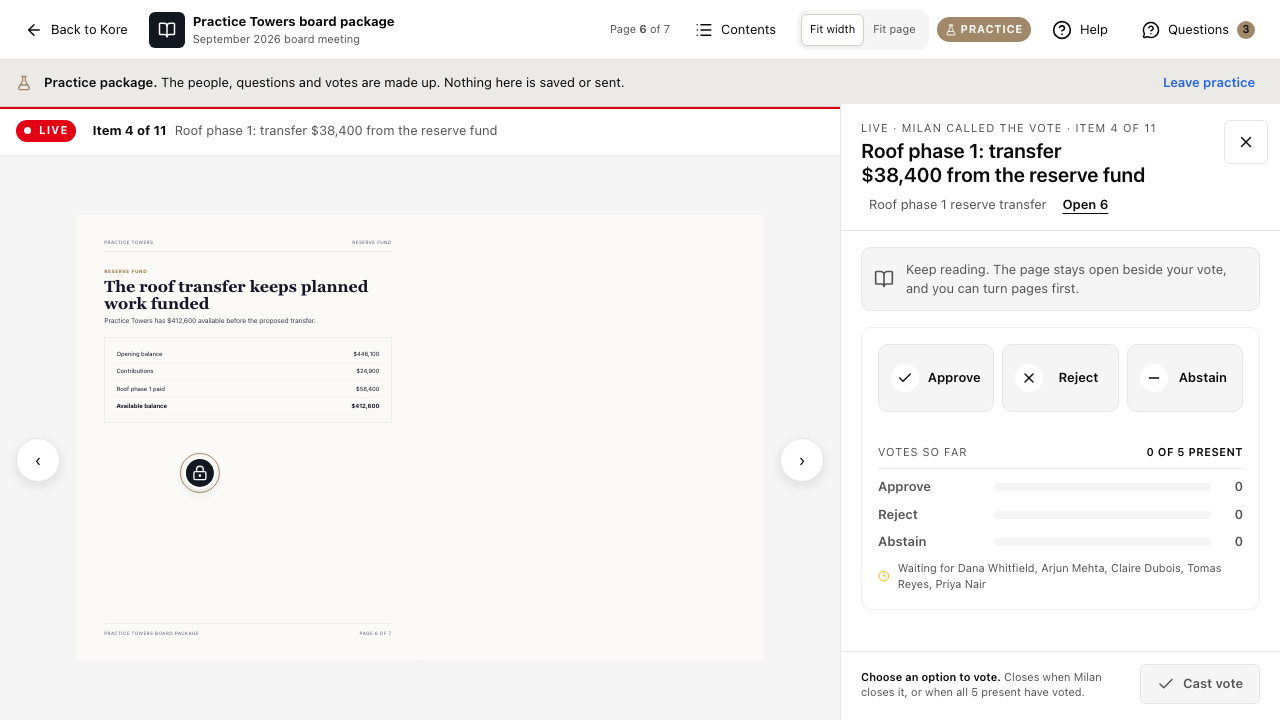
When the manager starts the meeting, a bar appears at the top of the booklet with a red Live badge, the item being discussed (for example Item 4 of 11) and its title. While Following is on, your booklet turns to the page of each item as the manager moves through the agenda.
To read ahead, turn Following off and turn pages as you like. Select Follow to catch up with the meeting again. Agenda opens the full agenda.
2. Vote when a vote opens
When the manager opens a vote, the vote opens beside the page.
- Read the item. The line Keep reading. The page stays open beside your vote, and you can turn pages first. reminds you the booklet stays usable.
- Choose Approve, Reject or Abstain. On a vendor choice, choose a vendor.
- Select Cast vote.
The count under Votes so far updates for everyone, with the names of the people still to vote. The vote closes when the manager closes it, or when everyone present has voted.
You can change your vote until the vote closes: choose another option and cast again.
If you moved or seconded the motion
When you move or second a motion, your vote counts as Approve the moment the vote opens. The vote then shows Counted as Approve. with the reason, instead of the choices, and the vote cannot be changed. This keeps the record consistent with the motion you made.
If the manager is also a board member
A manager who is also a board member votes from their own Your ballot card in the meeting panel. It counts the same as a vote from the booklet.