


Take the board package tour and practise a meeting
The board package has a short guided tour and a practice meeting. Both run on Practice Towers , a made-up package with made-up people, questions and votes. Nothing you do there is saved or sent, so...
Last updated
The board package has a short guided tour and a practice meeting. Both run on Practice Towers, a made-up package with made-up people, questions and votes. Nothing you do there is saved or sent, so you can click anything.
Which tour you see
URBI picks the tour from what you can do on the package, not from your title:
- Manager tour, if you can answer questions or run the meeting: answer a question on its page, run a live meeting and a vote, finish and sign the minutes.
- Board tour, if you can ask questions or vote: ask a question on a page, follow a live meeting, cast a vote.
If you can do both, you see both, manager tour first.
1. Start the tour
The first time you open a board package, a card offers Take a 2 minute tour of the board package.
- Select Start the tour to begin. The tour opens the practice package.
- Select Not now to skip it. The card does not come back by itself.
You can start it any time from Help at the top of the package: select Take the manager tour or Take the board tour.
The card does not appear while a meeting is live or a vote is open, so it never pulls you out of a meeting.
2. Follow the steps
Each tour has three steps. A card points at the part of the page it is about, with Next, Back and a step count such as 1 of 3. Select Skip all to stop, or Got it on the last step to finish. Escape also stops the tour.
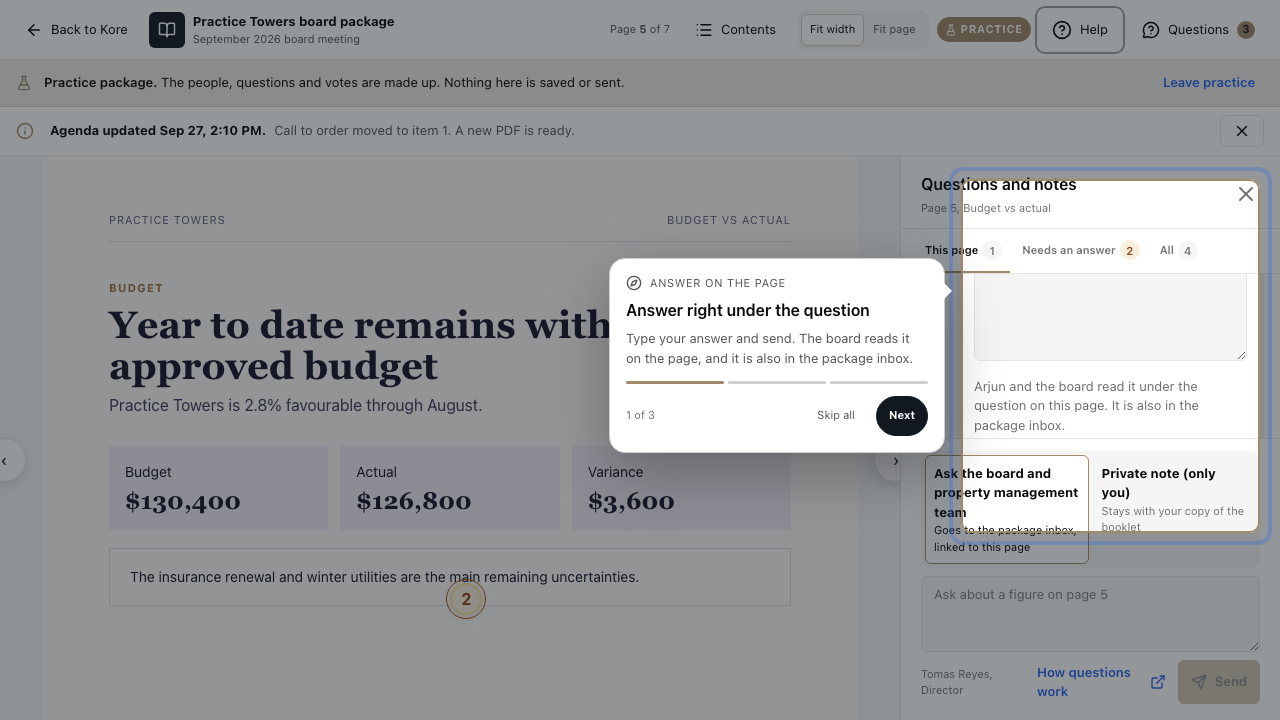
The manager tour steps are Answer right under the question, The main action comes first and Your minutes start drafted. The board tour steps are Ask your question where it belongs, This bar follows the meeting and Cast your vote here. At the end of the board tour a practice vote opens so you can cast one.
If you leave a tour part way, the next time you open a package URBI asks Pick up where you left off? with Resume at step 2 (or the step you stopped at) and Start over. Your place is remembered on this browser.
3. Practise a whole meeting
Managers can rehearse a full meeting before the real one. Select Help, then Practice a meeting. You can also select Practice on a sample meeting first on the Run the meeting checklist of a real package.
The practice meeting runs the same screens as a real one: the checklist, Start meeting, attendance, stepping through items, a motion with a mover and a seconder, a vote where the sample members vote over a few seconds, Close vote, End meeting, and minutes with ready-written drafts.
A few things cannot work on made-up data, such as opening a linked board decision or sharing the minutes. They show a short Not available in practice note instead.
4. Leave practice
The practice package always shows a Practice badge and the line Practice package. The people, questions and votes are made up. Nothing here is saved or sent. Select Leave practice to go back to the package you came from.