


Run a live board meeting
You run the meeting from the board package itself: the booklet page on one side and the Run the meeting panel on the other. The booklets of the board (on a commercial property URBI calls them the...
Last updated
You run the meeting from the board package itself: the booklet page on one side and the Run the meeting panel on the other. The booklets of the board (on a commercial property URBI calls them the owners) follow what you do. The agenda it runs is the one you built in Build the agenda for a board meeting.
Want to try it first? Select Help, then Practice a meeting, to run a whole sample meeting where nothing is saved or sent. See Take the board package tour.
1. Open the meeting
On the shared package page, the Board meeting card shows the date, place, agenda size and quorum. Select Meeting mode. The package opens with the Run the meeting panel beside the page. Until the meeting starts, Minutes on the card is disabled and says why.
The Board meeting card on the shared package page, before the meeting. Meeting mode is the main action.
Board meeting
Tuesday, Sep 29, 7:00 PM
| Where | Party room (2nd floor) and online |
| Agenda | 11 items, page 2 of the booklet |
| Board | 6 members, quorum 4 |
| Minutes | After the meeting |
Meeting modeMinutes
Minutes: after the meeting
Older links to the meeting page open the same place. On a laptop the page and the panel sit side by side, so you can show the page while you run the item. On a phone you see one page, the panel opens as a sheet, and the main action sits at the bottom.
2. Check the list before you start
Before the meeting, the panel shows a short checklist:
- Package shared with the board, with how many members opened it and marked it reviewed (or Not shared with the board yet).
- Agenda is final, or Agenda needs attention when a proposal is still waiting for a decision.
- N questions still need an answer, with Go to the unanswered list (or Every question has an answer).
- How many decisions have a vote ready.
- Mark attendance after you start, with who sent regrets, how many are expected and the quorum.
The list is a reminder, never a gate: Start meeting works whatever it says. Each row has a link to the help article about it.
3. Start and mark who is here
- Select Start meeting. The clock starts, the board's readers show the live bar and follow you, and every outcome from now on is recorded for the minutes.
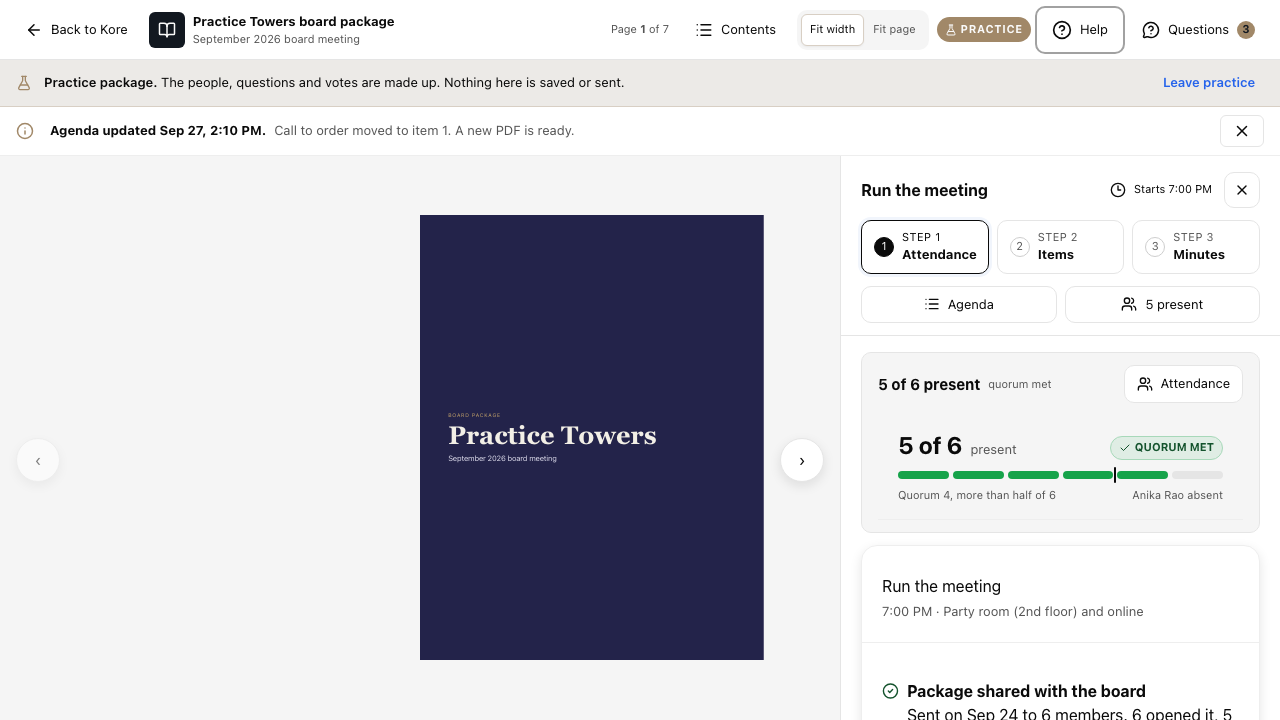
- Select Attendance and switch on each person who is present. The meter shows whether quorum is met. Quorum is more than half of the board members.
The steps at the top of the panel show where you are: Step 1 Attendance, Step 2 Items, Step 3 Minutes.
4. Step through the agenda
The current item has one large button: the step you most likely need next. Everything else for that item is under More.
| The current item | The large button |
|---|---|
| Information or procedure item | Mark received, next item |
| Discussion item | Mark discussed |
| Decision item with no vote yet | Open vote on item N |
| A vote is open | Close vote (or Mark someone present when quorum is lost) |
| The item has an outcome | Next item, or End meeting on the last item |
Previous and Next item stay at the bottom of the panel. The item number button (for example Item 4 of 11) opens the whole agenda. Write notes for the minutes on each item; they save as you type and the board never sees them until you put them in the minutes. To mark an item sensitive, use Sensitive item under More.
Votes and motions
Open and close a vote
- On a decision item, select Open vote on item N. Present board members vote beside their page (see Vote in a live board meeting).
- The count updates live. The vote closes when you select Close vote, or by itself when every present board member has voted, whichever happens first.
- The result appears on the item, stays there after the vote closes, and is recorded in Board Decisions. It reads the same in the panel, the reader, the minutes and the booklet.
A vote that is open. The count updates live. Close it with Close vote, or it closes by itself when everyone present has voted.
Vote open · since 7:25 PM
3 of 5 voted
ThyssenKrupp $1,540 2
Dana Whitfield, Arjun Mehta
Otis Elevator $1,650 1
Tomas Reyes
Abstain 0
Waiting on Claire Dubois and Priya Nair. Closes by itself when they vote, or when you close it.
Closing now records 2 to 1 with 2 not voting.
Close voteCancel the vote
The result stays on the item after the vote closes. A result reads Carried or Did not pass, with its count.
ThyssenKrupp chosen, 4 votes to 1
Closed by itself at 7:31 PM when all 5 present had voted. Recorded in the minutes as a decision of the board; both vendors are notified when you end the meeting.
| A passing result | Carried 5 to 0 |
| Bill or vendor choice that does not pass | Did not pass 2 to 4 |
A bill or vendor choice that does not pass stays open for ballots after the meeting.
Next item
Did not pass. A bill or vendor choice that does not pass shows Did not pass with its count, such as Did not pass 2 to 4, and stays open for ballots after the meeting. A passing result shows Carried with its count, such as Carried 5 to 0.
Quorum lost. If someone leaves and quorum is lost, votes pause and keep their ballots. Mark someone present again, or cancel the vote. Nothing is recorded as decided while quorum is lost.
A decision that was removed. Open vote is off. Ask the person who removed it, or select Drop from agenda.
Two things that stop a vote: quorum lost, and a board decision that was removed.
Quorum lost: 3 of 6 present, 4 needed. Votes are paused.
Claire Dubois and Priya Nair left at 7:29 PM. The open vote keeps its 3 ballots and resumes when a fourth member is back. Nothing is recorded as decided while quorum is lost.
Mark someone presentCancel the vote
Decision removed
This decision was removed. Ask the person who removed it, or drop the item. Open vote is off for this item.
Drop from agendaOpen vote
Your own ballot
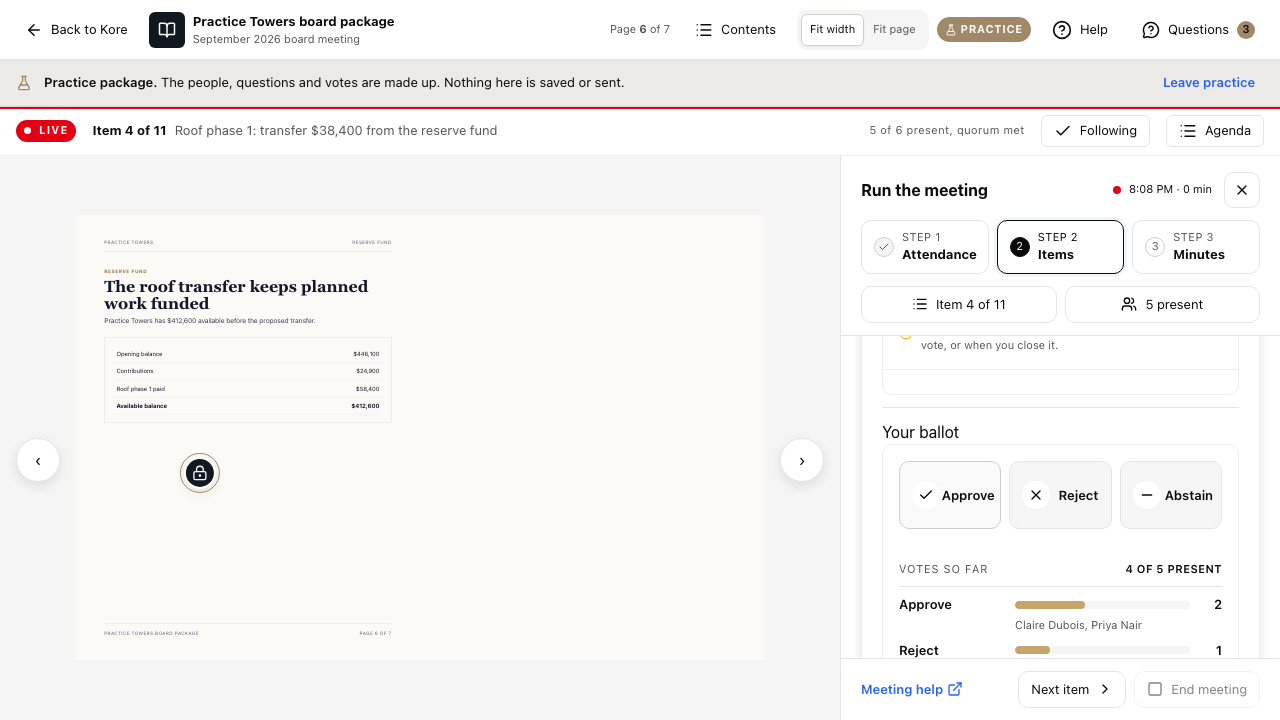
If you are also a board member, a Your ballot card appears on the current item while a vote is open. Choose and cast your vote there. Afterwards it reads, for example, You voted Approve. You can change it until you close the vote.
Start a motion from the page you are discussing
- With no vote open, turn to the page the motion is about and select Start a motion in the bar over the page (on a phone, select More, then New motion). A motion cannot start while a vote is open.
- The motion shows About page N and the page title. Enter the motion and choose the mover and the seconder from the members present. Their votes count as Approve the moment the vote opens, and they cannot change them afterwards.
- Select Open the vote, then close it as above.
If you just selected Mark received, next item, Open the vote stays disabled for a moment with Moving to the next item. The vote can open once it has saved., so the motion always lands on the right item. The minutes print About page N under the motion.
New motion
About page 6, Reserve fund. Recorded in the minutes with the page it was about.
Motion
That holiday lobby decorations be approved, up to $600
Moved by Claire Dubois | Seconded by Tomas Reyes |
Claire Dubois and Tomas Reyes are counted as approve the moment the vote opens. Arjun Mehta and Priya Nair vote in their reader.
CancelOpen the vote
5. Proposals during the meeting
A proposal sent by a board member appears on your screen. Select Add tonight to put it on tonight's agenda (it goes before New business, and the agenda is marked updated for every reader). Select Accept to put it on the next meeting's agenda. Or select Decline and give a reason.
A proposal arriving during the meeting, with three choices.
Priya Nair proposes an agenda item
Bike room security camera. Two bikes stolen in September.
AcceptAdd tonightDecline
Accept puts it on the Oct 27 agenda and tells Priya. Add tonight puts it before New business and marks the agenda updated for every reader.
6. End the meeting
Select End meeting, then confirm with End and write the minutes. End meeting stays disabled while a vote is open: close or cancel it first. The record is kept for the minutes and, for vendor choices, the vendors are notified. Minutes on the package page becomes the main action. Continue in Finish and sign the minutes: your minutes open already drafted.
If you open the meeting again after it has ended, it no longer looks like a live meeting. The panel shows the final record: a Meeting ended panel says The meeting is over. Attendance and outcomes below are final., the outcomes of every item are listed, attendance is locked, and Open the minutes takes you straight to the minutes.
The Run the meeting panel after the meeting has ended: the final record, locked attendance and a direct path to the minutes.
Meeting ended at 8:52 PM
Meeting ended
Final record. The meeting is over. Attendance and outcomes below are final.
Open the minutes
Outcomes
5. Elevator maintenance contract renewal: ThyssenKrupp chosen, 4 to 1
Attendance is locked: 5 of 6 present.
End the meeting: confirm with End and write the minutes. Afterwards Minutes becomes the main action on the package page.
End the meeting?
| Items all covered | Decisions | Motions |
Every vote is closed. Nothing is left open.
Readers leave follow mode. The agenda and outcomes stay in the package.
You can write the minutes now or later from the package.
CancelEnd and write the minutes
Board meeting
Tuesday, Sep 29, 7:00 PM
Meeting modeMinutes
Meeting mode: Ended 8:41 PM